

Why CRM Projects Fail in Small Business: The Main Causes
A CRM project usually fails when a business treats it as a software installation rather than a change to how work gets done. That’s the core of why CRM projects fail in a small business: the system doesn’t fit the team’s processes, connect with its existing tools or solve a clearly defined problem.
It’s frustrating when a new system adds admin without helping your team follow up, share customer information or see what’s happening in the pipeline. Buying software is only one step. Leadership, practical goals and staff involvement all influence whether a CRM becomes part of everyday work.
This article explains how leadership support, clear outcomes, user adoption, training and system integration affect CRM success. You’ll also see why involving the people who use the system matters and how to spot process gaps that can leave a CRM disconnected from the rest of the business.
Key Takeaways
- Give the CRM project a clear owner with authority over the business process, and involve the people affected by changes across teams.
- Set measurable outcomes and the reporting measures you need before configuring the system, then review progress after launch.
- Bring day-to-day users into planning early so the CRM supports their work instead of adding unnecessary admin.
- Pair practical training with ongoing change support to help staff build new habits and use the system consistently.
- Map how the CRM needs to connect with existing tools and data, so information can move smoothly across the business.
1. Leadership support and stakeholder involvement
CRM implementation needs active leadership, not just a budget approval. A business owner or senior manager should set priorities, explain the reason for the change and make time for decisions. Gartner reports a typical buying committee includes six to 10 stakeholders. In a small business, that group might include the owner, sales staff, customer service and whoever manages existing software.
Choose a project owner with authority over the process being automated. An IT contact may understand the software, but sales or service leaders know where customer handovers break down. If sales promises a follow-up that service never sees, for example, involve both teams in mapping the process. Ask stakeholders what information they need, where delays occur and what a better handover would look like.
Australian privacy and data security requirements depend on the business and the personal information it handles. For a CRM project, map what information you collect, who can access it, how it is shared and when it should be deleted. Use those decisions to set permissions and data-handling processes, and put safeguards in place before migrating customer records.
Implementation work can include staff time for planning and training, data clean-up and migration, software configuration, integration and ongoing support. Upgrades may also take time to test, including checks that connected systems still exchange information correctly. Include these tasks in the project scope so the software subscription isn’t mistaken for the full implementation effort.
Assign a clear owner and review process for data migration. Before importing records, identify duplicate contacts, outdated fields and inconsistent formats. Decide which records to move, how to map each field and who will review a sample after migration. A sales team, for instance, may need reliable contact details, lead sources and follow-up history, not every old note copied across.
Training and support should continue after launch. Show each team how to complete daily tasks, such as logging a call or handing a lead to another team. Give users a way to report confusing fields or broken workflows. Without a plan for post-launch support and improvement, CRM implementations can lose momentum soon after launch.
Set a regular communication rhythm between leadership, users and the implementation team. Short project meetings can track decisions, blockers and scope changes. Keep a decision log and assign each action to an owner. This makes problems visible early, whether they involve missing data, unclear responsibilities or an integration that doesn’t match how staff work.
2. Defining measurable CRM implementation outcomes
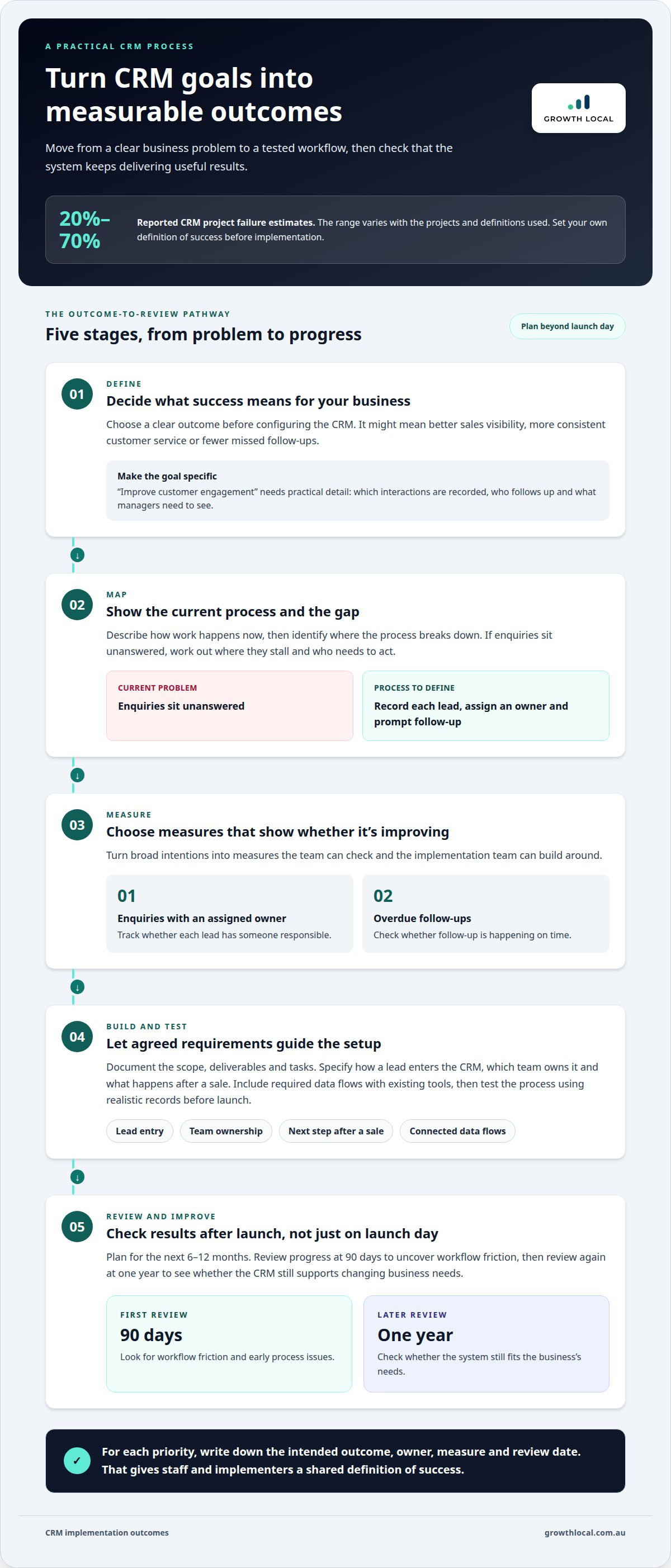
CRM project failure estimates range from 20% to 70%. That wide range reflects different projects and definitions; failure can mean missing agreed goals, poor adoption or software that doesn’t meet expectations. Set a clear definition for your business before implementation. For example, decide whether success means better sales visibility, more consistent customer service or fewer missed follow-ups.
Unclear goals create vague requirements, and vague requirements produce a system that can’t solve a specific problem. “Improve customer engagement” needs practical detail: which interactions should be recorded, who follows up and what managers need to see. Without those decisions, configuration can add fields and reports without helping staff take the right next step. This is one reason why CRM projects fail in a small business: the team hasn’t agreed on what success looks like.
Describe the current process, then define the desired result. If enquiries sit unanswered, specify how the CRM should record each lead, assign an owner and prompt follow-up. Choose measures that show whether the process is improving, such as the share of enquiries with an assigned owner or the number of overdue follow-ups. These measures turn broad intentions into requirements the implementation team can build and test.
Plan for the next 6-12 months, not just launch day. Define the key performance indicators leadership needs for decisions, then identify the CRM fields required to produce those reports. Review progress at 90 days and again at one year. The first review can expose workflow friction; the later one can show whether the system still supports changing business needs. Understanding why CRM projects fail in small businesses means looking beyond launch and tracking whether the system keeps delivering useful outcomes.
Let agreed requirements guide configuration. Document the scope, deliverables and tasks before setup begins. For example, specify how a new lead enters the system, which team owns it and what happens after a sale. Test the process with realistic records before launch. A platform such as Microsoft may sit alongside other business tools, so include required data flows in the design rather than treating integration as an afterthought.
A suitable implementation partner considers more than software features. Assess their approach to process design, data migration, user training and ongoing support. Ask how they’ll map sales and service workflows, existing customer-data systems and reporting needs. They should understand your business goals and challenges, then shape the configuration around them rather than defaulting to familiar settings.
If an implementation has stalled, start with an audit. Identify which system objects and properties are in use, where data is broken and which processes users have abandoned. Rank the problems by their effect on daily work. Repair essential records and workflows before adding features or rebuilding reports. This gives the recovery effort a clear scope and a practical way to measure progress.
Write down the intended outcome, owner, measure and review date for each priority. That gives staff and implementers a shared definition of success, and makes missed requirements easier to spot. If your goals are set but the setup needs a clearer plan, talk through your CRM implementation goals.
3. How do you ensure good user adoption for a new CRM?
Poor user adoption can leave a CRM full of gaps, stale records and unreliable reports. CIO Review identifies poor user adoption as a leading cause of CRM implementation failure. If staff keep customer details in spreadsheets or skip logging calls, managers lose a shared view of sales activity and follow-ups can fall through.
Resistance often signals a practical problem, not stubbornness. A salesperson may find that recording every interaction takes too long, while a service employee may not know which customer details matter. Treat these responses as evidence about the workflow. Ask users to show where the process slows them down, then remove unnecessary steps before expecting consistent adoption.
Involve end users in planning before configuring the CRM. Include people who handle enquiries, qualify leads, manage accounts and resolve customer issues. Ask each group to walk through a typical day, including handovers and exceptions. A service team, for example, may need to see sales promises before responding to a customer. That workflow should shape the system.
Make the change visible and specific. Managers should explain what will change, why the new processes matter and which old habits need to stop. A team briefing can demonstrate a real scenario, such as recording an enquiry and assigning its next action. Staff can then see how customer relationship management supports their work instead of viewing the CRM as extra monitoring.
Keep the first workflows simple. Start with essential actions, such as creating a contact, recording an interaction and assigning a follow-up. Don’t make every optional field compulsory. In a small business, extra data-entry requirements can slow employees down. Before adding a required field, check that it serves a clear business need.
Use role-based practice instead of one generic demonstration. Sales staff can practise updating an opportunity, while customer service staff practise finding interaction history and recording a resolution. Give users a safe place to try these processes before launch. After launch, managers can reinforce good habits by using CRM records in team discussions instead of accepting separate spreadsheets.
Track useful behaviours, not just logins. Check whether enquiries have owners, follow-ups are recorded and customer histories support handovers. Give staff a simple way to report confusing steps, then review the issues regularly. When a process is repeatedly skipped, find out whether the CRM design, unclear expectations or workload is causing friction, and address the actual cause.
4. User adoption, resistance to change and training
A CRM can have useful features and still frustrate staff if routine tasks feel complicated. Often, the system’s design doesn’t fit how employees manage customer relationships day to day. If logging a phone call involves several screens, for example, staff may delay updating records or keep notes elsewhere. Customer history then becomes incomplete, reducing the system’s value.
Compare CRM systems by testing real tasks, not just reviewing feature lists. Ask a sales user to record an enquiry, set a follow-up and find the contact’s interaction history. Then check whether the system supports your current processes and can adapt as your team or workflows change. Ease of use, relevant features and future flexibility all matter.
Resistance can also stem from uncertainty about new expectations. A staff member who has used a spreadsheet for years may not understand why customer details need to move into a CRM. Explain the practical reason for each change, such as clearer handovers or helping colleagues see the latest customer interaction. Avoid fields that don’t support a real task or decision.
Tailor training to each role. A sales employee needs practice managing an opportunity, while someone in customer service needs to find a customer record and log a resolution. Use realistic business examples, then let staff complete the tasks themselves. A written quick-start guide can reinforce the steps, but it shouldn’t replace hands-on practice.
Allow for different starting points. Some employees may already understand CRM concepts; others may need time to learn basic navigation and terminology. Break training into short sessions focused on a workflow, such as moving an enquiry from arrival to follow-up. Show how each step helps the next person handling the customer, rather than presenting every feature at once.
After launch, managers can spot training or design issues by reviewing common errors and staff questions. If users repeatedly miss a step, demonstrate it again and check whether the interface makes the action clear. If team members struggle to find overdue tasks, for instance, improve training on task views before adding more reminders or functionality.
Keep improving the system with regular feedback. Ask users which tasks take too long, which screens cause confusion and what information they need to serve customers well. Review their responses alongside actual workflows, then update guidance or configuration where it helps. A CRM becomes easier to use when training, processes and system design work together.
5. IT involvement and system integration
A CRM needs to work with the tools your business already relies on. If enquiries arrive through a website, sales activity sits in spreadsheets and customer service uses another platform, disconnected records create extra admin. Staff may copy details between systems, miss updates or work from different versions of the same customer information.
Bring IT knowledge and business process expertise into the implementation team. An IT specialist can explain how existing software stores and exchanges data, while a business analyst can map how staff need that information to move. For example, document what happens from a new enquiry through qualification, follow-up and handover. This map reveals which connections matter and what each system should manage.
Customising or integrating a CRM can create risks if data fields, workflows or system responsibilities don’t align. A poorly planned connection may duplicate records, pass incomplete details or fail when a system changes. Extensive customisation can also make future updates harder to manage. Focus changes on genuine business requirements, and adapt a process when that’s simpler than building around an old workaround.
Start by mapping each information flow. Identify where a record begins, which system holds the main version and what needs to pass between platforms. If a lead form feeds a CRM, for instance, specify the essential fields and how the CRM should record the lead source. If marketing and sales use different tools, define which updates each team needs to see.
Products such as Microsoft Dynamics may sit within a wider set of business systems. The platform’s name matters less than whether its configuration supports your actual workflows. List the existing tools involved, the data each needs and the business task each connection supports. This keeps integration work focused on operational needs rather than a collection of technical links without a clear purpose.
Test connections with realistic scenarios before launch. Submit a test enquiry, check that its details arrive correctly, then update the record and confirm the right teams can see the change. Include exceptions, such as missing contact details or duplicate submissions. Record who investigates errors and how staff can continue essential work if a connection stops functioning.
Plan for ownership after launch. Assign someone to review integration issues, coordinate changes and confirm that updates haven’t disrupted important workflows. When a connected system changes, test the affected data flow before relying on it again. Clear ownership helps a small business catch broken handovers before they lead to missed follow-ups or inconsistent customer records.
Map your current systems and identify the CRM connections your business needs. This gives technical setup a practical purpose: less double-handling, clearer handovers and more reliable information across departments.
Growth Local
Growth Local helps small businesses connect their CRM with the systems that capture and manage customer enquiries. If leads are slipping through gaps, customer information sits in disconnected tools or staff aren’t using the CRM consistently, Growth Local’s CRM Setup can organise the system around your business processes. Lead Generation System Setup and Marketing System Setup can also support how enquiries enter and move through your workflow.
The right next step depends on the bottleneck. A business with a working CRM but inconsistent enquiries may need a lead generation focus; one with disconnected customer workflows may need CRM setup. Contact Growth Local to discuss what’s getting in the way.
Make your next CRM move count
Understanding why CRM projects fail in a small business is useful, but the next step is turning that insight into a practical decision. Treat your CRM as part of how the business operates and grows, not simply another software purchase. Start with the obstacle that matters most, whether it’s disconnected customer information, inconsistent follow-up or a process that takes too much manual effort.
Decide what needs to change first and how you’ll know it’s helping. A focused improvement gives your team a clear starting point without trying to transform every workflow at once. As the business evolves, revisit the system’s role and adjust the plan to match new priorities.
If you’re ready to discuss a practical next step for your CRM, get in touch with Growth Local.
A clear plan can turn a frustrating system into a more useful part of how your business works. Take it one considered step at a time.
Frequently Asked Questions
What is the main reason CRM projects fail?
Poor adoption is a common underlying cause: the CRM doesn’t become part of everyday work. This can happen when staff don’t see how it helps or find it harder to use than their existing habits. If sales updates records but managers still rely on separate spreadsheets, for example, the team has little reason to trust the system. Make the CRM useful in real decisions, not just a place to store data.
Can a failed CRM implementation be recovered?
Yes, a stalled implementation can often be recovered by focusing on the business process that matters most. First, identify incomplete records, abandoned workflows and what the team still needs from the system. Then restore one essential workflow, such as assigning and following up new enquiries, and test it with real users. A focused recovery plan is more manageable than rebuilding everything at once.
How do you set a CRM implementation up for success?
Set up the CRM around a business outcome staff can recognise in their daily work. Before configuration, document a complete customer journey, from first enquiry to completed sale or service. Agree who owns each step, what information must be recorded and what a successful handover looks like. Use that journey as an acceptance test before launch, judging the setup by how well it supports work, not by how many features it contains.
How do you ensure good user adoption for a new CRM?
Make the CRM the easiest reliable place to complete core customer tasks. Have team leaders use it during pipeline discussions and service handovers, for example, rather than asking staff to maintain parallel spreadsheets. Set a clear standard for what each role should record, and review whether that information helps the next person act. If a step is consistently missed, investigate whether the instructions, workload or workflow needs to change.
Is CRM failure down to culture?
Culture can contribute, but it’s rarely the only factor. A team that treats customer information as personal territory may resist sharing records, while managers who ignore the CRM can signal that it doesn’t matter. Address both behaviours: set shared expectations for customer records and make decisions using the system’s information. If the process is confusing or adds unnecessary admin, fix that too. Staff can’t adopt a workflow that doesn’t work for them.
Is it better to customise a CRM or use it out-of-the-box?
Start with the standard setup if it supports the business process, and customise only when a genuine requirement remains unmet. A small team, for example, may be able to use an existing sales stage instead of creating several near-identical ones. Give each change a clear owner and purpose. Customisation can improve fit, but unnecessary changes add complexity and make future maintenance and staff training harder.
What are the warning signs of a failing implementation?
Watch for scope expanding without agreed priorities, unresolved data errors and teams maintaining separate records alongside the CRM. Other warning signs include repeated changes to essential workflows, unclear decision-making responsibilities and staff avoiding system tasks. A missed deadline alone doesn’t explain the cause. Check whether the delay stems from a blocked integration, undecided requirements or a process that hasn’t been tested with the people doing the work.
What should you do before signing an implementation contract?
Make sure the written scope explains what will be configured, what data will move and which systems need to connect. Confirm who will provide decisions, records and access, and who will approve completed work. Agree how scope changes are handled, what counts as acceptance and what support follows launch. For example, specify whether testing covers standard workflows only or also exceptions such as duplicate enquiries and incomplete contact details.


