

When to Upgrade Business Systems for Growth and Reliability
There’s no fixed timetable for when to upgrade your business systems. The right time is when outages, slow processes, security concerns, poor compatibility or business growth make your current setup hold you back. Review your phone system at least once every 12 months, then weigh the risks and costs before deciding whether to replace or improve anything.
It makes sense to avoid unnecessary spending, especially when a system still does its job. But waiting until it fails can disrupt your team and affect customer experience. Look for patterns such as repeated downtime, manual workarounds, delays or tools that can’t keep up with how your business now operates.
This guide explains how to time an upgrade by weighing cost, reliability, compatibility, growth and customer experience. You’ll learn which warning signs matter, how to align changes with business goals, and when a phased upgrade may be more practical than replacing everything at once.
Key Takeaways
- Upgrade when recurring outages, slow work or manual workarounds start disrupting daily operations, not simply because a system is old.
- Compare the full cost of keeping a system with the cost and disruption of replacing it.
- Check whether your software and equipment remain compatible with the tools your business relies on.
- Reassess your systems when your team, services or ways of working change, so they can support the next stage of growth.
- Set clear goals and priorities before choosing what to upgrade, then plan changes around the needs of staff and customers.
1. Timing upgrades to balance project cost against the risks of outdated systems
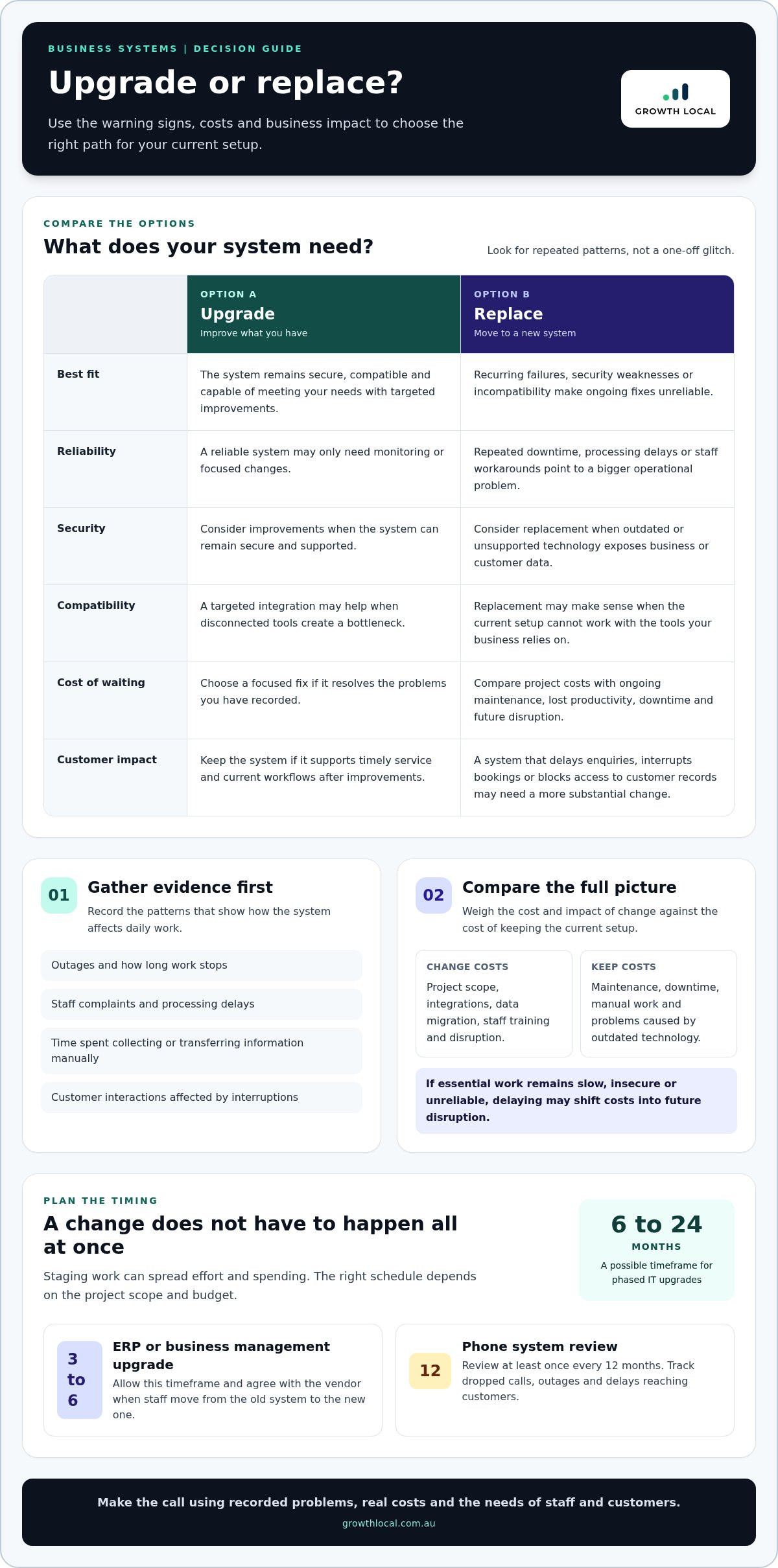
There’s no fixed replacement cycle for every business system. Decide when to upgrade your business systems by tracking downtime, processing delays, manual workarounds, security concerns and changing business needs. A reliable system may only need monitoring, while repeated disruptions can make the cost of waiting greater than the cost of change.
Look for patterns, not one-off glitches. Record outages, staff complaints, processing delays and time spent collecting information manually. For example, if staff repeatedly transfer customer details between disconnected tools, assess whether integration or replacement would remove the bottleneck. This evidence helps you compare project costs with lost productivity and the cost of fixing problems caused by outdated technology.
Older IT systems can be less secure and more vulnerable to cyber attacks. Unsupported software or equipment can expose business and customer data, so include security risks in your upgrade assessment. List the systems that hold sensitive information, identify where updates or support are lacking, and prioritise the technology that creates the greatest exposure.
Should a business upgrade its current system or replace it? Upgrade it if it remains secure, compatible and capable of meeting your needs with targeted improvements. Replace it if recurring failures, security weaknesses or incompatibility make ongoing fixes an unreliable way to keep operations moving.
Legacy phone systems deserve their own review. Businesses should review their phone system at least once every 12 months. Track dropped calls, outages, difficult call handling and delays reaching customers. If an ageing phone setup disrupts enquiries or staff communication, compare the cost and impact of maintaining it with moving to a system that better supports current workflows.
Timing also affects project disruption. A business can phase IT upgrades over 6 to 24 months, depending on scope and budget. Staging changes can spread work and spending, while a larger project may need coordinated implementation. For an ERP or business management system upgrade, allow 3 to 6 months, and establish with the vendor when staff should stop using the old system and start the new one.
What are the costs of upgrading business systems in Australia? There’s no single cost. It depends on the systems involved, project scope, integrations, data migration, staff training and potential disruption. Compare the project budget with ongoing maintenance, downtime and the potential cost of problems caused by outdated technology.
Before approving a project, explain its purpose, scope, timing and resource needs to affected staff and vendors. Compare options against the problems you’ve recorded: if a targeted fix resolves them, replacement may be premature. If essential work remains slow, insecure or unreliable, delaying may simply shift costs into future disruption.
2. Cost, reliability, and customer experience benefits
Calculate return on investment by comparing the upgrade’s total cost with the value it creates. Estimate savings from reduced maintenance, fewer disruptions and staff time recovered, then add measurable gains such as faster customer responses. Subtract the project cost from those benefits, divide by the project cost, and multiply by 100 for an ROI percentage.
Start with time lost to slow systems. Waiting half an hour each day for a computer to load can waste almost 17 days of work time per year. Across ten employees, loading delays could consume around five months of work hours every year. Record the time your team loses to repeat tasks, then estimate how much a proposed upgrade could reclaim.
Reliability affects productivity and customer experience. An outage can interrupt bookings, delay quotes or prevent staff from accessing customer records. Track how often interruptions happen, how long work stops and which customer interactions are affected. These records show whether an upgrade addresses a real operational cost, rather than simply adding features.
Remote access can help sales and customer service teams keep work moving off-site. For example, a salesperson travelling between appointments could check stock and delivery times, then place an order remotely. A customer service employee working away from the office could retrieve account details and respond without waiting to return to a desk. The value depends on secure, consistent access to the tools and information each role needs.
Customer experience improves when staff can find accurate information and respond promptly. A CRM platform upgrade can increase customer response speed by 30 to 45%. Look at how requests move from first contact to follow-up: duplicated records, missed handovers and slow searches can all delay service. A well-integrated system helps staff see the relevant interaction history and act without repeating questions.
Protecting sensitive customer data is another reason to include security in the business case. Security technology can help reduce breach risks, while managed detection and response software can support a more proactive approach to data threats. Identify where sensitive records are stored and who needs access. Then include the cost of improving access controls and monitoring in your assessment.
For a practical comparison, measure current maintenance, downtime, manual handling and customer delays before making a change. Compare them with implementation, training and ongoing system costs. Cloud-based applications may reduce maintenance demands, but assess them against your access, security and integration needs. The strongest case is clear: the upgrade solves a measured problem and improves customer service.
3. Outdated operating systems and software compatibility
An operating system can become a business risk when it no longer supports the software, devices or security tools your team relies on. Windows 7 and Windows XP are examples of outdated operating systems that may signal a need to upgrade. The practical test is whether your current setup remains supported, secure and compatible with daily work.
Compatibility problems often appear after adding a new tool. For example, a business might introduce cloud accounting software, a newer printer or an updated customer database, only to find that an older computer cannot run it properly. Staff then rely on workarounds, such as entering information twice or moving files between devices. Those extra steps create friction and more opportunities for errors.
Before choosing a replacement, map the connections between systems. List the operating system, key software, devices, data locations and integrations used for tasks such as invoicing or customer follow-up. Then test whether the proposed system can exchange the information your team needs. A new platform that works in isolation may still cause problems if it cannot connect with existing tools.
Business growth and a change in direction can expose gaps that were easy to overlook. A business expanding its services may need software that can handle new booking, reporting or customer-management processes. If your current technology can’t support the change, assess whether an upgrade can close the gap or a replacement would be more suitable. Decide based on the work the system must support, not its age alone.
Check the vendor’s development plans as well as current compatibility. Find out whether the technology continues to be developed and adapted. For an ERP system, assess compatibility with the systems already in use, including how data will move between them. This review can reveal integration limits before they disrupt staff or customer workflows.
A useful assessment distinguishes a device problem from a wider software issue. If one computer struggles with a newer application, test whether the issue affects that device alone or the broader setup. If several essential tools depend on outdated software, replacing one device may only delay a larger project. Record which tasks fail, which teams are affected and what information must transfer.
Finally, check compatibility with the technology you expect to use next. A system should support planned changes without forcing staff to rebuild familiar processes each time a tool changes. Compare options against your current workflows, required integrations and growth plans. Before deployment, test key tasks with real business data so you can find problems before staff depend on the new setup.
4. Upgrade triggers such as business growth and hybrid work
Growth changes the workload your systems must handle. More staff, enquiries, locations or service lines can expose bottlenecks in software, hardware and processes. A setup that works for one or two people may not suit five or more users unless it can scale. Review performance as your team grows, rather than waiting for a busy period to reveal its limits.
Look for friction in everyday tasks. If staff repeatedly move customer details between spreadsheets and booking tools, your systems may no longer match the workflow. If new services require different quoting or follow-up, assess whether your current software can support those steps. The trigger is a clear gap between how the business operates now and what its systems can reliably handle.
Hybrid work creates another practical test. A remote team member may need access to customer records, schedules or sales information without relying on someone in the office to retrieve it. Map which roles need which tools, and identify where access breaks down. Then assess whether systems provide consistent, secure access wherever staff work.
What Australian privacy, tax, and compliance requirements affect business systems? Assess whether your systems support your Australian privacy practices, tax record-keeping and relevant compliance processes. Map what information you collect, who needs access and how records are managed, then account for the rules relevant to your industry and operations.
Changes in business size can trigger a review in either direction. Growth may mean more users, higher enquiry volumes or additional locations; downsizing may leave you paying for tools and capacity you no longer need. In both cases, reassess user access, system capacity and the processes your business still depends on. Keep the setup aligned with the work being done.
Use a forward-looking test before committing to a system change. List planned changes, such as adding a service, hiring staff or changing how customers book. For each, identify the affected process, the information required and the teams involved. A system that supports those changes without creating duplicate data entry is better positioned for growth.
Review systems proactively whenever business plans or working arrangements change. Compare current capacity with expected workloads, check that remote staff can complete essential tasks, and flag dependencies on ageing hardware. Prioritise upgrades that remove a real constraint or support a defined change. This ties technology decisions to business needs instead of waiting for disruption.
5. Assessing IT assets and aligning upgrades with business goals
Start with an inventory of the technology your team actually uses. Record each system, device, software licence, owner and business task it supports. For example, map how an enquiry moves from a website form into a customer record and then into follow-up. This shows where tools overlap, where information is re-entered and which assets need attention first.
Next, identify who needs equipment and what they need to stay productive. A field-based employee may need secure access to customer details, while an office administrator may rely on a larger screen and document tools. Match each role to its essential hardware and software. This helps you avoid replacing equipment that still meets requirements or overlooking staff whose setup causes delays.
What steps are involved in planning a business systems upgrade? Define the business problem, set objectives and priorities, assess options, plan data migration and integrations, then test, train and review. Involve frontline users and secure executive support early so the project reflects daily work and has the authority to make decisions.
Set clear benchmarks before selecting a new system. If an ERP upgrade aims to reduce duplicate data entry, document where it happens and which teams are affected. Separate essential requirements from nice-to-haves, then assess each option against those criteria. A feature that looks useful in a demonstration may add complexity without fixing the problem staff raised.
Build the implementation plan around practical deliverables. Explain the goals, requirements, scope, timing, costs and resource needs to staff and vendors. Assign owners to milestones, prepare a data-mapping plan and manage scope changes before they distract the team. Include user training and test the system for errors before deployment, using realistic workflows and data.
Plan for the transition, not just installation. Agree when the old system stops and the new one begins, and allow for disruption to staff and operations after launch. A hyper-care period immediately after deployment gives the team time to resolve issues and stabilise work. Then review whether the original objectives and benchmarks were met.
Monitor performance against your benchmarks once the new setup is in use. For example, compare enquiry handling, staff workload and information accuracy with the starting point. If results fall short, identify whether the issue lies in configuration, training or the process itself. This keeps the upgrade tied to business goals instead of treating go-live as the finish line.
Growth Local: Lead Generation System Setup
Growth Local’s Lead Generation System Setup helps businesses organise how they capture and manage new enquiries. If leads are slipping through manual processes or follow-up is inconsistent, a structured system can clarify the next steps for your team. Growth Local also offers CRM Setup and Marketing System Setup to support how you track enquiries and manage marketing activity.
Consider this support when your review identifies a gap in lead handling or customer follow-up, rather than a hardware or infrastructure issue. Start with the specific bottleneck you want to solve and how it affects your daily work.
Contact Growth Local to discuss your business systems.
Turn your next systems decision into a practical step forward
Knowing when to upgrade your business systems is most useful when it leads to a clear action. Choose one friction point that affects growth, then decide who owns the next step and how you’ll judge whether the change improves the work. A focused improvement is easier to manage than trying to transform every process at once.
If the issue is how your business captures and follows up enquiries, Growth Local offers Lead Generation System Setup, CRM Setup and Marketing System Setup. These services suit businesses that need more structure in customer acquisition workflows, rather than those facing physical hardware or general IT support problems.
Start with the business outcome you want, such as clearer lead tracking or more consistent follow-up. This gives any system improvement a practical purpose and grounds decisions in your day-to-day operations.
Small, well-chosen improvements can help your business build momentum with confidence.
Frequently Asked Questions
Timing: How Often Should a Business Upgrade Its Technology?
There’s no single upgrade timetable for every business. Review technology when business plans, customer expectations or system performance change, then prioritise tools that no longer meet operational needs. A stable system may need maintenance rather than replacement, while a system that blocks essential work needs action. Weigh ongoing fixes against the disruption and risk of delaying a change.
What are the signs a business system needs upgrading?
Look for recurring problems that affect routine work, such as staff creating spreadsheets to cover missing functions or repeatedly entering the same details. Other clues include software that can’t connect with a new tool, delays in completing customer requests, or frequent support needs for the same fault. Ask affected staff to describe a task that has become harder, then trace the system steps behind it.
How often should Australian businesses review their software and IT systems?
Review systems whenever your business changes how it works, adds a service or changes its team structure. You can also review after a system failure, a new integration or a shift to remote work. Instead of relying only on calendar reminders, keep an asset register and note significant changes beside each system. This makes emerging compatibility and capacity issues easier to spot.
How can businesses minimise downtime and data loss during a system upgrade?
Plan the change around a lower-demand period, tell affected staff what will change, and assign someone to manage the transition. Keep verified backups using the 3-2-1 rule: three data copies, two different media types and one offsite or cloud copy. Test restore procedures quarterly, then check essential tasks in the new system before relying on it. Keep a rollback plan ready if migration fails.
What cybersecurity risks come from using outdated business systems?
Older systems may no longer receive security updates, leaving known weaknesses unaddressed and increasing exposure to cyber attacks. A compromised system could put business operations or customer information at risk. Identify which software and devices store sensitive information, check whether security support continues, and prioritise systems that access important records. Restrict access to what each role needs and review permissions when staff responsibilities change.
How do you choose a business systems upgrade that can scale with growth?
Choose against the work your business expects to handle, not just its current headcount. Write down likely changes, such as adding a service, increasing enquiry volume or connecting new software. Test whether a proposed system supports those workflows, integrates with essential tools and lets you add users or capacity without rebuilding processes. Involve the people who will use it daily, and compare options against clear must-have requirements.


