

Warning Signs Your CRM No Longer Gives Your Team Visibility
A CRM that hides more than it reveals is holding your team back. The clearest signs you need a better CRM system include scattered customer information, unclear sales metrics, disconnected tools, low team adoption and reports that don’t help you act. When people can’t see the same customer history or understand what’s happening in the pipeline, follow-ups slip and decisions become guesswork.
It’s frustrating when your team spends time chasing details across spreadsheets and inboxes instead of moving customer conversations forward. A CRM should make the next step clear, keep records accessible and give you useful insight into sales activity.
This article explains how to spot visibility gaps in customer records, performance metrics, integrations, team use and reporting. You’ll also learn what an effective CRM setup needs to do, so you can decide whether your current system needs a tidy-up or your business has outgrown it.
Key Takeaways
- Look for customer details scattered across systems or missing interaction history, which can leave your team without a clear view of each relationship.
- Track sales-cycle length, lead quality and close rates to see whether your CRM gives you useful insight into team performance.
- Map how your CRM connects with your other business systems and identify where manual data transfers create gaps or extra work.
- Spreadsheets and side notes can signal that your team isn’t consistently using the CRM; clear processes and practical training can help.
- Growth Local’s Lead Generation System Setup can help when disconnected lead processes and CRM visibility gaps are making it harder to manage enquiries.
1. Centralised customer data and team-wide visibility
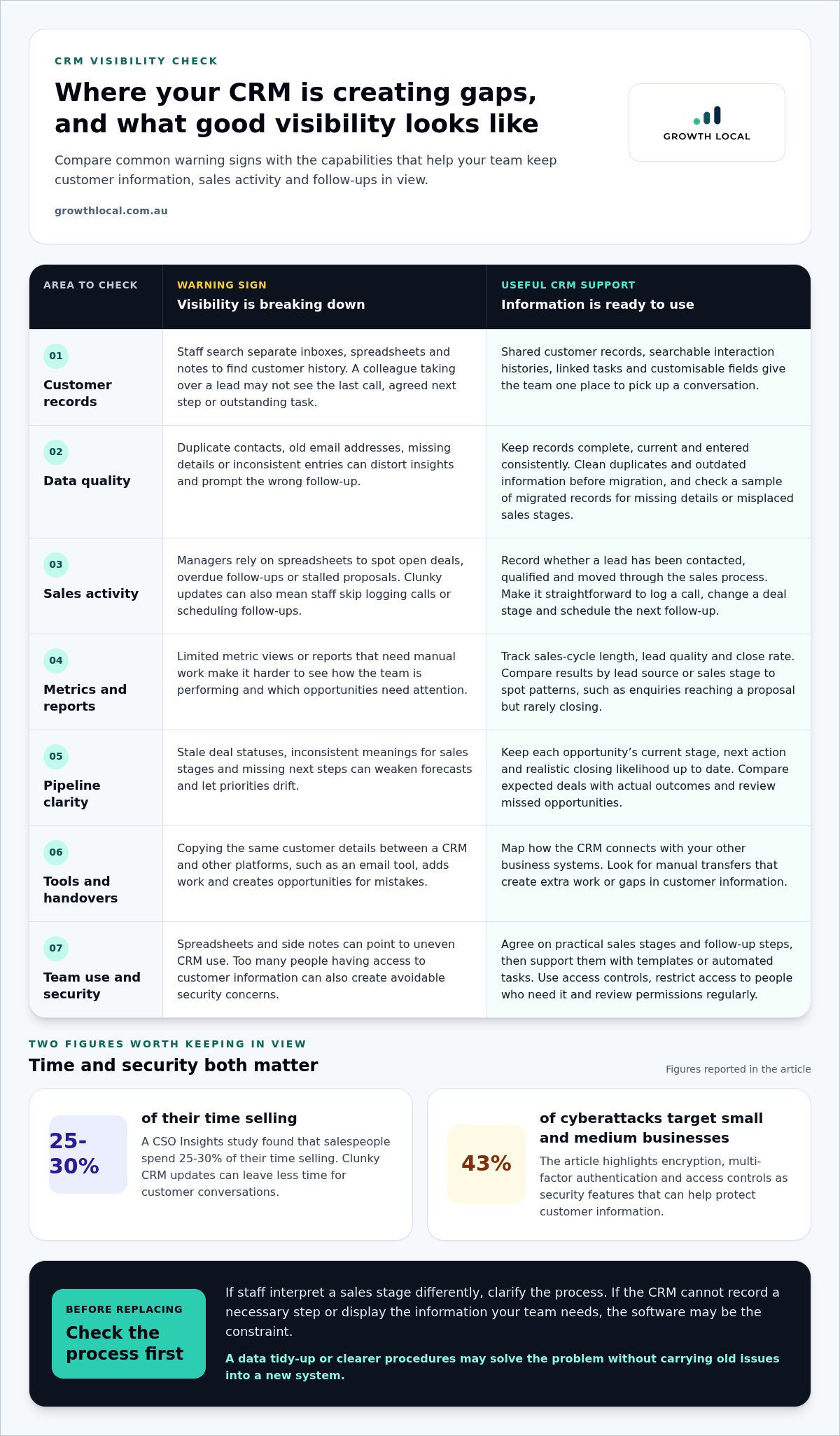
A CRM should give your team one reliable place to understand each customer relationship. If a salesperson has to search separate inboxes, spreadsheets and notes for a customer’s history, your customer relationship management system isn’t providing clear visibility. The problem grows when a colleague takes over a lead but can’t see the last call, agreed next step or outstanding task.
For Australian small businesses, compare CRM systems by how well they organise customer information, record interactions and support the sales process. The right fit is one your team can use consistently, with fields and dashboards that reflect how your business works. For example, a service business may need clear lead stages, contact history and follow-up tasks.
Useful features include shared customer records, searchable interaction histories, linked tasks, customisable fields and access controls. Check whether the system can segment customer groups and give the right team members access to relevant information. These capabilities help staff pick up a conversation without relying on whoever spoke with the customer last.
Data quality matters as much as the software. An old email address or duplicate contact can distort insights and prompt the wrong follow-up. Before acting on a report, check that records are complete, current and entered consistently. A clear process for updating details gives managers a stronger basis for sales and service decisions.
Security deserves the same attention as visibility. Security features such as encryption, multi-factor authentication and access controls can help protect customer information. Small and medium businesses are targets of 43% of cyberattacks, so restrict access to people who need it and review permissions regularly.
Before moving platforms, clean your data instead of carrying old problems into a new system. Remove duplicate, missing and outdated records, then align fields between the existing database and the new CRM. Back up customer records, documents, templates and past reports before migration. Test a sample of migrated records to catch missing contact details or misplaced sales stages early.
CRM software costs vary with factors such as user numbers, features, storage and billing arrangements. Compare the pricing structure with the tools your team will actually use, rather than paying for unused functions. Weigh ongoing costs against the time spent maintaining scattered customer information.
2. Sales, marketing and team performance metrics
A CRM should show what your sales team is doing and which opportunities need attention. If managers rely on spreadsheets to spot open deals, overdue follow-ups or stalled proposals, they may miss risks. Clear activity records show whether a lead has been contacted, qualified and moved through the sales process.
Time spent selling matters. A CSO Insights study found that salespeople spend 25-30% of their time selling. Clunky updates can leave less time for customer conversations. Check how many steps it takes to log a call, change a deal stage or schedule a follow-up. If staff regularly skip these activities, the system may be creating friction.
Useful metrics connect daily work with business outcomes. Track sales-cycle length, lead quality and close rate, then compare results by lead source or stage. If enquiries from one campaign reach the proposal stage but rarely close, review qualification and follow-up. A CRM should make those patterns visible, not bury them in disconnected reports. Limited metric views and reports that require manual work are two signs you need a better CRM system.
Pipeline tracking needs more than a list of names. Each opportunity should have a current stage, next action and realistic closing likelihood. When salespeople update these details consistently, managers can anticipate upcoming work and plan resources. If pipeline stages mean different things to different people, forecasts become less useful and priorities drift.
Test forecasting by comparing expected deals with actual outcomes. Review missed opportunities and identify whether the cause was an outdated status, a late follow-up or an overly optimistic estimate. A CRM should make progress and forecasts measurable through clear reports or visual dashboards, so decisions rely on recorded activity rather than memory.
To separate process problems from software limits, document the agreed sales stages and follow-up steps. If staff interpret a stage differently, clarify the process. If the system can’t record a necessary step or display the information, the software may be the constraint. This distinction helps you avoid replacing a CRM when clearer procedures would solve the issue.
Outdated software can slow sales when staff re-enter details, use workarounds or track follow-ups manually. Missed tasks and stale deal statuses can weaken conversion efforts because promising leads may not receive timely contact. Trace a recent proposal that went quiet to find where the workflow stalled. For a growing team, repeated admin and poor visibility into deal progress may be signs you need a better CRM system.
Standardise the basics before assessing individual performance. Agree on what qualifies as a new lead, which stages a deal follows and when the next activity is due. Then use CRM templates or automated tasks to support the same process across the team. If adoption remains uneven, check whether the workflow is practical and updates are straightforward.
3. Integrations with existing systems
A CRM loses value when employees have to copy the same customer details between platforms. For example, entering a new enquiry into a CRM and then retyping it into an email tool creates extra work and opportunities for mistakes. A connected technology stack gives teams a more complete view of business and sales activity.
Map the systems your team uses before implementing a new CRM. List where customer or deal information starts, where it needs to go and who updates it. A lead might arrive through a website form, move into the CRM, then trigger a marketing follow-up. If staff manually transfer information at every step, that handover is a clear integration gap.
CRM and ERP integration can connect customer-facing sales work with operational records. For instance, a salesperson may need to see whether a customer’s order has been invoiced or whether stock is available before discussing a new purchase. When those details sit in separate software, teams can work from different versions of the customer’s status. Agree which platform owns each record to avoid conflicting updates.
Integration quality matters as much as the connection itself. Check whether the CRM can import and export data from external sources, then test a sample record. Confirm that names, email addresses, deal stages and dates land in the right fields. A failed field match can turn a useful automation into a stream of incomplete records.
Review which tasks automation should remove. For example, a new enquiry could create a CRM record and assign a follow-up task, while a won deal could prompt an internal handover. Define the trigger, the information passed across and who is responsible if something fails. Keep a manual fallback for essential steps during testing.
Scalability is another warning sign. A platform that suits a small sales group may become cumbersome as new employees, lead sources or service lines are added. Check whether it can support additional users, flexible fields and future integrations. If every new process requires a separate spreadsheet, the system may no longer fit how your business works.
Test integrations with real workflows before rolling them out. Choose a common journey, such as an online enquiry moving from marketing into sales. Follow the record through each platform, check for duplicate entries and ask the employees involved where manual work remains. Fix those points before expanding the setup.
A better-connected CRM doesn’t mean connecting every tool. Prioritise integrations that reduce repeated entry, keep essential records aligned and help teams act on current information. If employees still rely on spreadsheets to bridge routine handovers, the software setup may need a more deliberate integration plan.
4. Consistent use and user engagement
A CRM only reflects the customer experience your team records in it. If one salesperson logs calls while another keeps follow-ups in a personal calendar, managers see an incomplete picture. Check usage by role: compare how sales staff, customer service employees and field workers record customer conversations. Different patterns can reveal whether training, unclear expectations or cumbersome screens are getting in the way.
Start with a short review of one customer journey. Follow an enquiry from first contact through qualification, a scheduled follow-up and a final outcome. Note each point where an employee leaves the CRM or asks a colleague for information. If several users encounter the same problem, simplify that workflow or adjust the system’s fields and tasks.
Low adoption can come from a process problem, not just a software problem. For example, if two salespeople define a qualified lead differently, their records won’t support a dependable forecast. Agree on the definition, document the steps and show how to record them. If employees understand the process but still can’t complete it efficiently, the CRM’s design may be adding friction.
Training works best when it matches real tasks. Use a live example, such as logging a customer call, setting the next action and updating an opportunity. Let employees practise in the CRM, then ask them to complete the same workflow without help. This exposes confusing labels and unnecessary steps before they become everyday workarounds.
A phased rollout gives teams time to connect the new process with daily work. Begin with one group or workflow, gather feedback, then refine the setup before extending it. For instance, a sales team could trial the lead-handling process while managers check whether staff can update records and find their next tasks. Share changes clearly so employees know what to do differently.
Track practical signs of engagement after training. Review whether customer interactions are recorded consistently, tasks are completed and opportunities move through the agreed stages. A rise in missing updates may point to a clunky workflow or competing priorities. Ask employees for specific examples, such as a task that takes too many screens or a customer detail they can’t find quickly.
Make the benefit visible to users. Show how a complete interaction history helps a colleague take over a customer conversation, or how timely updates improve the team’s view of upcoming work. When staff see how their entries support smoother handovers and a more consistent customer experience, using the CRM becomes part of the job, not extra admin.
5. Reporting and analysis
A CRM report should help you decide what to do next, not just display rows of data. If a manager exports records into spreadsheets before every meeting, the system may not present information clearly enough. Start with one decision, such as which customer group needs follow-up, then check whether a report answers it without manual sorting.
Useful reporting connects activity with outcomes. For example, compare enquiries received with opportunities progressed, then identify where prospects stop responding. Include the reporting period and stages measured, so the team compares like with like. If staff use different stage definitions, the analysis won’t give a dependable view of performance.
Customer measures can reveal issues beyond sales. Track customer lifetime value and churn rate to understand retention patterns, then review whether particular customer groups leave more often. A change in churn alongside a shift in service or communication can prompt a closer look. Treat the numbers as a signal to investigate, not an explanation by themselves.
Service reporting adds another practical view. Monitor support resolution and net promoter score alongside customer feedback. If resolution takes longer for a particular enquiry type, review the related interactions and handover steps. A CRM that keeps those records together helps managers connect customer comments with the work that followed.
Emails and recorded interactions make analysis more useful when they’re linked to the right customer and opportunity. That gives a salesperson a clear list to review, rather than forcing a manager to search separate inboxes and call notes.
Automated reporting can free teams to analyse results instead of repeatedly compiling them. Set a regular report for a team meeting, or configure a workflow to provide information when a defined event occurs. A new enquiry, a deal changing stage or a support case reaching a particular status can prompt the relevant update.
Keep each report focused. Choose its audience, the question it needs to answer and the action someone can take from its findings. A sales manager might need a pipeline summary, while a service lead needs resolution patterns. If one dashboard tries to serve every role, important details can become hard to spot.
Audit an existing report by checking its source records, filters and next action. If a total can’t be traced back to customer interactions, or the report doesn’t help anyone decide what happens next, improve the data setup or reporting workflow. Clear, efficient reporting turns CRM records into practical insights for the team.
Growth Local: Lead Generation System Setup
Growth Local’s Lead Generation System Setup can help when enquiries, follow-ups and customer records aren’t working together. If your team captures leads in one place but struggles to track them through the sales process, a better-connected setup can make each handover clearer.
Growth Local also provides CRM Setup and Marketing System Setup to bring lead capture and customer management into the same process. Turn to this support when your current tools make it hard to see where enquiries come from, who’s following up or what needs attention next. The goal is to organise the system around how your business handles leads, rather than add another disconnected tool.
Contact Growth Local to discuss a lead generation setup for your business.
Build a CRM setup that can grow with you
The signs that you need a better CRM system are a prompt to decide what your next stage of growth requires. Before changing platforms, map the customer journey you want to support, from first enquiry to ongoing communication. That gives you a practical brief for choosing improvements, setting priorities and getting your team on board.
Growth Local provides Lead Generation System Setup, CRM Setup and Marketing System Setup. These services can help align how your business captures enquiries, manages customer information and runs marketing activity. The right next step depends on where your current process loses visibility or creates unnecessary manual work.
Talk with Growth Local about the systems your team needs to support its next stage.
A clearer system gives your team a stronger base to move forward with confidence.
Frequently Asked Questions
What are the key warning signs that a business has outgrown its current CRM?
A business has likely outgrown its CRM when the system can’t support its current way of working. For example, a manager may be unable to tell who owns a new enquiry or what should happen next without asking staff. Look for recurring workarounds, missing functions and decisions delayed by system limitations. If these issues persist after clarifying processes and responsibilities, the CRM may no longer fit.
What is CRM software?
CRM software helps a business organise and manage its interactions with leads and customers. It can hold contact records, communication history, sales activity and service details in one system. A team might use it to see who last spoke with a customer, what they discussed and what action is due. Its value depends on whether it supports the work people need to do each day.
What role does AI play in an upgraded CRM?
AI can help a CRM automate routine tasks, highlight possible sales opportunities and surface insights from business data. For example, it might help staff prioritise leads based on recorded activity or reduce repetitive administration. AI works best when the CRM contains useful, consistent records and people review its outputs before acting. It supports decisions and workflows, but doesn’t replace the team’s knowledge of customers.
Why should a small or medium business (SMB) consider upgrading its CRM?
A small or medium-sized business should consider an upgrade when its growth plans require capabilities the current system can’t support. For instance, adding a sales role or customer service process may make existing access and workflows difficult to manage. Assess the system against planned users, customer journeys and operational goals. That keeps the decision focused on business needs, rather than adding features without a clear purpose.
What are the common signs a business has outgrown its CRM system?
Common signs include repeated workarounds, difficulty supporting new roles and workflows that depend on one person’s knowledge. For example, if a staff member has to explain how to find or update key records every time someone joins, the system may not be easy to scale. Look for patterns across teams and customer journeys. A one-off complaint may need a process fix; recurring friction deserves a closer review.
What steps should a business take before switching CRM systems?
Before switching, identify the workflows the new system must support and nominate someone to approve key decisions. Write practical acceptance criteria, such as whether staff can complete a core task and find the information they need. Trial the setup with a small group using realistic scenarios, then record and resolve problems before wider adoption. Keep the previous system available until the new process has been signed off.


