

Top Tradie CRM & AI Automation Providers in Australia
An AI receptionist can create jobs directly in a tradie CRM when it is connected to the system, rather than operating as a standalone answering tool. In Australia, tradies can use job-management platforms, CRM providers and automation agencies that connect call handling, customer records and job workflows. If you’re weighing which Australian companies provide CRM and AI automation for tradies, focus on how well those parts work together.
Missed calls, scattered customer details and manual follow-ups can slow a busy trade business down. A connected system can capture enquiries and move job information through the workflow, but the right fit depends on your team and how you manage work today.
This guide compares the types of Australian providers available, explains what to look for in AI reception and CRM integration, and shows how to assess systems for different business sizes. You’ll get a practical way to narrow your options and identify the first task to automate.
Key Takeaways
- See how an AI receptionist can connect with a CRM to capture enquiries and move job details into the workflow.
- Learn where automation can streamline quotes, scheduling, progress claims and customer follow-ups.
- Compare provider platforms by the workflows they support and the size of business they suit.
- Use practical selection criteria to assess system integration, data handling and fit with your day-to-day operations.
- Find out when Growth Local’s CRM Setup, AI Receptionist and related systems can help connect your lead and job workflows.
AI workflow automation and system integration
Tradie software in Australia commonly brings together customer records, job workflows and automation. Features may include enquiry capture, job creation, appointment updates, quote follow-ups and accounting software connections. An AI receptionist can create a CRM job when its integration passes the caller’s details and job information into the right fields.
Start with a single workflow, such as recording an enquiry from a missed call. Map the current steps: a call comes in, someone records the customer’s name, then a job is created. Set up CRM fields and automation so each step has a clear destination. Test with a sample enquiry before using the workflow with live customer data.
CRM setup should reflect how your team handles work. A sole operator might need customer details, job status and quote follow-up in one view. A larger team may need separate access, clear job ownership and consistent records across workers. Before migrating data, remove duplicate contacts, standardise phone numbers and map each old field to its new CRM equivalent. Document field mappings and workflow rules for future reference.
Accounting integration can reduce repeated data entry by passing relevant customer, invoice or payment details between systems. Before switching it on, decide which platform owns each record. For example, the CRM can hold enquiry and job stages while accounting software manages invoices and payments. For Australian sales above $1,000, a tax invoice needs the buyer’s identity or ABN, according to the Australian Taxation Office. Keep invoice workflows aligned with this requirement.
Zapier and Make can connect apps when a direct integration does not support a workflow. A trigger, such as a new CRM job, can start an action in another connected app. Add filters to stop incomplete records from moving forward, and test what happens when a field is empty or an app connection fails. These tools offer flexibility, but each additional connection is another point to document and maintain.
| Integration option | Best suited workflow | Key consideration |
|---|---|---|
| Built-in CRM integration | Job and customer records | Map fields and ownership |
| Accounting connection | Invoice and payment hand-off | Keep financial records consistent |
| Zapier or Make | Cross-app triggers and actions | Test errors and duplicate records |
| Manual data import | Initial CRM migration | Clean and map records first |
Drawbacks can include setup effort, messy migrated records and broken connections. Costs depend on data cleanup, workflow complexity, connected apps and training. The main risk is automating inaccurate information, which can create duplicate jobs or incorrect hand-offs. Choose a system that supports your priority workflow without unnecessary connections.
AI automation for quotes, scheduling and progress claims
Tradie CRMs that combine job management and automation can connect lead capture, quoting, scheduling, invoicing and customer follow-ups. AI features may include drafting quote information, automating routine messages and analysing travel times, worker availability and skill sets to help schedule jobs.
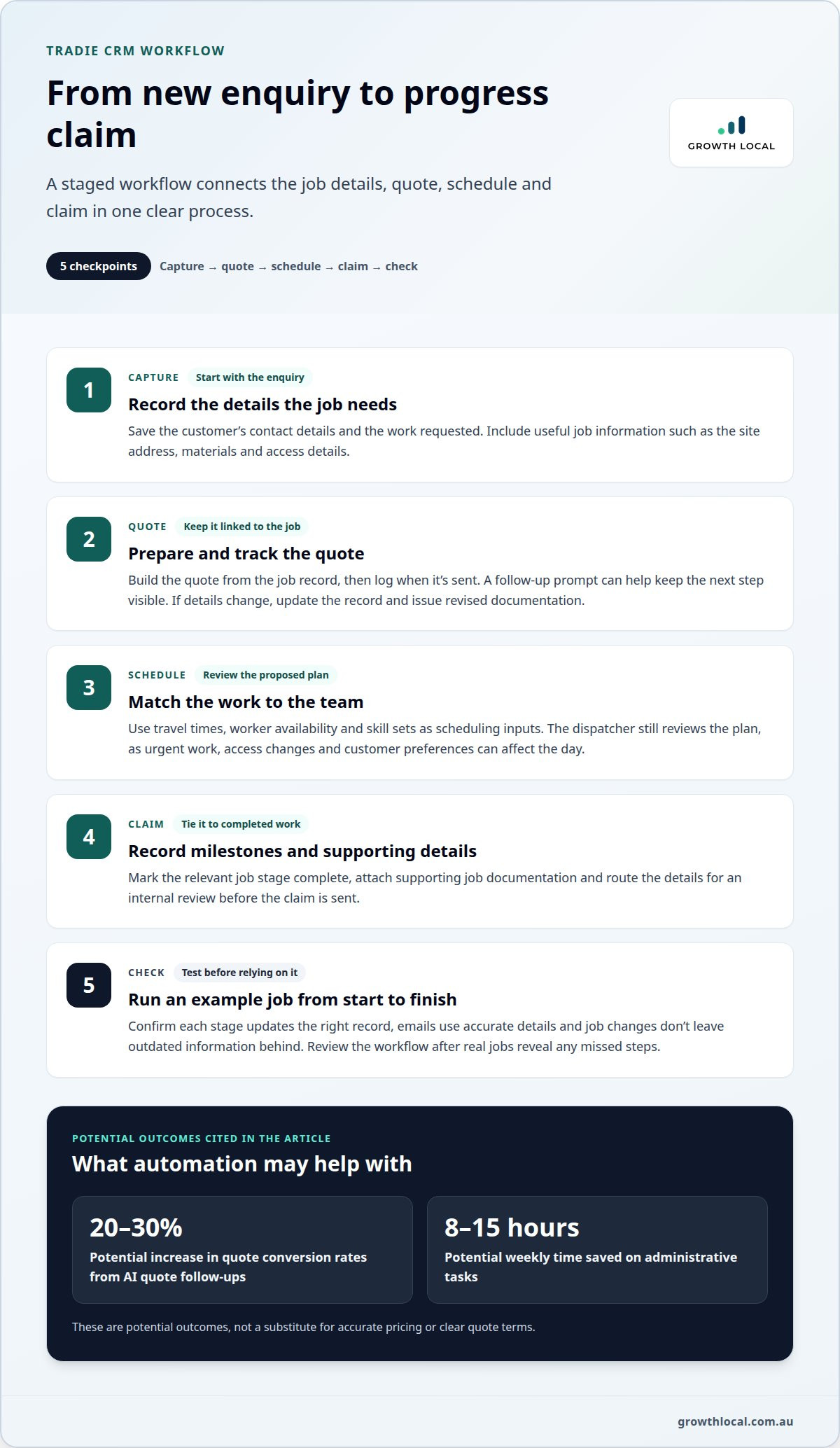
For quotes, the useful workflow starts when an enquiry becomes a job opportunity. AI can help organise customer details and job notes, then prompt a follow-up after the quote is sent. Automation estimates that AI quote follow-ups can increase quote conversion rates by 20-30%, while tradies using AI automation may save 8-15 hours per week on administrative tasks. Treat those figures as potential outcomes, not a substitute for accurate pricing or clear quote terms.
Build quote workflows around reliable information. Capture the site address, requested work, materials and access details before preparing a quote. Keep the quote linked to the customer record so an accepted quote can move into scheduling without re-entering job details. If the customer requests a change, update the record and issue revised documentation rather than relying on scattered emails.
Scheduling tools can use travel times, worker availability and skill sets to help assign jobs and plan routes. For example, a workflow can consider a technician’s qualifications alongside the job location and existing commitments. The dispatcher still needs to review the proposed schedule, because access changes, urgent work and customer preferences can affect the day’s plan.
Progress claims need a consistent link between completed work and supporting records. A practical workflow can connect job stages, recorded milestones and the information used to prepare a claim. For example, a team can mark a stage complete, attach relevant job documentation, then trigger an internal review before sending the claim. This keeps it tied to the job record instead of a separate spreadsheet.
Use a staged rollout to keep the process manageable:
- Capture: Record each new enquiry with its contact details and work requested.
- Quote: Prepare the quote from the job record and log when it’s sent.
- Schedule: Assign the work using travel, availability and skills as inputs.
- Claim: Record completed milestones and route supporting details for review.
Test an example job from enquiry to claim. Check that each stage updates the correct record, emails use accurate details and job changes do not leave outdated information behind. Review the workflow after real jobs reveal missed steps. For maintenance work, retain customer and job history so the next booking starts with useful context.
Automate one hand-off first, such as quote follow-up or job scheduling. This gives the team a defined process to assess before expanding automation to progress claims.
Automated follow-ups, reminders and review requests
A follow-up sequence works best when it responds to a clear job status, not just a date in the calendar. In a CRM, marking a quote as sent can start a reminder workflow. A recorded acceptance, decline or customer reply should pause it. This keeps the actual conversation in view and reduces the risk of sending an irrelevant message.
For an unanswered quote, set a simple sequence: send the first follow-up 24 hours after sending the quote, then another on day 3 if there’s no response. If the customer remains silent, send a final follow-up on day 7. Quote follow-ups sent after day ten rarely convert, so a later message may be better framed as a fresh check-in than another prompt to accept.
Each message should make the next step clear. A short email can name the quoted work, invite the customer to ask a question and explain how to respond. If the customer calls instead, record the outcome in the CRM and stop the automated sequence. This small update prevents the system from treating a real conversation as silence.
Job management reminders can cover appointments, access details and outstanding decisions. For example, a reminder linked to a scheduled job can prompt the customer to confirm access arrangements. A separate internal task can alert the office if those details are missing from the job record. Keep reminders linked to the current job status so a rescheduled booking does not trigger an outdated message.
SMS and email follow-ups covered by ACMA’s Spam Act rules should use consent and a working unsubscribe process. Build those controls into the workflow: store the customer’s communication preference, include an unsubscribe option where required and stop further marketing messages after an unsubscribe. Keep operational appointment messages distinct from promotional follow-ups, and record the reason for each contact.
After a completed job, send an automated review request 24 hours after completion. Trigger it from the job status, not the invoice date, because invoice timing may differ from the actual finish. If an invoice remains unpaid, handle that as a separate accounting workflow rather than mixing payment reminders with a review request. A customer can then respond to each message for its intended purpose.
- Quote sent: Start the 24-hour follow-up timer.
- No response: Send the day 3 and day 7 messages.
- Customer responds: Pause the sequence and record the decision.
- Job completed: Send the review request after 24 hours.
Review the sequence against actual CRM records. Check whether replies, accepted quotes, rescheduled jobs and unsubscribes change the next action correctly. These tests can catch duplicate messages and outdated reminders before they affect customer communication.
Provider platforms and typical customer sizes
ServiceM8, Fergus, Tradify and Simpro are options to compare, while platform fit depends on your workflow and team needs. If you’re comparing which Australian companies provide CRM and AI automation for tradies, start with the job processes each platform supports. Monthly prices and plan limits vary, so compare included users, features and usage rules rather than assuming one standard rate.
ServiceM8, Fergus and Tradify
ServiceM8, Fergus and Tradify are trade-focused platforms to assess for customer records and job management. Compare them against the same practical tasks: capturing an enquiry, moving it into a job, tracking its status and keeping customer information together. The right choice depends on which workflow suits your trades business, not on the product name alone. Map your current process before weighing plan limits.
Simpro and Other Tradie CRMs
Simpro is another platform to consider when comparing trade business systems. Assess it alongside other CRMs by checking how each handles your team structure, job stages, reporting and integrations. A system designed for a more involved workflow may suit a business with several staff, while a sole operator may prefer straightforward enquiry capture and fewer steps.
For a fair comparison, use the same sample enquiry with each platform. Follow it from first contact through job creation, scheduling, completion and customer follow-up. Note where staff enter the same details twice, which records update automatically and where a manual decision is still needed. This reveals practical differences more clearly than a long feature list.
Customer size is about operational complexity, not just headcount. A solo tradie may need clear customer records and reliable job statuses. A growing team may need work allocation, shared visibility and consistent documentation. Businesses handling maintenance as well as new projects may also need separate job types and repeat-customer history.
AI automation is not the same as a tradie CRM. A CRM organises customer and job information; AI or connected automation can help move information between tools or trigger a next step. For example, an AI receptionist can capture an enquiry while an integration passes its details into a CRM. Check what each component does rather than assuming every platform includes AI reception.
Which Australian companies provide CRM and AI automation for tradies depends on whether you need a trade CRM, an automation provider or both. You can pair a tradie CRM with a provider that connects AI-assisted enquiry handling to job workflows. Compare where the CRM ends and the automation begins, especially around hand-offs, errors and customer data.
Include compliance needs in your comparison. Keep customer contact preferences and job records organised, and make sure automated messages follow the consent and unsubscribe requirements discussed earlier. For each platform, identify its intended user count, included functions and usage caps before deciding whether it fits your operation.
- Solo operators: Prioritise simple enquiry capture and job tracking.
- Growing teams: Compare shared records, job allocation and workflow visibility.
- More complex operations: Assess integrations, reporting and manual hand-offs.
Choose the platform that handles your real enquiry-to-job process with the least unnecessary duplication.
Australian AI automation company selection criteria
Choose an automation partner by the work it handles, not its AI labels. For Australian businesses, the useful test is whether it can connect one real process, such as capturing a phone enquiry and creating a usable CRM record.
Tradie CRM providers are not automatically compliant with Australian privacy and data-protection requirements. Projects should comply with the Australian Privacy Act, and the system’s data handling and access settings need to support that outcome.
Start by mapping the process currently running in your business. Note how a new enquiry moves from a call or web form to a customer record, job assignment and follow-up. Your provider should explain which system handles each step, what information passes between systems and where a staff member needs to make a decision.
Next, assess how the proposed workflow handles customer information. Get a clear explanation of user access, data storage, retention, deletion and integration errors. Use a sample record to trace information through the CRM and connected apps. Assigning an owner to each system clarifies who is responsible when staff need to correct an entry.
Integration quality matters more than a long feature list. If an AI receptionist captures an enquiry, check how its details reach the CRM, which fields are populated and what happens if information is missing. A useful demonstration shows the full hand-off, including a failed connection and how staff recover the record.
Set up the project in stages. Begin with one workflow, such as capturing enquiries, then test it with realistic examples before adding more automation. Record the starting process, expected result and exception handling. Train everyone who uses the system, including the person responsible for correcting duplicate records or following up on incomplete enquiries.
- Workflow: Confirm the enquiry, CRM and job steps work together.
- Data: Trace a sample client record across connected systems.
- Access: Assign suitable permissions to each user role.
- Support: Define who handles errors and system changes.
- Measurement: Review whether the chosen process reduces manual hand-offs.
A practical partner explains these points in plain language and demonstrates the workflow using your business scenario. Avoid automating every task at once. Start with the bottleneck that creates the most repeated admin, then expand once the first workflow runs reliably. This gives your team a clear decision point before the next project begins.
Discuss an AI automation project
Your team can use those results to decide whether to continue, adjust the hand-off or pause expansion. For Australian businesses, the project should comply with the Australian Privacy Act. Ask the partner to explain how the proposed workflow supports that requirement, and base the decision on the process and information it handles rather than broad assurances.
Before extending the workflow, review sample records, exceptions and staff feedback. Confirm the owner knows how to correct errors and users can complete the hand-off as intended. If the results are unclear, refine the workflow and test it again before adding connected tasks.
Growth Local
Growth Local helps tradies connect lead capture, customer records and enquiry handling through Lead Generation System Setup, CRM Setup and an AI Receptionist. Turn to Growth Local when missed calls, scattered enquiries or manual CRM updates make it harder to keep jobs moving.
Start with the bottleneck in your workflow. An AI Receptionist can support enquiry handling, while CRM Setup organises customer and job information. Lead Generation System Setup can connect incoming leads with the process that follows. The focus is practical: capture enquiries, organise records and reduce repetitive admin.
If your current system needs a clearer path from enquiry to customer record, contact Growth Local to discuss your CRM and automation needs.
Make your next workflow the starting point
The right time to improve your systems is when a recurring task is already causing friction. Pick one hand-off that slows work down, define what a good result looks like, then build from there. That keeps the focus on smoother day-to-day operations, not automation for its own sake.
If you’re still weighing which Australian companies provide CRM and AI automation for tradies, focus on a partner that can connect your chosen workflow to the way your business runs. Growth Local offers Lead Generation System Setup, CRM Setup and Marketing System Setup to organise how enquiries and customer records move through your business.
Start with a clear operational goal and a process your team can maintain. Each improvement can provide a stronger foundation for the next.
Your next step can be simple. A well-chosen workflow helps build momentum with confidence.
Frequently Asked Questions
Can an AI receptionist write jobs straight into your CRM?
Yes, if the receptionist is connected to the CRM and set up to create job records. A useful setup defines the details required before creating a record, such as the caller’s contact information and requested service. It should also assign the new record to the right person or queue, giving your team a clear starting point for reviewing and managing each enquiry.
Which CRM platforms suit Australian sole traders, small trade businesses and larger contractors?
The best fit depends on how many people need access and how your business manages work. A sole trader may need a simple way to organise customer details and job records. A growing team may benefit from role-based access and clear task ownership. Larger contractors can assess whether reporting, permissions and approval steps match their operating structure before importing existing records.


