

The workflows to set up first for smoother CRM selling
Start with the workflows most likely to let leads slip through the cracks: create deals when leads are qualified, keep contact records accurate, and prompt timely follow-up. Optimising sales workflows in a CRM works best when the system takes care of repeatable admin without making it harder for your team to sell.
Reminders and templates matter because scattered updates, next steps, and customer details force salespeople to rely on memory and spend time chasing information. A practical workflow gives each lead a clear next step and keeps relevant details together.
This guide covers the CRM workflows to set up first, from deal creation and data hygiene to follow-up reminders and reusable templates. Learn how each workflow supports a consistent sales process, what to automate first, and how to connect the steps as your business grows.
Key Takeaways
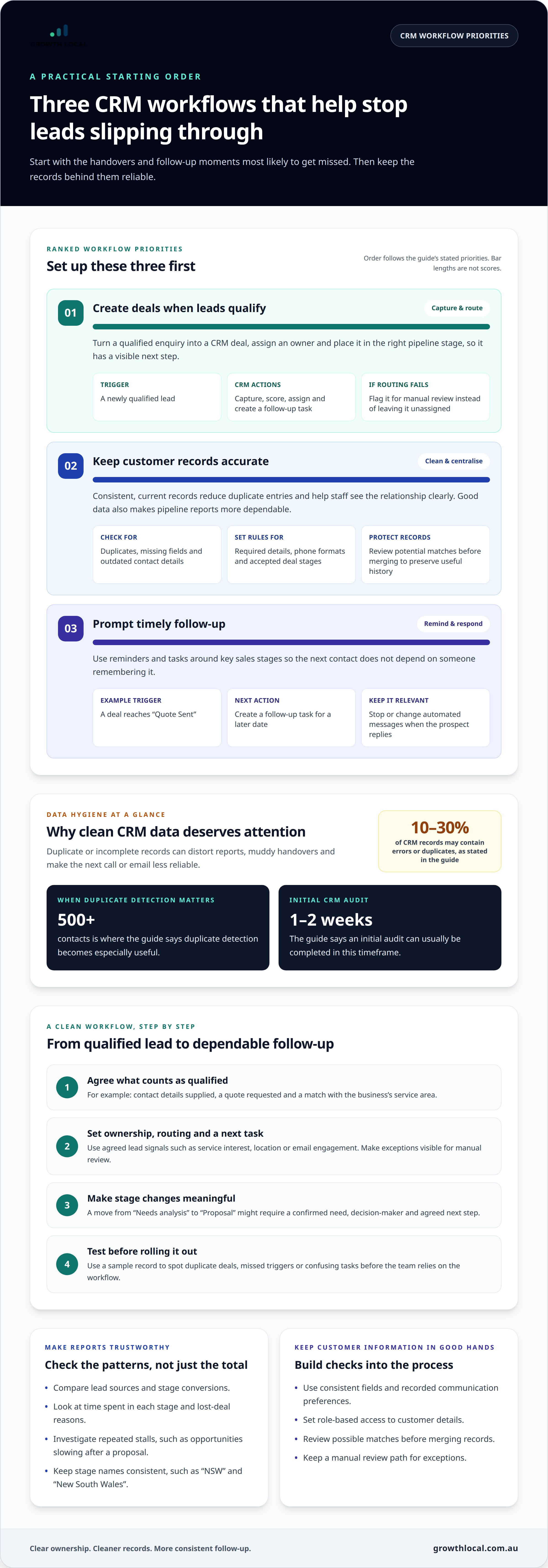
- Prioritise automatic deal creation after lead qualification so promising enquiries are captured and routed into the sales pipeline.
- Keep customer records accurate and centralised to reduce duplicate entries and give sales staff a clearer view of each relationship.
- Use pipeline dashboards and forecasts to make deal progress, stalled opportunities and follow-up tasks easier to see.
- Set reminders around key sales stages so prospects receive timely, consistent communication without relying on someone’s memory.
- Use reusable workflow templates for repeatable tasks, then tailor them to how your business handles leads and customers.
1. Automatic deal creation after lead qualification
For a sales team with 2 or more representatives, automatic deal creation can reduce missed handovers. A qualified lead from a website form can become a CRM deal, receive an owner, and enter the right pipeline stage. That gives each enquiry a visible next step instead of leaving it in an inbox.
Map your qualification criteria before setting an automation trigger. A lead might qualify when it provides contact details, requests a quote, and matches the business’s service area. The CRM can then capture the record, apply a lead score, assign an owner, and create a follow-up task.
Lead scoring helps teams prioritise enquiries using agreed signals, such as service interest, location, or email engagement. Configure scores and routing rules to match your sales process. If no representative meets the routing criteria, the workflow can flag the lead for manual review instead of leaving it unassigned.
Triggers connect a CRM event to a specific action. When a deal reaches “Quote Sent”, for example, the CRM can create a follow-up task for a later date. Other useful triggers include a newly qualified lead, a pipeline-stage change, or an unanswered email. Clear ownership and due dates help managers identify opportunities that need attention.
Automation can support sales outreach and demonstrations, too. A qualified lead might receive a tailored email while the assigned representative gets a task to arrange a demonstration. Use relevant customer details, and make the workflow stop or change when the prospect replies. This cuts repetitive admin without sending messages after the conversation has moved on.
To standardise workflows, map each sales stage, handover, decision point, and required CRM field with your team. Document what qualifies a lead, who owns it, and what happens next. Test the workflow with a sample record to uncover duplicate deals, missed triggers, or confusing tasks before rolling it out.
When comparing CRMs for sales automation and Australian pricing, match each platform’s workflow features, integrations, reporting, and subscription structure to your team’s needs. User licences, required features, and connected systems all affect the comparison. Assess prices in Australian dollars against the setup you intend to use.
Australian CRM workflows also involve data-quality, privacy, and compliance considerations. Incorrect contact details can misroute leads, while unclear communication preferences or broad staff access can expose customer information. Reduce these risks with consistent fields, role-based access, recorded communication preferences, and a manual review path for exceptions.
2. Maintaining accurate, up-to-date CRM data
CRM reports are useful only when records reflect actual customer activity. If one company appears under two names, a sales manager might count an opportunity twice. Outdated contact details can also undermine the next email or call. Clean data supports sound decisions, smoother handovers, and consistent customer relationships.
Opportunity stage gates keep pipeline records meaningful. Define what must be recorded before a deal moves forward. For example, moving an opportunity from “Needs analysis” to “Proposal” might require a confirmed need, decision-maker, and agreed next step. The CRM can flag missing fields or prevent a stage change until required details are complete. This helps reports reflect progress, not optimism.
Duplicate detection becomes especially useful for a CRM with 500 or more contacts. CRM records in most organisations contain errors or duplicates at a rate of 10-30%. A professional configures matching rules around fields such as email address, phone number, and business name. Potential matches can be reviewed before records are merged, protecting notes, deal history, and ownership details. Automatic merging without review can erase useful differences between contacts.
A structured audit checks the records that affect sales decisions first. Professionals can review duplicate contacts, incomplete fields, inactive opportunities, inconsistent stage names, and missing lead sources. An initial CRM audit can usually be completed in 1-2 weeks. The process includes identifying the issue, agreeing a correction rule, cleaning affected records, and testing the result against reports. For example, standardising “NSW” and “New South Wales” helps location-based reporting group records consistently.
Data hygiene takes an ongoing process, not a one-off clean-up. Set validation rules for phone formats, required contact details, and accepted opportunity stages. Make each record’s source and status clear so staff update the right entry instead of creating another. Regular reviews can catch outdated contacts and recurring errors before they undermine sales efficiency.
Clean records also help you spot patterns in sales performance. Compare lead sources, stage conversions, time spent in each stage, and lost-deal reasons. If opportunities often stall after a proposal, investigate the follow-up process. If one source brings contacts that rarely qualify, use that insight to refine lead prioritisation. The pattern matters more than a headline pipeline total.
For a clearer view of how data rules and workflow stages fit together, explore a CRM workflow walkthrough.
3. How can I streamline my CRM processes to improve sales and customer engagement?
Streamline CRM sales processes by mapping pipeline stages, removing unnecessary steps, and assigning clear ownership. Optimising sales workflows in a CRM starts with understanding how your team handles opportunities from first contact to close. Then configure triggers, tasks, dashboards, and reports to support that process. Consistent tracking makes it easier to see where opportunities stall.
A sales dashboard should focus on metrics that support decisions, such as lead response time, win rate, open tasks, and conversion between stages. It might show how many deals reached “Proposal Sent” and how many progressed afterwards. Managers can use this view to guide coaching and process changes based on pipeline activity, rather than guesswork or scattered updates.
Forecasts depend on accurate deal values, stage definitions, and expected close dates. A professional can group opportunities by likely closing period and compare forecast totals with actual outcomes. If a deal sits open without activity for 7 days, a stalled-deal alert can prompt a review. Teams with 10 or more active deals may find these alerts useful for keeping risks visible and deciding where sales attention is needed.
Clear stage criteria make pipeline reporting more reliable. Define the evidence required to move a deal forward, such as a confirmed need before “Qualified” or an approved quote before “Negotiation”. Remove obsolete stages and clarify who owns each handover. A shared process helps prevent salespeople from interpreting the same stage in different ways.
Stage changes can trigger the next task automatically. When a deal reaches “Proposal Sent”, the CRM can create a follow-up task within 48 hours. At “Contract Out”, it can prompt a signature check after 3 business days. A quote follow-up task can be scheduled 3 to 5 days after sending. These rules turn pipeline movement into clear actions and help prevent opportunities from sitting without an assigned next step.
CRM users can generate sales quotes using product and pricing information stored in the system. A professional configures the quote process so the right details feed into the document, then tracks whether it was sent and what happened next. Reviewing lost-deal reasons over 90 days can uncover repeated objections, weak qualification, or gaps in the sales sequence.
To optimise a sales workflow, document the current process, identify bottlenecks, configure targeted changes, and test them against real records. Then measure response time, SLA rate, win rate, and open tasks. Optimising sales workflows in a CRM also means reviewing these measures regularly, so triggers and reports stay useful as sales practices change.
For teams that need connected follow-up actions, discuss CRM workflow improvements that could include AI automations tailored to their sales process.
4. How Automated Follow-Up Reminders Work?
A CRM reminder turns a sales event into a clear next action. If a prospect hasn’t responded for 14 days, a workflow can prompt the assigned salesperson to follow up. That keeps communication visible in the record, rather than buried in an inbox, and gives the team a consistent way to manage open conversations.
Set up a workflow by choosing a trigger, defining its criteria, and assigning an action. For example, a proposal marked “sent” can start a reminder if it remains unopened for a set period. A reply, booked meeting, or closed deal can stop or change the sequence, preventing messages from continuing after the customer’s situation changes.
Timing should match the conversation. A lead-nurturing series might schedule tasks for T+2, T+7, and T+14 after its initial trigger. Each step can have a different purpose: answer a common question, share a useful detail, then invite the prospect to continue the discussion. A salesperson can personalise the message before it goes out.
Personalisation makes an automated prompt more useful than a generic email blast. A CRM can include a prospect’s name, service interest, last interaction, and assigned contact in task details. The salesperson can use that context to write a relevant email or make a call. This keeps follow-up manageable while helping protect the customer relationship.
Automated reminders also support post-sale communication. A workflow can schedule a customer check-in email 2 days after an opportunity closes. For example, a service business might use that touchpoint to confirm the next step and invite the customer to raise any immediate questions. A timely check-in keeps the relationship active after the deal moves out of the pipeline.
An omnichannel CRM brings interactions from channels such as email, social media, and calls into one view. When a prospect switches from email to a call, the salesperson can see earlier interactions and avoid asking them to repeat information. A shared record helps colleagues decide who should respond and what to say.
Sales notifications give managers visibility without requiring them to chase every update. A CRM can alert the deal owner when a prospect replies, a task becomes overdue, or an opportunity changes stage. Managers can use these signals to spot unanswered messages and prioritise active conversations, rather than relying only on a pipeline review.
Tailor reminder rules to your sales stages, communication criteria, and customer journey. Test each trigger with sample records, including a reply and a closed opportunity, to catch duplicate or irrelevant prompts. This keeps workflows useful in real sales conversations and reduces the time your team spends tracking reminders manually.
5. How do CRM workflow templates save time for small businesses?
A CRM workflow template gives repeatable work a defined sequence, so staff don’t rebuild the process for every customer. A small service business could use a new-enquiry template to assign an owner, record the service requested, and create a next-step task. The template sets a consistent starting point while leaving room to personalise each interaction.
Templates can support more than lead handling. A post-purchase workflow might generate a thank-you email with order details, request feedback, and schedule a later check-in about the customer’s experience. A separate inactive-customer template could prompt a relevant re-engagement message. Define each template’s trigger, purpose, owner, and exit condition so communications stop when they’re no longer appropriate.
Tailor templates to your actual process instead of using a generic sequence unchanged. Define the information needed at each step, assign responsibility, and remove actions that don’t help the customer or sales team. A business that books consultations, for example, might need a booking confirmation and preparation email. A business selling services by quote might need a quote-status task instead.
Integrating a CRM with marketing automation, collaboration, and customer support software can reduce repeated data entry. A new lead captured in a connected form can flow into the CRM with its source and details visible to the sales team. A connected marketing system can then use relevant customer information in an agreed campaign. Assign clear ownership of key fields to prevent conflicting records across systems.
Integrations don’t eliminate every manual step. Staff may still need to confirm details, add context after a conversation, or handle an unusual customer request. Map which information should sync, which actions should happen automatically, and where a person needs to review the record. This balance streamlines routine work without making the CRM process rigid.
Useful templates also make results easier to assess. Teams can track whether enquiries receive a timely response, whether follow-up tasks are completed, and whether customers engage with post-purchase messages. Nucleus Research attributes 51% of CRM return on investment to productivity and process efficiency gains. For a small business, that points to the value of templates that remove repeated admin while supporting real sales work.
Start with a few frequently repeated tasks, then expand templates as the team learns what works. A professional can configure connected systems through a CRM and marketing workflow demonstration.
Growth Local
Growth Local helps businesses turn sales workflow priorities into practical CRM systems. If leads are scattered, handovers are unclear, or follow-up relies on memory, CRM Setup can organise your pipeline, records, and next actions around your sales process. AI Automations can handle repeatable steps, while Lead Generation System Setup and Marketing System Setup connect incoming enquiries with the systems that manage them.
The right starting point depends on where work gets stuck, such as capturing enquiries, assigning ownership, or tracking opportunities. Growth Local can help shape the setup around those needs, rather than adding automation for its own sake. Contact Growth Local to discuss your sales workflows.
Make your CRM ready for what comes next
Your sales process shouldn’t stay frozen in place. As your services, team responsibilities, and customer expectations change, your CRM needs to keep pace. Treat optimising sales workflows in a CRM as ongoing operational work: review where decisions slow down, identify what has changed, and adapt the setup to support how your business sells today.
A useful next step is to agree on what an effective sales process should look like for your team. That gives CRM changes a clear purpose and helps keep staff aligned as the business grows. Practical systems should support good conversations, not add admin or make the customer experience feel automated.
Growth Local can shape a CRM setup around your sales process and business needs. Get in touch to discuss what could work for your team.
With a clear direction and the right support, your CRM can grow alongside your business. Build a smoother sales operation through considered improvements.
Frequently Asked Questions
What are the most important CRM workflows to set up first?
Start with the workflows that address the biggest gap in your sales process: capturing qualified enquiries, assigning ownership, keeping records usable, and prompting the next action. The best first workflow depends on where leads currently get delayed or overlooked. A business receiving enquiries through several channels, for example, may need a reliable capture and handover process before adding more advanced customer journeys.
Can a professional build these CRM workflows for a small business without a developer?
Many CRM workflows can be configured by a CRM professional using built-in platform settings rather than custom code. The professional translates your sales process into rules, fields, notifications, and actions, then tests them with representative records. Connections between separate systems may need technical configuration. Growth Local provides CRM Setup to help small businesses turn sales requirements into a working CRM configuration.
How Automated Follow-Up Reminders Work?
Automated follow-up reminders use a CRM event or condition to prompt the right person. A task could appear when a prospect hasn’t replied after an agreed interval, or when a meeting is marked complete without a recorded next step. The salesperson can review the conversation and choose an appropriate response, rather than sending a message that ignores the prospect’s latest update.
How Automated Sales Reporting Works?
Automated sales reporting collects CRM activity into recurring views or reports, reducing the need for managers to compile updates manually. A report might group open opportunities by owner, source, or expected close period, then highlight records missing key details. Consistent data entry and clearly defined stages are essential. Without them, even a polished dashboard can misrepresent sales activity.
How Lead Scoring Works?
Lead scoring assigns values to selected details or behaviours, helping a sales team sort enquiries by fit or apparent interest. You might prioritise a requested consultation over a general newsletter sign-up, while considering service type and location. Base scoring rules on how your business qualifies leads, not assumptions about every prospect. Use sales outcomes to refine the criteria and prioritisation.
How can a professional streamline CRM processes to improve sales and customer engagement?
Review how information moves from the first enquiry through sales and customer handover, then remove unnecessary steps or unclear ownership. Align CRM fields, permissions, notifications, and team responsibilities with that process. A service business, for example, may need sales to pass confirmed requirements to delivery staff before work begins. Clear handover details help prevent customers from repeating information.
How do CRM workflow templates save time for small businesses?
Templates give staff a consistent starting point for repeatable tasks, such as welcoming a new customer or preparing for a consultation. A small business can use a shared structure for the information to collect, the person responsible, and the next action, while tailoring messages to each customer. Templates work best when they match real working practices and are updated as those practices change.
How can a professional tell whether a CRM needs optimisation?
Warning signs include staff keeping separate spreadsheets, incomplete opportunity details, conflicting reports, and repeated delays between sales steps. Compare the CRM’s recorded process with how the team actually works, then look for duplicated effort, unused fields, and reports that don’t support decisions. If staff avoid the system because updating it feels harder than the task itself, review the setup.


