

Solar CRM software Australia
A solar-specific CRM isn’t essential for every Australian installer. Solar CRM software in Australia makes sense when your sales process needs to track site assessments, quotes, approvals and handovers in one place. A general CRM can still work if it captures the details your team needs and connects smoothly with the tools you already use.
It’s frustrating when Facebook leads sit apart from customer records or a spreadsheet becomes the only way to see what’s happening. The right setup should make follow-up easier, keep information organised and show which opportunities need attention, without adding busywork.
This guide explains when a solar-specific CRM is useful and when a general system may be enough. It compares free plans, data export and support, and covers practical integrations with Google Sheets and Facebook Lead Ads. You’ll have a clearer way to assess software against your sales process, service needs and growth plans.
Key Takeaways
- Choose a solar-specific CRM when your sales workflow needs solar-focused stages and customer details; a general CRM may suit a simpler process.
- Test whether Facebook Lead Ads and Google Sheets fit your workflow, and map what information should move between each tool.
- Compare free plans by their limits, data export options and support terms, not just the upfront cost.
- Map how your CRM connects with quoting, design, finance and accounting tools before settling on your software stack.
- If leads are slipping through the cracks, Growth Local can help set up lead generation, CRM and marketing systems around your process.
Data export and month-to-month support
A CRM should make your records easy to retrieve, not lock them inside one platform. Before committing, test an export with sample customer details, lead sources, quote status, appointment dates and follow-up notes. Open the file and check that fields are readable and connected to the right contact. If the spreadsheet loses those relationships, it can create more cleanup work than it saves.
Solar records can stay relevant beyond the first sale. Australia’s Small-scale Renewable Energy Scheme is scheduled to end in 2030, so installers should plan how they’ll retain useful customer and job history over time. Keep a clear record of what the CRM stores, how to export it and who can access it. That makes a future system change easier to manage.
- Test the export: use a sample lead and confirm key fields, notes and dates appear correctly.
- Check the exit process: identify who can export records and how access works if a subscription ends.
- Keep a usable copy: store exports in an organised location with a clear file name and export date.
Ongoing support matters as your workflow changes. Ask how support handles practical tasks, such as correcting an import, adjusting a pipeline stage or fixing a failed automated reminder. A useful answer explains the support channel, what information to provide and how requests are handled. If your sales team relies on a calendar reminder before a site visit, test that workflow rather than relying on a general product demonstration.
Contact checks and data updates should be part of routine CRM maintenance. For each new enquiry, record the name, phone number, email and lead source consistently. When a customer updates their details, edit the existing contact instead of creating a duplicate. Then review records with bounced emails, missing phone numbers or no recent activity. A generic CRM might flag a deal with no activity for three weeks for follow-up or closure.
For implementation, start with a clean data map. Match each spreadsheet column to a CRM field, decide how to handle duplicate contacts, then import a small test batch. Review the results with the people who use the system before moving the remaining records. For example, confirm that a customer’s address, quote stage and next appointment appear in the right fields. Keep the original file unchanged until you’ve checked the migrated records. This staged approach exposes mapping errors early and gives the team a clear way to report problems.
Integrations with Google Sheets and Facebook Lead Ads
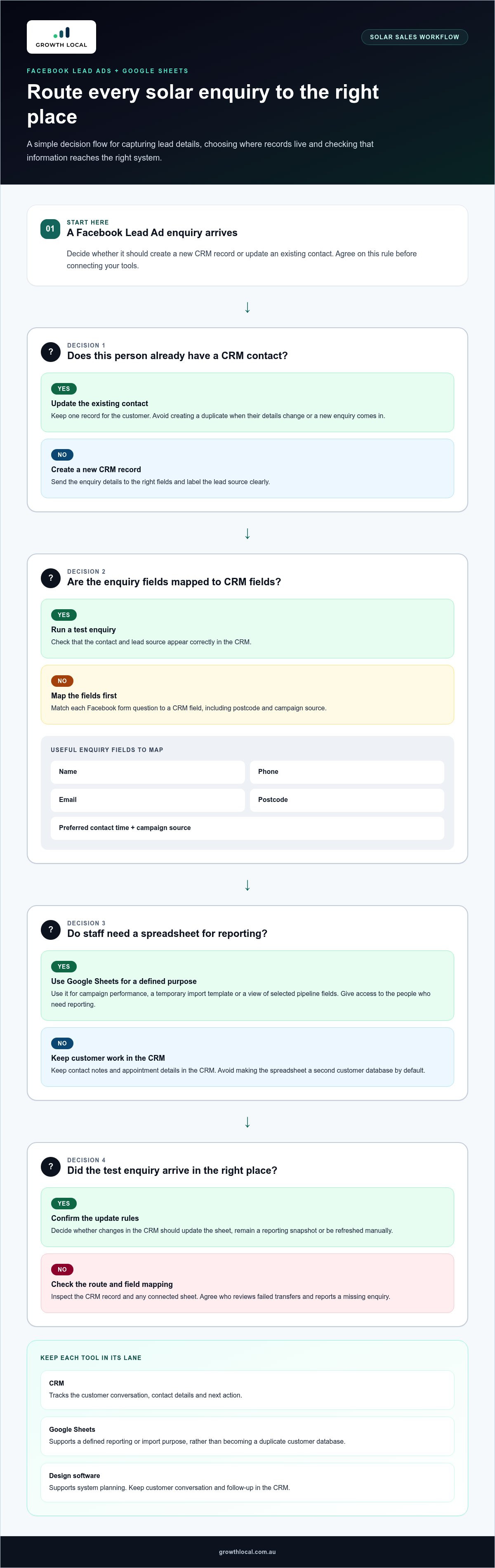
Google Sheets and Facebook Lead Ads can support different parts of an Australian solar sales workflow. Facebook Lead Ads collect enquiries, while a spreadsheet can help staff review or report on lead data. Decide which system owns each record. If contact details are updated in both places, staff may follow stale information or create duplicate entries.
Start by mapping the journey from ad response to sales follow-up. For a Facebook Lead Ad, list the fields your team needs, such as name, phone, email, postcode and preferred contact time. Then decide where each field should go in the CRM. Use a test enquiry to check that the details appear under the right contact and include a useful lead source label.
Before connecting Google Sheets, define its purpose. A sheet might track campaign performance, provide a temporary import template or give managers a view of selected pipeline fields. Avoid making it a second customer database by default. For example, keep contact notes and appointment details in the CRM, while using a sheet to report on lead source and sales stage.
- Map fields: match each Facebook form question to a CRM field, including postcode and campaign source.
- Set update rules: decide whether new enquiries create records or update existing contacts.
- Test the route: submit a sample lead, inspect the CRM record, then check any connected sheet.
- Limit access: give spreadsheet access to the people who need reporting, not every user by default.
Solar work also involves information that may not belong in an initial lead form. A customer might later discuss battery storage, renewable energy options or a roof layout with the sales team. Keep those details in relevant CRM fields or notes rather than squeezing technical context into a basic ad enquiry. Design software has a different purpose: it supports system planning, while the CRM tracks the customer conversation and next action.
Check what happens when a lead’s details change. If a customer corrects their phone number in the CRM, decide whether Google Sheets should update, remain a reporting snapshot or be refreshed manually. That prevents staff from treating an old spreadsheet row as current contact information. Also agree on who reviews failed transfers and how they report a missing enquiry.
Finally, document the workflow in plain language. Note which platform receives Facebook enquiries, which fields flow into the CRM and what the connected sheet is used for. If Facebook Ads are part of your lead strategy, a joined-up process can make it easier to see where enquiries come from and what follow-up happens next.
Solar-specific customer relationship management
A solar CRM organises customer work around the installation journey, not just a generic sales pipeline. A lead may move from enquiry to qualification, site assessment, proposal, approval, installation coordination and handover. These stages give the team a shared view of what’s happened and what needs to happen next. For example, a residential enquiry can be tracked separately from a battery upgrade or service request.
That structure matters because sales staff don’t control every step. Roughly half the stages in a solar installation job are handled by third parties outside the sales team’s control. A CRM can still show the status, owner and next action for each stage. If an installer is waiting for an external update, the record can distinguish that delay from a missed sales follow-up.
Set up fields around the decisions your team actually makes. For a new enquiry, that might include property type, postcode, energy needs, system interest and preferred contact method. When preparing proposals, record the current version and its status. Keep technical design details in the appropriate system, then link the customer record to the relevant job or document. This keeps sales notes useful without turning the CRM into design software.
- Enquiry: capture the lead source, contact details and reason for getting in touch.
- Assessment: record the appointment outcome and any information still needed.
- Proposal: track whether it’s being prepared, sent, revised or accepted.
- Handover: assign the next action and note who owns it.
Reporting should answer practical questions. A sales manager might review open proposals, overdue follow-ups and leads by source. Use consistent stage names so reports compare like with like. If one salesperson marks a proposal “sent” and another uses “awaiting decision”, the pipeline becomes harder to read. Agree on stage definitions before adding dashboards or automated reminders.
Australian solar work also has technical handover details worth recording in the right place. AS/NZS 5033 governs PV array installation and safety; AS/NZS 4777.2 governs inverter grid connection. AS/NZS 5139 covers battery energy storage installation. These standards don’t make a CRM compliant, but clear record ownership can help teams track relevant documents and handover tasks without mixing them into sales notes.
Keep the workflow easy to read on a busy day. Each open opportunity should show its current stage, responsible person and next action, rather than a minute-by-minute account. Review a sample record with sales and operations staff before rollout. If both teams can quickly find the proposal, appointment outcome and handover status, the setup is supporting the work instead of adding admin.
Which Australian solar CRMs integrate with quoting, design, finance, and accounting tools?
There isn’t one CRM that suits every Australian installer. The practical choice is a platform that connects your current quoting, design, finance and accounting workflows without forcing staff to enter the same job twice. Start with the tools your team uses now, then map the information needed at each handover.
For quoting, define what should pass between systems. A CRM record might hold the customer, site address, lead source and sales stage. The quoting tool may hold the proposed system and quote version. Decide whether the CRM stores a link, receives status updates or holds selected quote fields. For example, after issuing a proposal, the team could mark the deal “quote sent” and assign a follow-up task.
Design software has a different role from customer management. It handles system plans and technical design details, while the CRM tracks communication, ownership and the next sales action. Use a consistent job reference in both systems. This gives staff a clear path from the customer record to its design file, without treating the CRM as the technical design workspace.
Finance integrations need careful workflow mapping. Identify when a lead becomes a finance enquiry, what status should return to the CRM and who updates it. Keep sensitive application details in the finance system where they belong. If it suits your process, the CRM can show progress needed for sales coordination, such as “application started” or “decision received”.
Accounting handover usually begins after a sale or approved job. Decide which system owns the customer record, invoice status and payment information. For example, the CRM can show that an invoice was raised, while accounting software remains the record for financial transactions. Clear ownership reduces conflicting edits and makes reports easier to interpret.
- List each handover: name the sending system, receiving system, fields and responsible role.
- Check the connection method: distinguish a built-in integration from an API, file transfer or manual update.
- Test a sample job: follow one record from enquiry through proposal, design, finance and accounting.
- Agree error handling: decide who resolves missing fields, duplicate records or failed transfers.
Before choosing solar CRM software in Australia, compare the integration documentation with your workflow. Ask for a demonstration using a realistic job, not a generic sales screen. Check how changes to a quote, customer record or job stage appear across connected tools. A well-set-up CRM makes handovers visible and keeps each system responsible for the work it handles best.
Company-list figures can help frame the scale of the workflow a CRM must support. The Australian company list included 63 companies with 51-200 employees. The Australian company list included 15 companies with 201-500 employees. The Australian company list included 2 companies with 501-1,000 employees. The Australian company list included 1 company with 1,001-5,000 employees. Melbourne accounted for 7.0% of the Australian company list, the largest-city concentration shown. These figures are context for planning requirements, not a substitute for testing a specific integration.
Installer and designer accreditation in Australia transferred from the Clean Energy Council to Solar Accreditation Australia in 2024. For a workflow that tracks credentials or assigns accredited staff, confirm which system holds those records and how updates are reflected in the CRM. Keeping that responsibility clear can help prevent outdated information from being treated as current during job handovers.
Australian solar software stack selection
Choose software around the work your team needs to manage, not a long feature list. A solar installer might need lead tracking, system design, quoting, job coordination and accounts. Those functions can sit in separate platforms, provided staff can move the right information between them. Start by listing each task and naming the system responsible for it.
Revenue mix can help set priorities. Solar installers whose retrofit and service revenue together exceed 40 percent of last quarter's revenue should prioritise a licence other than a design tool. In that case, assess whether customer management or service workflows need more attention. A business focused mainly on new installations may put greater weight on lead handling and proposal coordination.
Next, map the workflow from first enquiry to completed job. For each handover, record what information moves, who owns it and how staff see progress. For example, a CRM could track the lead and next action, while design software holds system plans. Quoting and accounting tools can manage their specific tasks, with job references helping staff connect records.
- List the work: include sales, design, quoting, finance, installation coordination and service.
- Name the record owner: decide which platform holds the current customer, quote or job status.
- Map handovers: note which fields move between systems and who handles errors.
- Test a real example: follow one enquiry through a proposal and into job coordination.
Keep the software stack lean. If a spreadsheet already handles a simple reporting task, another platform may create extra updates rather than save time. If staff copy customer details between a CRM and quoting tool, prioritise a reliable integration or clearly assign who updates the information. Compare how each option handles duplicate records, changed details and failed transfers.
Before committing, run a practical demonstration using an Australian solar job. Ask the team to find a customer record and its proposal, identify the next action, and trace the job reference into design or accounts. Note where staff must switch platforms or re-enter information. These steps reveal friction more clearly than a feature checklist.
Finally, document the chosen setup in a simple system map. Include each platform, its purpose, the data it owns and the staff role responsible for updates. Review the map when your sales mix or service workflow changes. This keeps the software aligned with how the business actually operates.
Growth Local: Lead Generation System Setup
Growth Local helps Australian solar installers connect lead generation with the systems they use to manage enquiries and follow-up. Its Lead Generation System Setup can organise how enquiries enter your sales workflow, while CRM Setup helps track customer conversations and next actions. Consider this support when leads arrive through disconnected channels, staff rely on manual updates or your CRM doesn’t reflect how your team handles solar enquiries.
Growth Local can also set up marketing systems and an AI Receptionist as part of a broader lead-handling process. Start by outlining where leads come from, how your team responds and where follow-up gets stuck. That gives the setup a clear operational starting point.
Contact Growth Local to discuss your solar lead and CRM workflow.
Make your next CRM move practical
Choosing solar CRM software in Australia is only the starting point. The real value comes from shaping it around the work your team needs to manage and making it part of the everyday routine. Pick one workflow to improve first, such as assigning new enquiries or keeping proposal follow-up visible. Give someone ownership of that process and agree on how the team will use the system.
From there, review how the setup works on real jobs. Are staff recording information consistently? Can they find the next action without chasing updates? Use what you observe to refine the workflow before adding more automation or connections. A steady rollout gives your team room to build good habits and makes the next improvement easier to plan.
Growth Local can help turn those priorities into a practical CRM setup for your solar business. Take the next step when you’re ready to put a clearer system in place.
A simpler workflow starts with one clear decision. You’re ready to make yours.
Frequently Asked Questions
Do Australian solar installers need a solar-specific CRM?
No. Australian installers aren’t required to use a solar-specific CRM. The decision is operational, not a condition of running a solar business. For example, if your current CRM reliably preserves customer records when a salesperson leaves, that may matter more than whether the platform is designed specifically for solar. Assess how well your existing system protects continuity and keeps useful customer history available to the team.
How is it different to a general CRM?
A general CRM organises customer relationships across different business types, while a solar-focused setup is tailored to solar sales and delivery. The difference may be in how information is named and grouped, rather than a specific feature. For example, a solar team may want to distinguish a new system enquiry from an existing customer’s upgrade request. The right configuration should reflect those distinctions without making routine data entry harder.
How can a solar business choose and implement a CRM, and how long does setup take?
Start by listing the jobs the CRM must support, the staff who will use it and the other platforms it needs to connect with. Then compare options using a realistic example, such as an enquiry that becomes a proposal and later returns as a service request. Setup time depends on record quality, workflow decisions, integration work and staff training. Clean, consistently formatted contact records and agreed stage names make implementation more straightforward.


