

How to show the value of a CRM implementation
A strong business case for CRM implementation sets out the current problems, the intended improvements and a realistic plan to deliver them. It should explain how shared customer records could reduce fragmented information and support better sales, marketing and service decisions. Connect the proposed system to business goals, expected benefits, costs and risks.
It’s easy to focus on software features, but decision-makers need to understand how a CRM will change day-to-day work. Set out the time and resources required, and explain how employees will be supported to adopt the system rather than work around it.
This guide explains what to include, how to demonstrate value and how to build support across the business. Map current problems to measurable outcomes, account for implementation and training, and explain why accurate, shared customer data matters. The result is a practical basis for decisions and a clearer path through the change for employees.
Key Takeaways
- Start with the customer-data problems slowing work down, then show how a shared CRM record could help teams act on the same information.
- Build your financial case around the full costs, practical efficiencies and revenue opportunities, not software features alone.
- Bring sales, marketing, service and leadership into the discussion early so the goals and priorities are clear across the business.
- Plan clear communication and hands-on training to help employees adopt the new system and use it consistently.
- Structure the proposal around the current situation, the future vision and a realistic implementation and financial plan.
Centralised customer data and a single source of truth
Compare CRM implementation with improving existing sales and customer service processes. Process changes can remove specific bottlenecks, while a CRM can organise shared customer information and support work across teams. Assess both options against the same customer and operational problems before deciding.
-
Centralise customer data
Map where sales, marketing and customer service currently record customer details, then identify which record should become the source of truth. A CRM can bring interactions and customer information together, giving teams a 360-degree view rather than separate fragments. Check for duplicate records, inconsistent fields and missing interaction history before migration. Don’t assume centralisation alone will fix inaccurate data.
-
Assess current customer management processes
Map how a lead moves from first enquiry through sale, follow-up and service. Ask staff in sales, marketing and customer service where they re-enter information, search for updates or lose track of the next action. For example, compare the details on an enquiry form with the information a salesperson needs to prepare a quote. A CRM changes the system supporting these steps; process improvements can simplify them without adding software. Record the actual bottlenecks before choosing an approach.
- Consider how shared records could improve the customer experience. If a customer speaks with sales and then contacts customer service, both teams should be able to see relevant interaction history and avoid asking for the same details again. Identify what information each role needs, and avoid unnecessary fields that make records harder to update. This assessment also helps define access controls for sensitive customer data.
- Assess security and compliance from the outset. Review how customer data is stored, who can access it and how access is recorded. CRM systems may include safeguards such as encryption, user access controls and audit trails, as well as compliance management tools. Compare these with your business’s data-handling needs, and account for risks from connected systems or poorly managed access.
-
Use customer insights for decisions
Decide what questions customer data should help answer, such as which enquiries need follow-up or where customers disengage. CRM analytics can reveal trends, customer behaviour and opportunities; predictive analytics may also inform sales forecasts. Check records for consistency before relying on reports, since incomplete data can distort results. Set clear measures, such as customer satisfaction or website conversion, and use them to guide marketing and service decisions.
Centralised data is a practical capability, not a guarantee of better results. The case for investment should show how cleaner records, shared visibility and useful analysis address the specific problems your teams have identified. CRM use is common: 91% of businesses with more than 11 employees use a CRM.
What should a CRM business case include?
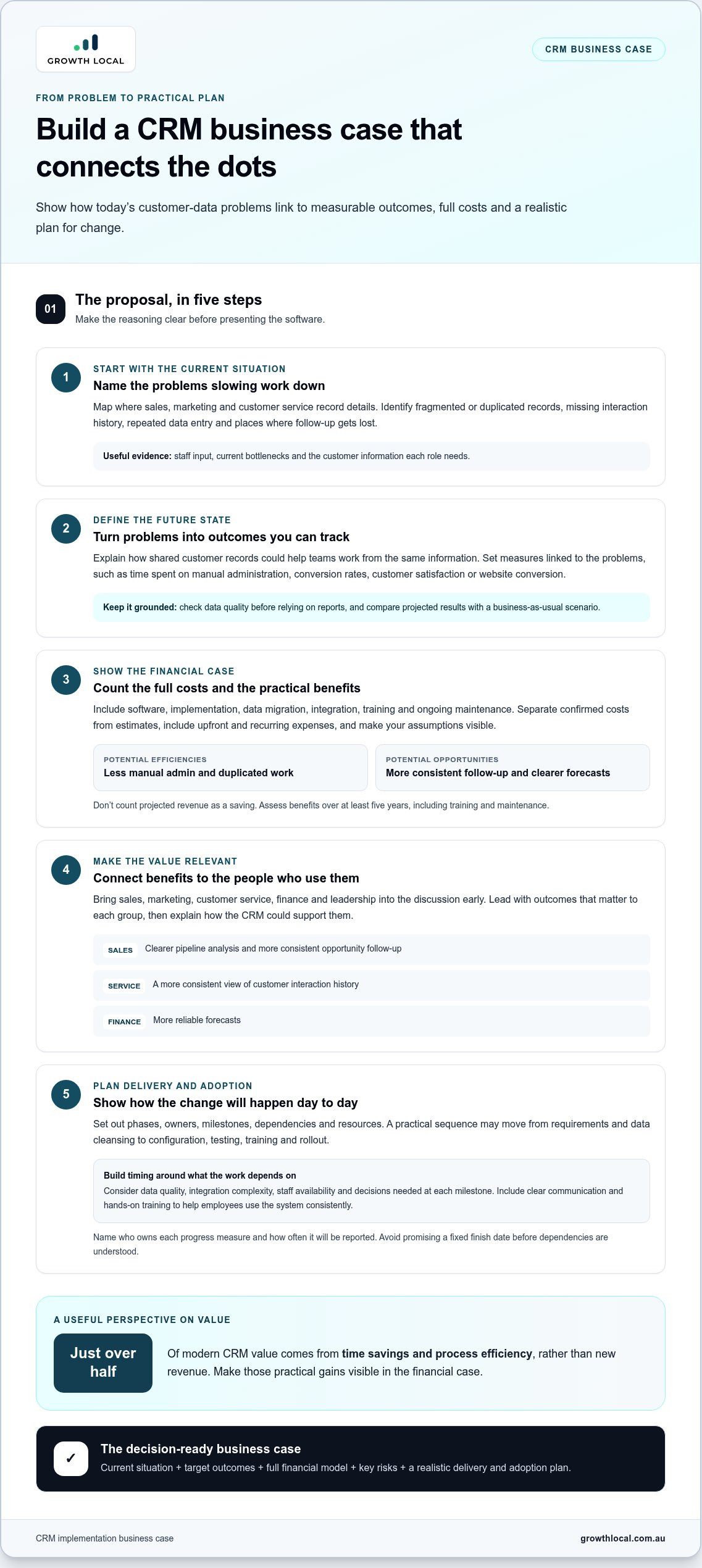
A business case for CRM implementation should connect the current problem to expected benefits, full costs and a delivery plan. Build the timeline around the work required, including data preparation, configuration, training and project milestones.
-
Map CRM costs and commercial benefits
List every cost category, including software, implementation, data migration, integration, training and ongoing maintenance. Link each item to a business outcome. For example, automated lead tracking could reduce time spent updating spreadsheets or help staff follow up opportunities consistently. Include upfront and recurring expenses, and distinguish confirmed costs from estimates. Don’t count projected revenue as a saving.
-
Quantify benefits and ROI
Choose measures that connect CRM use to operational or commercial results, such as time spent on manual administration, conversion rates, customer satisfaction or website conversion. Compare projected cash flows with a business-as-usual scenario, so the case shows what changes because of the project. Assess benefits over at least five years, include training and maintenance, and make assumptions visible. Just over half of modern CRM value comes from time savings and process efficiency rather than new revenue.
-
Communicate the strongest business benefits
Lead with outcomes that matter to each audience, then explain how the CRM supports them. Sales leaders may value clearer pipeline analysis; customer service managers may prioritise consistent customer histories; finance may want reliable forecasts. Connect each benefit to a business goal, such as reducing duplicated work or improving follow-up. Don’t present features as benefits without explaining who will use them and what will change.
-
Set out implementation steps and timeline
Break delivery into phases, with owners, milestones, dependencies and resource requirements. A practical plan may progress from requirements and data cleansing to configuration, testing, training and rollout. Set timing based on data quality, integration complexity, staff availability and decisions required at each milestone. Don’t promise a fixed finish date before understanding these dependencies; state what must happen before each phase begins.
- Bring the evidence together in a concise proposal. Define the current situation, target outcomes, financial model, key risks and progress measures. Name who owns each measure and how often they’ll report it. Treat the business case for CRM implementation as a decision framework, not a software pitch: make assumptions, trade-offs and expected outcomes clear. Growth Local can help translate those priorities into a configured CRM and connected lead generation and marketing systems. Discuss your requirements with Growth Local to plan a setup around your workflows.
Building stakeholder support for CRM procurement
Build support before procurement by showing each team how the CRM could improve its work. Involve department heads early, particularly when the project includes integration with ERP systems.
-
Engage stakeholders in procurement
Map who will be affected by the CRM, then involve those people in defining procurement needs. Include sales, marketing, customer service, operations, finance and IT, since each team sees different workflow pressures. Ask staff to identify duplicated tasks, missing information and hand-offs that cause delays. For example, sales and finance may need to agree how a confirmed opportunity moves into order processing.
Turn these needs into shared selection criteria, such as ease of updating records, reporting requirements and integration with existing systems. Ask stakeholders to rank priorities and explain trade-offs. A system that suits sales alone may create extra work for customer service or finance. Record who will assess each requirement and how the organisation will resolve conflicting views.
-
Secure executive sponsorship and buy-in
Identify an executive sponsor with enough authority to connect the project to business priorities. The sponsor should explain why the organisation is investing, make timely decisions and keep department heads aligned. Lack of executive sponsorship is one of the five most common contributing factors to CRM failure, so name the sponsor’s responsibilities in the proposal.
Give senior stakeholders a concise view of expected outcomes, project risks and the decisions they must own. For example, ask department heads to agree on shared customer data standards before integration begins. Their support can prevent teams from setting incompatible objectives or treating the CRM as another department’s system.
- Connect stakeholder goals to measurable business outcomes. Sales may focus on pipeline visibility, while customer service may prioritise consistent interaction histories. Finance may need clearer information for planning. Show how each outcome supports the organisation’s direction, then assign an owner to track progress. Distinguish expected revenue gains from process improvements, such as reduced manual entry, rather than presenting projected revenue as certain.
- Set a clear procurement decision process. Document who evaluates requirements, approves the preferred option and signs off on integration needs. If the CRM must connect with an ERP, department heads should agree on shared objectives before technical decisions are made. This helps teams weigh customer-facing improvements against operational requirements without losing sight of the project’s purpose.
- Keep stakeholders engaged after approval. Share decisions, risks and next steps through consistent updates, and give employees a way to raise practical concerns. For instance, a sales representative might flag that a proposed workflow misses a common hand-off. Resolve the issue with the relevant stakeholder, record the decision and explain how it affects the implementation plan.
Change management and employee training
Common CRM implementation risks include weak user adoption, poor data security and integration problems. Unclear objectives and limited training can also leave employees unsure how the new system fits their work.
- Define the change employees will experience. List the tasks the CRM will change, such as recording an enquiry, assigning follow-up or updating a customer record. Compare each task with the current process, then explain what staff will do differently. For example, instead of tracking a lead in a spreadsheet, the team records its status in the CRM.
- Set adoption objectives and manage expectations. Choose practical indicators, such as whether staff record agreed customer interactions or follow the new lead workflow. Explain what the CRM can streamline and which decisions still require human judgement. Automation can reduce repetitive work, but it won’t fix unclear processes or incomplete records on its own. Keep the plan grounded in changes employees can see.
- Plan role-based, hands-on training. Give sales, marketing and customer service teams practice with the tasks they’ll handle. Sales staff, for example, can practise creating an opportunity, while customer service staff review a customer’s interaction history. Use realistic scenarios and allow time for questions. A generic system tour may introduce features, but it won’t prepare each role for daily work.
- Communicate the purpose and progress. Before rollout, explain why the organisation is changing its process, what the timeline involves and where employees can raise concerns. During implementation, share updates when a workflow or milestone changes. If testing shows that a hand-off creates extra data entry, tell affected staff what will be adjusted. Specific updates help prevent rumours and keep expectations aligned.
- Support adoption after launch. Assign a clear contact for questions, gather feedback from each team and review whether agreed workflows are being used. If employees keep a parallel spreadsheet, investigate whether the CRM process is unclear, slow or missing a required field. Treat this as useful feedback. Adjust training or configuration, then explain the change so staff know which process to follow.
- Track risks alongside progress. Include data security, user adoption and integration with existing systems in the implementation risk assessment. Give each risk an owner, a response and a review point. For instance, test a data transfer before relying on it in a live workflow. Tie these checks to project milestones so problems are addressed before they disrupt customer-facing work.
Business case components
Make the proposal a decision tool, not a list of software features. A clear structure links the current situation, the future vision and the plan for getting there.
- Describe the current situation. Define the operational problem the CRM should address, using specific examples from your organisation. Show where sales enquiries stall, customer follow-ups are missed or staff repeat data entry. Explain who is affected and how the issue relates to business goals. This gives decision-makers a practical reason to act, rather than a general claim that the current process could be better.
- Set out the future vision. Describe the end state you want to achieve over 3-5 years. Make it tangible: staff can see relevant customer history, managers can review pipeline progress, and marketing can coordinate activity using consistent records. Tie each outcome to an organisational objective, such as improving customer experience or supporting growth. Avoid promising that a CRM will transform every process at once; define the changes the proposed scope can deliver.
- Build a delivery plan. Show the key phases, milestones, owners and resources needed to reach the intended future state. Include requirements, data preparation, configuration, testing, training and rollout where relevant. Identify dependencies, such as approving data fields before migration or resolving integration requirements before testing. A strong plan makes clear how work will progress, which decisions are needed and how teams will keep serving customers during the change.
- Model the financial case. Bring together upfront costs, ongoing maintenance, training requirements and expected savings or revenue opportunities. Separate measurable benefits from assumptions, and explain how each estimate was calculated. Compare projected cash flows with a business-as-usual scenario so leaders can see the expected difference. Include efficiency gains, such as less manual administration, alongside commercial outcomes. Don’t treat projected revenue as guaranteed.
- Show risks, measures and accountability. Assess data security, user adoption and integration with existing systems. For each risk, describe its likely effect, planned response and owner. Then name the measures that will show whether the project is meeting its objectives, such as customer satisfaction or website conversion. A useful business case links each initiative to an owner, a result and a review point, keeping collaboration focused after approval.
Growth Local: Lead Generation System Setup
Growth Local’s Lead Generation System Setup can help when your business case identifies gaps between generating enquiries and managing them. Pairing it with CRM Setup or Marketing System Setup can organise the systems behind lead capture, customer follow-up and marketing activity. These services are relevant when enquiries are handled inconsistently or your team needs a clearer process for turning interest into tracked opportunities. The setup should follow the objectives and workflows in your business case, not add technology for its own sake.
To discuss your lead generation and CRM needs, contact Growth Local.
Turn your CRM case into a clear next step
A business case for CRM implementation should help decision-makers move from discussion to a practical choice. Use it to confirm what needs to change, who will lead the work and how progress will be measured. Then turn the proposal into a working plan with clear ownership and room to adjust as the team learns.
Before proceeding, bring the people responsible for delivery together and agree on the first decision. It might be confirming the project scope, prioritising a workflow or assigning an owner to a key task. A defined next step keeps the proposal useful beyond approval and gives the team a clear place to begin.
With a grounded plan and shared ownership, you can move forward confidently and build a CRM approach that fits how your business works.
Frequently Asked Questions
How do you get executive buy-in for a CRM?
Get executive buy-in by linking the CRM decision to a business priority leaders already own. For example, show how missed follow-ups affect the sales pipeline, then ask a sponsor to approve a defined project scope and assign decision-makers. Give leaders a concise view of expected outcomes, investment categories and key risks. A specific request is easier to assess than a broad pitch for new software.
What are the business benefits of implementing a CRM system?
A CRM can help teams manage customer interactions, reduce repetitive administration and spot opportunities in sales activity. For example, linking customer enquiries with order or stock information can help sales staff avoid promising unavailable products. Managers can also use reports to identify stalled opportunities and focus coaching where it’s needed. The value depends on teams maintaining accurate records and acting on the information.
How do you calculate the ROI and payback period for CRM implementation?
Calculate ROI by comparing the project’s net benefits with its total costs: (benefits minus costs) divided by costs, then expressed as a percentage. Include savings from reduced manual work alongside revenue gains attributable to the CRM, and compare them with a business-as-usual scenario. Payback is reached when cumulative benefits cover the investment. Include implementation, training and ongoing costs, and make assumptions visible so leaders can test them.
What is the average cost of CRM software and implementation in Australia?
Build an Australian project estimate from the subscription and implementation scope, rather than relying on a single average. Software costs depend on the platform and selected capabilities; implementation effort depends on data migration, integrations, configuration and staff training. Ongoing support and maintenance also affect the total. A quote based on a defined scope gives a more useful budget than comparing subscription prices alone.
What costs should be included in a CRM implementation business case?
Include software subscriptions, setup, data cleansing and migration, integrations, configuration, training, internal staff time, support and ongoing maintenance. Moving customer records into a new CRM, for example, may require staff to review duplicates before migration. Separate one-off project expenses from recurring costs, and record assumptions about future usage. This makes it easier to compare total ownership costs with expected savings and revenue benefits.
How do you measure CRM success with KPIs such as sales growth and customer retention?
Set a baseline before launch, then track agreed measures consistently after implementation. Compare sales across equivalent reporting periods, and track customer retention by measuring the share of existing customers who continue buying. Pair these outcomes with operational measures, such as lead follow-up completion or time spent on administration. Assign each KPI an owner and review trends alongside process changes to better understand the CRM’s contribution.
What Australian privacy and data protection requirements apply to CRM systems?
For an Australian CRM, assess privacy obligations against the information collected, its purpose, who can access it, and how it’s stored, used and shared. Configure permissions so staff only see records needed for their roles, and document how customer preferences and data requests are handled. Review vendors and integrations for data flows, then set clear retention and security procedures. This makes privacy part of system design from the outset.


