

How to improve CRM user adoption through leadership and support
A CRM won’t earn adoption just because it’s switched on. Improving CRM user adoption rates starts with making the system useful in everyday work, providing practical, role-specific support and ensuring leaders use it too.
If your team sees CRM updates as extra admin, another training session won’t solve the problem on its own. Clunky workflows, duplicate data entry and unclear expectations can make the system harder to use, even when staff know the basics.
This guide explains how to tackle those barriers: simplify the user experience, provide ongoing support beyond initial training, address implementation gaps and connect CRM use to real business decisions. You’ll also learn how managers can reinforce good habits through coaching, deal reviews and clear standards, and measure meaningful use rather than just counting logins. The goal is a CRM that helps your team manage customer relationships and opportunities with less friction, not one people update just to tick a box.
Key Takeaways
- Make CRM use part of role expectations and performance conversations, while rewarding useful, complete customer records rather than record volume.
- Clarify how each role uses the CRM, then tailor workflows, dashboards and ongoing support to the work people actually do.
- Training won’t fix unclear data ownership, clunky processes or mandatory fields that encourage placeholder entries.
- Separate implementation, which gets the system up and running, from adoption, which makes it part of everyday work.
- Leaders can build trust in CRM data by using dashboards in deal reviews, coaching and business decisions.
1. How can you improve CRM adoption?
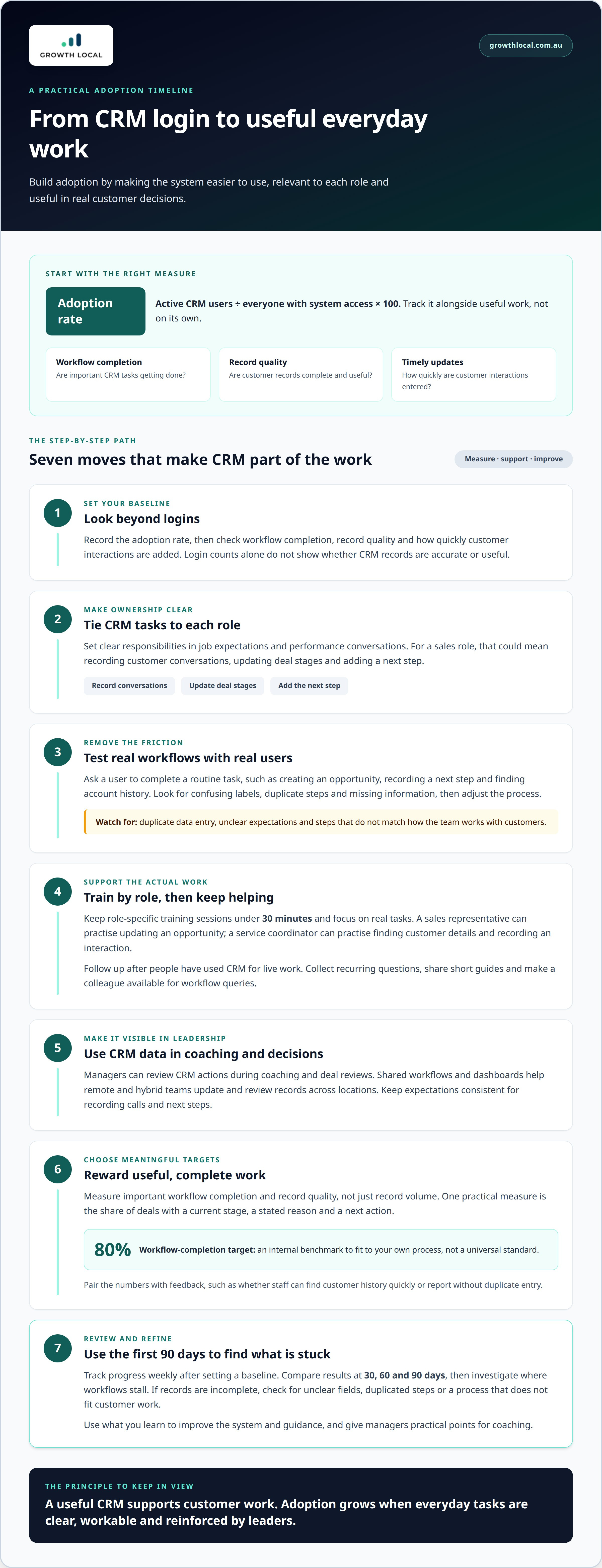
Start with a baseline, then focus on whether people complete useful CRM work, not simply whether they log in. Adoption rate is calculated by dividing active CRM users by everyone with system access, then multiplying by 100. Track that figure alongside workflow completion, record quality and how quickly customer interactions are entered.
Make CRM responsibilities clear in job descriptions and performance measures. For example, a sales role might require staff to record customer conversations, update deal stages and add a next step. Managers can review these actions during coaching, rather than treating CRM use as an extra task unrelated to the role.
Choose measures that show whether the CRM supports decisions. Login counts are easy to report, but they don’t show whether records are accurate or opportunities have useful next steps. Measure the completion and quality of important workflows instead. One practical measure is the share of deals with a current stage, a stated reason and a next action.
Set targets that fit your process, then review progress against them. An 80 per cent workflow-completion target can serve as an internal benchmark, not a universal standard. Pair it with qualitative feedback, such as whether staff can find customer history quickly or complete reporting without duplicate entry.
For remote and hybrid teams in Australia, shared CRM workflows and dashboards let staff update and review customer records from different locations. Set consistent expectations for recording calls and next steps, then discuss exceptions in regular online coaching. Mobile access can also reduce admin friction for sales professionals.
Track progress weekly during the first 90 days after setting a baseline. Compare results at 30, 60 and 90 days, and investigate where a workflow stalls. If records are often incomplete, check whether fields are unclear, steps are duplicated or the process doesn’t match how the team handles customers.
Use findings to improve the system, not just score employees. If one team regularly misses a deal-review field, ask users where the process breaks down and adjust the workflow or guidance. Recognise complete, useful records and follow-through, rather than rewarding record volume alone. This keeps reporting connected to customer work and gives managers practical coaching points.
2. What are the key aspects of CRM adoption?
CRM change management starts before launch, not after the first complaints. Explain what the system should improve, which teams will use it and how customer information will support daily decisions. For example, a sales coordinator might manage lead allocation, while an account manager updates customer history and opportunities. Clear role boundaries connect CRM tasks to outcomes employees recognise.
Resistance often points to a practical problem, such as duplicate entry or uncertainty about who owns a record. Ask people in each role to walk through a routine task, such as turning an enquiry into a qualified opportunity. Note the sticking points, then adjust the process or explain the reason for each step. Leadership should communicate the same purpose in team meetings, onboarding and written guidance.
A single generic training session won’t prepare every user for their daily workflow. A sales representative needs to practise updating an opportunity; a service coordinator needs to find customer details and record an interaction. Keep role-specific training sessions under 30 minutes, focused on real tasks. Follow with short guides and access to a colleague who can answer workflow questions as they arise.
Support matters most during the first few weeks, while new habits are forming. Schedule brief follow-ups after staff have used the CRM for live work, then collect recurring questions. If several users struggle to log a call, for example, review the steps and clarify the process. Training should continue as workflows change, rather than ending with initial onboarding.
Role-based dashboards reduce clutter by bringing relevant records and actions into view. A sales dashboard might show open opportunities and upcoming follow-ups, while a marketing workspace focuses on campaign responses and lead status. Tailored layouts help users find what they need without navigating unrelated fields. They can also clarify reporting by connecting each person’s daily work to team processes.
Test each workflow with the people who will use it before making it standard. Ask a new sales user to create an opportunity, record a next step and find the account history. Look for confusing labels, duplicate steps and missing information. Fixing usability issues makes the CRM easier to learn and reduces workarounds that scatter customer records across spreadsheets and inboxes.
For a practical walkthrough of how a CRM workspace can support distinct team roles, explore a role-based CRM demo. Use it to see how clearer workflows and relevant dashboards can connect everyday tasks with customer outcomes.
3. CRM adoption challenges that training cannot solve
Training can show someone how to update a record, but it can’t fix unclear ownership. If two teams both assume the other owns a lead, the pipeline can stall even when everyone knows the CRM steps. Assign a clear owner to each data type, such as sales for opportunity stages and service for interaction outcomes. Define who corrects duplicates and resolves incomplete records.
Process ownership also needs practical standards. Decide which customer interactions belong in the CRM, what information each record needs and when updates are due. For example, a call record could require its outcome and the agreed next action. Review those standards with the people doing the work, so they support real decisions instead of creating manual admin.
Enforcement without a useful reason creates friction. A mandatory field makes sense when a manager needs it to assess deal risk or plan a follow-up. If staff must fill it in just to move forward, they may enter placeholder text. The result is records that look complete but can’t support reliable reporting or customer handovers.
Forcing CRM use or monitoring employee activity too closely can damage buy-in. If staff are judged on logins or entry volume, they may prioritise visible activity over accurate records and meaningful customer follow-through. Measure completed workflows and data quality instead, then discuss missed steps as process problems before treating them as performance issues.
Support should continue after onboarding, but focus on recurring barriers. Set up a peer-champion routine with a short session every fortnight to surface common questions and workflow problems. If staff repeatedly ask how to handle a returned enquiry, clarify the process and update the relevant guidance. This makes support a practical action loop, not another broad training presentation.
Buy-in grows when employees can see how CRM information helps them do their work. Connect a current customer record to a smoother handover, a clearer forecast or a faster response to an enquiry. Ask users to identify a step that slows them down, then investigate whether the cause is a process rule, duplicate entry or unclear ownership.
Leaders should close the loop by sharing what changed in response to feedback. For example, if a team flags duplicate fields, remove or clarify them and explain how the revised workflow affects reporting. Keep a simple issue log showing the problem, owner and resolution. This makes accountability visible and shows staff that raising friction leads to action, not blame.
4. CRM adoption compared with implementation
Implementation gets the CRM platform configured, populated and ready to use. Adoption comes next: teams make it part of consistent daily work, so customer records support real decisions. A launch can be technically complete while staff still track leads in spreadsheets or keep account notes in inboxes. The distinction matters because value comes from ongoing use, not setup alone.
Bring employees into implementation before workflows are finalised. Ask sales, marketing and service staff to map how a lead becomes an opportunity, how customer details are handed over and what information each team needs. Test those steps with actual users. Their feedback can reveal confusing fields, duplicate tasks or gaps between the platform and the customer relationship process.
Common implementation mistakes include copying every existing process into the CRM, adding fields without a clear purpose and treating training as the finish line. For example, a sales team may be asked to enter the same customer detail in both a CRM record and a spreadsheet. That duplication creates friction and undermines trust in reporting. Simplify the workflow, clarify data ownership and remove steps that don’t support a decision.
A 90-day adoption plan can give the post-implementation period structure. Use days 1 to 21 to map friction, observe key roles and identify workarounds. From days 22 to 60, reconfigure and test the CRM experience. During days 61 to 90, reinforce new behaviours and measure whether important workflows are becoming routine.
Those phases don’t replace a realistic implementation timeline. The time required depends on the existing data, integrations, workflow complexity and number of teams involved. A business moving customer details from simple spreadsheets has different preparation needs from one connecting several platforms and processes. Set milestones for data preparation, workflow testing, training and launch, then allow time to make adjustments.
After launch, keep support active while the team builds confidence. Review user feedback and workflow completion, then assign someone to resolve process questions and system issues. If staff avoid logging enquiries, for example, examine whether the lead process is clear and whether the right fields appear at the right stage. Make evidence-based changes, explain what changed and check that the revised process works.
Progress means the platform consistently supports customer work, not merely that implementation tasks are complete. Keep a post-launch review scheduled, assign clear ownership for improvements and connect each change to a business need. This makes CRM implementation an ongoing relationship between the system, its users and the processes that help the business serve customers.
5. Executive sponsorship and leadership accountability
CRM adoption needs more than a project owner: it needs visible executive sponsorship. Senior leaders should agree on what the system must help the business do, such as track leads, manage customer relationships or understand pipeline health. If executives expect current CRM data but keep separate spreadsheets, staff receive conflicting signals. Consistent leadership behaviour shows that the platform supports real business decisions.
Managers can encourage CRM use without micromanaging by setting clear expectations and coaching towards meaningful outcomes rather than monitoring every click. For example, agree that deal reviews use current CRM records, and ask about missing next steps when they affect a decision. This keeps conversations focused on pipeline quality and customer follow-through, not constant surveillance of individual activity.
Leaders should use CRM dashboards in regular reviews. A sales manager can open the pipeline dashboard, discuss stalled opportunities and ask what support would move them forward. An executive can use account visibility to spot gaps in customer coverage. When leaders use the same records employees maintain, CRM updates become part of decision-making, not a reporting chore.
Set expectations that fit each role. A sales representative may need to update opportunity stages and record agreed actions, while a service manager tracks unresolved customer issues. Explain what information is required, when updates are due and how managers will use them. Clear standards reduce guesswork and give coaching conversations a practical starting point.
During the first 90 days, leaders can reinforce the new habits through regular check-ins and visible follow-through. If a dashboard shows missing deal updates, ask whether the workflow is clear or the required data is difficult to enter. Resolve process barriers, then agree on the next action and review whether the information improves. This approach builds accountability without turning CRM use into a daily policing exercise.
Recognition should reward useful CRM behaviour, not the highest number of records entered. A manager might highlight a well-documented customer handover or an accurate opportunity update that helped the team plan its next step. Pair recognition with human review, so completeness and meaningful follow-through matter more than activity counts. Leaders can also share examples of CRM data informing a decision.
Keep leadership accountability visible by assigning an executive sponsor, a manager responsible for team practices and an owner for data standards. Review adoption measures alongside business outcomes, and share decisions made using CRM reporting. If executives stop using dashboards or managers ignore outdated records, staff will notice. Leaders reinforce adoption by using the system themselves and removing barriers their teams raise.
Growth Local
Growth Local helps businesses address CRM adoption challenges through CRM Setup and related marketing systems. Turn to Growth Local when your team’s CRM feels disconnected from lead management, customer follow-up or everyday workflows. A considered setup can align the system with how your business handles enquiries and customer information, giving staff a clearer place to manage that work.
If the issue starts before a lead reaches the CRM, Lead Generation System Setup or Marketing System Setup may also be a fit. The next step depends on where work is getting stuck, whether that’s lead capture, record management or the connection between systems. Growth Local can help shape an approach around your business needs.
Contact Growth Local to discuss your CRM adoption needs.
Make CRM part of how your business grows
As your business changes, customer workflows change too. Treat the CRM as a working part of your operations, not a one-off technology project. Revisit whether it still supports how leads arrive, teams hand over information and customers are followed up. Ongoing attention helps the system stay useful as responsibilities and processes evolve.
Improving CRM user adoption rates means making the system fit the work, then keeping that fit current. If disconnected tools or unclear handovers are getting in the way, Growth Local can align CRM Setup with lead generation and marketing systems. Take the next step with a practical conversation about where your team’s process is losing momentum and what needs to work better.
Keep building a CRM your team can rely on, and let better-connected customer work support your next stage of growth.
Frequently Asked Questions
How can you improve CRM adoption?
Improve CRM adoption by making the next customer-related action easy to complete and useful to the person doing it. For example, after an Australian service business receives an enquiry, the CRM should make clear who follows up and what information they need. Review a customer journey from enquiry to completed work, then fix points where staff switch to email, spreadsheets or memory.
What are the key aspects of CRM adoption?
The key elements are usability, clear responsibilities, reliable customer information and a visible reason to use the system. Check whether each role can complete its main task without unnecessary steps. For example, a business owner should be able to see which enquiries need attention, while the person handling them can record the result. These needs should connect without forcing every user into the same screen or process.
How do I get sales teams to use the CRM every day?
Make CRM updates part of the natural sales routine, rather than a separate end-of-week catch-up. A representative can record the outcome immediately after a customer conversation, while the details are fresh. Keep required fields focused on decisions the team actually makes. If updates are routinely delayed, look for duplicate entry, unclear ownership or a workflow that doesn’t match how representatives sell.
How do you get senior partners to use a CRM?
Show senior partners how current CRM information answers questions they already face, such as which accounts need attention or where a proposal is waiting. Use a concise dashboard in a partnership meeting, then base a real decision on its information. Ask partners to record key relationship updates themselves, or agree who will capture them. If leaders rely on separate reports, the CRM can quickly feel optional to the rest of the team.
What are the most effective ways to improve CRM user adoption rates?
The most effective approach is to find where CRM use breaks down, then address the cause. If enquiry details are missing, trace the handover from first contact to the assigned staff member. If opportunities aren’t updated, check whether the stage definitions match the sales process. Improving CRM user adoption rates takes ongoing attention to how work gets done, not just more reminders to log in.
What is a good CRM adoption rate benchmark for businesses?
There isn’t one benchmark that suits every business, because teams define active use differently. A structured CRM adoption programme may use consistent use by 80% of the team in the first year as a realistic target. Treat that as a planning guide, not a universal standard. Pair any percentage with evidence that important customer workflows are being completed accurately and on time.
How can organisations measure CRM adoption and active usage?
Calculate adoption by dividing active CRM users by everyone with system access, then multiplying by 100. Define “active” around meaningful work, such as recording a customer interaction or progressing an opportunity, rather than a login alone. Then check whether key records are complete and current. A team can have frequent logins but still lack the information managers need to make sound decisions.
What are the common reasons employees resist using a CRM?
Employees may resist a CRM when it adds repetitive data entry, hides useful information or doesn’t reflect their actual work. They may also hesitate if customer records are unreliable or managers use activity reports without explaining their purpose. Ask staff to describe a task they avoid in the system, then observe the steps involved. Their example can show whether the issue is usability, process design or trust.


