

How to Choose the Best AI CRM for Australian SMBs
The right AI CRM for an Australian small business makes it clear which leads need attention, what follow-up is due and how each deal is progressing towards payment. To choose an AI-powered CRM with lead pipelines and payments for Australian SMBs, compare lead prioritisation, automated follow-ups, pipeline visibility, privacy controls and practical integrations.
It’s easy to be distracted by a long list of AI features. The key question is whether the system gives your team a reliable view of the pipeline and helps move opportunities forward without adding admin.
This guide compares four common CRM approaches and explains what to weigh up, from payment and accounting connections to implementation effort and ongoing costs. You’ll finish with a straightforward decision guide to help narrow the options to the setup that fits your workflows and growth plans.
Key Takeaways
- Prioritise CRM tools that make lead quality, follow-up actions and deal progress easy to see, not just tools with a long list of AI features.
- Assess how customer data is handled and whether the provider’s privacy and security practices suit your Australian business.
- Map out which follow-ups and activity logs you want automated, so useful tasks are handled consistently without losing visibility.
- Compare the full implementation effort and licensing costs, including integrations with your existing systems.
- Choose pipeline reports that help you forecast revenue and spot stalled deals, then weigh payment workflows against how your business actually sells.
Australian Privacy Principles and local data hosting
AI features are only useful when your CRM handles customer information responsibly. The Privacy Act 1988 is the Australian law relevant to the Australian Privacy Principles, according to the Federal Register of Legislation. For each CRM, map what information it collects, where it is stored, who can access it and how long it is retained. Local data hosting can help meet business preferences, but location alone doesn’t establish privacy or security.
Automated data capture can turn emails, calls and web enquiries into contact records and interaction summaries. Before enabling it, identify which fields the system captures, who can correct an inaccurate summary and whether sensitive details should be excluded. A sales manager needs a useful record of a prospect’s requirements, not an unchecked AI-generated assumption.
Customer profiles also need clear boundaries. Define your ideal customer profile using relevant details such as industry, service area, enquiry type and buying intent. Collect only prospect data that supports a sales or service purpose, then set access permissions for sales staff, marketing users and administrators. Clear governance makes insights useful without giving every user access to every record.
Which CRM features matter most for Australian SMBs with different industries and sales-team sizes? A trades business may prioritise enquiry capture, job-stage tracking and follow-up reminders, while a professional services firm may need account histories and proposal stages. A small team can often work from a shared pipeline; larger teams benefit from role-based access, ownership rules and actionable reporting.
Use this comparison to assess the hosting model alongside practical controls:
| Option | Data location | Access and governance | Key consideration |
|---|---|---|---|
| Australian-hosted CRM | Hosted in Australia | Review permissions and retention controls | Confirm what data and backups the location covers |
| Overseas-hosted CRM | Hosted outside Australia | Review provider policies and access controls | Understand the provider’s data handling arrangements |
| Hybrid or connected setup | Data may move between systems | Map access across each connection | Identify where captured and summarised data flows |
Choose the model that fits your data flows, access needs and governance process, not location alone.
Which payment gateways, such as Stripe, Square and PayPal, integrate with Australian CRM platforms? Treat these as options to assess, since connections depend on the CRM and its native integrations or connectors. Test whether a payment record links to the correct contact, deal and invoice.
Can Australian CRMs handle AUD payments, GST, invoices, subscriptions and payment plans? A CRM can support these workflows through payment or accounting integrations, but the setup needs to capture the transaction details your business uses. Check how it records AUD, GST, payment status and recurring arrangements.
To assess Xero or MYOB integrations, trace a sample enquiry through to a payment record. Confirm which system owns customer and invoice details, how updates sync, and whether staff must enter information twice. Connecting CRM and accounting systems can reduce duplicate data entry and make it easier to manage GST and invoice payments.
Before migration, remove duplicate contacts, agree on field names and assign record owners. Consistent data gives AI features a stronger base for summaries, segmentation and follow-up insights. If your team doesn’t agree on what counts as a qualified prospect or completed sale, settle those process rules before automating them.
AI-powered lead prioritisation and next-best actions
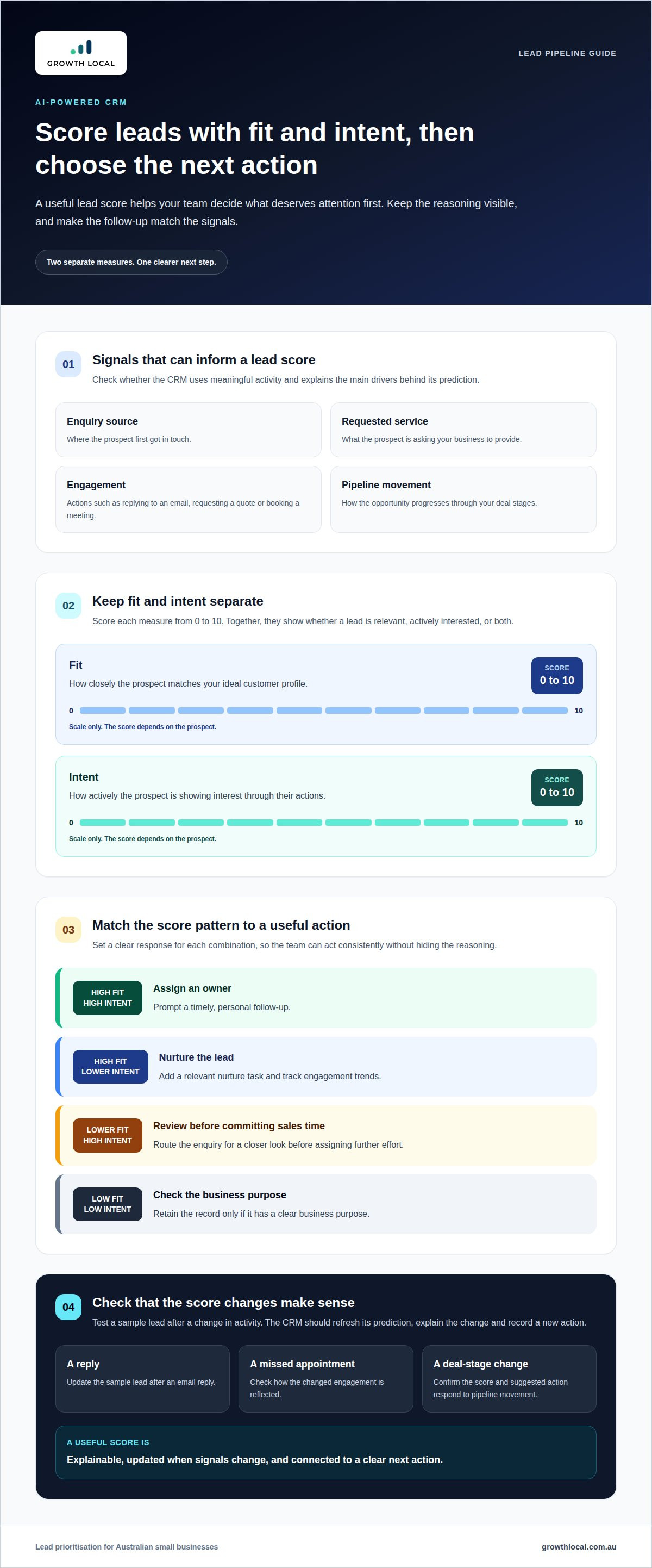
A useful lead score helps your team decide what deserves attention first. Look for predictive scoring that uses signals such as enquiry source, requested service, engagement and movement through the pipeline. The score should explain its main drivers, so a salesperson can judge whether a seemingly strong prospect is ready to act.
Start with two separate measures: fit and intent, each scored from 0 to 10. Fit reflects how closely a prospect matches your ideal customer profile. Intent reflects actions such as replying to an email, requesting a quote or booking a meeting. Keeping these scores distinct shows whether a lead is relevant, actively interested, or both.
For example, a commercial enquiry may score highly for fit but show little recent engagement. A homeowner who has asked for a quote may show strong intent but fall outside your preferred service area. The CRM should show both signals and suggest a clear next action, rather than hiding the reasoning behind one blended score.
What should an AI-powered CRM offer for Australian SMB lead pipelines and payments? Prioritise explainable lead scoring, configurable pipeline stages, follow-up prompts and payment progress linked to the relevant contact or deal. These capabilities connect sales activity with commercial outcomes instead of separating payment records from the pipeline.
Make lead scoring useful in daily work by defining the action for each score range. For example:
- High fit and intent: assign an owner and prompt a timely personal follow-up.
- High fit, lower intent: add a relevant nurture task and track engagement trends.
- Lower fit, high intent: route the enquiry for review before committing sales time.
- Low fit and intent: retain the record only if it has a clear business purpose.
Next, test how a score changes. Update a sample lead after a reply, missed appointment or change in deal stage. Check whether the CRM refreshes its prediction, explains the change and records a new action. If the score stays static, it may be little more than a manually assigned label.
Deal prioritisation also depends on reliable tracking. Connect scores to pipeline stages, assigned owners and recent activity, then give sales leaders a view of high-value opportunities that have stalled. Keep a manual override for situations where a relationship, referral or project constraint matters more than the model’s available data.
Review scoring rules as your ideal customers and sales process evolve. Compare the CRM’s priorities with outcomes such as qualified meetings, proposals and won deals. This feedback helps refine your criteria and makes predictive insights more relevant to the next sales action.
Automated follow-ups and activity logging
A missed follow-up can leave a promising enquiry untouched in the pipeline. An AI sales workflow can use activity signals, such as an unanswered email or overdue task, to prompt the next step. A good setup keeps a salesperson in control of the customer conversation instead of sending messages blindly.
Build automation around clear triggers and actions. For example, a workflow could create a follow-up task when a prospect has been inactive for 3 days. It might also alert the deal owner when a quote is viewed, a meeting is missed or a prospect replies. Each trigger should connect to a useful action, not another notification nobody has time to read.
Set rules around your real sales process. A service business might send an acknowledgement after a web enquiry, then assign the lead to the right team member. If the prospect books a site visit, the CRM can log it and prompt the salesperson to record the outcome. Each opportunity keeps moving with a clear human owner.
Activity logging matters as much as reminders. A well-configured CRM records calls, emails, meetings, notes and stage changes against the correct contact and deal. AI can summarise conversations, draft a follow-up and suggest a task, while the salesperson reviews the summary before it becomes part of the customer record.
Check how the CRM handles these common workflow cases:
- No reply: create a task after the agreed inactivity period, then pause automated messages when the prospect responds.
- New enquiry: capture its source, assign an owner and record the first response in the contact timeline.
- Meeting completed: prompt the owner to add outcomes, update the deal stage and set the next action.
- Payment recorded: update the opportunity status and retain the transaction event in its history.
Test each workflow with sample contacts before switching it on. Confirm that a reply stops an unnecessary sequence, duplicate records don’t trigger duplicate messages, and ownership changes reach the right person. Check that the CRM logs the trigger, action and outcome, so managers can see what happened without piecing together conversations across platforms.
Automation should respect customer context. Use approved templates, define which messages need human review and set clear exit conditions for each sequence. A prospect who asks to pause contact should not keep receiving scheduled follow-ups. Reviewing these rules helps protect customer trust while keeping routine admin under control.
AI agents are forecast to reduce operational costs by 30% by 2029 through resolving common customer service issues. Treat that forecast as a reason to assess workflow fit, not as a guaranteed saving. For your CRM, measure practical signals such as completed follow-up tasks, accurate activity records and deals progressing to their next stage.
Choose workflows that support consistent customer conversations and growth, while leaving messages requiring judgement to your team.
CRM implementation complexity and licensing costs
A CRM’s licence is only part of its total cost. The final bill depends on user numbers, plan limits, add-ons and integrations. Compare the features included at each tier, not just the starting price.
Implementation effort depends on how closely the CRM fits your current sales process. A team tracking enquiries in spreadsheets may need contact imports, pipeline stages, permissions and staff training. A business already using accounting and email platforms may need integration mapping and data cleanup before records sync reliably.
Break the rollout into clear steps: define sales stages, prepare clean records, configure integrations, then train users. For example, map how a new web enquiry becomes an assigned lead, a quote and a recorded payment. This reveals gaps before the whole team relies on the system.
Integrations can become complicated when Xero, MYOB, calendars and email platforms hold different customer details. Decide which system owns each record, then test how the CRM handles duplicates, changed invoice details and failed syncs. Reliable issue detection prevents manual corrections from becoming everyday work.
Check the licence against the tasks each role performs. A salesperson may need contact and deal access, while a manager may need reporting and workflow controls. AI assistants may require a higher plan or add-on, so include any limits in your comparison.
- Users: count the people who need access, including occasional users.
- Features: identify whether lead scoring, automation and reporting require a higher tier.
- Integrations: list essential connections, such as accounting, email and payment tools.
- Learning: allow time for staff to practise real tasks, such as updating a deal after a call.
Before migration, agree on field names and remove outdated or duplicate records. Import a small sample first, then confirm contact ownership, deal stages and linked activity. This practical test shows whether you need extra configuration or staff training before launch.
Measure results against a baseline your team already understands. Track manual data entry, missed tasks, incomplete records and time spent preparing pipeline reports. After adoption, review those measures alongside licence and integration costs to see whether the CRM is reducing operational friction.
Assess the provider’s pricing structure for clarity as your team grows. Compare user-based charges, plan restrictions and add-on requirements using the same currency and billing period. A lower entry tier may cost more overall if essential workflows, integrations or AI features are extra.
Lead pipeline visibility and forecasting
A pipeline report should show where revenue is coming from, which deals have stalled and what may close next. A CRM that only counts new leads can hide weak conversion between enquiry and sale. Build visibility around your sales stages, from first contact through proposal, decision and payment.
For each stage, define a clear entry and exit rule. For example, move a deal to “proposal sent” only once the quote reaches the prospect. This prevents different team members from using the same stage to mean different things and gives forecasting tools cleaner information.
Useful forecasts combine deal value, stage, expected close timing and recent activity. If a proposal has gone unanswered, the CRM should make that visible rather than treating the deal as certain revenue. Review the underlying records with sales staff, then adjust expectations when a prospect’s timeline or requirements change.
Use the dashboard to answer practical questions: which deals need attention, which sources deliver qualified enquiries, and where are opportunities dropping out? Compare campaign sources such as Google Ads with sales outcomes, not just clicks or form submissions. This separates activity from pipeline impact.
Choose reports that let you filter by details your team can act on, such as:
- Stage: find deals waiting for a quote, decision or payment.
- Owner: spot uneven workloads and unassigned opportunities.
- Source: compare referrals, organic enquiries and paid campaigns.
- Age and activity: identify deals with no recent customer contact.
- Value and timing: review expected revenue alongside likely close dates.
AI can flag unusual trends, such as more deals stalling after proposals. Treat that signal as a prompt to investigate, not a verdict. Check a sample of affected records for missing follow-ups, unclear pricing discussions or changes in the customer’s decision process.
Keep forecast reviews connected to customer relationships. A salesperson may know that a long-standing prospect is waiting on internal approval, while the CRM shows only an inactive deal. Record that context, update the expected timing and keep the next action visible. This combines human judgement with consistent pipeline tracking.
To assess whether the CRM forecasts usefully, compare projections with actual closed deals over time. Review where estimates were accurate, where deals slipped and whether stage definitions need adjusting. A dependable view helps leaders plan capacity and focus follow-up without mistaking an optimistic pipeline for committed revenue.
For Australian SMBs, the key is to choose pipeline reporting that connects lead source, deal movement, next action and payment status. If those details sit in disconnected screens, forecasts are harder to trust.
Growth Local: Lead Generation System Setup
Growth Local’s Lead Generation System Setup can help when enquiries are scattered across forms, inboxes and spreadsheets. CRM Setup connects lead capture with a clearer path from new enquiry to assigned lead, follow-up and pipeline stage. The system can be shaped around your existing sales process, so it supports how your business handles opportunities without adding unnecessary steps.
It’s a practical next step if your team is losing track of enquiries or spending too much time entering the same details manually. Growth Local can also connect the wider marketing workflow through Marketing System Setup. Contact Growth Local to discuss organising your lead flow and CRM processes.
Put your CRM choice to work
The right system should support how your business sells today and remain useful as that process changes. Before committing, test an everyday workflow, such as moving a new enquiry from capture to a qualified opportunity. This gives your team a practical way to assess usability and fit before expanding automation across the business.
Choosing an AI-powered CRM with lead pipelines and payments for Australian SMBs means looking beyond feature lists. Focus on whether the system helps your team make clear decisions and keep customer work moving. Start with the business problem causing the most friction, then build towards a connected setup that supports steady growth.
A considered first step can turn scattered sales activity into a process your team can keep improving. Start with the workflow that most needs attention, then choose a system that fits how your business works.
Frequently Asked Questions
2026 CRM Software: Which is Best for Small Businesses in Australia?
There’s no single best CRM for every Australian small business. A solo operator may value simple contact management and reminders, while a growing sales team may need permissions, reporting and connected payment records. Start with the main bottleneck, such as slow enquiry handling or poor visibility over active deals. Then compare systems using a realistic workflow, including how staff will use them during a normal workday.
How Is AI Being Used in CRM?
AI in CRM software can analyse customer records, summarise conversations, draft messages and flag potential next actions. After a sales call, for example, it might prepare a summary and suggest a follow-up task for the account owner. Treat generated content as a draft, not a verified record. Human review helps catch incorrect details, missing context or recommendations that don’t suit the customer relationship.
How do I choose the right AI CRM software?
Choose software by testing the work your team needs it to do, rather than counting AI features. Follow a sample journey from new enquiry to sales decision, noting each manual step, integration and handover. Compare usability, reporting, privacy controls, data export and total licensing requirements. The right fit should support your process without forcing staff to maintain duplicate records or unnecessary tools.
Which CRM platforms offer AI features, visual lead pipelines and payment processing for Australian small businesses?
Compare CRM platforms by checking whether AI tools, visual pipelines and payment processing are built in or connected through integrations. Stripe, Square and PayPal are gateway examples to assess for compatibility, but available connections depend on the CRM. Test a sample transaction and confirm it links to the right contact or deal. Check how the CRM records payment status alongside sales activity.
How do popular AI CRMs compare on pricing in Australia, including per-user fees and payment transaction costs?
Compare the recurring licence with plan limits, AI add-ons, implementation effort and integration costs. Payment transaction charges are separate and depend on the payment provider and processing arrangement. Review all costs together using your expected user count and payment workflow, so a low starting licence doesn’t obscure other expenses.
What Australian privacy, Spam Act and data-residency requirements apply to CRM lead data and AI features?
The Privacy Act 1988 is the Australian law relevant to the Australian Privacy Principles, according to the Federal Register of Legislation. For email and SMS workflows, configure the CRM to record permission, sender details and suppression requests, and review campaigns against Spam Act requirements. Ask where contact records, backups and AI prompts are processed. Local hosting may suit your preferences, but assess security and data handling too.
What steps should a small business follow to evaluate, trial and migrate to an AI-powered CRM?
Start by listing the sales tasks and integrations the CRM must support. Test a realistic workflow with sample records, then assess ease of use, reporting and AI accuracy. Before migration, remove duplicate contacts, agree on field names and map existing records to the new pipeline. Import a small test batch first, then confirm ownership, activity history and connected systems before moving the remaining data and training staff.
What security, data ownership and AI accuracy risks should Australian SMBs check before choosing a CRM?
Check who can access customer records, how permissions are managed and whether data can be exported in a usable format if you change systems. Review the provider’s retention and deletion controls and how it handles information entered into AI tools. Test AI summaries against real conversations for inaccurate names, commitments or customer details. Keep a human review step for important records and customer-facing messages.


