

How to build lasting team support for a new CRM
Frontline enthusiasm alone can’t carry a CRM rollout. Getting team buy-in for a new CRM takes visible senior sponsorship, practical input from the people who’ll use it, and a system shaped around their daily work. Leaders need to use the CRM themselves, not just approve the project.
It’s understandable if your team is wary of learning another system, especially when spreadsheets and familiar routines seem to work. A rollout is more likely to stick when people can see how it will make their work easier and have a genuine say in how it’s set up.
This guide explains how to build support across sales, management, marketing and other stakeholder groups, then choose a CRM based on the tasks your team needs to do. You’ll also learn how to set expectations, provide practical training and maintain adoption after launch, so the system becomes part of how your business works instead of another tool people avoid.
Key Takeaways
- Keep adoption on track after go-live with regular check-ins, practical support and clear expectations for CRM data quality.
- Bring frontline users into design and testing early, then show how their feedback shaped the system.
- Tailor the case for change to each team’s priorities, from sales follow-ups to management visibility and marketing workflows.
- Pair visible executive sponsorship with shared outcomes and leaders who use the CRM in their day-to-day work.
- Choose a CRM around real team tasks, then use CRM Setup to turn the agreed workflows into a system people can use.
1. How do you stop CRM buy-in from fading after go-live?
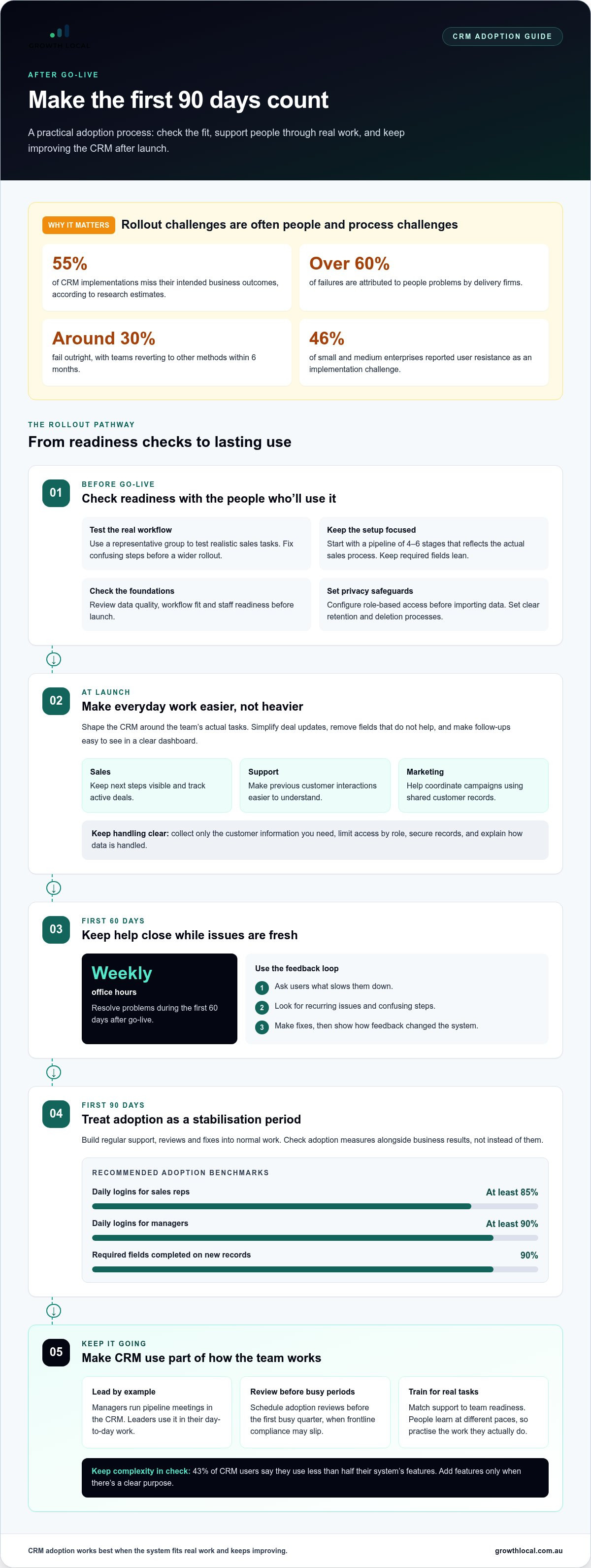
Go-live is the start of adoption, not the finish. Research estimates that 55% of CRM implementations miss their intended business outcomes, while delivery firms attribute over 60% of failures to people problems. Roughly 30% fail outright, with teams reverting to other methods within 6 months. Treat the first 90 days after launch as a stabilisation period, with support, reviews and fixes built into normal work.
Resistance is practical, not always stubbornness. A 46% share of small and medium enterprises reported user resistance as a CRM implementation challenge. Sales reps may avoid duplicate data entry, unfamiliar steps or fields that don’t help them close work. Make everyday tasks easier: simplify deal updates, remove unnecessary fields, and show how a clear dashboard helps track follow-ups. Salesforce is one familiar example of a CRM name, but adoption depends on fit, not brand recognition.
For CRM use in Australia, build privacy and data security into the way customer information is handled. Collect only what you need, limit access by role, secure records, and set clear retention and deletion processes. Configure permissions before importing data, then include access and data-handling checks in rollout reviews.
Reduce common rollout risks by checking data quality, workflow fit and staff readiness before launch. Start with a representative group of users, test realistic sales tasks, and fix confusing steps before wider rollout. Keep the initial setup focused: a pipeline can begin with 4-6 stages that reflect the actual sales process, while required fields should stay lean. A 43% share of CRM users say they use less than half their system’s features, so adding complexity without a clear purpose can weaken adoption.
Match support to your team’s size and readiness. A small team can test a simple workflow together, while a growing team may need role-based training and named internal champions. A larger rollout often works better in phases, with feedback gathered at each stage. Some representatives may work independently within days, while others need months to master more features. Use practice based on real tasks rather than expecting everyone to learn at the same pace.
Connect CRM activity to outcomes employees care about: fewer missed follow-ups, clearer ownership and a more accurate view of active deals. Set practical measures, such as whether required record fields are complete and whether sales reps log in daily. Adoption benchmarks recommend at least 85% daily logins for sales reps, 90% for managers and 90% completion of required fields on new records. Review those measures alongside business results, not as a substitute for them.
Schedule adoption reviews before the first busy quarter, when frontline compliance may slip under pressure. Use weekly office hours during the first 60 days after go-live to resolve problems while they’re fresh. Ask users what slows them down, act on recurring feedback, and have managers run pipeline meetings in the CRM. That visible example keeps the system useful after launch and supports lasting adoption.
2. Gathering support from sales reps and stakeholders
Start before choosing software. Map each group’s role in the decision, what they need from the CRM, and what the rollout will require from them. Sales should own the system or have an equal voice alongside IT. Involve frontline representatives, support staff and marketing in design and testing before configuration is final. Their feedback builds commitment when it leads to better workflows.
Explain the change in plain terms: what’s changing, why it matters, what success looks like for staff, and what each person needs to do. Connect the CRM to business goals, not just a software upgrade. For example, show how shared customer records can help sales manage follow-ups, support understand previous interactions, and marketing coordinate campaigns. Repeat the message through team meetings, short written updates and one-to-one conversations. The 2013 Edelman Trust Barometer reported that people may need to hear information three to five times before believing it.
Choose a CRM that supports your team’s existing sales process instead of forcing representatives into an unfamiliar sequence. Walk through a real opportunity, from the first enquiry to the quote and follow-up. Check that every step is clear, identify data that needs importing, and confirm reports answer practical questions. Ask a sales team member to test the workflow and flag duplicate entry or fields that add effort without helping close or manage work.
Make the personal benefit clear. A salesperson can use the CRM to keep next steps visible, find customer history quickly and reduce time spent piecing together email threads. A business case can make the expected outcome tangible: an illustrative example estimates that a salesperson closing 20% more deals, with an average deal worth A$5,000 and a team making 20 deals per month, could represent A$20,000 in additional sales every 30 days. Treat this as an example, not a promise; use your own sales figures when explaining the case.
Use incentives carefully. Reward useful CRM behaviours, not empty activity. For example, recognise reps who send 20 or more quotes through the system, secure 10 or more electronically signed proposals, or log 50 text follow-ups. Keep the rules visible and link rewards to accurate records and meaningful customer progress. Gamification should support CRM adoption, not encourage rushed entries that weaken reporting.
Ask salespeople for candid feedback through anonymous surveys or small-group discussions, then share what changed as a result. If marketing needs better campaign coordination, Marketing System Setup can connect marketing activity with business goals. Clear reasons, relevant workflows and visible follow-through give stakeholders something concrete to support.
3. Tailoring presentations to managers, teams, IT, marketing and finance
One CRM presentation rarely addresses every team’s concerns. Build the case around each group’s decisions, responsibilities and daily work. Keep one shared business outcome, then show how each role contributes. For example, improving visibility across customer enquiries can link sales follow-up, marketing campaigns and management forecasting.
- Managers: Show how a consistent pipeline view supports coaching, workload planning and more informed forecasts. Demonstrate a real dashboard using familiar sales stages.
- Frontline teams: Walk through a common task, such as updating a deal after a customer call. Show which steps replace spreadsheet handovers or repeated searches through email.
- IT: Explain the system’s data flows, access roles, integrations and migration tasks. Invite IT to identify dependencies before configuration or import begins.
- Marketing: Show how organised customer records can support campaign planning and clearer handovers to sales. Connect the CRM to the team’s reporting needs.
- Finance: Present the decision criteria, implementation workload and measures for assessing business value. Separate expected outcomes from assumptions in the business case.
Expectations need the same role-based clarity. Most mid-market CRM rollouts take three to six months to implement, followed by a 90-day stabilisation period. Complex programmes involving multiple regions and legacy migrations commonly take nine to twelve months end to end. These timelines help set planning expectations, but your scope, data condition and team availability shape the actual work. Rushing can undermine return on investment; moving too slowly can delay useful results.
Plan implementation in stages, with decision points for workflow design, data preparation, testing and launch. Allow extra time for the transition so unexpected roadblocks don’t force teams to skip testing or training. Explain what will be ready at each stage, who needs to contribute, and what staff should expect to change. This makes delays visible early, before uncertainty turns into frustration.
Peer champions make the system practical and familiar. Choose respected users from different roles, then give them time to test common tasks and share useful tips with colleagues. A sales champion can demonstrate how to review a pipeline, while a marketing champion can show how campaign records support handovers. Managers reinforce these examples by using CRM information in regular discussions instead of requesting separate reports.
Appoint a CRM manager to coordinate decisions, training and issue resolution. They need technical confidence, resourcefulness, strong communication skills and the ability to organise training. Give them a clear path to escalate blockers and gather feedback. Their role isn’t to solve every problem, but to keep the right people working together and ensure implementation decisions stay connected to business needs.
4. Does executive buy-in alone guarantee CRM adoption?
No. Executive support can bring momentum and company-wide commitment, but frontline teams still need a system that works in their daily routine. Research cited on organisational change reports that 70% of change efforts fail. A senior endorsement won’t fix confusing workflows or make staff trust reporting. Pair executive backing with clear decisions, practical team input and visible follow-through.
Name one executive sponsor rather than assigning sponsorship to a committee. Shared responsibility can blur accountability, while a named sponsor can make decisions and remove roadblocks. Before launch, agree on specific actions: the sponsor runs forecast reviews in the CRM, uses its dashboard and refers to its records in business discussions. Staff can then see whether leaders follow the process they’re asking others to use.
Involve the executive in CRM decisions before configuration is final. Ask which features support the organisation’s goals, then compare those priorities with frontline tasks. For example, a sales director may need a reliable view of upcoming deals, while representatives need to update records quickly after customer conversations. IT can assess integration needs, and marketing can explain how customer records support campaign planning.
Set one shared, outcome-based measure that executives and frontline users can both see. Avoid separate targets that pull departments in different directions. For example, track whether active opportunities have a recorded next step, then discuss how that supports forecasting and follow-up. The measure should reflect a useful business result, not just software activity. Login counts alone can’t show whether customer work is moving forward.
Make accountability a two-way commitment. Frontline staff need clear expectations for updating records, and leaders must use those records to make decisions. If an executive asks for a separate spreadsheet after a CRM update, the team learns that the CRM isn’t the real source of truth. Hold pipeline meetings and forecast calls in the CRM, then assign someone to resolve issues raised.
Keep the sponsor engaged after the announcement. Share specific success stories, such as a team using CRM records to spot a stalled opportunity or coordinate a customer handover. Ask employees how the change affects their work, and address recurring friction. If automation is part of the rollout, explain which task it changes and how staff should handle exceptions. This keeps the technology connected to daily work, not just an executive presentation.
Executive buy-in gives the rollout direction, authority and visibility. Lasting adoption comes when leaders, managers and frontline users share an outcome, use the same information and tackle problems together. Keep the sponsor accountable for visible actions and involve the team in shaping how the CRM works.
5. Choosing a CRM around team needs
The right CRM fits the work your team already does and makes important tasks easier. Start with customer journeys, sales handovers, service follow-ups and reporting. Map how an enquiry becomes a qualified opportunity, then identify where information gets lost. A system that supports those steps is more useful than one chosen for an impressive feature list.
Involve employees before making a decision. Ask a representative group to map real tasks, test workflows and compare what each option makes easier or harder. Include sales, support, marketing, field staff and leadership. Give everyone a clear way to record feedback, then explain which needs shaped the final choice. This makes selection a practical test, not a popularity vote.
Test the tasks that matter most. For example, ask a field-team member to update a deal on a phone in under 30 seconds. Have a sales representative record a call, set a next step and find the customer’s history. Ask support staff to review previous interactions, while marketing checks whether customer records support campaign planning. These examples reveal friction before it becomes part of everyday use.
- Workflow fit: Can the CRM reflect your current sales process without forcing awkward workarounds?
- Ease of use: Can each role complete common tasks without unnecessary steps or duplicate entry?
- Useful reporting: Can managers see deal progress, follow-ups and pipeline changes clearly?
- Team access: Can staff find the records and functions their responsibilities require?
- Growth needs: Can the setup support changing processes as the business and revenue goals evolve?
Use a trial as a structured test, not a feature tour. CRM free trials commonly last 14-30 days. Before starting, choose realistic tasks, nominate testers and agree what feedback to collect. Ask each person to complete the same workflow, then compare time, clarity and data entry effort. A trial gives the team evidence about fit, rather than relying on a polished presentation.
Keep the first configuration focused. Start with essential workflows and required information, then use the CRM for 3 months before adding further customisation. That gives employees time to build habits and helps leadership distinguish genuine gaps from early learning curves. Review feedback against the original tasks, and make changes when they solve a clear problem.
Choose a system your people can use consistently, not the one with the longest feature list. A CRM that supports real work helps employees serve customers, gives managers clearer visibility and gives the business a sounder basis for success.
Growth Local: Lead Generation System Setup
Growth Local helps businesses connect lead generation with the systems they use to manage enquiries and customer relationships. Lead Generation System Setup can support a more organised path from new enquiry to follow-up, while CRM Setup shapes the system around your team’s workflows. Turn to Growth Local when leads come in but follow-up feels inconsistent, customer details are scattered, or staff aren’t sure how the CRM fits their daily work.
For businesses coordinating campaigns and customer records, Marketing System Setup can bring those processes together. The right starting point depends on where your current workflow gets stuck, whether that’s capturing enquiries, organising customer information or managing follow-ups. Contact Growth Local to discuss your lead generation and CRM needs.
Make your next CRM decision a team decision
Getting team buy-in for a new CRM isn’t a one-off launch task. It’s an ongoing way of working, shaped by whether people see the system helping them serve customers and make sound decisions. Before taking the next step, write down the main workflow your team needs to improve and the outcome you want. Use that as a practical test for configuration changes, training and future improvements.
Keep the conversation going after rollout. Invite staff to point out friction, share what’s working and suggest changes based on real customer interactions. When leaders respond visibly, people can see their input matters. This feedback loop keeps the CRM connected to the work instead of becoming another system people update only to meet a requirement.
Ready to turn your CRM goals into a workable plan? Talk with Growth Local about a setup that fits your business and team.
Start with one useful improvement, involve your people and build from there.
Frequently Asked Questions
Can a CRM rollout succeed on frontline enthusiasm alone, without a senior sponsor?
A frontline-led pilot can test whether the CRM suits real customer work, but enthusiasm can’t authorise every business decision. Staff may identify a useful change that affects reporting rules or access across departments, for example. Without an executive who can approve it, the pilot may stall. Treat frontline support as evidence for the rollout, and secure senior backing for decisions beyond the team’s authority.
Does executive buy-in alone guarantee CRM adoption?
No. A leader may approve a CRM that looks right on paper but still overlook how staff handle unusual customer situations. Before finalising the setup, observe a range of real tasks, including exceptions such as a customer reopening an old enquiry. This can reveal gaps a standard demonstration won’t show. Executive commitment matters, but the system must also reflect how work actually happens.
How do you get frontline teams behind a new CRM?
Start with a specific frustration staff want fixed, then let them test whether the CRM addresses it. For example, ask a new team member and an experienced salesperson to complete the same customer handover. Their different approaches may expose unclear labels or assumptions in the process. Getting team buy-in for a new CRM is easier when the people doing the work can point to changes that make a real task clearer.
How do you keep both groups aligned through rollout?
Agree on decision boundaries before work begins. Set out which choices belong to the executive sponsor, which need technical approval, and which should be shaped by staff who use the workflow. If a proposed change affects more than one group, involve their representatives in the decision together. This reduces late surprises and helps each team understand why a trade-off was made.
How do you secure the executive sponsor?
Choose a leader with enough authority to resolve cross-team barriers and a direct interest in the business problem the CRM should address. Make the role specific: clarify which decisions need their approval, what updates they’ll receive, and when their involvement is needed. A sponsor who understands the operational issue can explain the change credibly to peers, rather than treating the rollout as just a software purchase.
How do you stop CRM buy-in from fading after go-live?
Build CRM use into how new staff learn their roles. Update onboarding guides and internal process notes so people don’t inherit outdated instructions or create workarounds. When a process changes, revise those materials and tell affected employees what’s different. This keeps the system connected to daily practice as the team changes, instead of relying on launch training indefinitely.
Should CRM usage be tied to compensation?
Only consider it when the measure is fair, relevant to the role and within the employee’s control. A salesperson shouldn’t be penalised for an outage or a process their team doesn’t manage. If compensation is linked to CRM use, explain the criteria beforehand and provide a way to review disputed records. Keep the focus on responsible customer management, not activity entered just to earn a reward.
What is a good CRM adoption rate?
Define adoption by the work the CRM is meant to support, rather than treating every login as meaningful use. For a team handling enquiries, assess whether eligible staff record outcomes and maintain a clear next action. Separate employees expected to use the system from those whose roles don’t require it. This gives leaders a more useful view than one rate across the whole organisation.


