

CRM ROI for Small Trade Businesses: Practical 2026 Guide
What if the next job you win is already sitting in a missed call, an unanswered message or a quote that never got a follow-up? The ROI of a CRM for a small trade business comes down to whether it helps recover work and free up admin time, after you account for the full cost of running it.
If you’re juggling enquiries between jobs, it can be hard to see which leads turn into booked work. And every hour spent chasing details or updating records is an hour away from quoting and serving customers. A CRM can bring those moving parts into one clearer process, but the numbers need to make sense for your business.
This guide shows you how to estimate the value using your own figures: recovered jobs, time saved and total CRM costs, including setup, training and essential add-ons. You’ll also learn which measures to track to see whether follow-ups and admin are improving, so you can choose a practical next step with confidence.
Key Takeaways
- Measure the ROI of a CRM for a small trade business by comparing attributable gains and admin savings with the full cost of setup and use.
- Use a simple ROI formula to assess whether realistic benefits justify the investment, rather than relying on software activity alone.
- Compare CRM options by workflow fit, ease of use, reporting, integration needs and total ownership cost.
- Track one enquiry-to-outcome workflow over a consistent baseline period to see whether results are changing.
- Once you’ve built your ROI case, a tailored CRM and lead-generation system setup can help organise the path from enquiry to follow-up.
What does CRM ROI mean for a small trade business?
For a trade business, CRM return on investment is about more than storing customer details in software. It’s the measurable value the system helps create compared with the full cost of setting it up and using it. That value might come from jobs recovered through better follow-up, less time spent searching for information, or more repeat work from organised customer records. The key is to connect CRM activity to a business result.
A CRM can record an enquiry, show whether a quote was sent and prompt a follow-up. Those actions are useful, but they don’t prove a return on their own. A busy dashboard won’t tell you whether more suitable quotes are being followed up, whether admin time is falling, or whether additional work is being booked. For a general overview of the system, see What is Customer Relationship Management (CRM)? The practical question is what changes in your own enquiry-to-job process.
Where CRM value can show up in a trade business
Picture an enquiry arriving while you’re on a job. If its details are recorded in one place, you can see who called, what work they need and what action is due, rather than relying on memory or searching through messages later. That can help prevent opportunities being overlooked, although it won’t make every lead suitable or turn every enquiry into booked work.
After a quote goes out, a visible follow-up status helps you act consistently instead of guessing who still needs a call. Centralised customer details can also reduce time spent checking inboxes, spreadsheets and old notes. These improvements create business value only when they lead to a measurable outcome, such as less admin or more jobs won.
Why CRM ROI needs a business-specific baseline
CRM ROI is the value your business gains from the system, measured against its total ownership cost. Your result depends on your starting point. Lead volume, typical job value, team size and existing follow-up habits all shape what a CRM can realistically change. A system may have more impact where enquiries are often missed than where every lead is already recorded and followed up reliably.
Before changing your process, note how it works now. Track how enquiries arrive, how many receive a quote, what follow-up happens and where each opportunity ends up. Also note the admin involved, such as finding customer details or updating quote records. Keep the measures practical and use the same definitions throughout your comparison. For example, decide what counts as a qualified enquiry and a completed follow-up before you start counting.
This baseline isn’t a promise of future results. It gives you a fair reference point for judging whether the CRM is making a difference. Compare like with like, and separate changes the system may have influenced from other factors, such as a shift in enquiry volume or a change in the types of jobs coming in. Your estimate will then reflect your trade business, not a generic return figure.
How to calculate the ROI of a CRM without guessing
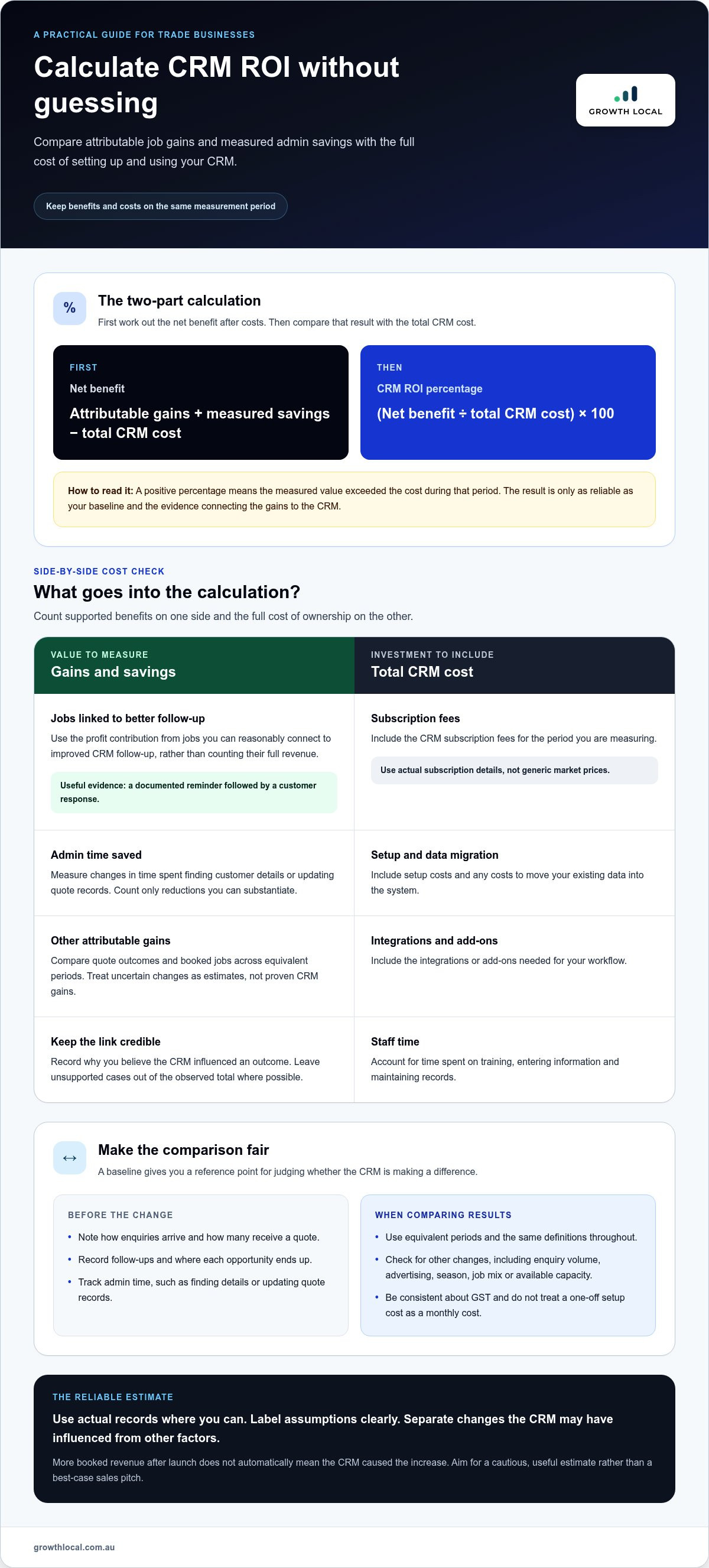
A useful CRM ROI estimate separates what you’ve observed from what you’re assuming. Start with actual records where possible, then label any estimates clearly. More booked revenue after a CRM goes live doesn’t automatically mean the CRM caused the increase. Aim for a cautious, useful estimate, not a best-case sales pitch.
Use this formula:
CRM ROI percentage = (net benefit ÷ total CRM cost) × 100
Net benefit = attributable gains + measured savings − total CRM cost
Keep the two steps distinct: first calculate net benefit after costs, then divide that figure by the total cost and multiply by 100. Use the same period for benefits and costs, such as a month or a year. A positive percentage suggests the measured value exceeded the cost during that period, but the result is only as reliable as the baseline and attribution behind it.
Build the full CRM cost figure
Don’t stop at the software subscription. Include the costs that apply to your setup and ongoing use:
- CRM subscription fees over the period you’re measuring
- Setup and data migration costs
- Integrations or add-ons needed for your workflow
- Staff time spent on training, entering information and maintaining records
Use actual subscription details and proposal figures rather than generic market prices. If you’re planning the setup component of your budget, Growth Local’s CRM setup pricing information can help you understand that part of the investment. Be consistent about whether your calculation includes GST, and don’t treat a one-off setup cost as though it recurs every month.
Estimate gains without overstating CRM impact
Compare quote outcomes and booked jobs across equivalent periods, using the same definitions and records. If more quotes were accepted after launch, check what else changed: enquiry volume, advertising, the season, job mix or your available capacity. Treat the difference as a possible CRM contribution, not proof that the system delivered every extra job.
For a more careful estimate, use the profit contribution from jobs you can reasonably connect to improved CRM follow-up, rather than counting their full revenue as benefit. Record why you believe the CRM influenced the outcome, such as a documented reminder that led to a customer response. Mark uncertain cases as estimates, and leave them out of your observed total if you can’t support the connection.
Measure admin savings just as carefully. Record the time spent on tasks such as finding customer details or updating quote records before and after the change. Value only the time reduction you can substantiate, then compare those savings and attributable job gains with the full cost of the system. For a realistic ROI of a CRM for a small trade business, show observed results separately from assumptions so you can see what’s solid and what still needs testing.
Which CRM returns matter most for tradies, and what should you compare?
A CRM’s value shows up in the work it helps you manage, not the number of fields or dashboards it offers. For a small trade team, a few clear measures can show whether enquiries are progressing to quotes and booked jobs, and whether customer admin is getting easier. Choose metrics you can record reliably. A complicated scorecard won’t help if updating it becomes another job.
Trade-business metrics that connect CRM use to results
Define each stage before you start counting. Decide when an enquiry becomes a quote opportunity, what counts as a quote sent, and when a job is booked. Use the same definitions throughout the period you’re measuring. Then choose a compact set of measures that reflects your actual workflow:
- Enquiry-to-quote rate: Shows how many recorded enquiries progress to a quote. It doesn’t explain why other enquiries didn’t qualify or proceed.
- Quote-to-booking rate: Connects quoting activity with booked work, but can shift with job type, pricing and customer demand.
- Follow-up completion: Shows whether planned contact after a quote is happening. A completed follow-up doesn’t prove the customer will book.
- Lead-response time: Helps you understand how quickly enquiries are acknowledged. Faster isn’t automatically better if the response is rushed or lacks the information the customer needs.
- Admin and record-search time: Tracks time spent finding customer details or updating records. Compare the same tasks before and after the change.
These measures give you a practical view of the ROI of a CRM for a small trade business without trying to monitor every dashboard metric. Interpret the figures in context, especially if your workload or the types of jobs you quote have changed.
How to compare CRM options on likely return
Start with the path a real enquiry takes in your business: it arrives, gets assessed, receives a quote, needs follow-up and ends in a booking or a clear outcome. Compare how naturally each option supports that flow. Check whether your team can use it during a busy day, record useful details without unnecessary steps, and find the next action quickly.
Use a simple comparison table to keep the decision grounded. A feature matters when it supports a task or measure you intend to use.
| What to compare | Business meaning | Limitation to consider |
|---|---|---|
| Workflow fit | Enquiries, quotes and customer conversations follow a clear path. | A workflow that doesn’t match how jobs are handled may add extra steps. |
| Usability | The team can keep records current while managing day-to-day work. | Features won’t support ROI if staff avoid using the system. |
| Reporting | You can review the small set of measures that matter to your business. | More charts don’t necessarily lead to better decisions. |
| Integrations and ownership cost | Required tools and ongoing costs are visible in the overall comparison. | Extra connections can add setup effort and ongoing complexity. |
Be realistic about adoption. If the team doesn’t consistently record enquiries, quote outcomes and follow-ups, the data will be patchy and the CRM won’t give you a dependable view of performance. Choose a system your crew can maintain during busy periods over one that looks impressive in a demo but creates more admin.
How to build a practical CRM ROI case from your current workflow
Build your case around one real path through the business, not a perfect version of how work should happen. Follow an enquiry from its first contact through assessment, quote, follow-up and final outcome. Include hand-offs between people, too. This shows where information goes missing, where tasks rely on memory and where a CRM could make the process easier to manage.
Turn the current workflow into a measurable baseline
Write down how the process runs today before changing it. For each step, note what happens, where the information lives and who is responsible for the next action. Keep the map simple enough that the team recognises its actual working day, including busy periods and interruptions.
Then choose a manageable baseline period that reflects normal activity. Record enquiry sources, follow-up completion, quote outcomes and time spent on manual admin. Note how you count each measure, and keep those definitions the same when reviewing results. This makes the comparison useful even if different staff handle the work.
- Trace the enquiry: Note whether it arrives by phone, message, email or another channel, and where its details are first recorded.
- Follow the quote: Record who prepares and sends it, what follow-up is planned and how that task is tracked.
- Capture the outcome: Mark whether the customer books, declines, goes quiet or needs more information.
- Estimate the effort: Track the time spent locating details, updating records and chasing the next action.
Setup planning should account for the people and process involved, not just the software. Consider what customer information needs to be moved, how the team will learn the new steps and who will keep records up to date. A CRM implementation plan for a small business can help frame those practical setup decisions.
Review results and adjust the case
Set review points that suit your business rhythm, then compare the same measures against your baseline. Keep a brief note of what changed during each period, including enquiry volume, advertising activity, team capacity or the mix of jobs coming in. These factors can shift booked work independently of the CRM, so separate them from improvements in recording or follow-up.
Use conservative targets for process changes, such as making follow-up ownership clearer or reducing time spent searching for customer details. Treat them as assumptions, not promises. At review time, compare the target with what the team actually recorded, and revise the case if adoption has been patchy or the workflow needs adjusting. Connected sales workflow automation can also help show how enquiries and follow-up steps fit together.
A practical ROI case should show what’s working, what still needs attention and whether maintaining the system makes sense. Once you’ve mapped the process and gathered a baseline, Growth Local can help you plan a CRM setup around that workflow.
Turn your CRM ROI case into a working lead system
A CRM makes sense when the benefits you can reasonably attribute to it justify the full cost and the effort of getting your team to use it. If the evidence is mixed, that’s useful too. It may point to a workflow problem to fix first, or show that the setup needs to stay simple for the way your business handles enquiries and quotes.
What a tailored CRM setup can address
Use the gaps you’ve documented to shape the workflow. If enquiry details are scattered, create a clearer way to capture and organise them. If quote follow-ups are being missed, make ownership and next actions easier for the team to see. The goal is a process that fits the real path from first contact to booked job, rather than adding software steps for their own sake.
Growth Local sets up CRM and lead-generation systems for Australian service businesses, including trade businesses. A configured system can bring lead information and follow-up activity into a clearer process, helping the team see what needs attention next. Consider the full lead journey too: how an enquiry is generated, captured, followed up and recorded, rather than treating the CRM as a stand-alone fix.
Growth Local also integrates AI receptionists for lead capture and initial customer interactions. Whether that belongs in your setup depends on the gaps you’ve identified and how it fits your customer contact process. It isn’t essential for every trade business, and it should only be part of your ROI case if there’s a clear reason to assess it.
Choose a next step based on the evidence
Before discussing implementation priorities, bring together your baseline figures, workflow map and main assumptions. Be ready to explain where enquiries come in, how quotes are followed up, what happens to unbooked work and which admin tasks take the most effort. That gives the setup conversation something practical to work from.
Use your ROI case to focus on the biggest bottleneck first. If follow-up ownership is unclear, prioritise that part of the process. If customer records are difficult to find, look at how information could be organised. Keep the initial workflow manageable, then review actual usage and results before expanding it. Every business has different lead volumes, team habits and job types, so the right configuration should reflect your evidence rather than a standard template.
A well-planned setup won’t guarantee extra revenue or savings. It can give your team a clearer way to capture leads, manage next steps and measure what’s changing. Bring your main bottleneck and ROI assumptions to a demo and use them to guide the discussion.
Make your next CRM decision with confidence
The next step isn’t adding more software or chasing every possible efficiency. It’s deciding which part of your lead process deserves attention first, then choosing a setup your team can realistically keep using. A grounded ROI of a CRM for a small trade business starts with evidence from your own workflow, not promises about what a system might deliver.
Growth Local helps Australian service businesses, including trade businesses, set up CRM and lead-generation systems around their processes. If your figures point to missed enquiries or unclear follow-up, a tailored workflow can give the team a clearer way to manage lead details and next actions. AI receptionist integration can also support lead capture and initial customer interactions where it fits your needs.
Bring your key bottleneck and ROI assumptions to the next conversation. You don’t need every answer upfront, just a clear starting point and a willingness to measure what changes.
Start with one practical improvement, track its impact and build from there. Your next step can be a confident one.
Frequently Asked Questions
Is a CRM worth it for a sole trader?
It can be, if it solves a real problem without adding more admin than it removes. A sole trader who regularly forgets which quotes need follow-up may benefit from keeping enquiry details and next actions in one place. The ROI of a CRM for a small trade business depends on your workflow, costs and whether you’ll keep records up to date. Start with the simplest setup that addresses your biggest bottleneck.
How long does it take to see ROI from a CRM?
There’s no set timeframe. It depends on how often you handle enquiries, how long your sales cycle is, how quickly the team adopts the system and when you review its costs and results. If customers take time to decide on a quote, booked-job outcomes may take longer to assess than changes to follow-up or admin routines. Choose review points that fit your booking cycle, and avoid treating a short-term change as a lasting return.
What costs should I include when calculating CRM ROI?
Include the recurring subscription, initial setup and data transfer, plus any integrations or add-ons you need. Account for staff time spent learning the system and keeping information current, too. If a cost only happens once, record it separately from ongoing expenses so you don’t accidentally treat it as a monthly charge. Use the actual figures that apply to your business, and make sure the costs and benefits cover the same period.
Can a CRM help a trade business win more jobs?
It can support better follow-up, which may help you make the most of suitable enquiries, but it can’t guarantee more bookings. For example, a clear record that a customer is considering a quote can prompt a timely check-in instead of the opportunity slipping from view. The customer still decides whether to proceed, and the result can also depend on factors such as job fit, availability and pricing.
What if my trade business does not get many leads?
A CRM may still be useful if it helps you manage the enquiries you do receive, track repeat customers or keep quote details easy to find. But if the main issue is a lack of enquiries, organising them won’t create demand by itself. First identify whether the bigger gap is lead generation or handling existing leads. That distinction helps you avoid paying for a system that doesn’t address the actual problem.
How do I calculate the value of admin time saved by a CRM?
Choose a recurring task, such as looking up customer details or updating quote records, and compare the time it takes before and after using the CRM. Convert the time saved into a dollar value using a reasonable hourly cost for the person doing the work. If you’re the owner, consider what that freed-up time could realistically be used for, but label any estimated value clearly rather than treating it as cash already earned.
Can I calculate CRM ROI using booked revenue alone?
You can track booked revenue, but it’s not enough for a reliable ROI calculation on its own. Revenue doesn’t show the profit left after job costs, and it may not tell you whether the CRM influenced the booking. A stronger assessment considers the job’s contribution to profit, any measured admin savings and the full system cost. Keep uncertain links between CRM activity and bookings separate from results you can confidently attribute.


