

CRM for Financial Advisors in Australia: A Reference
What if the bottleneck isn’t a lack of client information, but the way it’s scattered across your business? A CRM for financial advisers in Australia gives your team a shared place to manage client and prospect information, rather than relying on spreadsheets or disconnected databases. It can help keep records organised and make it easier to see what needs attention.
Choosing a system means looking beyond contact storage. The right setup should fit how your firm handles enquiries, client relationships and everyday workflows, without adding unnecessary admin.
This guide explains what a financial services CRM can help with, what to consider when choosing one and how to approach implementation. Use it to assess the fit for your firm and identify where CRM setup can support a more connected approach to managing leads and marketing.
Key Takeaways
- Choose a CRM around your firm’s workflows, team collaboration and client information needs, not just its contact database.
- Use activity tracking to make follow-ups and relationship management easier to see and coordinate.
- Plan adoption and integrations together so the system fits daily work instead of creating extra admin.
- Map how your CRM will connect with Xplan, WealthSolver or other advice software before settling on a setup.
- When setup or disconnected systems are slowing your processes, CRM and marketing system support can help streamline the way leads and client activity are managed.
Selecting and implementing a financial services CRM
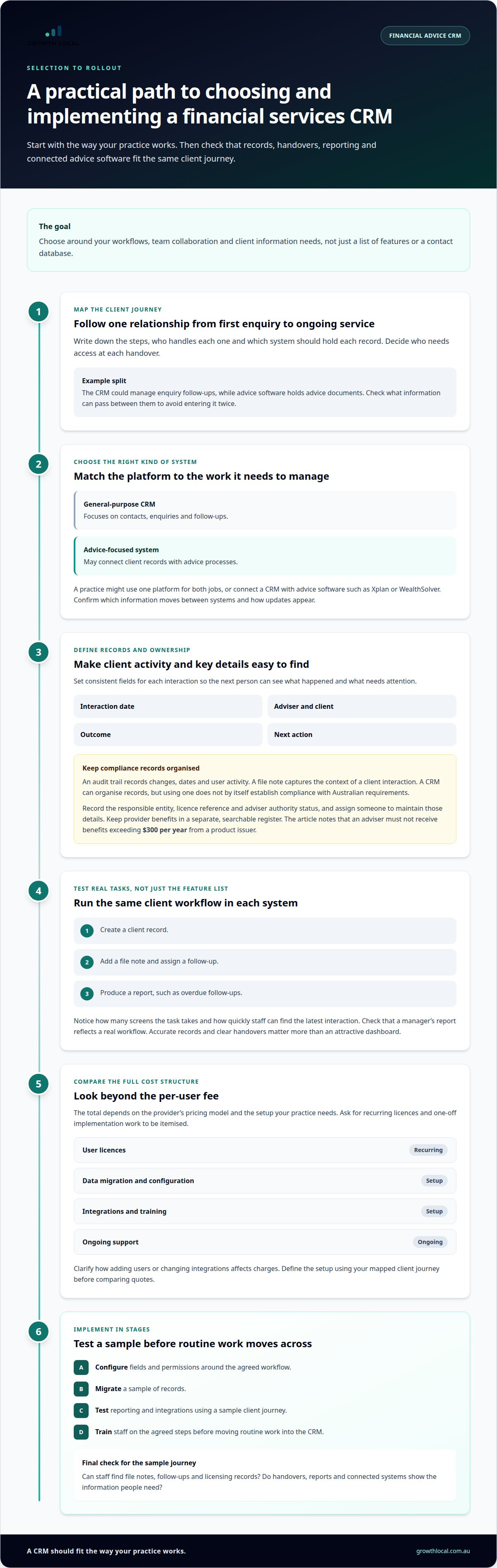
Choose a CRM to fit your advice workflow, records and team handovers, not just its feature list. A practical selection process tests how the system handles client relationships, provider information and reporting.
Financial services CRM types
A financial services CRM organises client relationships and related work. A general-purpose CRM focuses on contacts, enquiries and follow-ups, while an advice-focused system may also connect client records with advice processes. A practice might use one platform for both, or connect a CRM with advice software such as Xplan or WealthSolver.
Start by mapping one client journey, from the first enquiry through ongoing service. Identify which system should hold each record and who needs access. For example, a CRM might manage enquiry follow-ups while advice software holds advice documents. To avoid duplicate entry, check what information can pass between systems.
Compliance records and audit trails
Compliance records are documents and activity histories a practice keeps to evidence its work. An audit trail records changes, dates and user activity, while a file note captures the context of a client interaction. A CRM can organise these records, but using one does not by itself establish compliance with Australian requirements.
Set clear fields for interaction date, adviser, client, outcome and next action. For example, add a file note after a call and link it to the relevant client record. Australian legislation prescribes the types of information ASIC can disclose publicly about financial advisers. ASIC uploads selected data from the Financial Advisers Register each week as a snapshot. Keep public register information separate from your firm’s internal licensing records.
For licence details, record the responsible entity, licence reference and adviser authority status, then assign an owner to maintain them. Keep provider benefits in a separate, searchable register. The Australian rule says an adviser must not receive benefits exceeding $300 per year from a product issuer. A CRM can help organise entries, but the practice still needs a defined process for recording and reviewing them.
Usability, reporting and client management
Usability is how easily staff can complete everyday CRM tasks. Reporting turns activity records into views of enquiries, follow-ups and client work. Client management brings contact details, interaction history and next steps together. To compare systems, run the same task in each: create a client, add a file note, assign a follow-up and produce a report.
Check how many screens the task takes and whether staff can quickly find the latest client interaction. Then test a manager’s report against a real workflow, such as overdue follow-ups. For connections to Xplan or WealthSolver, confirm which information moves between systems and how updates appear. An attractive dashboard matters less than accurate records and clear handovers.
Setup and per-user fees
CRM costs in Australia depend on the provider’s pricing model and the setup your practice needs. Common cost factors include user licences, data migration, configuration, integrations, training and ongoing support. Compare the full cost structure, not just the per-user fee, because setup work and connected software can affect the total.
Ask for pricing components to be itemised, including recurring licences and one-off implementation work. Clarify how adding users or changing integrations affects charges. A small practice may need less configuration for a simple contact system than for a workflow linked to advice software. Define the required setup using your mapped client journey before comparing quotes.
Implement in stages: map the workflow, configure fields and permissions, migrate a sample of records, then test reporting and integrations. Use a sample client journey to check that file notes, follow-ups and licensing records remain easy to find. Train staff on the agreed steps before moving routine work into the CRM.
Activity tracking and analytics
Activity tracking records the work your team does with clients and prospects. Analytics turns those records into patterns that can guide follow-up and service planning. Useful entries for an advice practice might include a review meeting, an unanswered enquiry, a document request or a scheduled call. Consistent records make it easier to see what has happened and what should happen next.
Track meaningful client activity
Start with a short list of activities that reflect your advice process. Practical examples include a phone call, email, meeting, referral and review. For each entry, record the client or prospect, the staff member responsible, the outcome and the next action. A note such as “review booked, send agenda” gives the next person more context than “contacted”.
Set clear rules for recording each activity. If a client emails an updated document, the record should show who received it and what follow-up is needed. If an enquiry is awaiting a response, assign an owner and due date. Keep activity labels consistent, so one adviser’s “review” isn’t another adviser’s “annual check-in”.
Use reports to spot workflow gaps
A CRM report organises recorded information to answer a business question. For example, a practice manager could review open follow-ups by owner or group enquiries by referral source. These views can reveal stalled handovers and recurring workload bottlenecks. They don’t explain the cause on their own, so discuss the underlying workflow before changing targets or processes.
Choose measures that prompt action. An overdue follow-up list can remind staff to contact clients, while a view of unassigned enquiries can reveal a handover gap. A report showing activity by adviser can support workload planning, but raw totals need context. A high call count, for instance, doesn’t show whether conversations were useful or resolved the client’s need.
Keep analytics useful and trustworthy
Analytics is only as reliable as the information entered into the CRM. Missing outcomes, inconsistent categories and duplicate records can distort reports. Review a sample of records during implementation, then adjust fields and instructions where staff interpret them differently. Keep required fields focused on information that supports a real task, rather than making every entry burdensome.
Set a regular review rhythm that suits your practice. A team lead might scan open actions at a weekly meeting, then review referral patterns in a separate planning discussion. Share report definitions so everyone understands what “open”, “completed” and “awaiting client” mean. Without shared definitions, teams can interpret the same dashboard differently.
To connect reporting with day-to-day work, explore how CRM activity tracking could fit your workflow.
CRM adoption and integration challenges
CRM adoption means making a new system part of everyday practice. Integration connects that system with other software so information can move between tools. Both need planning: a platform staff avoid, or one that creates duplicate records, can add admin rather than reduce it.
Build adoption into everyday work
Start with one workflow, such as recording a new client enquiry and assigning its follow-up. Define who enters the information, which fields matter and what happens next. Keep the process practical: a long form can slow staff down, while too few details can leave colleagues without useful context.
Next, involve the people who will use the CRM, including advisers and support staff. Ask them to test realistic tasks, such as finding a client record, recording a meeting outcome and locating the next action. Use their feedback to simplify labels and remove steps that don’t support the workflow.
Training should use examples from your practice. Show staff how to record a referral, update a client’s contact details and hand over an enquiry. Set a consistent approach for older records too. If some staff use spreadsheets while others enter updates in the CRM, information can become fragmented and reports less reliable.
Plan integrations around the information flow
Integration requirements describe which information should move between connected systems, and in which direction. Which CRMs integrate with Australian platforms such as Xero, Microsoft 365 and Outlook? Support depends on the CRM and its configuration, so assess each connection by mapping the records and tasks it needs to handle.
For example, list whether a contact, meeting or email activity should appear in more than one system. Decide which platform is the source of truth for each record. Then test a sample workflow, such as updating a contact in Microsoft 365 and checking whether the CRM reflects that change. Confirm what happens when information conflicts or a sync fails.
Manage the risks of a general-purpose CRM
A general-purpose CRM is designed for broad relationship management, not a specific advice workflow. What are the risks of using one for financial advice in Australia? The main risk is poor fit: your practice may need extra fields, manual workarounds or separate records to manage advice-related processes.
For instance, a standard contact record may not capture the stages an advice team uses to manage a client relationship. Staff might put context in free-text notes, making it harder to search or report consistently. A CRM also doesn’t make a practice compliant by itself. The practice still needs suitable procedures for its records and work.
Before migration, document the workflow, required information and system connections. Test a small set of records, review permissions and reports, then refine the process before wider use. This staged approach can uncover duplicate fields or confusing handovers early, before they affect everyday work across the practice.
CRM benefits for financial advisers
A CRM benefits an advice practice by bringing relationship information and follow-up work into a shared system. For an Australian adviser, that can mean less time piecing together email threads, spreadsheets and meeting notes before speaking with a client. The value comes from how the team uses the system, not simply from storing more data.
More complete client context
Client context is the relevant history and current information staff need before an interaction. A well-organised CRM record can bring together contact details, referral source, past conversations and upcoming actions. Before a review meeting, an adviser can see that a client asked about a document last week, rather than relying on memory or searching several inboxes.
A shared view also supports handovers. If an adviser is away, a colleague can see the last recorded interaction and the next agreed step. Set clear access permissions and use consistent fields, so sensitive information is available only to appropriate users and useful details don’t disappear into free-text notes.
More consistent client service
Service consistency means clients receive clear, timely follow-up across different interactions. A CRM can prompt a staff member to send a meeting summary, record a referral introduction or follow up on an unanswered question. For example, after a client requests information by email, the assigned adviser can record the request and track its progress.
Use the system to organise communication, not to send every client the same message. A note about a client’s preferred contact method or current query helps staff make follow-up relevant. Review templates and reminders against your practice’s actual service approach, so automated steps support personal advice rather than making it feel generic.
Clearer prioritisation and growth
Prioritisation means deciding which client or prospect action needs attention first. A CRM can sort open work by due date, owner or enquiry stage. For instance, a new referral awaiting an initial call can be distinguished from a client who has already booked a review.
This can help managers allocate work more deliberately. A team lead can identify unassigned enquiries, balance follow-ups across advisers and spot stages where prospects regularly stall. Use those patterns to improve the process, such as clarifying who responds to referrals. Don’t treat activity totals as a direct measure of advice quality.
Less dependence on individual memory
Operational continuity is the ability to keep work moving when responsibilities change. A CRM gives the team a shared record of ownership, decisions and next steps. If a support staff member transfers an enquiry to an adviser, the handover can include its source, the client’s request and the agreed follow-up.
Start with one repeatable process, then check whether records remain useful when another team member takes over. For example, test whether a colleague can understand a client’s outstanding request without asking the original staff member. That practical check shows whether the system captures working context, not just contact details.
Which Australian CRM platforms integrate with Xplan, WealthSolver, or other advice software?
An integration transfers information or actions between software systems. For an advice practice using Xplan or WealthSolver, the useful question isn’t just which CRM connects, but what information moves and where it goes. Compare the exact workflow your team needs, such as keeping client contact details aligned across systems.
A native integration is built into the products, while an API is a software interface that can support data exchange. Middleware is another option, linking applications through a separate service. These approaches differ in setup and maintenance, so the word “integrates” alone doesn’t explain how a connection behaves.
Start with the records your practice needs to share between its CRM and advice software. For example, decide whether client names, contact details, meeting activities or task statuses should transfer. Then define which platform owns each record. If Xplan is the source of truth for a particular field, an update in the CRM shouldn’t silently overwrite it.
Next, map the direction and timing of each transfer. A one-way sync from a CRM to WealthSolver behaves differently from a two-way sync. Write down what should happen when an adviser changes a client’s email address, creates a task or closes an activity. This makes gaps visible before staff rely on the connected workflow.
Evaluate each CRM and advice-software pairing as a specific combination, not as a broad brand claim. A connection may cover contact records but not documents or task updates. Ask to see the relevant workflow using sample records, then check the resulting fields, ownership and error handling. A successful contact sync doesn’t prove every process is connected.
Data quality matters too. Duplicate client records can arise when Xplan and a CRM use different matching fields, such as an email address versus an internal client identifier. Agree on a matching rule before migration. Test how the systems handle changed details, blank fields and duplicate entries, so staff don’t have to repair records manually after each transfer.
For Microsoft 365, Outlook or Xero connections, apply the same method: define the task, data fields and direction of travel. Keep a simple integration register naming each system, its purpose, record owner and support contact. That register helps advisers understand where to update information and gives administrators a clear starting point when a sync fails.
Use a workflow demonstration to assess how CRM connections could fit your advice software.
Growth Local
Growth Local helps financial advice practices turn CRM requirements into practical workflows for managing leads, client information and marketing activity. If disconnected tools or manual follow-ups are making work harder, its CRM Setup can organise the system around your team’s processes. Lead Generation System Setup and Marketing System Setup can also support a more connected path from enquiry to ongoing communication.
Bring your priorities, current workflow and the software connections you need to discuss. Growth Local can help shape a setup that fits those needs, without adding steps that don’t serve your team. If you’re ready to talk through your CRM requirements, contact Growth Local.
Make your next CRM decision practical
Your next step is to turn your preferred client experience into a clear operating plan. A CRM for financial advisers in Australia should support how your practice wants work to flow, not force the team into a system that adds avoidable admin. Write down the key handovers, information needs and decisions that shape your day-to-day work.
Use that plan to guide a focused discussion about your setup. It gives you a practical way to explain what needs to work together, what your team needs to see and where a process currently slows down. Growth Local can help connect those requirements with CRM, lead generation and marketing system setup.
You don’t need to solve every workflow at once. Start with the process that matters most, then build towards a setup your team can use confidently.
A clear next step can turn a complicated systems decision into steady progress.
Frequently Asked Questions
How Do CRM Solutions Help Financial Advisers?
CRM solutions help advisers coordinate client enquiries and keep work moving between stages. For example, a referral can be recorded, assigned to an adviser and followed through to an initial meeting, reducing the chance of a missed handover. A CRM can also help a practice see which sources bring enquiries and where prospects pause, so the team can refine follow-up based on actual records.
What CRM software is best for financial advisers in Australia?
The best CRM for financial advisers in Australia is the one that fits the firm’s processes and existing software. A small practice may prioritise straightforward contact management, while a larger team may need tailored permissions and reporting. Before choosing, test a realistic task from start to finish, such as recording a referral and preparing its next step. Check how the system works with the advice tools your team relies on.
What should an Australian financial advice firm consider when choosing or switching CRM software?
Consider the work the CRM must support, the information to transfer and how staff will use it during the change. Before switching, group records into active clients, prospects, former clients and duplicates. Decide which fields each group needs, then trial the transfer with representative records. Compare the results with the original entries and document changes, so staff know where to find information after the new system goes live.
Which CRMs support Australian financial advice compliance, audit trails, and file notes?
A CRM can organise audit trails and file notes, including changes, dates, user activity and client interactions. Using a CRM does not by itself establish compliance with Australian requirements.


