
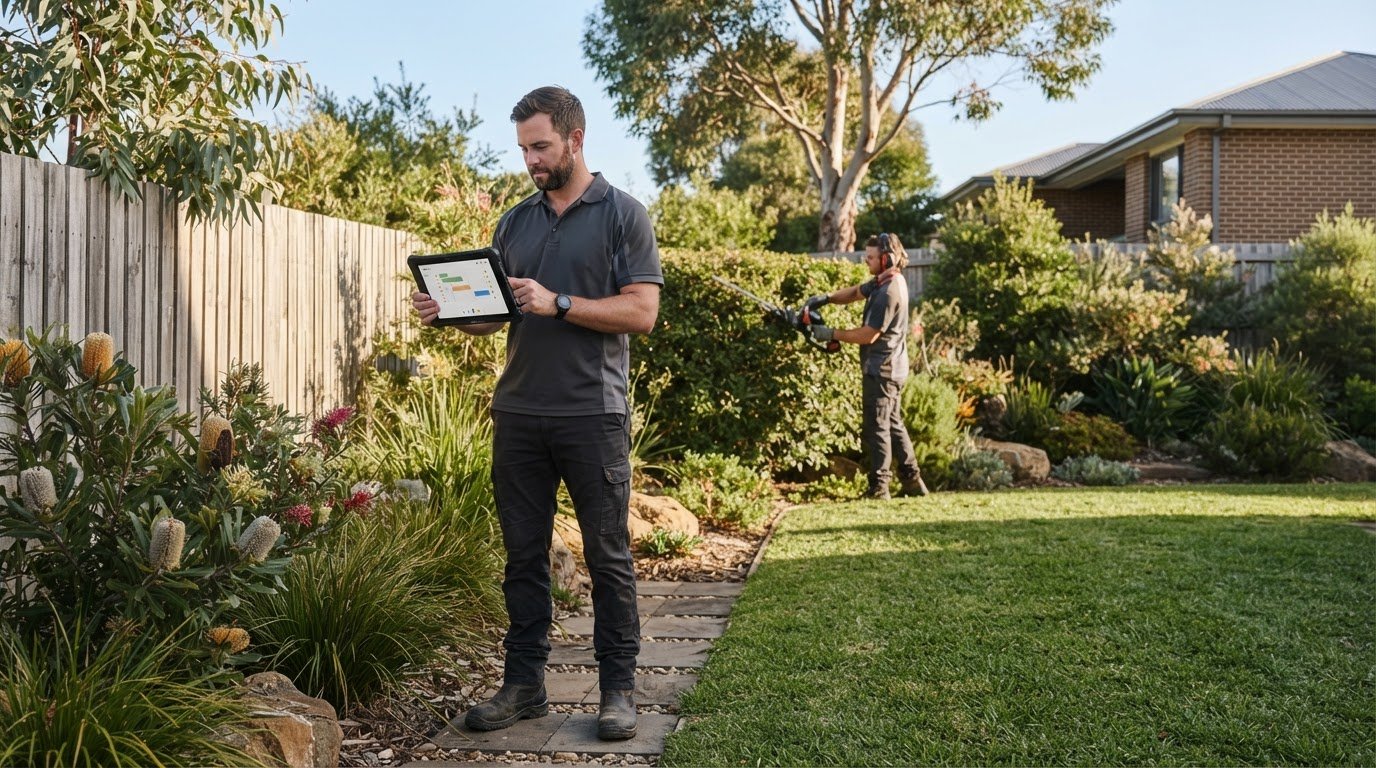
CRM for Australian landscapers managing recurring maintenance
Recurring maintenance shouldn’t depend on someone remembering when the next round is due. A CRM for landscapers in Australia can organise customer conversations, schedule repeat visits and prompt reminders for services such as fortnightly garden maintenance. It gives you a clearer way to keep track of customers and upcoming work.
When you’re out on site, a follow-up, booking change or admin task can easily slip through. A useful system brings those details together, so you can see what’s scheduled, what needs attention and where each landscaping job stands.
This guide explains how CRM tools can support recurring maintenance, scheduling, customer communication, admin workflows and job tracking. You’ll also learn what to look for, including mobile access for work away from a desk, and how to decide whether a standalone CRM suits your business or your current job-management records are enough. The aim is to reduce chasing and double-handling, and make regular work easier to manage.
Key Takeaways
- Keep customer messages and follow-ups organised so booking changes and enquiries don’t get lost across channels.
- Set up repeat visits, such as fortnightly maintenance, with clear schedules and reminders for each customer.
- Use recurring card payments or direct debit to reduce payment-chasing for ongoing maintenance work.
- Map job stages from enquiry through to completion to make the next action clear for you and your crew.
- Choose mobile-friendly tools that fit your current workload, and weigh up whether your job-management software still covers your CRM needs.
Customer conversations across channels
For field teams, mobile-first software is a practical choice because landscapers work away from a desk. Mobile access, offline use and GPS job tracking are separate capabilities, so compare them individually when choosing an app for your Australian business.
Where possible, bring calls, emails, website enquiries and social messages into one customer record. For example, a homeowner might enquire through Facebook, then call to change the access instructions. A shared record gives the office and crew one place to find the conversation instead of relying on someone’s inbox or memory.
Keep records useful with consistent fields. Capture the customer’s name, property address, preferred contact channel, service requirements and relevant site notes. A note such as “side gate access, dog in yard” gives the crew practical context before arrival. Keep customer details separate from job notes so updates don’t get buried in a long message thread.
- Record the source: note whether an enquiry came through a phone call, email, website form or Facebook message. This helps you see which channels bring suitable work.
- Log the next action: after sending a quote, record who will follow up and what needs to happen next.
- Keep changes visible: add revised access details or service requests to the customer record, then share relevant updates with the assigned crew.
- Use mobile access: let the team review job notes and update conversations from the field, rather than waiting until they return to the office.
Offline access matters when a crew loses reception at a property. Depending on the app, GPS job tracking can help locate job sites or associate a visit with a location. Treat both as specific feature requirements, not standard parts of every CRM. When comparing mobile-first systems, check whether records remain accessible offline and how location information is used.
Migrate customer and job data in a controlled sequence: export existing records, remove duplicates, map fields, import a small test batch, then review the records before moving the rest. After migration, set access permissions and agree how staff will record calls, messages and job updates.
- Export: gather customer details, addresses, job history and open enquiries from spreadsheets or existing software.
- Clean: merge duplicate customer entries and standardise address and phone formats.
- Map: match each old field to a CRM field, including service notes and communication preferences.
- Test: import a sample and check that names, notes and job links appear correctly.
- Train: show the team how to log a conversation and record its next action.
Start with the task causing the most friction. If missed quote follow-ups are the problem, make the enquiry source, quote status and next action easy to record. This gives your team a simple routine to follow across phone, email and social channels.
Scheduling and recurring maintenance
Recurring work gives a landscaping calendar structure, but only when each visit is recorded clearly. A CRM can link a customer, property, service and repeat schedule, so the next maintenance round doesn’t depend on someone remembering it. For example, a returning customer might book fortnightly lawn and garden maintenance, then request a separate seasonal tidy-up.
Set up each repeat service with its own schedule and job details. Record the agreed frequency, service scope, property access notes and preferred contact method. Keep a seasonal tidy-up as a separate job type if it requires different work, equipment or crew planning. This makes the next visit easier to understand before the team arrives.
A useful schedule needs more than a repeating calendar entry. It should make upcoming work visible and show which jobs need attention. Assign each visit to a crew or staff member, attach relevant property notes and set a reminder before the scheduled date. A reminder gives the office time to prepare and flag changes with the customer.
- Group nearby properties: use suburb or address details to plan a practical run for the crew.
- Allow for job duration: use the expected work involved to avoid stacking unsuitable visits together.
- Track changes: record a postponed visit against the customer’s schedule, then set its replacement date.
- Review seasonal work: identify returning customers who need a separate seasonal tidy-up and schedule it alongside regular maintenance.
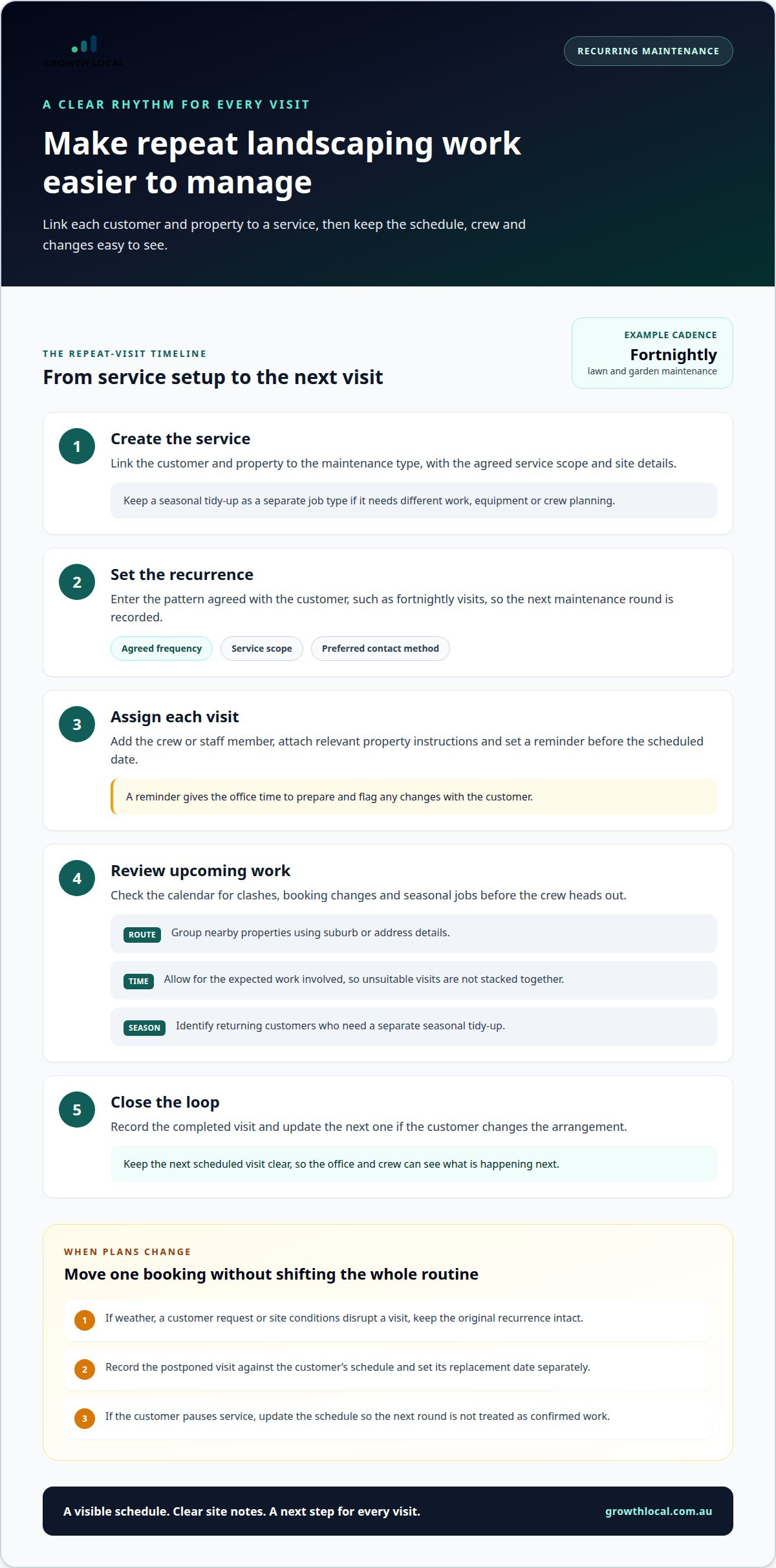
Weather, customer requests and changing site conditions can disrupt a planned run. Keep the original recurrence intact when one visit moves, then update that booking separately. This helps prevent a single postponement from shifting every future visit. If the customer pauses service, update the schedule so the team doesn’t treat the next round as confirmed work.
Build the workflow around a simple sequence:
- Create the service: link the customer and property to the maintenance type.
- Set the recurrence: enter the agreed pattern, such as fortnightly visits.
- Assign the visit: add the crew and relevant site instructions to each scheduled job.
- Review upcoming work: check the calendar for clashes, changes and seasonal jobs.
- Close the loop: record completion and update the next visit if the customer changes the arrangement.
Before relying on a CRM calendar, test a recurring customer record from booking through completion. Confirm that the next visit appears, the assigned crew can find the site notes, and postponing a job doesn’t silently change later dates. This workflow test shows whether the schedule supports real maintenance rounds or merely repeats calendar entries.
Admin workflows and automation
Admin builds up between site visits: a quote needs following up, an invoice needs sending, and a payment needs reconciling. A CRM workflow can give each task a clear trigger, owner and next step. For example, marking a job “completed” can prompt an invoice task, while an unpaid invoice can create a follow-up reminder.
Landscaping businesses can pair a job-management tool with Xero or MYOB for accounting tasks such as GST and bookkeeping. For a CRM integration, check that customer, job and invoice details pass between systems in a way that suits your workflow. Avoid entering the same information twice, and decide which system holds the master customer and job record.
GST, invoicing and privacy settings matter because a CRM stores customer and transaction details. Set up invoice fields and GST treatment to match your business processes, and restrict access to customer records by staff role. Keep site access notes and contact details relevant to the job instead of collecting information the team doesn’t need.
Choose features around the actual job sequence, from enquiry to payment. Quoting tools should capture the requested work and proposed scope. Scheduling should connect accepted work to a date and crew. Job management should track progress and completion, while invoicing should use the final job details. Together, these features reduce re-keying and make handovers easier to follow.
- Quote follow-up: create a reminder when a quote is sent, then record whether the customer accepts, declines or requests a change.
- Job completion: prompt the office to prepare an invoice after the crew marks work complete.
- Payment follow-up: use recurring card payments or direct debit for maintenance work to reduce payment-chasing.
- Bookkeeping handover: send the required transaction information to Xero or MYOB, then reconcile it through your accounting process.
Before selecting software, map a real job from quote to payment. Check which fields carry through to the invoice, where GST information is handled and how an adjustment appears in the accounting workflow. This test can reveal duplicate data entry and missing handover steps before they become routine.
Start automation with a repeatable admin task, not every process at once. For example, automate a reminder after sending a quote, then review whether staff record the outcome consistently. Add another workflow only when the trigger, responsible person and resulting task are clear. This keeps automation practical and gives the team a process it can maintain.
For recurring maintenance, connect completed visits to the next invoice or payment task. Recurring card payments or direct debit can reduce manual chasing, while a clear record of the job and payment status helps the office see what still needs attention. Keep exceptions, such as a changed scope, visible before finalising the invoice.
Landscaping job pipeline stages
A pipeline makes each job’s status visible, from the first enquiry to completed work. Clear stages help you spot stalled estimates, upcoming jobs and tasks still waiting for action.
CRM software pricing depends on factors such as user access, setup needs and integrations; the price is given after a quote request.
Moving jobs through pipeline stages
Start with stages that match how your landscaping work moves: new enquiry, site assessment, estimate sent, accepted, scheduled, in progress, completed and invoiced. A small garden tidy-up may skip a detailed site assessment, while a larger planting project may need one before estimating. Look for a CRM that lets you customise stages and record why a job pauses or changes direction.
Each stage should prompt a clear next action. An accepted estimate can move to scheduling, while a completed job can move to invoicing. Keep “waiting for customer” separate from “ready to schedule”, so an office review shows who or what is holding up the work. This makes the pipeline useful for daily decisions, not just a visual board.
Managing leads and customer follow-ups
Create a record for every new lead, including its source, property details, requested work and next action. For an estimate, note the discussed scope and whether a site visit is needed. After sending it, set a follow-up task and record the customer’s response. The pipeline then shows whether the estimate is pending, accepted, declined or needs revision.
Use the customer record to keep calls, emails and changes connected to the same job. If a homeowner asks to adjust the planting scope, log the request and update the estimate before moving the job forward. Assign an owner to each follow-up so an enquiry doesn’t sit without a clear next step.
For a small landscaping business, common drawbacks include extra data entry, confusing stages and paying for features the team won’t use. A pipeline also depends on staff updating job status consistently. Stale records can make an available slot look occupied or hide an estimate still awaiting a response.
Keep the process lean with a practical setup:
- Choose stages: use the terms your team already understands, from enquiry to invoice.
- Set entry rules: define what must be recorded before a job advances, such as an approved scope.
- Assign ownership: make one person responsible for each open estimate or follow-up.
- Review exceptions: check paused, declined and revised jobs so the pipeline reflects actual work.
Before adopting a system, test a typical job from first enquiry to completion. Check how an estimate changes after a customer request, how a postponed job is marked and whether the next action remains visible. If the workflow requires repeated copying or workarounds, simplify the stages or reconsider which features your business needs.
What are the best CRM options for landscapers in Australia compared by features and reviews?
There isn’t one best fit for every landscaping crew. Choose software based on the task costing you time or money, then compare how well it handles customer records, repeat work and field updates. Reviews can reveal patterns in usability, but the right choice depends on your day-to-day workflow.
Start by comparing these three approaches:
- Job-management software with customer records: suits operators who mainly need to organise estimates, jobs and customer details in one system.
- A standalone CRM: can make sense when customer numbers or marketing activity outgrow the records built into job-management software.
- A paired setup: keep job management for field work and connect it with a CRM or accounting platform where each tool has a clear role.
For example, a solo gardener may manage enquiries and jobs with a simple system, while a growing crew may need stronger customer tracking across marketing and repeat work. Free plans may limit users, jobs or invoices, making them more suitable for solo gardeners than growing crews. Check the limits against your current workload and likely team needs.
Compare features against actual tasks, not a long list of software claims. A mobile-first system matters for landscapers working away from a desk. Check whether staff can access customer records, update job details and see the day’s schedule from the field. If offline access or GPS job tracking matters, assess each feature separately rather than assuming it comes with mobile access.
Reviews are most useful when they describe a workflow similar to yours. Look for specific comments about mobile usability, repeat-job scheduling, customer support and the effort needed to maintain records. Detailed examples are more useful than broad praise or complaints. Compare review themes across platforms, and don’t rely on an overall rating alone.
Use this short evaluation process before choosing:
- List the bottleneck: identify whether enquiries, recurring jobs, crew scheduling or admin takes the most effort.
- Test a real job: enter an enquiry, prepare an estimate and move the job through its stages.
- Check the field workflow: review mobile access and test any required offline or GPS functions.
- Check integrations: if you use Xero or MYOB, assess how customer, job and accounting information moves between systems.
- Review plan limits: check user, job and invoice allowances against the crew’s needs.
Choose an option that handles your priority task without adding unnecessary double-entry. A small business focused on job scheduling may not need a separate CRM yet. A business whose customer and marketing records have outgrown its job software may benefit from one.
The best fit depends on your main bottleneck: job-management software with customer records for estimates, jobs and customer details; a standalone CRM when customer tracking or marketing needs outgrow those records; or a paired setup when field work and broader customer management need separate tools. Compare mobile updates, repeat-job scheduling, support, record upkeep, integrations and plan limits. Give more weight to reviews describing a workflow like yours.
Growth Local: Lead Generation System Setup
Growth Local helps landscaping businesses organise lead generation and customer management through Lead Generation System Setup and CRM Setup. If enquiries come through different channels or follow-ups rely on memory, a connected workflow can give each lead a clear next step. Marketing System Setup can support more organised marketing activity, while an AI Receptionist can help handle incoming enquiries.
Turn to Growth Local when you’re ready to improve how leads are captured, followed up and managed in your CRM. The setup should fit how your landscaping business handles enquiries and moves work forward, rather than adding admin for the sake of automation.
Contact Growth Local to discuss your lead and CRM workflows.
Make your next improvement count
A CRM for landscapers in Australia should support the way your team works, not become another system to maintain. Before changing tools, choose one practical improvement to focus on, such as clarifying the next action after an enquiry or giving the office a better view of open jobs. A defined priority makes it easier to judge whether your setup is helping.
Then assign an owner to the workflow and review it regularly. Ask whether information is easy to update from the field, staff know what to do next, and any steps still rely on copying details between systems. If the process feels clunky, adjust the workflow before adding more automation. Simple, consistent habits provide a stronger foundation for growth.
Growth Local can discuss how a CRM workflow can fit your landscaping business and its next stage of growth.
Take the next step at a pace that suits your business. A clearer system can help your crew spend less time chasing admin and more time moving work forward.
Frequently Asked Questions
Can it remind me about recurring maintenance rounds?
Yes, a CRM can create a reminder based on a scheduled maintenance date or an unfinished job. For example, set an internal task to review a customer’s upcoming round before confirming the crew’s workload. Assign the reminder to a staff member, then record the outcome. This helps distinguish a visit that still needs planning from one that has already been arranged.
What CRM software is designed for Australian landscaping businesses?
There isn’t one universally best option for every Australian landscaping business. Choose a CRM for landscapers in Australia by checking how it handles your records, service history and team access. Before committing, test whether you can export customer information in a usable format and control which staff can view or edit records. These checks matter if your crew grows or your business changes systems later.
Which Australian CRMs integrate with accounting software such as Xero and MYOB?
Landscaping businesses can pair a job-management tool with Xero or MYOB for accounting tasks such as GST and bookkeeping. Check that customer, job and invoice details pass between the systems as your workflow requires.
How much does landscaping CRM software cost in Australia, including per-user and setup fees?
Free landscaping software plans may limit users, jobs or invoices, making them more suitable for solo gardeners than growing crews. No per-user or setup fees are provided.


