

CRM data migration: prepare, test and clean your data
A CRM migration involves more than moving customer records. It can also mean transferring system settings and business processes to a new platform. Data migration challenges for CRM projects often begin with messy records, mismatched fields and unclear ownership. Moving the data is only one part of preparing the new system for everyday use.
Worrying about losing useful information or disrupting daily work is reasonable. A clear plan helps you decide what to move, clean or archive, then test the transfer before migrating all your data.
This guide explains the difference between CRM migration and data migration, how to prepare and test a transfer, and how to assign an owner. You’ll learn how to map fields, validate results and involve the people who rely on the CRM, so the new setup supports how your business works.
Key Takeaways
- Treat a CRM migration as a move of data, settings and workflows, not just customer records.
- Map fields and relationships before transferring records so customer histories and interactions stay connected.
- Use sample transfers to uncover mapping errors and integration issues before the full migration.
- Clean up duplicates and outdated records, and archive useful history that doesn’t need to move into the new CRM.
- Appoint an owner to coordinate decisions and consult the people who rely on the data day to day.
1. What’s the difference between CRM migration and data migration?
CRM data migration means moving information from one customer relationship management system to another. CRM migration is broader: it also includes system settings, workflows, integrations and how staff use the platform. Transferring contact records alone, for example, won’t recreate a sales pipeline, user permissions or an automation that assigns new leads.
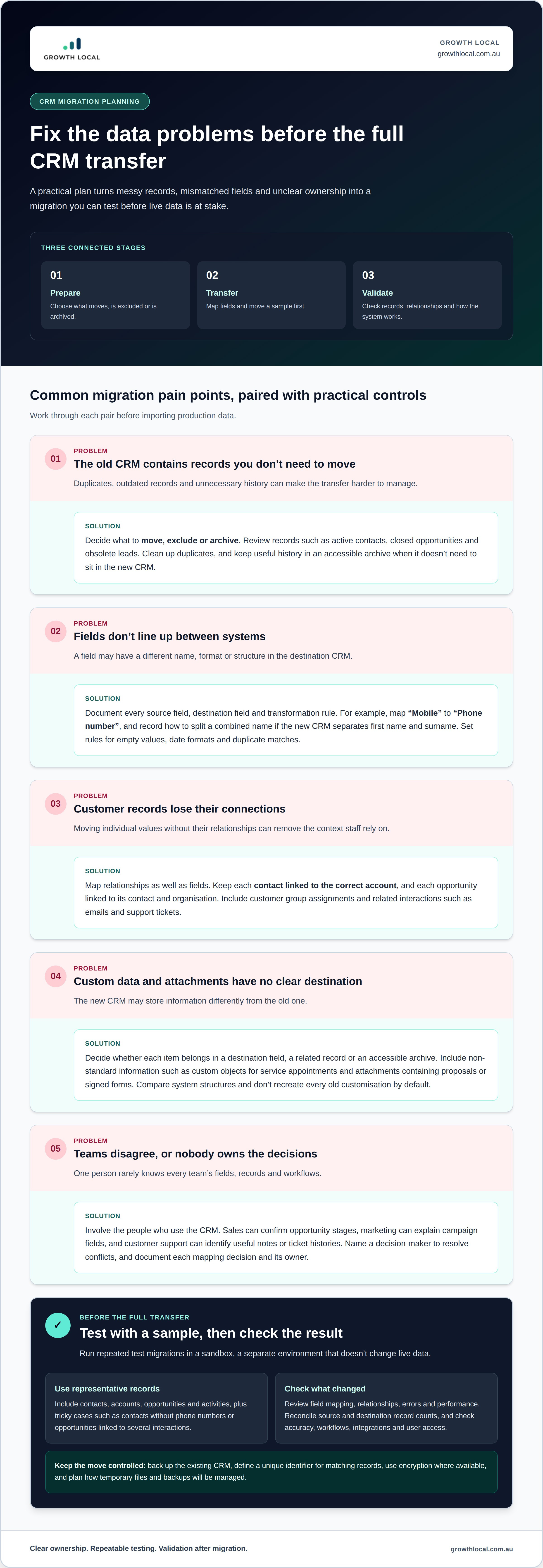
Think of migration as three connected stages: prepare, transfer and validate. Identify the records and fields to move, clean inconsistent data, then map old fields to their new destinations. Transfer a test batch and compare record counts, relationships and key details. This helps catch mapping errors before they disrupt daily work.
Cloud and on-premises migrations differ mainly in where systems are hosted and how data is accessed. A cloud-to-cloud migration generally transfers information between hosted platforms, while an on-premises system may require access to local servers and coordination with internal IT. In either case, document integrations and data flows before moving records.
Migration costs vary with record volumes, data quality, integrations, custom fields and how much history you plan to move. A straightforward CRM migration may take a few weeks; a larger project involving customisations and multiple business systems may take several months. Scope and complexity shape both the timeline and the work involved.
To reduce the risk of data loss, duplication or corruption, back up the existing CRM before migration. Remove duplicates, define a unique identifier for matching records, and document how each source field maps to the destination. Transfer a sample first, then reconcile source and destination counts. Check, for instance, that each contact’s company association still points to the correct account.
Test in a sandbox, a separate environment where sample records can be transferred without changing live data. Run several test migrations to check field mapping, relationships, errors and performance. After the final transfer, validate record counts, accuracy, workflows, integrations and user access. Compare important reports with pre-migration figures before retiring the old system.
In Australia, migration risks include exposing personal information through excessive access, insecure transfers or poorly controlled copies of CRM data. Restrict access to people involved in the migration, use encryption where available, and plan how temporary files and backups will be managed. Review privacy and compliance controls for the information your organisation holds.
These checks make migration a controlled change to business operations, not just a one-off data transfer. Clear ownership, repeatable testing and validation after migration help teams spot issues early, protect useful customer history and keep essential automation working after the switch.
2. How do I prepare for a successful CRM data migration?
Start by deciding which records belong in the new CRM. List what to move, exclude or archive, such as active contacts, closed opportunities and obsolete leads. Then review the legacy system’s fields, reports and workflows. Sales may rely on a custom “Lead source” field, for example, while marketing uses the same value to segment campaigns.
Next, create a mapping document for every source and destination field. Record the transformation rule, relationship and record owner. For example, map the legacy field “Mobile” to “Phone number” and keep Australian numbers in a consistent format. If the destination separates first name and surname, document how to split a combined name from the old system.
Field mapping must preserve relationships between records, not just their individual values. Link each contact to the correct account, and each sales opportunity to its contact and organisation. Carry over customer group assignments and related interactions, including emails and support tickets, so staff can see the context behind each record.
Include non-standard data in the plan. A custom object might track service appointments, while attachments could contain proposals or signed forms. Decide whether each item belongs in a destination field, a related record or an accessible archive. This helps preserve important context when the new CRM stores information differently.
Involve business users in mapping decisions. Sales can identify the opportunity stages they use; marketing can explain campaign fields; customer support can flag notes or ticket histories needed to resolve enquiries. One person rarely knows every team’s data. Name a decision-maker to resolve conflicts, and ask each team to confirm its records and workflows.
Compare the old and new CRM structures before importing production data. Identify missing destination fields, overlapping custom fields and workflows with no clear purpose. For example, two legacy “Industry” fields may need to become one destination field, with an agreed rule for conflicting values. Don’t recreate every old customisation by default.
Document each mapping decision and its owner. Include rules for empty values, date formats, duplicate matches and records without a linked account. If email is the matching key, decide what to do when an address is blank or shared. Clear rules make test results easier to interpret and help teams trace unexpected changes.
A documented map gives the migration team a practical basis for testing records and relationships. If you’re shaping a new CRM alongside these decisions, talk through your CRM structure as part of planning.
3. Testing migration before the full transfer
A sample transfer shows whether the plan works before live records are at stake. Run repeated test migrations in a sandbox using representative contacts, accounts, opportunities and activities. Include tricky cases, such as contacts without phone numbers or opportunities linked to several interactions. These can reveal mapping and data quality problems that a clean sample would miss.
For each test load, compare the results with your migration rules. Check record counts, required fields, relationships, dates and transformed values. If an account has ten related contacts in the source CRM, confirm that all ten appear under the correct account in the new system. Log failed records and their causes, then update the mapping or cleaning rules before the next test.
Set acceptance criteria before testing starts. These might cover whether priority fields are populated, key records retain their relationships and duplicates stay within agreed limits. The migration owner should record each result and assign unresolved issues to a person or team. This gives stakeholders a clear basis for approving the next test load.
Test integrations end to end, not just as separate connections. For example, submit a test lead through a website form and follow it into the CRM. Confirm that its source is recorded, the right team receives it and any follow-up automation runs as intended. Also test systems that send data back, such as marketing platforms that update contact preferences.
Test reports as well. Compare priority dashboards with pre-migration baselines and check that calculations use the intended fields. A sales report might count opportunities by close date, while a marketing report groups leads by campaign. Ask the teams that use each report to confirm the figures make sense before retiring the old CRM.
To minimise CRM downtime and disruption, schedule the final transfer during an off-peak period, such as nights or weekends. Use a tested cutover plan that states when users stop updating the old CRM, how final changes will be transferred and who handles recovery if a critical step fails. A backup and rollback plan help preserve access to business records.
Include training in the test plan. Ask staff from sales, marketing and customer support to complete common tasks in the new CRM, such as updating an opportunity or finding a customer interaction. Their feedback can reveal confusing screens or missing permissions before go-live. Tailor training to each role instead of giving every user the same walkthrough.
After launch, check record completeness, workflow use, integration results and timely opportunity updates. Keep a clear route for reporting issues, then review and resolve patterns such as failed form submissions or missing activity history. The migration roadmap allows 3-5 weeks for field mapping, test migrations and sandbox validation, giving teams time to correct problems before the full transfer.
4. Data auditing, cleansing and archiving
An audit shows what the source CRM contains before you move records to a new platform. Review data by object, such as contacts, accounts, opportunities and activities, then assess completeness, accuracy, consistency and relevance. For example, check how missing email addresses affect workflows that rely on email.
Look for patterns that could cause problems after migration: duplicate people, outdated details, inconsistent formats and incomplete records. A contact might appear twice with different spellings, or a phone number might use inconsistent spacing and country codes. Record each issue, decide how to handle it, and apply the same rule across the dataset.
Clean data before importing it. Standardise formats, correct clear errors and fill missing values only when you have a reliable source. Don’t guess. If two records may belong to the same person, apply agreed matching rules and review uncertain matches rather than merging them automatically. This helps prevent useful customer history from being attached to the wrong record.
Not every historical record belongs in the new CRM. Assess whether old notes, closed opportunities and inactive contacts still support current service, sales or reporting workflows. A meeting note from five or ten years ago may no longer help staff manage an active customer relationship. Keep relevant history available, but don’t migrate records simply because they exist.
For information excluded from migration, decide whether to archive or remove it. An archive should remain accessible to people who need historical context, with clear ownership and documented access. If you can’t transfer the complete CRM history, note which dates, record types or interactions are missing. This helps users interpret reports without mistaking an incomplete history for a complete account record.
Include attachments and linked records in the audit. A proposal stored against an opportunity may matter even if an old contact note doesn’t. Confirm how each attachment fits the destination platform and whether its relationship to the account or opportunity will remain clear. Document exceptions instead of leaving decisions to individual judgement during the transfer.
Audit findings also shape the migration scope. Summarise which records will move, which need cleansing, and which will remain archived. The CRM migration roadmap allocates 1-2 weeks to planning, data auditing and scoping. Use that work to identify dependencies before the transfer, so unexpected data issues don’t disrupt essential workflows.
Finish by documenting sign-off on the cleaned dataset and archive approach. The business owner and affected teams should understand what the new CRM will contain and where excluded history can be found. This gives staff a clear reference when a customer asks about an older interaction or a report differs from the legacy platform.
5. Appointing a data migration owner
A named migration owner keeps decisions, deadlines and handovers connected. Without one, sales may approve a field mapping while customer support relies on a different definition. The owner coordinates decisions, tracks unresolved issues and makes sure affected teams contribute. Since one person rarely understands every record and workflow, consultation is essential.
Choose someone who can coordinate across departments and get decisions from the right people. They don’t need to know every technical detail, but they should have authority to assign work and escalate blockers. An executive sponsor can resolve business-level conflicts, while department champions represent daily users in sales, marketing and customer support.
Set clear responsibilities before the first test migration. The owner can maintain the migration plan, decision log and issue register. Data specialists handle extraction and transformation; system administrators manage access and configuration; team champions check that records support their workflows. Sales, for example, can confirm how opportunity stages should appear, while marketing checks campaign-source data.
Give each decision a clear route to resolution. If sales and marketing disagree about a lead-status definition, the owner records both needs and asks the relevant sponsor to decide. Add the agreed definition, field mapping and effective date to the decision log. This prevents the same question from resurfacing during later tests or after go-live.
The owner should also track progress with measures that show whether migration is working. Compare source and destination record counts, review missing required fields and monitor errors by record type. After launch, adoption measures might include record completeness, workflow use and timely opportunity updates. A high login rate alone doesn’t show whether staff are using the CRM effectively.
Set approval gates for each stage. Before a test load proceeds, the owner confirms that mapped records and relationships meet agreed criteria. Before go-live, affected teams review critical reports, integrations and access. If a missing account association could affect customer service, assign an owner, resolve the issue and retest before approval.
Keep the owner’s role active after launch. Staff need a practical way to report issues, and department champions can spot patterns such as incomplete contact records or unused workflows. The owner reviews reports, assigns fixes and shares updates, so small problems don’t turn into workarounds that undermine adoption.
The key to a successful CRM migration is straightforward: appoint one accountable coordinator, involve affected users and make decisions visible. This connects technical tasks with how people actually use customer data.
Growth Local
Growth Local can help when migration planning shows your CRM needs a clearer setup around your sales and marketing workflows. Its CRM Setup service supports configuring a system to fit how your business manages customer information, while Marketing System Setup can help connect your marketing processes with your CRM. If you’re still deciding what the new system needs to do, start with the workflow problems and handovers your teams want to improve. That gives the setup a practical focus, rather than carrying unnecessary legacy processes into a new platform. For support shaping a CRM setup that fits your business, contact Growth Local.
Keep your CRM ready for what’s next
Migration is an opportunity to improve how your business manages data going forward. Data migration challenges for CRM don’t end at go-live if teams keep entering information in different formats or working around unclear processes. Make data quality part of everyday operations, with clear ownership for updates and a simple way to raise issues.
As your business changes, review whether the CRM still supports how your teams attract, manage and serve customers. New services, campaigns or handovers can change which information matters. Regular reviews help keep the system useful without reintroducing old complexity.
Growth Local helps businesses align their CRM and marketing systems with practical growth goals. When you’re ready to discuss your setup, get in touch with Growth Local.
A well-organised system gives your team a stronger foundation for the work ahead.
Frequently Asked Questions
What is CRM migration?
CRM migration means moving to a different customer relationship management platform and adapting it for business use. Alongside customer information, the change can involve sales stages, user access, reports and connections to other systems. For example, a business might move its contact history while setting up new permissions for sales and support staff. Planning these operational changes helps make the platform usable from day one.
How do I know my business is ready for a CRM migration?
Your business is better prepared when it has a clear reason for changing systems and agreement on what the new CRM needs to support. For example, if staff maintain separate spreadsheets because the current platform can’t support a key handover, document that workflow and its requirements. Readiness also means having a decision-maker, time for staff input and a plan to keep essential work moving during the change.
How do I prepare for a successful CRM data migration?
Start with a practical scope: identify the teams, systems and customer tasks affected by the move. For example, trace what happens after a new enquiry arrives, from first contact through qualification and follow-up. Note where staff update information and which systems rely on it. This reveals dependencies a record-only plan might miss and gives teams a shared picture of what the new CRM needs to support.
What are the most common CRM data migration issues?
Common issues include mismatched records, missing information, incorrect field transformations and integrations that stop passing updates. These are frequent data migration challenges for CRM projects. A marketing platform might keep sending enquiries to the old CRM while sales works from the new one, splitting customer histories between systems. Agree which platform owns each important data type, then test the full handover to confirm updates reach the right place.
What tools can help automate a CRM migration?
Migration can use a destination CRM’s import tools, migration assistants, APIs or data integration tools. The right choice depends on the systems involved and the complexity of their fields, relationships and connected workflows. A basic file import, for instance, may suit straightforward contact records, while API-based transfers can support more complex connections. Automation can reduce repetitive work, but mappings and transferred results still need testing.
What’s the difference between CRM migration and data migration?
Data migration is the transfer of information between systems. CRM migration includes that transfer, plus the setup and business processes needed to use the new customer platform. Moving account details is data migration; configuring sales stages and deciding how staff manage incoming opportunities are broader CRM migration tasks. Keeping both scopes in view helps ensure a complete transfer also leaves teams with the workflows they need.
What are the most common CRM data migration challenges?
The most common data migration challenges for CRM projects often involve decisions as much as technology: choosing which history matters, resolving conflicting records and getting teams to agree on new processes. One department may rely on a field another considers obsolete. Without resolving that conflict, the new CRM may inherit confusion or lose useful context. Involve affected users early and agree on ownership and business definitions before the transfer begins.
How do you assess and clean data before a CRM migration?
Assess data for completeness, accuracy, consistency and relevance to current business activities. For example, check whether inactive contacts belong in active sales views and whether company names follow a consistent format. Group issues by type, such as duplicates or missing details, then set a consistent correction or exclusion rule. Record decisions so users understand why information was changed or left out.


