

Compare quoting options for Australian service businesses
There isn’t one universal winner. The best automated quoting software for a small business in Australia is the option that fits how you price work, prepare quotes and manage customers. Compare reusable templates, supplier pricing and connections with the tools you already use. A good fit should streamline quoting without adding unnecessary admin.
If you’re still building every quote from scratch, you know how quickly small tasks can interrupt revenue-generating work. Faster quoting can help you respond consistently, keep pricing organised and spend less time repeating manual steps.
This guide explains how to compare quoting options for Australian service businesses, including which features matter, when simpler tools may be enough and when more advanced software is worth considering. You’ll also find a practical way to narrow down options for your daily workflow.
Key Takeaways
- Compare quote templates, pricing rules and supplier price lists to see whether a tool can handle the way your business scopes and prices work.
- Check how quoting software connects with your CRM or ERP, so customer and job details can move through your sales and finance workflows.
- Match the software to your service type and quoting process; a straightforward tool may suit a small operation better than complex CPQ software.
- Test a shortlist against five real quotes to spot friction in calculations, approvals and the customer-ready document.
- Look for automation that cuts repetitive admin while keeping pricing consistent and quote details easy to manage.
Quote templates, options and supplier price lists
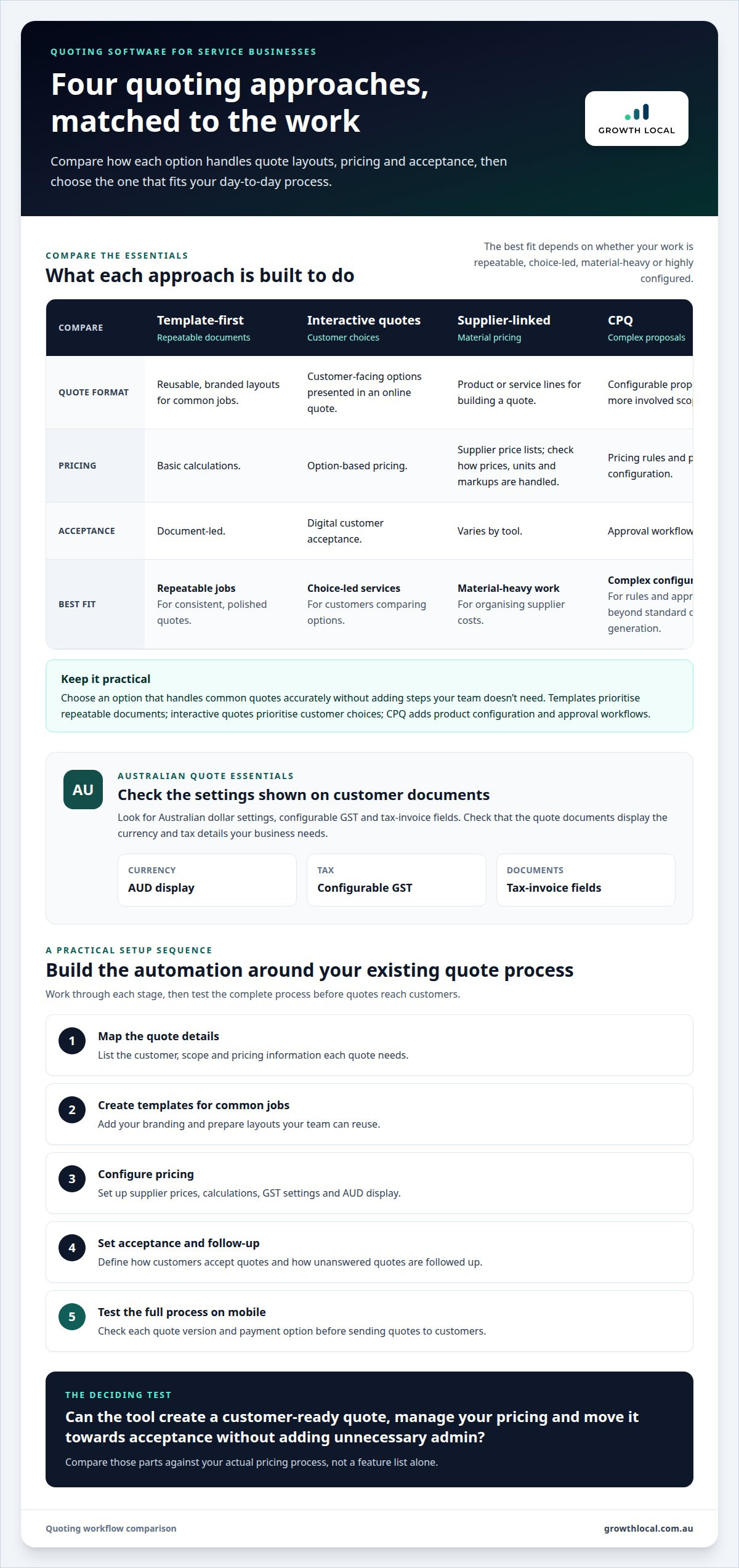
Compare quoting tools by how they create a customer-ready quote, manage pricing and move it towards acceptance. The right combination depends on whether your work involves repeatable packages, changing supplier costs or tailored scopes.
For Australian GST, tax invoices and AUD pricing, look for software with Australian dollar settings, configurable GST and tax-invoice fields. Check that generated documents display the currency and tax details your business needs.
Quote templates and branding
Template-first tools help you produce consistent documents quickly. Create versions for common jobs, then customise each quote with your branding, scope, inclusions and exclusions. For example, a plumbing business could use separate templates for maintenance and installation. Unlike interactive quotes or CPQ, templates prioritise polished, repeatable documents over customer choices or complex approval rules.
Interactive quotes and payment options
Interactive online quotes let customers review options and accept a proposal digitally, rather than relying on a printed document. Look for clear acceptance steps, visible inclusions and payment options that suit your workflow. A cleaning service, for example, could present standard and deep-clean options side by side. This approach encourages customer action, while a basic template mainly standardises the quote’s layout and wording.
Supplier price lists and quote-generation features
Supplier price lists help organise material costs when preparing quotes. Check how the tool imports or updates prices, handles units and applies your markup. Quote-generation tools can calculate totals and apply pricing rules, reducing repeated arithmetic. Software that also adds product configuration and approval workflows is CPQ, which goes beyond standard quote generation. Compare these features with your actual pricing process.
| Option | Templates | Pricing | Acceptance | Best fit |
|---|---|---|---|---|
| Template-first | Reusable, branded layouts | Basic calculations | Document-led | Repeatable jobs |
| Interactive quotes | Customer-facing options | Option-based | Online acceptance | Choice-led services |
| Supplier-linked | Product or service lines | Supplier price lists | Varies by tool | Material-heavy work |
| CPQ | Configurable proposals | Pricing rules | Approval workflows | Complex configurations |
Choose an option that handles common quotes accurately without adding steps your team doesn’t need.
Quote automation setup steps
Build automation around your existing quote process, then test each stage before sending quotes to customers. A practical setup sequence is:
- Map the details each quote needs, including customer, scope and pricing.
- Create templates for common jobs and add your branding.
- Configure supplier prices, calculations, GST settings and AUD display.
- Set acceptance steps and follow-up messages for unanswered quotes.
- Test the complete process on mobile, checking each quote version and payment option.
This sequence separates template setup from pricing and follow-up automation, making it easier to spot errors before quotes reach customers.
Can quoting software integrate with my CRM or ERP system?
Yes. Quoting platforms can integrate with CRM and ERP systems, sharing information across sales and finance workflows. The right integration can reduce duplicate entry, but its value depends on which records move between systems and how your team uses them.
In Australia, quoting software costs depend on features, user access, integrations and support. Compare what each plan includes with your workflow, rather than choosing on subscription price alone.
Standalone and integrated quoting tools
A standalone tool generates quotes in a separate workspace. It can suit a business that needs straightforward documents without connecting multiple systems. An integrated platform links quotes to customer or job records, helping staff track an opportunity from enquiry to approval. For example, a service business could open a CRM record and view its associated quote without searching through separate files.
Map your current workflow before choosing. Note where staff enter customer details, prepare a quote and record acceptance. If those steps involve repeated data entry, integration may reduce friction. If quotes are simple and infrequent, a standalone tool may keep the process lean.
CRM, ERP and accounting integrations
A CRM integration can share contact, enquiry and sales-status information. An ERP integration can connect quoting with operational or finance workflows. Accounting integration can pass approved quote details into later billing steps. Connections vary by platform, so match the information exchanged to your process.
- CRM: identify which customer and opportunity fields transfer.
- ERP: map quote items to relevant job or finance records.
- Accounting: check how accepted quotes move into invoicing workflows.
Supplier and other business-app integrations can also reduce manual updates. For example, a supplier price change should appear in the price list used for a new quote, without silently changing a version already sent.
Security, pricing risks and contract terms
Integrations move customer and commercial data between systems, so review access controls, user permissions and data handling before connecting accounts. Limit access to staff who prepare or approve quotes. Keep a record of pricing-rule changes and test calculations before sending customer documents.
Automation can repeat a pricing mistake across multiple quotes if rates, quantities or tax settings are wrong. Check a sample quote against your current process, then review the software’s contract terms for renewal, cancellation, data access and export conditions. Clear terms matter if you later change platforms.
Trials and customer support
If a trial is available, test it with a real workflow rather than a blank demo. Generate a quote, change an item, revise the version and track it through acceptance. This reveals whether the integration carries the right data or creates extra steps.
Test support with a practical setup question, such as how to map a CRM field or correct an accounting hand-off. Compare the clarity of the answer and the support channels available. Before committing, list the integrations you need, assign a team member to test them and document any workflow gaps.
Which Quoting Software Suits Your Service Business?
For Australian small businesses, options range from simple quote generators to CPQ tools with configuration rules and approvals. A sales quote should identify the seller and buyer, issue and expiry dates, and a reference number. Treat these as practical document fields, not a blanket statement about legal requirements.
Quoting software for tradies and service businesses
Tradies need quotes that capture labour, materials, site details and job-specific inclusions. A mobile-friendly tool can help prepare and send a quote from a job site, avoiding office re-entry. Professional services may prioritise scoped deliverables, hourly work or project stages instead. Choose software based on the information your sales process needs to capture.
For example, a gardener might create separate estimates for regular maintenance and a one-off garden clean-up. A consultant may need a clear breakdown of discovery, delivery and review. Reusable job types can speed up drafting while leaving room to customise the scope and exclusions.
Quoting and estimating for tradies
Estimating tools focus on calculating job costs before presenting a customer quote. Tradies can estimate labour, quantities and materials, then use those figures in customer-facing documents. This differs from a basic quote template, which mainly standardises wording and layout. Keep estimate calculations distinct from invoices, which record amounts billed for work.
Check how a tool handles changes to quantities or supplier costs. For a fencing job, an estimate might need separate line items for posts, panels and labour. A clear breakdown makes figures easier to review before sending the quote, especially when site conditions change the scope.
Options for small businesses
To find the best automated quoting software for a small business in Australia, match the tool to your work and pricing process. Simple software suits repeatable jobs; interactive quotes support customer choices, while complex product combinations may call for CPQ rules and approvals. Ecommerce businesses often need catalogues and order flows, while trades and professional services need job scopes, labour or deliverables.
There’s no single winner for every business. Compare the best automated quoting software for a small business in Australia by testing your next five actual quotes, including routine work and a less-standard request. Record how easily staff prepare each quote, revise it and move the sale forward. The right fit supports your workflow without unnecessary steps.
Quote and estimate details for Australian businesses
Use practical document fields to make each proposal clear: seller and buyer details, an issue date, an expiry date and a quotation reference. Add the work description, quantities, pricing and relevant GST details so customers understand the offer. A sales quote is a proposal, not a legally binding contract by itself.
For estimates, label assumptions and exclusions clearly. A painting estimate, for instance, can identify the areas covered and preparation included. Keep a dated copy of each version sent, then record customer acceptance or requested changes. This helps staff distinguish an estimate from a final quote and later invoices.
Choosing software based on business requirements
Start with the bottleneck: slow quote preparation, inconsistent pricing, missed follow-ups or disconnected billing. Before comparing platforms, note the jobs your software must handle. A user-friendly interface matters, but it won’t fix unclear pricing rules or ownership. Set a practical goal, such as standardising quote details or linking accepted work to billing.
Next, run your next five actual quotes through each shortlisted platform. Include routine work, a change request and a quote with several line items. Record where staff pause, re-enter details or need approval. Check whether customers can review an interactive quote, accept it online and add a signature. This shows how each option fits your real sales process.
Compare features that affect daily work:
- Quote creation: Can staff reuse templates and adjust scope without rebuilding documents?
- Pricing: Do calculations and pricing rules match how you estimate jobs?
- Customer action: Can customers accept the quote and provide a signature within the workflow?
- Handover: Does accepted work flow into scheduling, accounting or billing systems?
- Team use: Can the people preparing and approving quotes learn the process and use it consistently?
Use your results to judge which best automated quoting software for a small business in Australia fits the way your team works. Keep the rollout proportionate to the tool’s complexity. Basic quoting software can be set up in a few days. Enterprise-grade CPQ with custom configurations and integrations may take several weeks or months. This matters if you need a working process quickly or complex product rules justify a longer setup.
A 90-day rollout gives your team staged checkpoints. During days 1-30, set up the tool and prepare the first real quotes. During days 31-60, integrate connected systems. During days 61-90, optimise the workflow using staff feedback and quote results. Assign an owner to each stage, and train the people who create, approve and follow up quotes.
Finally, assess whether the platform meets the goal you set at the start. Track incomplete quotes, pricing corrections and outstanding follow-up tasks. If staff still copy customer details between systems, revisit the integration or process design. Choosing the best automated quoting software for a small business in Australia means selecting a tool that removes a real bottleneck and supports the way your team works.
Benefits of quoting automation for Australian businesses
Australian tradies spend an average of 5-10 hours per week on quoting, invoicing, scheduling and payment follow-up. Quoting automation can reduce repeated admin by reusing job details, applying pricing rules and generating proposals from saved information. The practical benefit is more time for customer work and selling, rather than rebuilding familiar quotes.
Quote preparation can also move faster. A quote that takes 30-45 minutes to build manually may take under 10 minutes with quoting software. That shift comes from storing common line items, applying calculations automatically and using templates for repeat jobs. Staff still need to check the scope and figures, but they can spend less time entering the same details.
Accuracy matters most where material costs shape the margin. If a materials estimate is wrong by even 10-15%, a material-heavy trade can feel the impact on its job margin. Supplier prices, quantities and labour assumptions all influence the total. Automating calculations can make those inputs more consistent, while a final review catches outdated rates or unusual site requirements.
Admin time has a real cost. Quoting software won’t remove every admin task, but it can reduce manual quote preparation and follow-up. That gives business owners a clearer view of which tasks consume time without directly delivering work.
Automation helps keep proposals consistent across a team. For example, a maintenance business can standardise scope descriptions, exclusions and payment terms, then tailor each proposal to the property and requested work. Customers get clearer information, and staff have fewer chances to omit key details. Saving each quote version also helps the team track changes after a customer requests an adjustment.
Follow-up automation can make open quotes easier to manage. Set a reminder after sending a proposal, record whether the customer accepted or requested changes, and assign the next action to a staff member. This creates a trackable sales process instead of relying on someone to remember every unanswered email. Keep messages helpful and relevant to the quote, not a generic chase-up.
Reporting turns these records into useful decisions. Review which proposals remain open, which job types need frequent revisions and where calculations require correction. For instance, repeated changes to one service’s scope may mean its template needs clearer inclusions. Use reporting to refine pricing inputs and workflows, then check whether quote preparation becomes faster and more accurate.
The takeaway is straightforward: automation pays off when it improves speed, consistency and visibility in the quoting tasks your team repeats. Measure those outcomes against your current process before adding more features.
Growth Local: Lead Generation System Setup
Growth Local’s Lead Generation System Setup organises how enquiries enter your business, while CRM Setup helps manage customer information and follow-up. Marketing System Setup can connect your marketing activities with the process for handling new leads.
Consider these systems when your quoting workflow is ready but enquiries are being missed or follow-up is inconsistent. For example, a service business could organise incoming leads in its CRM, then track each opportunity through to a prepared quote. The focus is the path into your sales process, not choosing or supplying quoting software.
If you want a more organised approach to lead handling, contact Growth Local to discuss your business needs.
Turn your quoting process into a growth habit
Choosing the best automated quoting software for a small business in Australia is only the start. Next, make it part of a consistent team routine, with clear ownership of quote quality, changes and follow-up.
Before rollout, agree on what a complete hand-off looks like. Decide who reviews unusual pricing, how staff record customer changes and where the next action is tracked. These practical rules help keep the software aligned with your business as the team grows.
Review the process regularly and adjust it as your services or customer needs change. Software should support good decisions, not lock your team into a workflow that no longer fits. Growth Local can help strengthen the systems around enquiries and customer management.
Choose a process your team can use consistently, then build from there.
Frequently Asked Questions
Why Do Australian Businesses Need Sales Quoting Tools?
Sales quoting tools help Australian businesses prepare, send and track proposals with less repeated data entry. For a mobile electrician, saved service items can make it easier to build a quote between site visits, while status tracking shows which customers still need a response. The benefit depends on your workflow: choose a tool that removes a real bottleneck instead of adding another system your team must maintain.
What is quotation software?
Quotation software creates and manages price proposals for customers. It can help staff assemble line items, calculate totals, prepare documents and track quote progress. For example, a consultant could build a proposal with separate discovery and delivery stages. CPQ, or configure, price and quote software, adds product configuration, pricing rules and approval workflows for businesses with more complex sales requirements.
Which Quoting Tools Work on iPad, Android or Mac?
Browser-based quoting tools can be accessed on an iPad, Android device or Mac through a compatible web browser. Mobile apps offer another option, particularly for tradies preparing estimates on site. The practical difference is what you need to do away from a desk: test entering line items, editing a quote and viewing customer details on your device before adopting a mobile workflow.
Which Tools Offer Online Acceptance and Automatic Quote Follow-Up?
Choose a quoting platform with customer-facing online approval and workflow-based reminders if you want acceptance and follow-up in one process. For example, a landscaping business could send a proposal after a site visit, record the customer’s decision and schedule a reminder if it remains unanswered. Set follow-ups to suit your sales process, and ensure staff can see whether a customer accepted or requested changes.
Which Australian quoting tools integrate with accounting software like Xero, MYOB and QuickBooks?
Quoting platforms with accounting integrations can share information with systems such as Xero, MYOB or QuickBooks. The right fit depends on what your business needs to transfer, such as customer records, accepted quote details or invoice information. For example, a small contractor may want approved work to flow into accounting without re-entering customer and job details. Map that hand-off before selecting software.
What features should small businesses look for in automated quote software?
Prioritise features that fit your quoting workflow: reusable templates, accurate calculations, editable pricing, quote-status tracking and clear customer approvals. A cleaning business might need distinct service packages, while a builder may need detailed job line items and revision history. Also consider user permissions, mobile access and reporting. A feature is useful when it removes a task or prevents a common mistake, not simply because it appears on a list.
Which quoting tools let customers approve quotes and pay deposits online?
Look for tools that combine online quote acceptance with a payment option for deposits. Customers should be able to review the scope, accept the proposal and follow payment instructions without relying on a separate paper form. For a one-off repair, this can clarify the next step after approval. Check that the payment workflow records the accepted quote and relevant transaction details for your team.
Which quoting software supports Australian GST, tax invoices and AUD pricing?
Look for software with Australian dollar settings, configurable GST and tax-invoice fields. Check that generated documents display the currency and tax details your business needs.


