

Common CRM implementation problems that slow adoption
A CRM can be technically sound and still fail to fit the way a business works. Common CRM implementation problems usually fall into five areas: low user adoption, poor data quality, over-customisation, weak stakeholder support and integrations that don’t work smoothly. These issues can turn a system intended to save time into another source of manual work.
It’s frustrating when a new CRM adds steps instead of making sales and customer follow-up easier. Start by identifying what’s slowing implementation, then align the system with real workflows and give staff clear guidance and support to use it.
This article explains how adoption, data quality, customisation, stakeholder involvement and integrations affect implementation. You’ll learn what can go wrong in each area and what to focus on to make a CRM useful in everyday work.
Key Takeaways
- Build adoption into the rollout with clear goals, practical training and support that continues after launch.
- Clean and organise customer records before migration so teams can rely on the information they use.
- Design workflows before configuring the CRM, and avoid customisations that add complexity without solving a real need.
- Give an engaged executive sponsor clear accountability for decisions, priorities and removing roadblocks.
- Map how the CRM needs to work with existing tools, then test those connections before full implementation.
1. User adoption and change management
A CRM is more likely to support customer work when staff use it as part of their day-to-day processes. If it adds clicks or duplicates existing work, employees may keep notes in spreadsheets or inboxes instead. For example, a sales consultant asked to enter the same lead details twice is less likely to update the CRM promptly. The result is lower adoption and incomplete information for managers.
Compare in-house and consultant-led implementation by considering internal capacity, system complexity and workflow requirements. An in-house team understands daily operations, while a consultant-led approach can provide structured support and help manage technical decisions. In either case, appoint decision-makers, involve the people who will use the CRM, and assign responsibility for training and ongoing support.
Start with objectives that connect the CRM to everyday responsibilities. Map the current sales process, identify where the system should reduce manual work, configure essential workflows, and test them with the people who will use them. For example, define how a new enquiry is assigned, followed up and marked as won or lost. This turns broad goals into practical steps staff can follow.
Poor change management and inadequate training can result in incorrect records, missed follow-ups and workarounds outside the CRM. Staff may enter inconsistent information if they don’t know which fields matter, or avoid logging calls when the process is unclear. Role-specific training can show a sales representative how to update a lead and a manager how to review pipeline activity.
User experience matters too. Cluttered screens, confusing field names and workflows that don’t match the team’s process make routine tasks harder. Review the CRM alongside tools staff already use, such as email or marketing software. If a salesperson must switch between systems to find enquiry details, address the friction with a suitable integration or a simpler workflow.
Training shouldn’t stop at launch. Give employees a clear way to report problems, appoint internal super-users and update instructions as workflows change. A super-user can help a colleague correct a record or explain the next step without delaying customer follow-up. Regular feedback also shows whether the CRM supports its intended objectives or needs adjustment.
Monitor adoption using practical indicators, such as whether staff record new enquiries and complete agreed follow-up tasks. Use these checks to find barriers, not to blame individuals. When teams understand how the CRM supports their roles and leaders respond to feedback, change becomes part of implementation rather than an afterthought.
2. Poor data quality and data cleansing
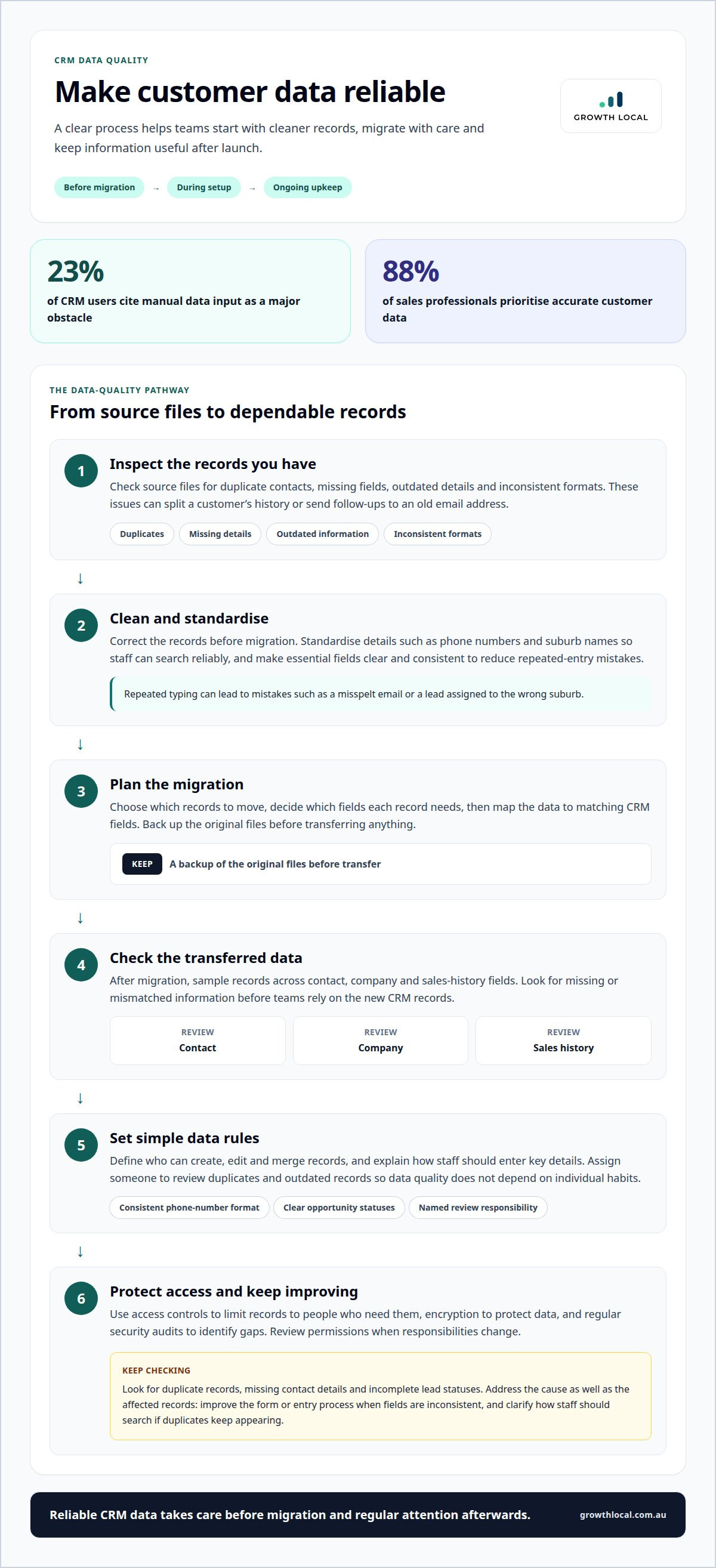
Poor-quality records make a CRM less useful from the start. Duplicate contacts can split a customer’s history, while an old email address can send follow-ups nowhere. Before migration, check source files for duplicates, missing fields, outdated details and inconsistent formats. For example, standardise phone numbers and suburb names so staff can search records reliably.
Manual entry adds another weak point. Twenty-three per cent of CRM users cite manual data input as a major obstacle, and 88% of sales professionals prioritise accurate customer data. Repeated typing creates opportunities for mistakes, such as a misspelt email or a lead assigned to the wrong suburb. Reduce repeated entry where practical, and make essential fields clear and consistent.
Data migration calls for a controlled process, not a quick file upload. Decide which records to move and which fields each needs, then clean the data and map it to matching CRM fields. Back up the original files before transferring them. Afterwards, sample records across contact, company and sales-history fields to catch missing or mismatched information.
Data governance keeps records useful after launch. Set rules for who can create, edit and merge records, and explain how staff should enter key details. A simple policy might specify a consistent phone-number format and sales-opportunity status. Assign responsibility for reviewing duplicates and outdated records so data quality doesn’t depend on individual habits.
Customer data also needs appropriate protection. Use access controls to limit records to people who need them, encryption to protect data, and regular security audits to identify gaps. For example, someone handling enquiries may need contact details but not broader access to sensitive notes. Review permissions when responsibilities change instead of leaving old access in place.
Check data quality by looking for duplicate records, missing contact details and incomplete lead statuses. Review the results regularly, then address the cause as well as the affected records. If new enquiries arrive with inconsistent fields, improve the form or entry process. If duplicates keep appearing, clarify how staff should search before adding contacts. This makes data cleansing ongoing maintenance that supports growth.
If migration or record quality is holding up your CRM rollout, talk through your customer-data workflow and the steps needed to make it more reliable.
3. Overengineered and overly customised systems
A CRM becomes harder to use when every team request leads to a custom field, screen or automation. For example, a business might create separate fields for every enquiry source when one structured source field would suffice. Extra layers can slow routine work, complicate reporting and make future changes harder. Start with the customer and sales processes the system needs to support, then configure it around those requirements.
Prevent scope creep by agreeing on essential outcomes before configuration begins. Record each requested change, the problem it addresses and who approves it. Separate launch requirements from later improvements so a special dashboard request doesn’t delay core lead tracking. Review proposed changes against agreed objectives and capacity before adding them to the build.
Use standard platform settings when they meet the need. If a sales team wants to flag urgent enquiries, a built-in priority field may work better than a custom workflow with several conditions. Custom code adds maintenance and testing requirements, so reserve it for a clear business need that standard configuration can’t meet. A simpler CRM is easier to explain, update and support.
Customisation also affects integration. A heavily altered contact record may not match the fields expected by accounting, email marketing or payment software. Before building a connection, map which system owns each piece of information and how updates should flow. For example, decide whether the CRM or accounting platform supplies a customer’s business name. Test common changes in both directions before relying on the integration.
Customer feedback helps separate useful features from personal preferences. Gather comments from staff handling enquiries, sales and follow-up, then group requests by the workflow they affect. If several users struggle to find a customer’s latest interaction, improve that view before adding unrelated reporting options. After each change, ask those users to test the revised process and explain what still slows them down.
Set boundaries to keep the build manageable: appoint a decision-maker, document approved changes and review outstanding requests at project checkpoints. Each request should identify the user, the task and the expected benefit. If the benefit is unclear, defer it. This makes trade-offs visible and limits avoidable rework without blocking changes that support a real customer relationship.
If your CRM design is becoming difficult to manage, talk through a simpler implementation approach.
4. Executive sponsorship and stakeholder investment
A CRM rollout needs an executive sponsor with the authority to make decisions and remove roadblocks. Without one, a sales manager may prioritise lead tracking while marketing focuses on campaign attribution, leaving teams with competing requirements. The sponsor should connect those goals to business priorities and explain why the change matters.
Give the sponsor specific responsibilities, not just a name on the project plan. They can approve scope, resolve conflicts between departments and communicate decisions to staff. For example, if sales and marketing disagree about when a lead is ready for follow-up, the sponsor can bring both teams together to confirm a shared process.
Ownership also belongs with people who understand the work. Assign a business lead to define sales and marketing workflows, a technical lead to manage configuration and integrations, and team representatives to test everyday tasks. These roles help ensure technical decisions include input from staff who handle customer enquiries.
Before implementation begins, align stakeholders on the outcomes the CRM should support. A sales leader might prioritise clear pipeline reporting, while marketing needs reliable campaign-source information. Agree on which outcomes matter first, how teams will use shared fields and who makes the final decision when requirements conflict. This gives the project a practical basis for decisions.
Without executive sponsorship, important decisions may stall, communication may weaken and teams may return to separate spreadsheets. A sponsor should provide regular updates, explain changes in plain language and address concerns directly. For instance, a project update can outline what changes for sales staff, when the new process begins and how to share feedback.
Stakeholder commitment means protecting time for the work, not simply endorsing the CRM. Schedule representatives from sales, marketing and technical teams to review workflows, test real scenarios and report issues. If the project team meets only after configuration, missed requirements can lead to rework. Early involvement makes complex decisions easier to resolve while the system is still being shaped.
Set a clear process for ongoing improvement. Record each issue, assign an owner and agree on how to prioritise it. A missing lead-status option may block reporting, while a dashboard preference can wait. The sponsor can review these trade-offs, keep the team focused on agreed objectives and prevent small disagreements from stalling progress.
Strong sponsorship doesn’t mean one executive decides every technical detail. It means the right people own decisions, communicate changes and stay accountable for customer and business outcomes. When leaders visibly support the process, teams have a clear way to raise problems and keep implementation moving.
5. Integrating CRM with existing systems
A CRM integration should move useful information between systems without creating extra work. The main challenges are mismatched fields, duplicate records, unclear data ownership and updates that don’t sync as expected. Seventeen per cent of companies report lack of integration with other tools as a major CRM challenge. Map how payment, accounting, ERP and marketing applications exchange information before implementation.
Start by tracing a customer journey from first enquiry to completed sale. For example, a lead might arrive through a website form, enter the CRM, then pass to an accounting platform after a sale. Decide which system owns each record and which fields need to move. If both systems can update a customer’s address, define how to handle conflicting changes.
Integration failures can cause everyday service problems. A sales team may see an old order status, while customer service can’t find the latest interaction. A connected CRM can give staff a more complete customer view, but only if records match across systems. Agree on a shared identifier, such as a customer ID, and test how the connection handles missing or duplicate records.
Data migration adds another layer of complexity. Older systems may store names, dates or sales stages in formats the CRM can’t use directly. Map each source field to its destination, standardise inconsistent values and keep an untouched backup. Then test a sample that includes active customers, closed sales and incomplete records. Compare key fields before and after transfer to catch gaps before wider use.
Test integrations with real workflows, not just a successful connection message. Submit a test enquiry, update its details, record a sale and confirm each change appears in the right system. Check what happens when a field is blank or a sync fails. Document who investigates errors, how records are corrected and how staff can avoid entering the same information twice.
Budget and timing depend on the number of systems, data formats, connection methods and testing requirements. An executive sponsor can help teams decide which integrations are essential for launch and which can wait. For example, connect the CRM to the marketing platform first if campaign follow-up is a priority, then plan accounting data flows for a later phase. This keeps work focused while allowing for broader integration over time.
The key is to define the customer journey, assign data ownership and test every important hand-off. This helps uncover integration issues before they disrupt sales or customer service. It also gives teams a clear record of how information should move between the CRM and existing tools.
Growth Local
Growth Local helps businesses address CRM implementation challenges with practical system setup tailored to their workflows and customer journey. If adoption is low, records are unreliable or integrations create manual work, a structured review can help identify what needs attention. CRM Setup supports businesses planning a new rollout or improving an existing system. Lead Generation System Setup and Marketing System Setup can also connect customer enquiries with follow-up workflows.
Bring your priorities, current workflow and main sticking points to the conversation. This gives the next steps a clear focus, whether you’re planning an implementation or improving an existing CRM.
Make your next CRM decision count
Treat your CRM as part of how the business operates, not as a one-off software project. Choose a practical improvement to focus on first, such as clearer enquiry hand-offs or less repetitive admin. Then observe how the change affects the team’s daily work and decide what to refine next.
This approach helps address common CRM implementation problems without adding complexity for its own sake. Focus on whether the system helps people move customer work forward. If priorities compete or progress stalls, a fresh perspective can help turn the next decision into a clear plan.
A CRM that fits the way your team works can provide a stronger foundation for what comes next.
Frequently Asked Questions
What are the most common CRM implementation challenges?
The main challenges are low staff adoption, unreliable records, mismatched workflows, unclear ownership and weak connections with other software. Their effects often overlap. For example, a customer service team might miss an update because an order status hasn’t synced, then enter the same information manually. Mapping a customer’s journey from first enquiry to completed service can reveal where these issues intersect.
Why do so many CRM implementations fail?
Implementations often fall short when a CRM is treated as a software installation rather than a change to daily work. The system may go live before teams agree on how to handle enquiries or define useful reporting. Staff then create workarounds, and leaders can’t rely on the results. Tie each system decision to a specific business objective, such as making lead sources easier to trace.
How do you ensure data security during CRM implementation?
Protect CRM data by limiting access to appropriate roles, using encryption and reviewing security controls regularly. For example, someone handling bookings may need contact details but not access to every internal note. During implementation, consider which systems receive customer records and who can export them. Documenting these access decisions makes permissions easier to manage when someone changes roles.
How do you measure CRM implementation success?
Measure success against the business outcomes set before launch, not simply whether the software is running. If the goal is to reduce missed enquiries, track how quickly new leads receive follow-up and how many remain unassigned. Compare results with the business’s starting position, then review them regularly. Combine operational measures with staff feedback to spot improvements that raw activity counts may miss.
What is the biggest cause of CRM implementation failure?
Low user adoption is a leading cause of CRM project failure, according to CIOReview. A system may have useful features, but results suffer if staff keep customer details in personal spreadsheets or skip updates. Managers can investigate by observing a real task, such as assigning and following up on an enquiry. This can reveal whether the barrier is an unclear process, poor usability or a lack of practical support.
Why is my CRM implementation not working?
A CRM may not be working because its setup doesn’t match the actual customer journey. Find a specific point where work stalls: an enquiry might enter the system without an assigned owner, or a report might depend on a field staff rarely complete. Trace a recent customer case from start to finish. The gap between the intended process and what happened usually points to the next fix.
What are the most common CRM implementation problems?
Common CRM implementation problems include poor adoption, inconsistent information, unnecessary complexity, limited leadership involvement and integration gaps. To narrow down the cause, follow one task across teams. For example, trace a campaign enquiry through qualification, sales follow-up and customer service. Note where information goes missing or someone repeats work, then prioritise that bottleneck.
What percentage of CRM implementations fail or miss their goals?
Estimates of CRM implementation projects that fail to meet their objectives range from 20% to 70%. The range is broad, so it’s not a precise prediction for an individual business. It does show why success needs a clear definition before launch. Set measurable goals that reflect your priorities, such as lead follow-up or record completeness, and assess progress against your own starting position.


