

Best Tradie CRM in Australia: Complete Buyer's Guide
The best tradie CRM isn’t necessarily the one with the most features. If you’re weighing up what the best CRM for tradies in Australia is, start with a system that captures enquiries, tracks quotes and keeps customer follow-ups organised. The right choice depends on how your business wins work and manages each job.
It’s easy to confuse a CRM with job management software. A CRM focuses on customer relationships, from the first enquiry to repeat work. Job management software is built around scheduling and running the work itself. Some platforms combine both, while others focus on one function.
This guide explains how to compare the options without paying for tools you won’t use. You’ll see what to look for in pricing, setup, scheduling and customer workflows, and how to decide whether a CRM-only system or an all-in-one platform suits your trade business. The goal is a practical shortlist that fits the way you work, not another complicated system to maintain.
Key Takeaways
- Choose a CRM for managing enquiries and customer relationships, and job management software for organising work. Integrations help keep customer and job information connected.
- Map the customer journey from booking and quoting through invoicing and payment, so fewer details need to be entered twice.
- Use timely quote follow-ups and post-job review requests to keep customer communication moving after the initial enquiry.
- Match the system to your workload. Sole traders with fewer than 15 active leads may start with a well-organised Google Sheet before moving to a CRM.
- Plan for setup and refinement: with help, a trade business’s core CRM system is usually running within a few weeks, with the first 90 days as the implementation period.
Tradie CRM vs Job Management Software Explained
A CRM and job management software handle different parts of a trade business’s workflow. The right setup depends on whether enquiries, customer records, field operations or handovers are causing the most friction.
CRM and Job Management Software
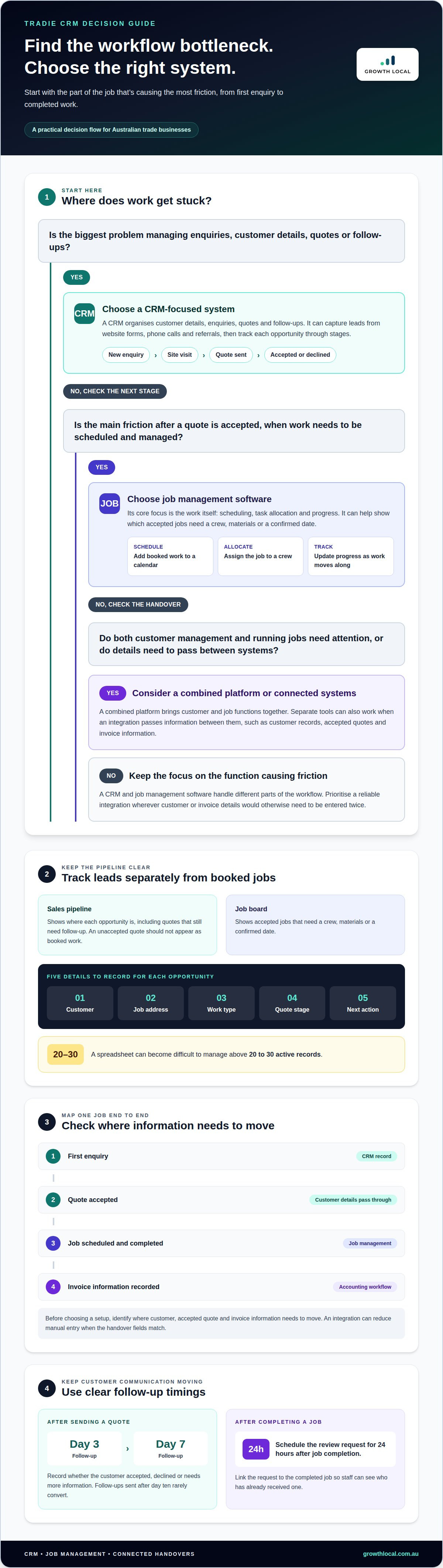
A CRM organises customer details, enquiries, quotes and follow-ups. Job management software focuses on the work after a quote is accepted, including scheduling, task allocation and progress. A combined platform brings both functions together, while an integration can pass information between separate systems. For example, an accepted quote can become a job without manually entering the customer’s details again.
Lead Capture and Pipeline Management
A CRM captures leads from channels such as website forms, phone calls and referrals, then tracks each opportunity through stages. A simple pipeline might run from new enquiry to site visit, quote sent, accepted or declined. To keep it useful, record five details: customer, job address, work type, quote stage and next action. A spreadsheet can become difficult to manage above 20 to 30 active records.
A sales pipeline is different from a job board. A customer who has received a quote may still need follow-up, even if no work is scheduled. A job board, by contrast, helps show which accepted jobs need a crew, materials or a confirmed date. Keeping the stages distinct helps prevent an unaccepted quote from appearing as booked work.
Integration is the link between customer management, job management and accounting tools. It can reduce manual entry by sharing details such as customer records, accepted quotes and invoice information. In 2026, CRM and email marketing platforms may offer links between customer records and invoicing tools. Before choosing a setup, map one job from first enquiry through completed work, then identify where information must move between systems.
Scheduling and managing multiple crews usually sit within job management software. A dispatcher can assign a booked job to a crew, add it to a calendar and update its status as work progresses. For example, an electrician might have one crew handling a switchboard replacement while another attends a fault call. The CRM records the customer conversation; the schedule shows who is doing the accepted work and when.
| Option | Lead capture and follow-up | Scheduling and crews | Accounting integration |
|---|---|---|---|
| CRM | Core focus | Limited or separate | May connect to invoicing tools |
| Job management software | Basic or secondary | Core focus | May connect to accounting tools |
| Combined platform | Customer pipeline and records | Jobs and crew allocation | Integration varies by platform |
| Spreadsheet | Manual tracking | Separate calendar or process | Details may need manual entry |
Choose the option that addresses your biggest bottleneck, then prioritise a reliable integration wherever customer or invoice details would otherwise need to be entered twice.
Booking, invoicing, payments and review requests
A CRM can keep customer details and quote history together, while accounting software manages invoice records. Enter your Australian business’s GST details in the accounting system, then connect customer and job information where the tools allow it. Your tax invoice workflow should keep invoice and payment records alongside the customer file.
Start with the customer’s next step. After they accept a quote, confirm the booking, assign the job and record its status. Once the work is complete, create the invoice from the agreed job details. This sequence helps prevent a quoted amount, scheduled job and final invoice from becoming three disconnected records.
Quotes need a clear follow-up process. Schedule a message for day three and day seven after sending a quote, then record whether the customer accepted, declined or needs more information. Follow-ups sent after day ten rarely convert. A CRM can trigger reminders or messages, so the office doesn’t need to rely on someone remembering each quote.
Keep the booking connected to the quote. For example, if a customer accepts a plumbing repair quote, the record should show the agreed work, booking date and assigned team. A mobile view matters when a tradie needs to check customer notes or update a job between appointments. Confirm that on-site changes flow back to the main customer record.
After completing the job, send the invoice through the connected accounting workflow. The system should make it easy to see whether payment is pending or recorded, without entering the same customer details twice. Duplicate data entry between a CRM and invoicing software is a common reason Australian tradies abandon CRMs after two months. An integration can reduce that friction, but only if the handover fields match.
Review requests also benefit from a defined trigger. Schedule the request 24 hours after job completion, when the customer has had time to see the finished work. Keep the request linked to the completed job, so staff can distinguish customers who have already received one from those still awaiting a message.
Before choosing a subscription, map these steps in order: quote sent, follow-up, booking, job completed, invoice issued, payment recorded and review requested. Then check which steps the platform automates, which require staff input and where accounting integration removes manual work. AI automations can also help with routine customer messages, while invoice creation and payment tracking remain tied to the right records.
How long does it take to set up a CRM for a trade business?
With help, a trade business’s core CRM system is usually running within a few weeks. The first 90 days form the implementation period: configure the workflow, migrate useful records, then refine it using real enquiries and jobs. A sole trader importing a tidy contact list has less setup work than a multi-crew business connecting several systems.
Choose tools around the work your team actually does. A plumber handling local repairs may need enquiry capture, customer history and reminders. A business managing several crews may also need job allocation, shared calendars and clear handovers. Field service tools suit teams working across job sites, while a simpler CRM can work well for a sole operator focused on enquiries and referrals.
Business size matters, but workload matters more. A small trade business with frequent quote requests may need pipeline tracking before advanced reporting. A growing team may prioritise shared customer records and permissions, so office staff and tradies see consistent information. Start with the bottleneck: missed enquiries, slow quote follow-up, duplicate records or unclear job ownership. Choose functions that address that problem first.
For a clean migration, work through these steps:
- List the workflow: map how a new enquiry becomes a quote, booking and completed job.
- Choose key records: identify the customer, contact details, job address, enquiry source and current status.
- Clean existing data: remove duplicate contacts and separate active opportunities from old records.
- Set up the system: configure pipeline stages, user access, reminders and useful connections to other tools.
- Test a real job: enter one enquiry and follow it through each stage before moving across the wider team.
Migration works best when you compare the old and new workflows before importing everything. For example, a spreadsheet may use “waiting” for both a pending quote and a booked job. Separate those stages in the CRM so the next action is clear. Keep useful customer history, but leave out fields nobody uses.
Roll out the core process first, then review it during the first 90 days. Track whether enquiries have owners, follow-ups happen on time and staff can find job details. If the team skips a field or keeps a separate manual list, simplify the workflow before adding more automation. A CRM should fit the way the trades business operates, not create another admin task.
CRM pricing and platform suitability
A CRM’s value depends on the work it helps you win and the admin it removes. Compare the potential value of work you can manage more effectively with the subscription cost, time spent quoting and following up, and the risk of missed handovers. The best fit is the system that solves a real bottleneck.
Match the platform to your current workflow. A sole operator may need customer records, quote tracking and reminders. A business with office staff and several crews may need shared access, role permissions and job management features. Paying for functions your team won’t use adds complexity without fixing the problem.
For a smaller operation, a well-organised spreadsheet can be a sensible starting point. A dedicated CRM becomes more useful as enquiries, follow-ups and customer history get harder to manage manually. If you’re weighing up what the best CRM for tradies in Australia is, focus on how reliably you can track opportunities and maintain customer relationships, not the length of the feature list.
Use a free trial to test real tasks, not just the dashboard. Paid CRM tools in this comparison offer a free trial. Enter an enquiry, create a quote stage, assign a follow-up and try the mobile experience. Then test whether customer details connect cleanly with your invoicing or job management software.
Read the contract terms covering renewal, cancellation, user limits, data storage and export. Check which features sit behind higher subscription tiers, and whether integrations or extra users change the plan. Those details affect the ongoing cost and whether your records remain usable if you move systems.
Common risks include paying for unused features, relying on an integration that doesn’t transfer the fields you need, and finding customer records difficult to export. Look for clear cancellation terms, data-export options and a practical way to retrieve records. For example, check that names, phone numbers, quote stages and job notes can be exported in a usable format.
- Identify the problem: missed enquiries, slow quoting, scattered customer history or repeated admin.
- Choose the plan: select only the users and functions your workflow needs.
- Test the handover: move a sample customer record through the CRM and connected tools.
- Read the terms: note renewal, cancellation, data access and feature limits before committing.
Compare platforms using the same test enquiry and follow-up process. Record which steps work, where manual entry remains and what the subscription includes. Start by solving the costliest friction, then add features as your workflow calls for them.
Job scheduling and dispatching
Scheduling turns accepted work into a practical plan for the day. Dispatching assigns each booked job to a suitable person or crew. For example, an electrical business can separate planned installations from urgent fault calls. A shared calendar helps staff see current commitments before confirming another appointment.
Useful dispatch details go beyond a customer’s name and appointment time. Include the job address, work description, access notes, assigned crew and status. A technician arriving at a unit complex may need entry instructions, while a renovation job may need site contact details. Keeping these records with the booking gives the crew useful context before they travel.
Plan the schedule around real constraints. A dispatcher can consider location, skills, job duration and existing commitments before assigning work. If a team member handles gas appliance work, make that capability clear in the schedule. For a multi-crew business, clear ownership reduces confusion when appointments change or customers call the office.
Set a consistent status flow so office staff and field workers know what happens next. For example, use stages such as booked, assigned, on site, work complete and ready to invoice. Each update should answer a practical question: has the crew accepted the job, has work started, or does someone need to contact the customer? Keep status labels distinct from quote stages.
Before selecting scheduling features, walk through a typical workday. Start with a confirmed job, assign the crew, add site notes, then record a change. Check whether the calendar makes overlaps visible and whether staff can find the latest job details. A mobile view can help a tradie review the next appointment away from the office.
- Separate job types: distinguish planned maintenance from urgent call-outs.
- Assign responsibility: name the crew or worker handling each booked job.
- Keep records current: update appointment changes, access notes and job status.
- Plan repeat work: link returning customers to previous job records and relevant notes.
- Review capacity: use the calendar to spot clashes before confirming new work.
Good dispatching also supports customer communication. If a job moves, update its record and tell the customer through your chosen process. When repeat work comes in, previous records can help staff understand the site and service history. The schedule should show what is booked; the customer record should retain the context behind it.
Choose scheduling tools that fit how your team assigns and updates work. If changing bookings leaves staff relying on separate calendars or messages, map that handover before configuring the system.
Discuss your CRM workflow
Growth Local
Growth Local helps trade businesses turn CRM decisions into a workable customer and marketing process. If enquiries are slipping through the cracks or follow-ups rely on memory, its CRM Setup can organise the pipeline around how your team handles leads, quotes and customer records. Lead Generation System Setup and Marketing System Setup can connect enquiry generation with a clearer process for managing new prospects.
For trade businesses handling routine incoming calls, Growth Local’s AI Receptionist can help manage that part of the customer workflow. The right starting point depends on the bottleneck: choose CRM support for scattered customer information, or lead generation support when attracting enquiries is the priority.
Contact Growth Local to discuss what would suit your trade business.
Build a system your team will actually use
Choosing the right CRM for your trade business comes down to fit, not feature count. The next step is turning your chosen setup into a habit: make sure each enquiry has an owner, each opportunity has a next action, and your team knows where updates belong. A system only helps when people use it as part of their normal workday.
Start with one clear workflow and improve it as your business changes. That keeps the process practical, gives your team room to adapt and makes future decisions about tools easier. If you’d like help shaping a CRM process around your trade business, get in touch with Growth Local.
Take the next step at a pace that suits your business. A clearer system can give you more room to focus on the work ahead.
Frequently Asked Questions
Can I run a CRM from my phone?
Yes, many CRMs offer mobile access through an app or browser. From a phone, you can review a customer record before a site visit, add a call note or check the next task between jobs. Mobile access varies by platform, so consider how it handles poor reception and whether key functions work on your device. A mobile-friendly interface should make updates quick, not add extra admin.
How much does a CRM cost for a tradie?
CRM subscription costs vary according to the plan, users, features and integrations included. Compare the full subscription, not just its entry-level offer: automations, extra users or connections to other systems may sit in different tiers. Also weigh the time spent following up enquiries against the workflow the CRM supports. Compare the system’s cost with the admin it removes and the work it helps you manage.
Which CRM do most small Australian tradies actually use?
There isn’t one CRM that suits every small Australian trade business. The right choice depends on how enquiries arrive, how quotes are handled and whether the business needs scheduling in the same system. A sole operator with a straightforward process may not need the same setup as a team coordinating office staff and crews. Focus on a platform your team will use consistently, rather than choosing one based on assumed popularity.
What are the best CRM and field service software options for tradies in Australia in 2026?
The best option in 2026 depends on whether you need customer relationship management, field service operations, or both. A CRM-led platform suits businesses prioritising lead follow-up and customer history. Field service software suits teams that need job allocation and operational scheduling. An integrated platform may bring these workflows together. Compare how each handles your real customer journey, rather than relying on a general “best” ranking.
Which Australian CRM tools are designed for electricians, plumbers, builders and other tradies?
Tools designed for trades should support how the business works, not just use trade labels in their marketing. An electrician may need clear records for different work types, while a builder may need customer communication tied to longer project stages. Plumbers may prioritise incoming service enquiries and repeat customer history. Assess the workflow, team access and field-service requirements that matter in your trade.
How do tradie CRMs compare on quoting, scheduling, job management, invoicing and payments?
Tradie CRMs vary in how many operational tasks they handle directly. Some focus on customer records and quote follow-up; others combine those with job scheduling, invoicing or payment functions. Trace an accepted quote through booking, job completion and payment. This reveals whether details move between stages or staff must enter them again. Check which functions are built in and which depend on connected software.
How much do popular CRM and job management tools for Australian tradies cost?
Subscription pricing differs between platforms and plans, so there’s no standard fee shared by popular tools. Compare the advertised amount in Australian dollars, then look at what it includes: user access, job features, integrations and support. Add-ons can affect the total subscription. A lower starting tier may not cover your team’s workflow, while a broader plan may include functions you won’t use.
Which tradie CRM integrates with Xero, MYOB, accounting software and Australian payment providers?
Integration compatibility depends on the CRM and the accounting or payment system you use. Xero and MYOB connections may pass different information, such as customer details, invoices or payment status. Check which records transfer and whether updates sync both ways or require manual entry. For payment providers, distinguish a link that lets customers pay from an integration that also updates the CRM or accounting record.


