

Automated lead follow up for tradies with quote reminders
You don’t have to stay glued to your phone for automated lead follow-up for tradies to work. Connect Facebook lead ads to a CRM pipeline and set up SMS, email and quote reminders, so enquiries get a prompt next step while you’re on the tools. A practical quote reminder sequence is day 2, day 5 and day 10 after sending.
Automation doesn’t need to replace personal contact. It can handle routine follow-ups and keep leads moving while you focus on questions, site visits and decisions that need your experience. The goal is to stop promising prospects slipping through simply because you’re busy on a job.
This guide explains how automated messages, missed-call replies, quote reminders and CRM stages work together, and how Facebook lead ads can feed new enquiries into the process. You’ll learn what to automate, where a personal touch matters and how to keep the system useful rather than turning it into another task to manage.
Key Takeaways
- Set up SMS and email replies to acknowledge new enquiries while you’re on the tools, then take over when a prospect needs a personal conversation.
- Use a CRM pipeline to track each lead from first enquiry through quoting, booking and completed work, with a clear next action at every stage.
- Connect Facebook lead ads to your follow-up process so new enquiries are captured and routed into the same pipeline.
- Schedule quote reminders for day 2, day 5 and day 10, and make each message useful rather than sending the same nudge repeatedly.
- Start with the biggest follow-up gap in your business, then build and test the automation before adding more steps.
Automated SMS and email follow-up
A prompt reply helps keep a new enquiry moving. A missed-call text-back can acknowledge a caller within seconds. Automated lead follow up for tradies can send that first response while you’re on a job.
Use SMS for short, immediate updates and email for details prospects may want to refer back to. Give each message one purpose, such as confirming an enquiry arrived or asking for a job photo. A clear next step tells the customer what to do.
Choosing follow-up tools
Choose tools that capture enquiries, send messages and store replies together. A CRM connected to your website or Facebook lead ads can place each prospect in one pipeline. Check that your team can view message history, update lead status and see who owns the next action.
For Australian tradies and small trade businesses, the right setup depends on where enquiries arrive. Test the full journey with a sample Facebook lead, from form submission to reply. Automated lead follow up for tradies should reduce manual chasing without hiding important conversations. An admin team member can manage exceptions, while manual tracking relies on someone remembering each callback.
Privacy, consent and spam rules
For Australian commercial SMS and email, build your process around consent, clear business identification and an easy way to stop marketing messages. Record how a contact gave permission and honour opt-outs across relevant messaging tools. Distinguish a service update, such as confirming an inspection, from promotions for future work.
Before activating a workflow, test the opt-out process with a sample contact. Make sure opting out removes that person from relevant marketing sequences, not just one message. Keep follow-ups connected to the original enquiry, and don’t add someone to unrelated campaigns without permission.
Lead follow-up software
Lead follow-up software connects contact details, message templates and lead stages. For example, a new roof repair enquiry could trigger an acknowledgement, create a CRM record and assign a callback task. Replies can then be stored with that record, giving your team one place to review the conversation.
Set clear triggers before switching on automation. A new form submission can start an SMS, while a missed call can trigger a text-back. Use email when a prospect needs details, such as what to prepare for a site visit. Staff should handle questions that require trade knowledge.
Risks include missed leads, duplicate messages and poor personalisation. Test with sample contacts to check that each enquiry creates one record and triggers the intended reply. Pause messages when a prospect responds or a team member updates the lead. Regularly review failed sends and incorrect contact details.
Keep the process practical: capture the enquiry, send a useful reply and assign the next action. If a prospect asks for a call, make that request visible to the right person. Automation handles repeatable steps, while your team takes charge of conversations that need experience and judgement.
Automation setup and launch timeframe
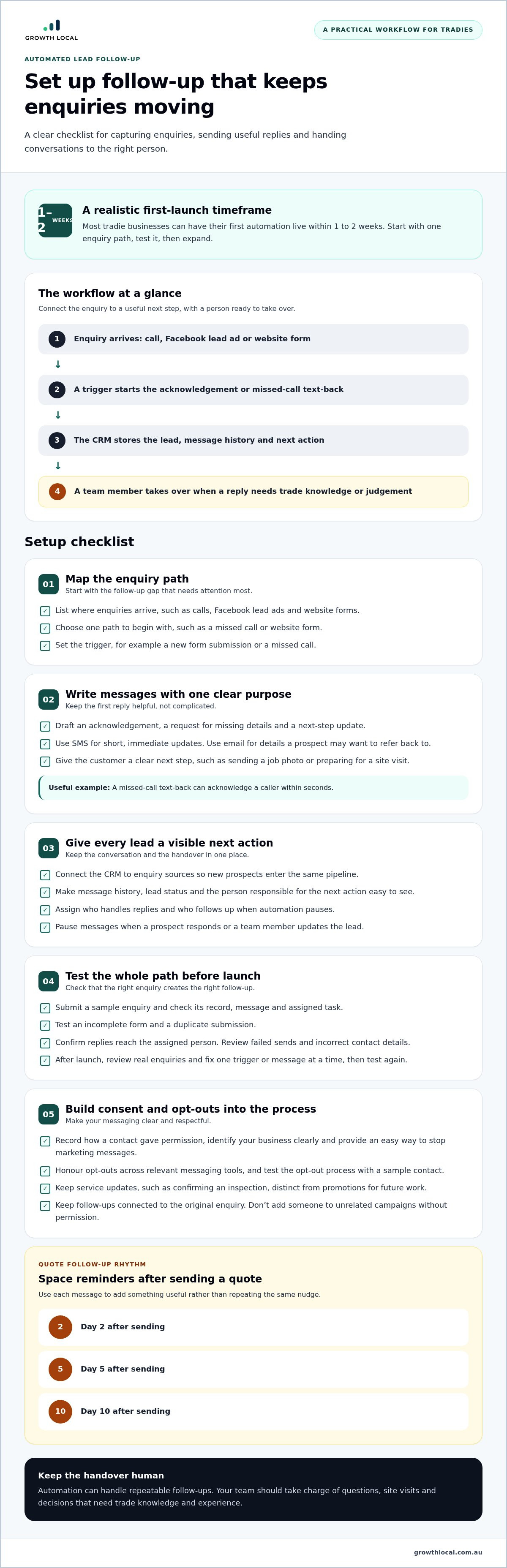
Set up automation by mapping enquiry sources, choosing triggers, writing messages and testing each workflow. Most tradie businesses can have their first automation live within 1 to 2 weeks.
Roll out in stages: start with one enquiry path, check the results, then expand. For example, connect a website form before adding Facebook lead ads.
Setup steps
These steps turn follow-up into a clear workflow rather than a collection of disconnected messages. Start with the enquiry that most often needs attention, such as a missed call or website form.
- Map enquiries: List each source, such as calls, Facebook lead ads and website forms.
- Set the trigger: Choose what starts the workflow, such as a new form submission.
- Write the messages: Draft an acknowledgement, a request for missing details and a next-step update.
- Assign ownership: Decide who handles replies and who follows up when automation pauses.
- Test the path: Submit a sample enquiry and check its record, message and assigned task.
Keep the first workflow focused. A plumbing business might acknowledge a new service enquiry, collect the suburb and flag urgent requests for a team member. Don’t automate decisions that need trade knowledge. Once the first path works, document its trigger and owner before building another.
Setup costs and timeframes
Setup cost depends on the case and is provided after a quote request. Factors include the tools already in use, the number of workflows, data cleanup, integrations and testing requirements.
Ongoing costs can also depend on the software and services used. Separate the initial setup from continuing platform, communication or support costs when planning your budget. Review what each charge covers, including setup, testing and ongoing work.
Most tradie businesses can launch their first automation within 1 to 2 weeks. The actual setup sequence depends on access to enquiry channels, existing contact records and approved message wording. A workflow using one form and one acknowledgement is simpler than connecting several lead sources and follow-up branches.
Before launch, test a new lead, an incomplete form and a duplicate submission. Confirm each creates the right record and triggers the correct message. Then check that replies reach the assigned person. A simple test log can record the trigger, result and any fix needed.
After launch, review the workflow using real enquiries. Check for failed messages, missing contact details and leads without an owner. If a change is needed, update one trigger or message at a time, then test it again. This keeps the process easy to understand as you add more sources.
CRM pipelines for leads, customers and jobs
A CRM pipeline shows where each enquiry sits and what happens next. Use separate stages for new leads, quotes, booked jobs and completed work. For example, a leaking tap enquiry shouldn’t remain labelled “new” after the customer books.
Build stages around real actions, not vague labels. A practical pipeline might include:
- New enquiry: Record the contact, job type and lead source.
- Contact attempted: Note the call or message and next action.
- Site visit needed: Assign an owner and record the proposed visit details.
- Quote sent: Save the quote date and follow-up task.
- Job booked: Capture the agreed work and scheduling status.
- Work completed: Close the job and retain useful customer details.
Keep each record useful
For a roofing enquiry, record the customer’s name, suburb, job description and preferred contact method. Add the lead source, such as a Facebook form or phone call. These details help staff understand the request before making contact, without searching through separate inboxes.
Make every stage point to a clear next action. When a quote moves to “sent”, create a follow-up task for its owner. If the customer accepts, move the record to “booked” and assign the scheduling step. A visible owner stops an enquiry sitting untouched between team members.
Track customers and jobs
Keep customer details linked to their jobs instead of creating disconnected records for each visit. A returning customer with a blocked drain may also have an earlier plumbing job on file. That history helps staff understand previous work and prepare relevant questions before a callback.
Separate job progress from sales progress. “Quote accepted” describes the customer’s decision; “work scheduled” describes the job. This distinction helps you spot accepted work that still needs booking, or completed work that needs closing notes.
Plan seasonal customer reminders
Group past customers by service type and relevant season. For example, an air-conditioning business could organise records by installation or service history, then prepare a suitable reminder before warmer weather. A gutter cleaning business could use local seasonal conditions to plan messages before customers commonly review drainage.
Keep reminders relevant to the previous job and the customer’s contact preferences. A useful message might refer to the service completed and offer an easy way to discuss future work. Record the message and any reply in the customer’s CRM history so staff can see whether a conversation is already underway.
Review the pipeline regularly. Check for records without an owner, jobs left open after completion and customers due for a relevant seasonal reminder. These checks turn the CRM from a contact list into a working view of leads, customers and jobs.
Automated quote follow-up sequences
A practical quote follow-up schedule sends reminders on day 2, day 5 and day 10 after sending. Slow quote responses can lose 35 to 50% of jobs, while automated follow-ups can convert 20 to 30% of stale quotes into accepted jobs.
Quote follow-up timing
Use the day 2, day 5 and day 10 sequence as a starting point. Each reminder should have a different purpose, rather than repeating the same request for an answer. A day 2 message can confirm the quote arrived. A day 5 follow-up can offer to clarify an item. A day 10 message can ask whether the prospect wants to proceed.
Set the sequence to stop when the customer replies, accepts the quote or declines. This prevents a booked job from receiving another sales reminder. If a prospect asks for more time, pause the remaining messages and assign a personal follow-up task. Track each outcome in the quote record so the next action matches the customer’s response.
Quote message sequences
Write each message about the quoted work. For a fence repair quote, the first follow-up could ask whether the customer received the estimate. The next could invite questions about materials or scope. The final message can ask whether they’d like to proceed or close the quote for now.
Keep SMS concise, with the job and business clearly identified. Use email when a prospect needs quote details or a written explanation. Avoid sending identical SMS and email reminders together. A useful sequence gives the customer a clear way to reply and records the response against their quote.
Before automating, check that the quote status triggers the right messages. A quote marked “draft” shouldn’t start a sent-quote sequence. Test a sample record from quote sent through to accepted, declined and no reply. Confirm that acceptance stops reminders and moves the job to the correct next stage.
Use the results to refine the wording. Compare replies to the day 2, day 5 and day 10 messages, then adjust any message that creates confusion. If customers repeatedly ask about the same quote detail, add a plain explanation to the relevant follow-up. Keep the original quote accurate, and don’t use a reminder to change its terms.
Automation can support follow-up, but it shouldn’t make decisions about unusual requests. Route questions about a changed scope, access constraints or urgent work to a person. For example, if a customer asks to add a second fence line, pause the standard sequence and review the revised quote before messaging again.
Use clear outcomes in the CRM: accepted, declined, pending or revised. These labels show which quotes need action and which sequences should stop. Review open quotes regularly, including records with no reply after the final reminder. This keeps follow-up useful without sending messages indefinitely.
What is automated lead follow-up software for tradies in Australia?
For an Australian tradie, this software connects enquiries, customer records and follow-up tasks. It moves routine steps along while you focus on the job.
What the software connects
A typical setup links lead sources, a CRM and message workflows. For example, a Facebook lead ad can send a prospect’s details into a CRM record, showing the enquiry source, requested trade and contact history. A workflow can then trigger an acknowledgement or assign a callback task.
The software is more than a message scheduler. It links a prospect’s details to the next action, such as requesting job photos or arranging a site visit. A sparky might receive a new enquiry, see its suburb and job description, then call with useful context. That’s easier than piecing details together from separate inboxes.
Different tools handle different tasks. A Facebook lead form collects an enquiry. A CRM stores and organises the record. Automation rules decide what happens when a new lead arrives. Email and SMS carry the follow-up, while staff handle questions that need trade knowledge.
How the workflow operates
Start by defining what counts as a new lead. A submitted Facebook form might create a record marked “new” and assign it to the person handling enquiries. The system can send an acknowledgement and create a task for the next conversation. If the prospect replies, staff can update the record and take over.
Clear stages make a workflow easier to manage. A lead could move from “new” to “contacted”, then “site visit” or “quote required”. Each change should reflect an action, not just a label. For instance, mark “contacted” after an actual call or message, not when a task is assigned.
Choose software by how well it fits your current process. Map where enquiries arrive, who follows up and what information each job needs. Then test a sample lead from a Facebook form through to its next task. Confirm the record stays useful when someone else takes over the enquiry.
Keep automation focused on repeatable work. A workflow can capture details, send a relevant acknowledgement and flag a callback. A person should handle scope changes, technical questions and unusual requests. Review real records to catch duplicate entries, missing details or tasks without an owner.
For example, a fencing business could route a new quote enquiry into its CRM, record the suburb and request site photos. The owner can review those details before preparing a quote. This gives the system a clear job while leaving pricing and trade decisions with the business.
Growth Local: Lead Generation System Setup
Growth Local sets up lead generation systems that connect new enquiries with a clear follow-up process. If Facebook lead ads, customer details and callbacks currently sit in separate places, a joined-up workflow can make the next action easier to manage.
Growth Local’s Lead Generation System Setup and CRM Setup support enquiry capture, lead organisation and follow-up workflows. Marketing System Setup and AI Receptionist services can also help businesses streamline how they handle enquiries. The right starting point depends on where leads come from and which step is causing the biggest bottleneck.
Bring a real example, such as a Facebook enquiry that needs a quote reminder. Growth Local can discuss how a suitable setup could fit that process. Contact Growth Local to talk through your lead follow-up needs.
Make follow-up part of how you work
Choose one point in your customer journey where follow-up regularly competes with doing the job. Set a clear owner, decide what a useful customer experience looks like and build the process around your team’s real workload. Automated lead follow-up for tradies should support the way your business operates, not create another system to babysit.
After launch, keep the process accountable. Decide who reviews customer feedback, updates message wording and handles situations that need a personal touch. As your services or workload change, revisit those decisions to keep the system relevant. The goal is a dependable routine that gives your team more room to focus on skilled work and customer conversations.
Growth Local can help you set up a system that fits your lead follow-up process.
You now have a clear way to move from missed follow-ups to a process your team can own. Contact Growth Local to discuss setting up your lead generation system.
Frequently Asked Questions
Do I need to be on my phone for this to work?
No. Automated workflows can acknowledge enquiries and organise follow-up while you’re working. You’ll still need to step in when a prospect asks for trade advice, changes the job scope or requests a conversation. For example, a new enquiry can create a callback task for a team member, giving the lead an owner without requiring you to check your phone constantly.
How fast does the follow-up go out?
A missed-call text-back can send an SMS within seconds. Other follow-ups depend on their trigger, such as a new form submission or a quote being marked as sent. Set each workflow to start when the relevant event happens, then test it with a sample enquiry. This helps catch delays caused by missing contact details or incorrect setup.
What if I already have a CRM?
You may be able to build on your existing CRM rather than start again. First, map its current lead stages, contact fields and follow-up tasks. Then test a sample enquiry to see whether its details and message history appear in the right record. Check for duplicate contacts and assign responsibility for merging them before connecting more lead sources.
How much does tradie lead follow-up software cost in Australia?
Setup pricing depends on the case and is given after a quote request. Cost factors include the number of lead sources and workflows, your existing CRM, required integrations, data cleanup and testing. Ongoing software or communication costs may also affect the total. Separate setup work from ongoing charges so you can compare what each part covers.
Can Australian tradies automate SMS, email, and phone follow-ups for new enquiries?
Yes, SMS and email follow-ups can be automated, while phone follow-up can be prompted through an assigned call task. An AI receptionist can also automate lead capture and initial customer interactions. For example, a new enquiry could receive an acknowledgement while a staff member gets a task to call about access details or a complex job request.


