

Automated email sequences for new leads that nurture and onboard
More emails won’t fix a follow-up process without a clear plan. Automated email sequences for new leads work when every message has a purpose and reflects what the prospect needs next. If enquiries are handled manually, follow-ups can easily slip through or arrive without the right context.
A sequence gives your business a consistent way to welcome leads, build trust and share useful information while you focus on work that needs your attention. But it shouldn’t send the same messages regardless of how someone responds. Engagement can shape what happens next, whether that means sharing relevant information, addressing a concern or guiding a new customer through onboarding.
This guide explains how sequences work, how to plan their timing and content, and how to tailor messages to subscriber behaviour. You’ll see how educational emails, case studies and objection handling can support a decision, and how marketing email automation differs from a sales sequence. The aim is a follow-up system that feels relevant to each lead and runs reliably behind the scenes.
Key Takeaways
- Match each email to the lead’s decision stage, so useful information arrives before a sales conversation is needed.
- Use engagement signals to guide the next message, rather than sending every subscriber the same follow-up.
- Build onboarding around one clear next action at a time, helping new users make progress without information overload.
- Use educational content, case studies and objection handling to address concerns and make the next step clearer.
- Separate marketing automation from direct sales follow-up, then connect the right system to your lead and CRM processes.
1. What is an email sequence, and how can it enhance your email marketing strategy?
An email sequence is a set of pre-written messages sent automatically after a trigger or at scheduled intervals. A newsletter signup, resource download or enquiry can start one. Each message then gives the recipient a relevant next step, instead of leaving follow-up to memory. For example, someone who downloads a service guide could receive practical advice before an invitation to discuss their needs.
Lead nurturing helps prospects move through their buying journey with useful information at each stage. An early email might explain the problem your service solves, while a later one answers questions about the process. Warm leads need decision-stage content, such as a case study, a clear explanation of what happens next or answers to common concerns. These touchpoints build context before a sales conversation. Salesforce is cited for the estimate that generating a viable sales lead usually takes six to eight touches.
Sequence content should reflect the lead’s situation, not follow a rigid template. Someone comparing options may need evidence and practical details; someone who has just enquired may need a prompt response and a simple next action. A lead nurture sequence typically runs four to eight emails over two to six weeks. Spacing messages three to seven days apart gives recipients time to consider each point without letting the conversation go cold.
Timing can also change with the buyer journey. A new subscriber might receive an introduction first, followed by educational content and then decision-stage information. If they request a quote or book a conversation, shift the sequence to support that active step. A contact who downloads a guide but takes no further action may need a different follow-up. The trigger and message should reflect what the person did, not just the date they entered the system.
Lead scoring can help prioritise the next steps. A marketing system can assign more weight to meaningful actions, such as visiting a service page, replying to an email or requesting a quote. Repeated engagement may signal readiness for direct follow-up, while a single download may call for further nurturing. Scoring works best when its criteria match real buying signals and sales and marketing teams share the same definitions of an active lead.
Nurturing and onboarding are connected, but they have different goals. Nurturing helps a prospect decide whether to buy; onboarding helps a new customer take the first steps after signing up or purchasing. For example, a service enquiry sequence might explain options before a decision, then switch to welcome information and next steps once the person becomes a customer. Mapping both stages prevents sales prompts from continuing after onboarding begins.
2. Conditional branching based on subscriber engagement
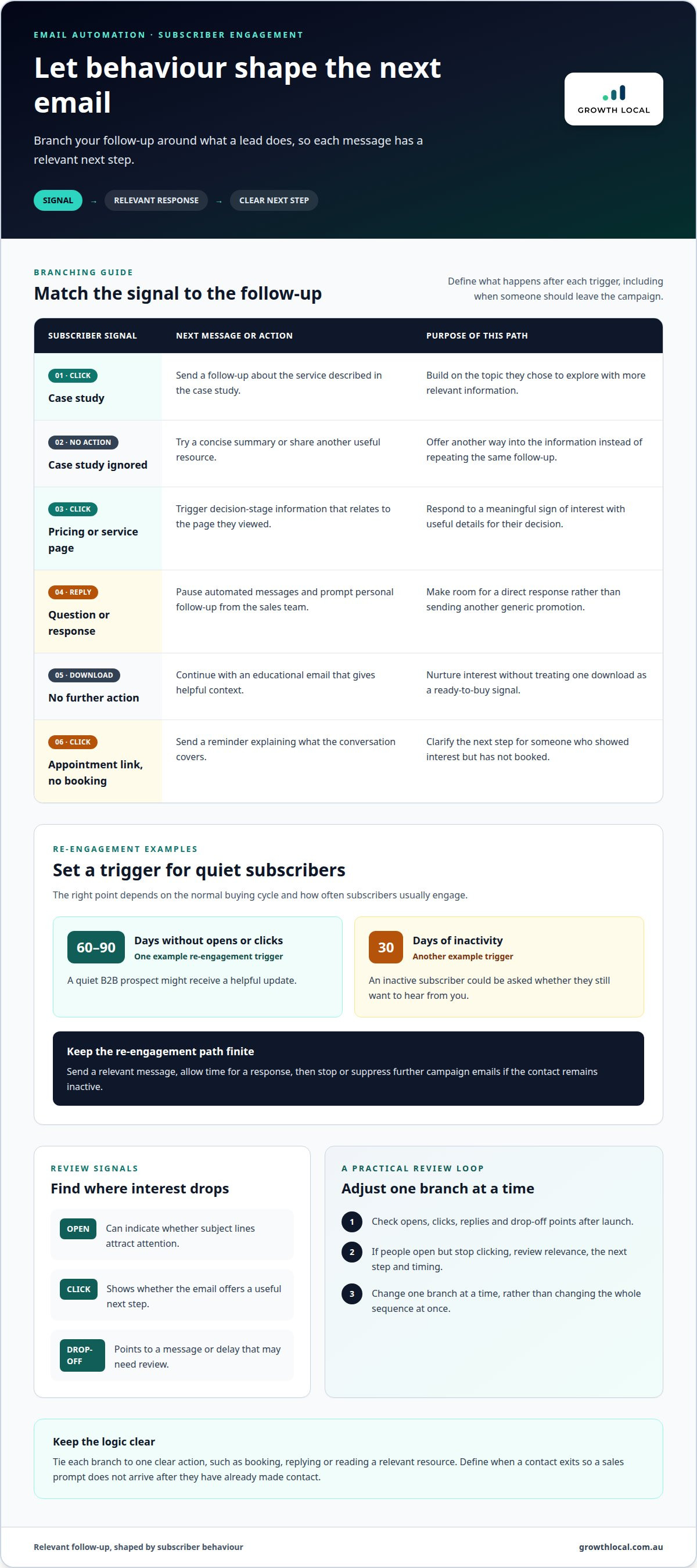
A campaign can branch into different paths when subscribers open, click, reply or stay inactive. For example, a lead who clicks a case study can receive a follow-up about the service it describes. Someone who ignores that email might instead receive a concise summary or another resource. This branching links each action to a relevant next message, so lead nurturing responds to behaviour instead of following one fixed timetable.
Set branch rules around actions that indicate interest. A click on a pricing or service page can trigger decision-stage information, while a reply can pause automated messages and prompt personal follow-up. A download without another action may lead to an educational email. Define what happens after each trigger, including when a contact exits the campaign, to avoid sending a sales prompt after they have already made contact.
Use engagement metrics to spot where subscribers lose interest. Open rates can indicate whether subject lines attract attention, while click-through rates show whether an email offers a useful next step. Drop-off points reveal which message or delay might need review. If subscribers open the first email but stop clicking after a later one, examine its relevance, call to action and timing before changing the whole sequence.
Engagement can also shape conversion follow-up. A lead who clicks an appointment link but does not book could receive a reminder explaining what the conversation covers. Someone who replies with a question should be directed towards a response from the sales team, rather than receiving another generic promotional email. Tie each branch to one clear action, such as booking, replying or reading a relevant resource.
Re-engagement needs its own trigger and message. A sequence can begin after 60-90 days without opens or clicks, while 30 days of inactivity is another example trigger. The right point depends on the normal buying cycle and how often subscribers usually engage. A quiet B2B prospect might receive a helpful update; an inactive subscriber could be asked whether they still want to hear from you.
Make the re-engagement path finite. Send a relevant message, allow time for a response, then stop or suppress further campaign emails if the contact remains inactive. This keeps the active audience clearer and prevents repeated nudges from becoming noise. Review opens, clicks, replies and drop-off points after launch, then adjust one branch at a time. If you want to see how engagement-based automation can connect with your lead process, book a system demo.
3. Onboarding users towards a specific outcome
A useful onboarding sequence guides a new customer towards a clear first result. Start by defining that outcome, such as completing a profile, booking an appointment or using a core feature. Then map the steps from signup to that result. A welcome email can confirm what happens next, while later messages address practical barriers. Without this structure, customers may receive information but still be unsure where to begin.
The trigger should match the customer’s actual starting point. A purchase, account creation or trial signup can each begin a different sequence. For example, someone who books a service appointment needs confirmation and preparation details, while a new software user needs a getting-started guide. Matching the trigger to the action helps prospects and customers receive messages that fit their situation, rather than a generic welcome intended for everyone.
Build the sequence around a simple progression. The first message welcomes the customer and sets expectations. A getting-started email explains the first action, followed by a practical tip to help them complete it. Later messages can introduce another useful feature, point to support information and check whether the customer has reached the intended milestone. Each email should guide the reader towards one focused action, not compete with several requests.
For a software trial, that might mean guiding a new user to create an account, complete a key setup task and try a core feature. A welcome message can explain where to start; a later tip can show how that feature solves a real work problem. Usage milestones then give the sequence a reason to progress. If the user hasn’t completed setup, an advanced feature tour may only add confusion.
Send messages at a pace that suits the customer and the task’s complexity. A short onboarding path may suit a straightforward service, while a product with several setup stages needs more time between instructions. Messages sent too close together can arrive before the customer has tried the previous step. A delay also gives the system time to recognise progress, so completed actions can stop redundant reminders.
Keep the customer journey connected to support. Include a clear way to get help if a setup step fails, and make the next message useful even if the customer has fallen behind. For example, a follow-up can link back to the unfinished task instead of introducing a new feature. Review where users pause or abandon the process, then adjust the guidance there. A strong onboarding sequence turns signup into progress, with each message helping the customer reach a specific outcome.
4. Educational content, case studies and objection handling
Useful lead emails answer the questions people have before choosing a service. Start by defining the sequence goal, such as helping a new enquiry understand the process or book a consultation. Then match each message to a decision point. Someone unsure whether a service suits their business may need a practical explainer; someone comparing options may need a relevant case study.
Case studies make abstract benefits easier to assess. A useful example outlines the customer’s situation, the work completed and the outcome, without suggesting every business will get the same result. For a local service business, a case study might show how a customer moved from inconsistent enquiries to a clearer follow-up process. The email can then invite readers to discuss whether a similar approach suits their circumstances.
Objection handling works best when it addresses a real concern directly. If prospects worry about disruption, explain the steps involved and what information the business needs from them. If they’re unsure about timing, clarify the factors that affect the process. A message should acknowledge the concern, provide a useful answer and offer one next step, rather than burying the response in a hard sell.
Sequence length should reflect the goal and the information people need. Map the contact journey, identify the key questions and give each message a distinct job. A short enquiry follow-up might focus on the service process and a booking action; a more involved decision may need educational content, proof and a reminder. Each email should add something new instead of repeating the welcome message in different words.
Relevance starts with the lead’s reason for signing up. A person who downloads a guide about solar may need an explanation of system options, while someone requesting a consultation needs confirmation and preparation details. The subject line should make that purpose clear. Keep subject lines under 50 characters, use plain wording and avoid promising more than the email delivers. “What to expect from your first appointment” is more useful than a vague teaser.
Before sending, check that each email has one focus, a clear subject line and a suitable call to action. Then review the sequence as a whole: does the first message welcome the lead, does the next answer a genuine question, and does the final reminder offer a sensible next step? This content plan helps a campaign educate, build confidence and address objections without turning every message into a sales pitch.
5. Sales sequences versus marketing email automation
Sales sequences and marketing email automation both send messages automatically, but they serve different purposes. A sales sequence supports direct, person-to-person follow-up with a specific prospect. Marketing automation nurtures a broader audience through relevant content, using triggers such as a signup or service-page visit. The practical difference is ownership: a salesperson responds to a conversation, while a campaign delivers the next planned message.
For automated marketing emails in Australia, the Spam Act 2003 requires consent, sender identification and a functional unsubscribe option. A business should send commercial messages only to recipients who have consented, and make it easy to opt out.
A sales series might begin after an enquiry, with a personal email that answers the prospect’s request. A sales sequence with a two-week sales cycle and three conversations typically needed for a sale can start with three emails over two weeks. Each message should add context, refer to the previous interaction and make a clear next step possible. If the prospect replies or books a meeting, the automated sequence should stop or change so the salesperson can respond directly.
Email marketing automation suits repeatable communication with a defined audience. For example, a new subscriber could receive an educational message, then a case study, followed by an invitation to enquire. The system can change the next email based on clicks or inactivity. Unlike a direct sales email, this content is designed for a group, even when personalisation makes it relevant to each subscriber.
The two approaches work best when the handover is clear. A marketing campaign can nurture contacts until they request a quote or respond to a booking invitation. That action can alert the sales team and pause promotional messages. A CRM should record the trigger, engagement and current status, helping sales staff avoid repeating questions or sending a message that ignores the lead’s latest action.
Deliverability depends on sound sending practices, not wording tricks that promise to bypass spam filters. A professional can configure SPF, DKIM and DMARC authentication, gradually increase volume on a new domain, and remove invalid or inactive addresses. They can also review subject lines, bounce patterns and domain reputation, then test a sequence with a small audience before wider sending. These checks help identify technical or list-quality problems early, while relevant content gives recipients a reason to engage.
For support connecting your email campaigns with lead follow-up, book a system demo.
Growth Local: Lead Generation System Setup
Growth Local sets up lead generation systems for businesses where enquiries come in but follow-up feels scattered or manual. Its Lead Generation System Setup connects lead capture with a clearer process for nurturing prospects. CRM Setup and Marketing System Setup help organise contact records and automate follow-up, giving each new lead a relevant next step. This is a practical fit when you want email activity to work alongside the way your business manages and responds to enquiries.
Share how leads currently arrive, what happens after an enquiry and where follow-up tends to stall. This gives your system setup a clear starting point and keeps the process aligned with your customer journey.
Make your follow-up work for the way your business grows
Treat your email flow as part of the day-to-day customer experience, not a set-and-forget campaign. As your services, enquiry sources or sales process change, your messages may need to change too. Assigning an owner and reviewing the sequence regularly helps keep it useful, accurate and connected to what happens after a lead responds.
To keep automated email sequences for new leads relevant, consider how the system handles real-world changes. A prospect might reply by phone, return months later or move straight to a booking. Give those actions a clear place in the follow-up process, so communication feels joined up rather than disconnected.
Ready to turn manual follow-up into a more organised process? Take the next step with Growth Local.
With a clear process behind each message, your team can spend less time chasing reminders and more time having useful conversations.
Frequently Asked Questions
What is an email sequence, and how can it enhance your email marketing strategy?
An email sequence is a planned series of messages linked to a subscriber’s actions or timeline. It makes email marketing more consistent by giving each contact relevant information without relying on someone to send every follow-up manually. For example, a person who registers for a webinar could receive joining details, a reminder and a follow-up with useful resources. The sequence should support the purpose of that signup.
Drip campaigns and email sequences: What’s the difference?
A drip campaign usually sends pre-set messages at planned intervals, while an email sequence can also respond to subscriber actions. For example, a drip campaign might send the same welcome emails to every new contact. A sequence could send a different follow-up to someone who clicks a booking link. Businesses often use the terms interchangeably, so focus on whether the system can respond to behaviour.
Can a provider run sequences without switching CRMs?
An existing CRM can support automated sequences if it has the required triggers, contact fields and email automation. For example, an enquiry status could start a follow-up sequence, while a booked appointment could stop it. The setup needs to account for how the CRM stores consent, replies and customer status. Keeping those records connected helps prevent duplicate messages and awkward follow-ups.
Can a provider connect sequences to tools like Stripe or Shopify?
This is possible when the email platform and the other tool support a suitable integration. A Shopify purchase, for example, could trigger a receipt-related follow-up, while a Stripe payment event could update a contact’s status. The setup needs to map the right event to the right person and message. It should also prevent purchase reminders from continuing after payment has been recorded.
How much does professional sequence setup and the required data really cost?
Professional setup costs depend on the scope, the number of workflows, the systems involved and the condition of your contact data. A simple enquiry follow-up differs from a setup requiring several audience segments, CRM changes and external integrations. Costs for Growth Local’s services depend on the project and are provided after a quote request. The required data usually includes contact details, lead sources, consent records and relevant customer stages.
What information does a provider need before setting up your sequences?
A setup needs to account for how enquiries arrive, what action should follow and how your team handles replies. Useful inputs include examples of current emails, service information, audience groups, CRM fields and the events that should start or stop a sequence. For instance, if booking an appointment should end sales emails, identify that event in the workflow plan.
What is an automated email sequence for new leads?
An automated email sequence for new leads is a set of messages sent after someone makes an enquiry or takes another defined action. It can acknowledge the enquiry, provide useful information and guide the person towards a suitable next step. For example, a home services business might send service details after a quote request, then share preparation information if an appointment is booked.
What are the essential emails in a new-lead nurture sequence?
A practical sequence often includes an acknowledgement, a useful educational message, evidence such as a relevant case study, an answer to a common concern and a clear invitation to take the next step. The right mix depends on what the lead needs to decide. For an appointment-based business, confirmation and preparation details may matter more than another promotional email.


