

Upgrading CRM for Service Business: 2026 Aussie Guide
What if the software meant to save your business is actually the very thing strangling your growth? Most Aussie service pros know the clunky system headache all too well. You're likely sick of paying for fancy features your team never touches while your best leads fall through the cracks of a manual spreadsheet. If you've been putting off upgrading CRM for service business operations because you're terrified of losing a decade of customer history or facing a staff mutiny, you're not alone. It's a massive time sink that feels impossible to fix without breaking something important.
In this 2026 guide, we'll show you how to swap your outdated setup for a high-performance engine without the typical migration meltdown. You'll learn how to build a single source of truth that automates your follow-ups and keeps you on the right side of the new December 2026 Privacy Act changes. We're diving into the migration-first strategy that ensures your data stays safe, your staff stay happy, and your business finally starts scaling without the manual heavy lifting.
Key Takeaways
- Learn why shifting from a basic contact list to an automated sales engine is the only way to stop losing leads in 2026.
- Discover the specific strategies needed to prevent data corruption and field mapping errors during your migration process.
- Identify whether Monday.com or GoHighLevel is the right fit for your specific needs when upgrading CRM for service business growth.
- Get a practical checklist for auditing your existing data and designing workflows that your staff will actually want to use.
- Understand why a professional managed setup saves you dozens of hours and prevents the common "System Limp" of DIY software.
Why Upgrading Your CRM is Non-Negotiable in 2026
If you’re still relying on a basic contact list or a messy spreadsheet to run your operations, you’re essentially trying to win a race with a flat tyre. In 2026, the gap between Aussie businesses that use automation and those that don’t has become a canyon. Upgrading CRM for service business needs isn't just about moving names and numbers; it’s about building a system that sells for you while you’re busy on-site. The old way of "getting back to them later" doesn't cut it when customers expect an instant response.
To understand the foundation of this shift, Customer Relationship Management (CRM) has evolved from a simple digital Rolodex into a complex ecosystem that manages every touchpoint of a buyer's journey. Today, it serves as an automated sales engine. It captures leads from your website, sends an immediate text to say you’re on the way, and follows up three days later to ask for a review. If your current setup doesn't do this, you’re leaking profit every single day. With the December 2026 Privacy Act requirements now in full effect, having a secure, modern system is also a legal necessity for handling automated decisions and data protection properly.
The cost of sticking with a clunky old system is higher than ever. Every missed call or forgotten follow-up is a gift to your competitors. To stay truly competitive, your next system must integrate with an AI receptionist. This ensures that no matter how busy things get on the tools, every enquiry is captured and logged without you lifting a finger. It’s the difference between a lead that goes cold and a booked job.
Signs Your Service Business Has Outgrown Its Current System
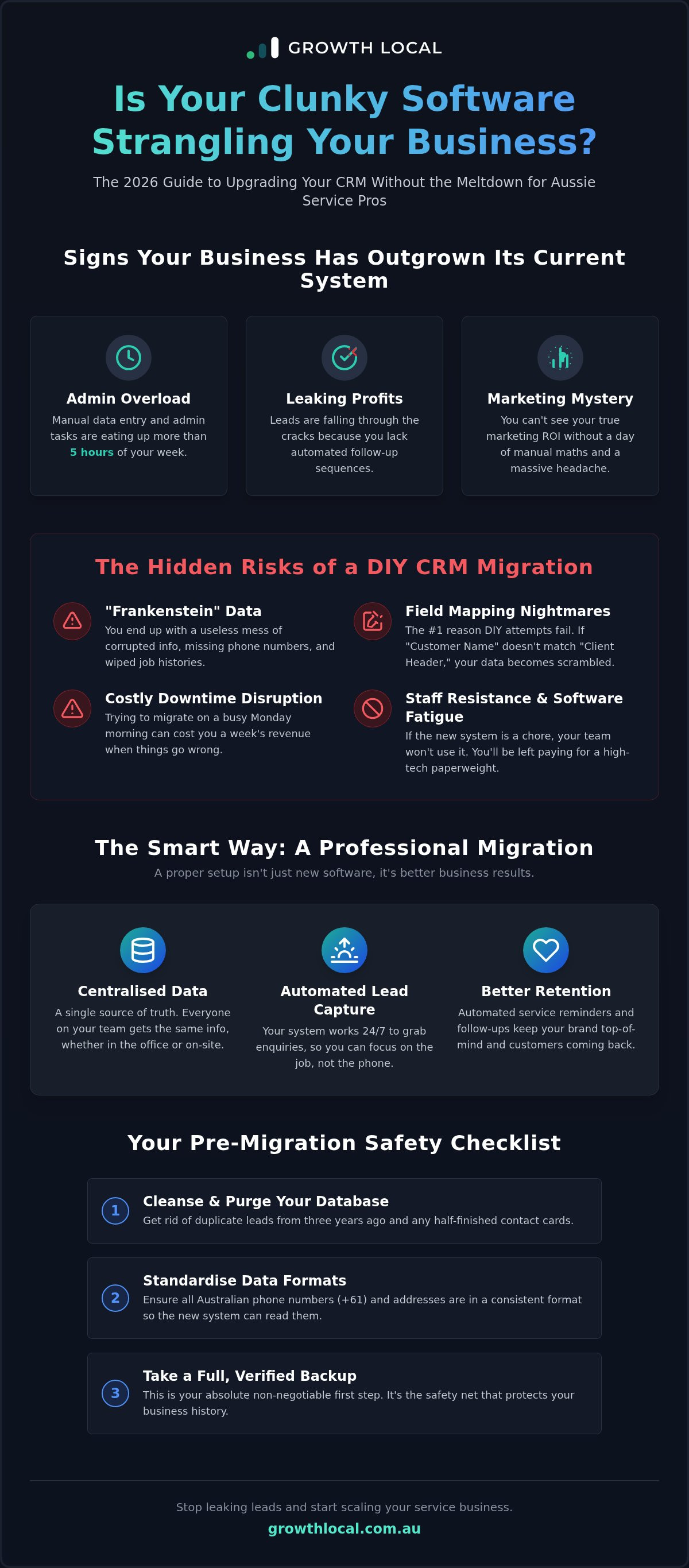
It’s often hard to spot the exact moment your system breaks, but the symptoms are usually obvious if you know where to look. You might be ready for an upgrade if:
- Manual data entry and admin tasks are eating up more than 5 hours of your week.
- Leads are falling through the cracks because you don't have automated follow-up sequences.
- You can’t see your actual ROI on marketing spend without a massive headache or a day of manual maths.
The Benefits of a Professional CRM Migration
A successful transition isn't just about new software; it’s about better results. When upgrading CRM for service business growth, you unlock several key advantages:
- Centralised data: Every team member has access to the same info, whether they are in the office or out on a job site.
- Automated lead capture: Your system works 24/7 to grab enquiries while you are focused on the heavy lifting.
- Better retention: Automated service reminders and follow-ups keep your brand top-of-mind without any extra effort.
The Hidden Risks of CRM Migration (and How to Dodge Them)
Moving your business data isn't as simple as a quick drag-and-drop. If you get it wrong, you end up with "Frankenstein data" where phone numbers are missing, job histories are wiped, and your dashboard looks like a jigsaw puzzle with half the pieces gone. Research into Why CRM Projects Fail often points to poor data handling and a lack of clear strategy as the main reasons projects hit a wall. For an Aussie service business, this isn't just a tech glitch; it's a lost week of revenue and a massive blow to your reputation.
Field mapping is where most DIY attempts go to die. Generic software often assumes every business works in a corporate office, ignoring the specific data structures used by tradies or solar installers. If "Customer Name" in your old system doesn't perfectly match the "Client Header" in the new one, your database becomes a useless mess. You also need to watch out for downtime disruption. Upgrading CRM for service business operations shouldn't happen on a Monday morning when the phones are ringing off the hook. You need to time your migration to protect your weekly sales targets.
Staff resistance is the final hurdle. "Software fatigue" is a real thing for teams who are already flat out on the tools. If the new system feels like a chore rather than a tool, they'll simply stop using it, and you'll be left paying for a high-tech paperweight. Getting your team on board is just as important as the technical setup itself.
Protecting Your Customer Data During the Move
Before you even think about importing files, you must perform a "cleanse and purge" of your current database. Get rid of the duplicate leads from three years ago and the half-finished contact cards that only have a first name. Standardise your formats for Australian phone numbers and addresses across the whole database so the new system can actually read them. A full, verified backup is the absolute first step in any migration to ensure you have a safety net if things go pear-shaped.
Managing the Human Element of Software Change
Success depends on your team actually using the software. Involve your key staff in the selection process early to ensure they feel a sense of ownership. When it comes to training, keep it practical and Aussie-style by focusing on "what’s in it for them," such as less paperwork and faster quoting. Setting a firm "cut-over" date is essential to avoid the confusion of staff trying to run two different systems at once. If you want to see how to bypass these migration headaches entirely, you can schedule a demo to see a managed setup in action.
Choosing the Right Platform for Your Aussie Service Business
Selecting the right software is the most critical decision in your digital overhaul. Many Aussie business owners fall into the "All-in-One" trap, where they buy a platform that promises to do everything but ends up being a mile wide and only an inch deep. When upgrading CRM for service business needs, you must prioritise deep functionality in the areas that actually drive your revenue. A platform that claims to handle your marketing, accounting, and project management might sound convenient, but it often lacks the specific triggers and automation required to scale a high-volume service operation.
Your CRM isn't just a database; it’s the central nervous system of your business. It must integrate seamlessly with your existing stack, especially your accounting software like Xero and your lead capture tools. If your new system doesn't talk to your AI receptionist, you're back to manual data entry, which defeats the purpose of the upgrade. Budgeting for this move requires looking past the monthly subscription fee. When upgrading CRM for service business success, you need to account for the total cost of implementation, including workflow design and staff training, to ensure the system actually delivers a return on investment.
Monday.com for Solar and HVAC Teams
Visual project management is the standout feature here. It allows you to track every install from the initial site visit through to final sign-off using customisable boards. You can easily organise different stages of your sales pipeline, giving your team a clear view of where every job stands at a glance. It’s perfect for teams that need to coordinate between office staff and technicians on the tools. For a deeper look at how to set this up, check out our guide on Monday.com for Solar Lead Management.
GoHighLevel for High-Volume Lead Generation
This platform is a beast when it comes to automated SMS and email follow-ups. It replaces multiple expensive subscriptions by including built-in funnels and lead capture tools that work 24/7 to ensure no enquiry goes cold. It’s particularly effective for businesses that need to move fast and maintain a high "speed-to-lead" ratio without hiring extra admin staff. You can see a full breakdown of the setup in our GoHighLevel for Tradies automation guide.
Your Step-by-Step CRM Migration Checklist
Moving to a new system is the perfect time for a digital spring clean. When you're upgrading CRM for service business growth, your first job is to audit your existing data. Most businesses are carrying around years of digital clutter, including dead leads, incomplete contact cards, and duplicates that serve no purpose. Moving this junk into a high-performance system is like putting dirty fuel into a brand-new ute; it simply won't run right. Be ruthless. If a contact hasn't engaged in three years and has no job history, leave it behind.
Next, you must define your new workflows. One of the biggest mistakes owners make is trying to replicate their old, broken processes in the new software. If your old way involved three manual spreadsheets and a post-it note, don't try to build that in your new system. Use this transition to automate your sales engine from the ground up. Once the workflows are clear, you can begin mapping your fields. This ensures every piece of data, from customer names to specific site notes, has a matching home in the new CRM. Before you hit the "import all" button, always run a pilot test with a small batch of 20 to 30 leads to catch any formatting errors early.
Pre-Migration Preparation
Start by exporting your data into clean CSV formats and checking for duplicates one last time. You'll need to identify "Custom Fields" that are unique to your specific niche, such as roof types for solar installers or unit ages for HVAC teams. This granular data is what makes your automation powerful later on. Finally, ensure your CRM implementation roadmap is fully signed off so everyone knows the plan before the technical heavy lifting begins.
Post-Migration Optimisation
The work doesn't stop once the data is in. Immediately after the import, set up your automated triggers for new leads to ensure your speed-to-lead is instant. Conduct a thorough Data Integrity Audit by checking random records to make sure nothing was lost or scrambled in transit. Finally, establish a feedback loop with your staff. They're the ones using the interface every day, so listen to their input on how to customise the layout for maximum speed and minimum clicks.
Why a Managed CRM Setup Beats the DIY Headache
The temptation to handle your own software migration is strong when you're looking at the bottom line. However, the true cost of DIY is rarely found in the subscription price. If you spend 40 hours of your own time wrestling with field mapping and troubleshooting API errors, you aren't just losing a week of admin time; you're losing 40 hours of winning new jobs and managing your team. For a high-growth Aussie business, your time is far more valuable than the cost of hiring an expert to do the heavy lifting for you.
Most DIY attempts result in what we call "System Limp." This happens when a poorly set-up CRM is so difficult to use that staff eventually give up and go back to their old ways. Upgrading CRM for service business success requires more than just a data import. It requires a strategic partner who understands the specific pressures of the Australian service industry. Without bespoke workflows that match your actual day-to-day operations, your shiny new software becomes nothing more than an expensive, digital filing cabinet that never delivers a real return on investment.
Expert Implementation vs Software Subscription
Simply buying a software licence is only 10% of the battle. The real magic happens during the implementation phase, where a strategist builds the automated engine behind the scenes. A professional setup ensures that your AI receptionist, lead capture forms, and marketing tools all work in perfect harmony. This level of integration is what allows you to scale your business without immediately having to hire more office staff. We focus on creating a system that works for you, rather than giving you another tool you have to work for.
Ready to Scale Your Service Business?
It's time to stop wrestling with clunky, outdated systems and start automating your growth. Whether you're a solar installer needing visual project boards or a high-volume trade business looking for instant lead follow-up, we have the expertise to make it happen. You can check out our pricing page for transparent setup options that fit your scale and ambition. Don't let a "System Limp" hold your business back from reaching its full potential in 2026.
Build Your Automated Sales Engine Today
Upgrading CRM for service business operations is the single most important move you can make to scale in 2026 without burning out. You don't need another digital filing cabinet; you need an automated sales engine that handles the heavy lifting while you're on-site. By following a structured migration checklist and choosing a platform built for high-volume leads, you turn your customer data into a growth asset rather than a liability. Sticking with a broken system isn't just an admin headache; it's a direct leak in your profit margins.
Growth Local specialises in these transitions for the solar and service industries. Our 100% Australian managed setup includes full AI receptionist integration, ensuring your business never misses a lead again. We take the technical headache off your plate so you can focus on winning more jobs. It's time to stop wrestling with clunky spreadsheets and start running a business that actually works for you.
Your future growth depends on the systems you build today. Let's get yours sorted and start winning more jobs with a system that never sleeps.
Frequently Asked Questions
How long does a CRM migration typically take for a service business?
A standard migration for an Australian service business usually takes between two and four weeks. This timeframe allows for a deep audit of your current data, custom workflow design, and thorough testing. While you might be tempted to rush, skipping the testing phase can lead to broken automations. We focus on a methodical approach that ensures your sales engine is fully operational before you switch off the old system.
Will I lose my existing customer history when I upgrade?
You won't lose your customer history if you use a professional migration-first strategy. The key is standardising your data formats and mapping fields correctly so that every job history and site note has a matching home. By performing a "cleanse and purge" before the move, you ensure only high-quality data enters the new system. A full backup is always the first step to guarantee your history remains safe.
Do I need to hire a developer to move my data?
You don't need a full-stack developer, but hiring a specialist in upgrading CRM for service business systems is highly recommended. While DIY is possible, it often leads to "System Limp" where the software is poorly configured and never reaches its full potential. An implementation expert understands the specific triggers and integrations your trade business needs, saving you dozens of hours of technical troubleshooting and ensuring the system actually works.
Can I integrate my new CRM with my current accounting software like Xero?
Yes, integrating with Xero is a standard requirement for most Aussie service businesses we work with. Your CRM should talk directly to your accounting software to automate invoicing and track job profitability without manual data entry. This creates a single source of truth for your finances and customer interactions, allowing you to see your actual ROI on marketing spend without jumping between different platforms or spreadsheets.
What is the best CRM for Australian solar and HVAC companies in 2026?
Monday.com and GoHighLevel are the top contenders for Australian service businesses in 2026. Monday.com is excellent for solar and HVAC teams who need visual project management to track installs from start to finish. GoHighLevel is a beast for high-volume lead generation and automated follow-ups. The best choice depends on whether you prioritise complex project tracking or aggressive, automated sales sequences to keep your pipeline full while you're on-site.
How much does a professional CRM migration and setup cost?
The investment for a professional CRM setup varies based on the volume of your data and the complexity of your automated workflows. While we don't provide a one-size-fits-all price, the cost reflects the value of having a system that works from day one. Hiring an expert prevents the expensive time sink of DIY errors and ensures you see a return on investment through better lead conversion and significantly less manual admin.
Is it possible to automate lead follow-ups during the migration process?
It is absolutely possible to automate lead follow-ups while you are in the middle of a transition. By integrating an AI receptionist early in the process, you can capture and log every new enquiry even before your full database migration is complete. This ensures that while you are upgrading CRM for service business growth, your current sales pipeline stays active and no new leads fall through the cracks during the move.
What happens if my staff refuse to use the new CRM system?
Staff resistance is usually a symptom of a system that feels like extra work rather than a helpful tool. To avoid this, involve your team in the selection process early and provide practical, Aussie-style training that focuses on how the system makes their jobs easier. Setting a clear "cut-over" date and removing the old system prevents the confusion of staff trying to run two different setups at once.


