

Solar Lead Tracking Software: 2026 Practical Guide
The best lead tracking software for solar companies isn’t necessarily the one with the longest feature list. It’s the one that shows where each enquiry came from, who’s following up and what needs to happen next. When leads arrive through calls, forms and ads, scattered records and manual reminders can make your pipeline hard to trust.
That’s a familiar frustration for solar teams. A standard CRM may track sales activity, but your process can involve several hand-offs, from the first enquiry and qualification through to proposal, contract and project delivery. Your system should reflect how the team works, not add another layer of admin.
This guide will help you compare lead tracking software with your solar sales journey and choose a setup that supports timely follow-up and clearer oversight. It covers the capabilities that matter, including lead capture, pipeline stages, task automation, reporting and hand-offs between sales and operations. You’ll also see how to weigh a general-purpose CRM against a solar-focused system.
Key Takeaways
- Map every enquiry source and sales hand-off to see where leads enter your process and what should happen next.
- Choose tracking features around your workflow, including clear lead ownership, activity history and follow-up tasks.
- Compare a focused tracker, a customised general CRM and a broader solar platform against the work your team needs to do.
- Test lead tracking software for solar companies with a real use case before committing to a system or setup.
- Set pipeline stages and responsibilities first, then configure and review the system to support consistent team adoption.
Why lead tracking software for solar companies should follow the enquiry journey
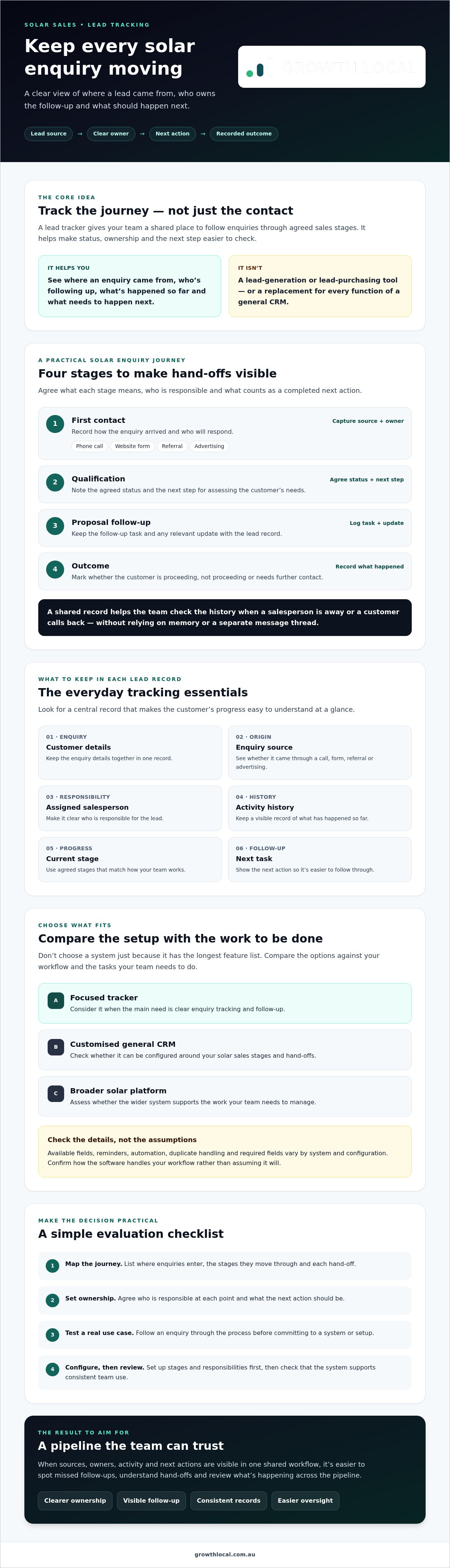
A solar enquiry can arrive by phone, website form, referral or advertising. If each channel has its own inbox, spreadsheet or note-taking habit, it’s hard to see whether someone has responded, who owns the follow-up and what happened next. A shared workflow brings those details together, from first contact through qualification and proposal follow-up to a recorded outcome.
Lead tracking software records, follows and reviews enquiries through agreed sales stages. It doesn’t generate leads or replace every function of a general CRM. Think of it as the practical tracking layer within your broader lead management process. The aim is to give the team a consistent place to check each enquiry’s status and next action.
What does lead tracking software do for a solar business?
A lead record can connect the customer’s enquiry with its source, assigned salesperson, current status and next action. Calls, web forms and referrals can then follow the same visible process instead of being stored separately. Available fields, reminders and automation vary by system and configuration, so check what can be tailored to your workflow. Tracking manages enquiries you receive. It isn’t the same as generating or purchasing leads.
Where can solar leads get lost between enquiry and sale?
Gaps often appear at hand-offs. A callback may be missed, two staff members may create duplicate records, or an enquiry may sit without a clear owner. Proposal follow-up can also be hard to distinguish from a first response if the team uses inconsistent status notes.
Set out the journey your team needs to track:
- First contact: Record how the enquiry arrived and who will respond.
- Qualification: Note the agreed status and the next step for assessing the customer’s needs.
- Proposal follow-up: Log the follow-up task and any relevant update.
- Outcome: Record what happened, such as proceeding, not proceeding or requiring further contact.
These stages make ownership easier to check without assuming every enquiry follows an identical path. They also make the hand-off to the next person clearer. For example, if a salesperson is away or a customer calls back, the team can check the record rather than rely on someone’s memory or a separate message thread.
The right lead tracking software for solar companies should fit the way your team handles enquiries, not force staff into generic stages that don’t match their work. Start by agreeing what each stage means, who is responsible and what counts as a completed next action. Then check whether the system can capture and display that information clearly.
Which lead tracking features matter in solar sales software?
The right feature set makes it easier to answer practical questions: where did this enquiry come from, who’s responsible for it, what’s happened so far and what needs to happen next? Start with the tracking basics your team will use every day. Don’t pay for a broad platform simply because it has more features.
For each lead, check that the system can keep a central record of the customer’s details, enquiry source, assigned salesperson, activity history, current stage and next follow-up task. Source attribution helps you review whether calls, website forms, referrals or advertising are bringing enquiries into the pipeline. Clear ownership and a visible next action reduce reliance on scattered notes and memory.
Lead capture, source tracking and follow-up
Check how enquiries enter the system from the channels your business actually uses. Ask whether records show the latest interaction and whether staff can easily find and update follow-up tasks. Also test what happens when an enquiry is incomplete or arrives twice. Duplicate handling and required fields vary by system, so confirm how these are identified and managed rather than assuming the software will sort them automatically.
Reporting should answer useful operational questions: which sources are producing enquiries, how records are moving through agreed stages, and what outcomes are being recorded? Keep reports tied to decisions your team needs to make. A dashboard is only helpful if the underlying records are consistent and the team understands what each stage means. McKinsey’s discussion of challenges in the residential solar market focuses on the US market, but it offers broader context for why businesses pay attention to customer acquisition and sales processes.
Solar CRM features beyond basic lead tracking
Some systems extend beyond enquiry tracking to include proposal workflows, customer communication or a hand-off from sales to project delivery. These can be useful if those steps are currently disconnected. Keep core tracking separate from optional extras such as solar design tools, project management or installation functions. Ask whether each capability solves a real gap in your process, and check what the system supports before treating it as essential.
Map your journey first: enquiry, qualification, proposal follow-up and recorded outcome. Then compare software against those stages. A general CRM may be configurable, while a solar-focused platform may include workflows that better match the sector. Either way, the system needs clear ownership, useful records and follow-up tasks that staff can maintain.
For broader implementation context, see this solar CRM setup services guide. Choose features around the work your team needs to track, not the length of the feature list.
How to compare solar lead tracking software without overbuying
Compare systems by the work they’ll handle, not the size of their feature list. A focused tracker may cover enquiry records and follow-up, while a general CRM can be configured around solar sales. A broader solar platform may combine lead tracking with other sales or operational functions. The right scope depends on your workflow, required integrations and how much setup your team is prepared to manage.
Use the same sample enquiry to assess each option: a website enquiry arrives, a salesperson qualifies it, sends a proposal, follows up and records the customer’s decision. Check where details are captured, how the record moves between stages and whether the next action stays visible. This gives you a practical comparison rather than a polished demo built around feature counts.
| Check | What to test |
|---|---|
| Capture | Can enquiries from your actual channels be recorded consistently? |
| Pipeline customisation | Can you set stages that match your solar sales process? |
| Follow-up | Can staff see who owns the lead and what action is due? |
| Reporting | Can you review sources, stage movement and recorded outcomes? |
| Integrations | Does it connect with the tools you need, and how does that connection work? |
| Usability | Can staff update records as part of their usual workflow? |
| Support | Who can help configure the system and support staff adoption? |
Software choice also sits within wider commercial pressures. Wood Mackenzie discusses US customer acquisition cost (CAC) trends. For an Australian business, use that as context rather than a local cost forecast. Your comparison should focus on whether the system helps your team track enquiries and follow-up clearly.
Solar CRM or general CRM: which approach fits?
A solar-focused system may use familiar terminology and include process templates for the sector. A general CRM may offer more flexibility, but your team may need to configure fields, stages and workflows to suit solar sales. Consider how complex your hand-offs are, which integrations matter and who will maintain the setup. For broader context, explore CRM implementation guidance for Australian small businesses.
Questions to ask before choosing a platform
Ask the provider to show how one record moves from first enquiry through qualification, proposal, decision and hand-off. Confirm data export options, user access, reporting choices and integration details directly with them. Pricing, features and availability can vary by provider and plan, so verify what’s included. Finally, establish who will configure the system and help your staff adopt it. That’s a core consideration when assessing lead tracking software for solar companies, not an afterthought.
How to evaluate and roll out lead tracking software in your solar business
A successful rollout starts with your process, not the software settings. Before choosing lead tracking software for solar companies, trace how an enquiry currently moves through your team. Note where it comes from, which tools hold its details, who handles each hand-off and how the final outcome is recorded. Include sticking points, such as callbacks that rely on memory or proposal updates stored outside the main record.
Map the current solar lead process before configuring software
Agree on what information staff need to qualify an enquiry and follow it up. Keep required fields practical: collect enough to support the next step without making the record a chore to complete. This map also gives you a way to compare the existing process with the proposed setup. For broader systems context, Growth Local has a lead generation system setup framework.
Then test one realistic journey, such as a website enquiry moving from initial contact to qualification, proposal, decision and hand-off. Check that key details remain visible at each step and that staff know what action they’re responsible for. Use real enquiries only in a way that’s appropriate for your business and the people involved.
Set up stages, automation and reporting carefully
Configure the agreed pipeline stages, ownership rules and follow-up responsibilities first. Once those basics are clear, consider automating repeatable tasks, such as creating a follow-up reminder when a lead reaches a particular stage. Make sure the trigger is clear and staff can still review and correct records when needed. Automation won’t fix an unclear process. It can repeat the confusion faster.
A useful lead-tracking measure is the share of enquiry records with a named owner, current stage and recorded next action. It shows whether the information needed to manage follow-up is present, without setting an unsupported performance target.
Start with a small pilot. Ask the people using the workflow to flag missing fields, confusing stage names, duplicate records and tasks that don’t fit the way they work. Review record quality and staff adoption before expanding automation or building reports around the data. If updates aren’t consistent, fix the process or configuration first. Extra dashboards won’t make incomplete records reliable.
Growth Local provides CRM and solar CRM setup, with systems configured around a team’s lead journey. A demo can be a practical way to discuss your current workflow and requirements.
When expert solar CRM setup can make lead tracking work harder
Setup support may be useful if your team can’t agree on pipeline stages, records are incomplete, tools don’t share information or staff avoid updating the CRM. These are signs the issue may be more than a software choice. A system needs to fit the way enquiries move through your business, and people need to understand how to use it.
Implementation should start with your workflow requirements, not assumptions about a particular product. Growth Local provides CRM and solar CRM setup for Australian businesses. The company focuses on implementation rather than selling physical hardware or providing a human-staffed call centre. The goal is to configure the system around your lead journey, responsibilities and information needs.
What a solar CRM setup process should clarify
Before configuration, get clear on the stages an enquiry moves through, the details staff need to record, who owns each next step and what you want to see in reports. Identify the tools your team currently uses and which ones need to connect. Then verify platform and integration compatibility directly, rather than assuming a connection is available.
Agree how staff will learn the workflow, how existing records will be handled and who will review the setup over time. These details help avoid a system that looks organised on launch day but doesn’t match everyday work. The right lead tracking software for solar companies is only useful if its records and processes remain clear to the people using it.
Connect lead capture with timely initial responses
An AI receptionist may support automated lead capture and initial interactions, helping connect an incoming enquiry with the next step in your workflow. Confirm what it can handle and how it passes information into your CRM. It supports a process. It isn’t a 24/7 human call centre, and it shouldn’t be presented as one.
If unclear stages, disconnected tools or inconsistent records are getting in the way, discuss your current workflow and system requirements with Growth Local.
Discuss your solar CRM setup
Build a clearer path from enquiry to next step
Choosing lead tracking software for solar companies starts with your actual sales journey, not a long list of features. Look for a setup that brings enquiries into one visible workflow, makes ownership and follow-up clear, and reports on useful activity and outcomes.
Before adding automation, agree on your pipeline stages, essential lead details and staff responsibilities. Test the workflow with real enquiries, then review record quality and team feedback before expanding it. That groundwork helps keep the system useful rather than creating more admin.
Growth Local specialises in CRM implementation and solar CRM setup, configuring systems around a solar team’s lead journey. AI receptionist integration can also support automated lead capture and initial customer interactions as part of a connected workflow.
Frequently Asked Questions
What is lead tracking software for solar companies?
Lead tracking software for solar companies records enquiries and follows their progress through agreed sales stages. A record can bring together the customer’s details, enquiry source, assigned salesperson, interaction history and next action. This differs from lead generation, which attracts enquiries, and from a general CRM, which may manage broader customer relationships. The software tracks and organises leads your business receives. It doesn’t automatically generate or purchase them.
What features should solar lead tracking software include?
Look for centralised lead records, source information, clear ownership, activity history and visible follow-up tasks. Your team should be able to review which stage an enquiry has reached and what needs to happen next. Reporting should help you examine lead sources, stage movement and recorded outcomes. Check that pipeline stages can be configured to match your process, and confirm which features are available in the system and plan you’re considering.
Is a solar CRM better than a general CRM for lead tracking?
Not automatically. A solar CRM may use industry-relevant terms or provide workflows that suit solar sales, while a general CRM may offer flexibility but need more configuration. The better fit depends on your team’s sales stages, hand-offs, required integrations and capacity to maintain customised fields. Compare both using a real enquiry journey, from first contact to proposal follow-up, rather than choosing based on the label alone.
Can lead tracking software capture enquiries from calls and website forms?
It may be able to, but capture methods depend on the software, configuration and available integrations. Ask the provider to show how a website form creates or updates a record, and how staff log a phone enquiry. Check whether each record can retain its source, owner and next action. Also ask how duplicate or incomplete records are handled, so enquiries don’t end up split across separate entries or tools.
How do solar companies track a lead from first enquiry to installation?
Set pipeline stages that reflect your own process, such as enquiry received, qualification, proposal, customer decision and hand-off for delivery. Record the owner, latest interaction and next action at each stage. If your team tracks installation progress, agree how that status is updated and who is responsible for it. Confirm whether the chosen system supports that hand-off or whether project details need to be managed elsewhere.
How can I compare solar CRM platforms before choosing one?
Test each option with the same example: an enquiry arrives, a team member qualifies it, a proposal is followed up and the outcome is recorded. Compare capture, pipeline customisation, follow-up, reporting, integrations, usability and support. Ask providers directly about feature availability, pricing, data export and user access. A practical walkthrough will show whether the system suits your workflow more clearly than a long list of advertised features.
Do solar companies need expert help to set up lead tracking software?
Not every team needs outside help, but support may be useful if stages are unclear, records are inconsistent, tools are disconnected or staff aren’t using the system. Setup should begin with your workflow, essential information, responsibilities and reporting needs, then confirm platform compatibility. Growth Local provides CRM implementation and solar CRM setup, and can include AI receptionist integration to support automated lead capture and initial interactions.
Ready to discuss your solar lead tracking workflow with Growth Local?


