

How to Reduce Admin Time in a Trade Business: A Practical Guide
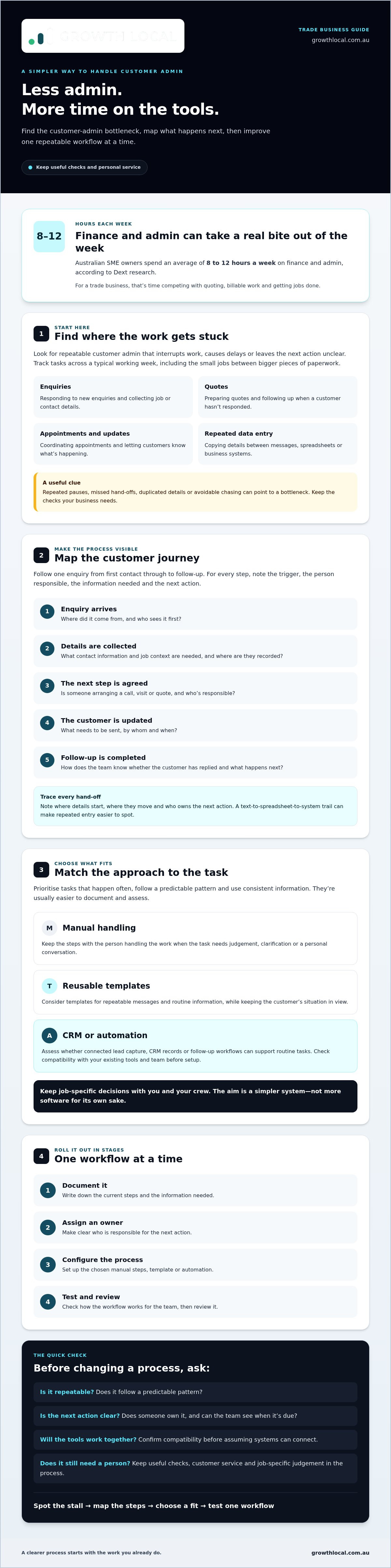
Australian SME owners spend an average of 8 to 12 hours a week on finance and admin, according to Dext’s 2025 research. For a trade business, that’s time competing with quoting, billable work and getting jobs done. If you want to reduce admin time in a trade business, you don’t need to automate everything or add another app. Start with the repeatable customer admin that interrupts work or causes delays.
Customer details and follow-ups can end up scattered across calls, texts and inboxes. You know the admin needs doing, but it can be hard to tell which tasks are worth fixing first or how to improve the process without disrupting the work that keeps the business moving.
This guide shows you how to identify and prioritise repetitive admin, create a clearer process for handling enquiries and follow-ups, and assess practical automation against your existing tools and team. Connected lead capture, CRM records and follow-up workflows can support routine tasks, while job-specific decisions stay with you and your crew. The aim is a simpler system, not more software for its own sake.
Key Takeaways
- To reduce admin time in a trade business, start by finding where customer enquiries or follow-ups regularly stall.
- Map each step from first enquiry to follow-up. Note the trigger, person responsible, information needed and next action.
- Compare manual handling, reusable templates and CRM automation against the task and your team’s needs.
- Roll out one workflow at a time: document it, assign an owner, configure the process, then test and review it.
- Consider where a CRM, lead-generation system or AI receptionist could support your process, and check tool compatibility before setup.
Why reducing admin time in a trade business starts with finding the bottleneck
Paperwork and customer follow-up can creep into the gaps between jobs, interrupt time on the tools and stretch into the evening. But not every admin task is wasted effort. Some records and checks are necessary for your business. Others are repeatable steps that could be made simpler, more consistent or automated.
Admin time is the time spent on repeatable coordination and record-keeping work that keeps a job or customer interaction moving. The aim isn’t to remove useful checks or personal service. It’s to spot avoidable effort, such as entering the same customer details twice or chasing an update because nobody knows what should happen next.
Which admin tasks are taking tradies away from the tools?
For a clear picture, note where time goes during a typical working week. Include the small customer-facing tasks that break up the day, not just obvious paperwork. Depending on how your business operates, these might include:
- Responding to new enquiries and collecting job or contact details.
- Preparing quotes and following up when a customer hasn’t responded.
- Coordinating appointments and sending customers updates.
- Copying details between messages, spreadsheets or business systems.
Record who handles each task and whether work is passed between people. Invoicing, compliance records and job delivery requirements vary between businesses, so don’t assume they can all be simplified in the same way. Keep the checks your business needs, and look closely at how the surrounding admin gets done.
How do you tell a genuine bottleneck from necessary paperwork?
Track recurring tasks and hand-offs across a typical working week. For each one, note what triggers it, what information is needed, who takes it on and what happens next. A repeated pause, missed hand-off or round of avoidable chasing can point to a bottleneck.
Then separate useful customer service from duplicated effort. A call to clarify a customer’s needs may be valuable; copying the same details into several places may not be. Follow-up can also be important, but manually remembering every reminder is a process worth reviewing.
Prioritise tasks that happen often, follow a predictable pattern and use consistent information. They’re usually easier to document and assess for templates or automation than unusual jobs that need a tradie’s judgement. Business process automation describes how software can handle repeatable processes, but the first step is still understanding the workflow you want to improve. That’s how you reduce admin time in a trade business without automating the wrong thing.
Map the customer admin workflow before choosing automation
Before choosing software, follow one customer enquiry through your business from first contact to completed follow-up. The process may differ for a sole trader and a larger crew, so map what actually happens rather than designing an ideal version on paper.
A workflow map makes duplicated admin visible by showing where the same details are recorded, checked or passed on more than once. It can also reveal delayed responses and hand-offs where nobody’s sure who owns the next action.
What should a trade business include in its admin audit?
Check where enquiries come in, such as phone calls, website forms, email or messages. Then trace what happens to each one. For every step, record the trigger, the person responsible, the information needed and the next action. A simple audit could look like this:
- Enquiry arrives: Where did it come from, and who sees it first?
- Details are collected: What contact information and job context are needed, and where are they recorded?
- The next step is agreed: Is someone arranging a call, visit or quote, and who’s responsible?
- The customer is updated: What needs to be sent, by whom and when?
- Follow-up is completed: How does the team know whether the customer has replied and what happens next?
Be specific about the tools and hand-offs in use. If a customer’s details start in a text, move to a spreadsheet and are then copied into another system, note each transfer. Check how the team can see who owns a follow-up and when it’s due. Confirm compatibility before assuming any existing tools can connect.
How do you prioritise admin tasks to fix first?
Once you’ve mapped the process, assess each task by how often it happens, how repetitive it is, its effect on the customer and how many hand-offs it involves. A frequent, predictable step with repeated entry or unclear ownership may be a stronger candidate to improve than an occasional task that needs careful judgement.
Pick one narrow workflow first, such as handling a particular type of enquiry. Don’t try to overhaul the whole business at once. Keep trade expertise, site-specific decisions and job delivery in the crew’s hands. Focus on making the surrounding coordination clearer and more consistent. That gives you a practical starting point to reduce admin time in a trade business without changing how the work itself gets done.
If your map shows that customer records or follow-up need a clearer home, CRM setup support is one option to explore.
Compare manual admin, templates and automation for trade businesses
There’s no single best way to handle every admin task. A manual process may suit occasional, job-specific work. Templates can make common messages quicker to send, while a connected CRM may help organise customer records and follow-up steps. The right choice depends on how often the task happens, how predictable it is and how many people need to see what happens next.
Software only adds value if it removes friction from a defined workflow. If the process is unclear, adding a tool can simply move the confusion onto a screen. Compare the options against the task you’ve mapped, not a feature list.
| Approach | Setup effort | Repeatability and visibility | Human oversight | May suit |
|---|---|---|---|---|
| Manual handling | Low to start | Can vary between people; records may be spread across channels | High, each step is handled directly | Unusual tasks that need judgement or happen infrequently |
| Templates and checklists | Some effort to create and maintain | More consistent for routine steps; visibility depends on where records are kept | High, a person still checks and sends information | Common messages and straightforward processes with few hand-offs |
| CRM automation | Requires workflow planning and configuration | Can organise customer records and follow-up workflows when set up appropriately | People still need to review customer needs and job-specific decisions | Frequent, predictable customer admin involving repeated steps or hand-offs |
When are templates or checklists enough to reduce admin?
Use a template for a repeatable message, such as acknowledging an enquiry or asking for standard job details. A checklist can clarify who does what next without replacing professional judgement about a customer’s job. Remember that separate documents or systems can still create duplicate entry if the same details need to be recorded in several places.
When can a CRM or AI receptionist help with customer admin?
A CRM may suit a workflow where the team needs a clearer way to organise customer records and follow-up. An AI receptionist may support lead capture and initial customer interactions. Its scope depends on how it’s configured, so confirm what it can handle before building it into your process. Check compatibility with existing tools rather than assuming systems will connect.
For a broader view of CRM planning, see CRM Implementation for Small Business Australia: The 2026 Growth Roadmap. If you’re weighing up implementation scope, review Growth Local pricing information. Choose the simplest approach that makes the next step clearer, then test it before applying it more widely. That’s a practical way to reduce admin time in a trade business without adding software for its own sake.
How to reduce admin time in a trade business with a staged rollout
A new process shouldn’t create extra headaches for a busy crew. Keep the change small and practical: choose one customer admin workflow, document how it works, configure the revised process, test it, then review what needs adjusting. For example, start with how new enquiries are recorded and assigned rather than changing every part of the business at once.
Before setting up a template or software, agree on the basics. Name one person responsible for the workflow, define the information that needs to be captured and make the next action clear. If those details are undecided, the system can’t reliably guide the team.
How do you introduce a new admin process without disrupting jobs?
Choose a suitable time to introduce the change, when the team can understand the new steps without adding pressure to a busy job. Explain the practical reason, such as enquiry details going missing or follow-ups lacking a clear owner. Keep instructions short. Show the crew where information belongs, who acts next and how to flag an unusual situation.
Start with a small pilot, such as one enquiry type or a limited part of the process. Give the crew a clear fallback for requests that don’t fit the usual pattern or need a person to make a decision. Gather feedback as the process is used. If a step is confusing or creates extra work, refine it before rolling it out more widely.
What should you measure after changing the workflow?
Compare the effort involved before and after the change, but don’t assume a particular time saving. Look for practical signs that the process is working, including:
- Whether customer records are complete and easy for the right people to find.
- Whether follow-ups are overdue or left without a clear owner.
- Whether staff are still entering the same information more than once.
- Whether the crew finds the new steps clearer, or feels they add avoidable work.
Use what you learn to remove unnecessary steps and clarify instructions. If the workflow is easier to follow and customer details are handled consistently, you have a stronger base to build on. If not, adjust the process before applying it to another task. A staged rollout helps you reduce admin time in a trade business while keeping job-specific decisions with the people who know the work.
Build a connected admin system with the right support
A workable admin system starts with a clear picture of the process, not a new app. Map the customer journey, pick one repeatable task that causes friction, then improve it in stages. A CRM may help organise customer records and follow-up workflows. A lead-generation system can support how enquiries are captured, while an AI receptionist may assist with lead capture and initial customer interactions. These tools have different roles, and they won’t replace every calendar, accounting or job-management system your business uses.
What should you clarify before choosing a system setup partner?
Get specific before committing to a setup. Ask which workflow it will address and how you’ll assess whether the process is clearer or more consistent. List the tools your team already uses, then confirm which ones can be integrated rather than assuming compatibility. Also clarify who configures the system, what information your team needs to provide and what support is included. Clear answers help keep the setup focused on your actual admin bottleneck.
How can Growth Local help streamline customer-facing admin?
Growth Local sets up lead-generation systems and CRMs for Australian service businesses, and integrates AI receptionists for lead capture and initial customer interactions. A suitable setup should match the way your business handles enquiries and follow-up, not add automation for its own sake. Your team’s needs, the information you want to capture and the tools already in use all matter. For solar businesses, Growth Local also offers specialised CRM setup.
To reduce admin time in a trade business, focus on a defined customer workflow and the repeatable steps around it. A setup partner can help you discuss how lead capture, CRM records and follow-up might fit together, while checking tool compatibility and clarifying what the system is intended to handle. Keep trade decisions and job-specific judgement with your crew.
Make your next admin improvement count
You don’t need to overhaul the whole business to make progress. Start by mapping customer admin, then choose one frequent, repeatable task that creates friction. A clear process and staged rollout help you test what works without disrupting the jobs your crew needs to deliver.
To reduce admin time in a trade business, match the tool to the task. Templates may be enough for straightforward steps; a CRM or AI receptionist may suit parts of customer record-keeping, lead capture and initial interactions. Keep job-specific decisions with your team, and check how any new setup will work with the tools you already use.
Growth Local sets up CRM and marketing systems for service businesses, with a focus on digital infrastructure and workflow setup. If you’re ready to talk through your admin bottleneck and assess a practical system for your business, book a demo.
One well-chosen improvement can give your team a clearer way to handle customer admin. Start small, learn from the process and build from there.
Frequently Asked Questions
How can I reduce admin time in a trade business?
Start by finding the repeatable admin that interrupts jobs or gets done more than once. Track a typical working week, map a customer enquiry from first contact to follow-up, and note who handles each step. Look for duplicated data entry, unclear ownership and avoidable chasing. Then choose one predictable workflow to simplify with a checklist, template or suitable system, and review whether the new process is clearer.
What admin tasks can tradies automate?
Tradies can review routine customer-facing tasks such as capturing enquiry details, organising customer records and managing follow-up workflows. Templates may make common replies easier to send, while a CRM or AI receptionist may support parts of lead capture and initial interactions when configured for the business. Keep job-specific decisions, technical advice and unusual customer situations with a person who can assess the details.
Can a CRM reduce admin for a trade business?
Yes, a CRM may reduce repeated customer admin by organising records and follow-up workflows more consistently. Its value depends on how it’s set up and whether the team uses it as the agreed place to record customer information and next actions. It won’t necessarily replace accounting, calendar or job-management tools, so check which systems can connect before choosing a setup.
Is an AI receptionist suitable for a small trade business?
It may suit a small trade business if capturing enquiries and handling initial customer interactions are recurring admin pressure points. First, confirm what the AI receptionist is configured to do, what information it can collect and when a customer should be directed to a person. Keep expectations grounded: it supports lead capture and initial interactions, but it doesn’t replace trade expertise or every customer conversation.
How do I choose which admin process to automate first?
Choose a task that happens often, follows a consistent pattern and creates noticeable friction for customers or staff. Consider how repetitive it is, how many hand-offs it involves and whether delays or missing details are common. Start with a narrow workflow, such as handling a particular type of enquiry, rather than changing everything at once. Leave steps requiring site-specific judgement with the crew.
Will automation make my trade business feel less personal?
Not if you use it to support routine coordination rather than replace meaningful customer contact. A consistent process can help ensure enquiry details and next steps are recorded, while your team still handles conversations that need trade knowledge, judgement or a personal touch. Decide which interactions are suitable for a template or automated workflow, and make it clear how customers can reach a person when needed.
How can I tell whether a new admin system is working?
Compare the process before and after the change, without assuming it will save a specific amount of time. Check whether records are complete, follow-ups are being missed and staff are still entering the same details repeatedly. Ask the team whether the steps are clearer or have added unnecessary work. Use that feedback to simplify the workflow before applying the approach to other tasks.


