

How to Manage Leads from Website and Phone Calls: A Practical System
What if every website enquiry and phone call landed in the same place, with a clear owner and next step? If you’re working out how to manage leads from website and phone calls, the challenge isn’t just generating enquiries. It’s making sure good ones don’t disappear into separate inboxes, call notes or someone’s memory.
It’s easy for a split process to develop: one person checks the website form, another takes calls, and nobody’s certain who is following up. A straightforward system captures both types of enquiry, assigns responsibility and makes the next action visible.
This guide shows you how to build that process, from recording a lead’s details and source to setting its status, owner and follow-up task. You’ll also see how a configured CRM can support a shared workflow, and where an AI receptionist can help with lead capture and initial interactions. The aim is a practical system your team can use consistently, so you can see what’s progressing without relying on memory.
Key Takeaways
- Learn how to manage leads from website and phone calls with one consistent process, regardless of how an enquiry comes in.
- Build a useful lead record with the details your team needs, without collecting unnecessary personal information.
- Compare separate inboxes, spreadsheets and CRMs to choose an approach that fits your enquiry volume and team workflow.
- Use a repeatable sequence to capture, assign and follow up each enquiry, including checking for existing records.
- See how CRM setup and, where appropriate, AI receptionist integration can support a connected lead process.
Why website enquiries and phone leads need one management process
A website form lands in a shared inbox. A missed call appears in the call log. A staff member writes a name and callback note on a pad. Each record may be useful on its own, but together they create separate versions of the truth. One person sees the form, another returns calls, and the business owner can’t easily tell who’s responsible or what needs attention next.
Lead management is the practical work of capturing, assigning, tracking and following up genuine enquiries. The Lead Management overview describes the wider process. For a service business, the priority is making sure website and phone enquiries follow consistent rules. That gives the team a shared view of who enquired, what they need, who owns the follow-up and what should happen next.
A shared lead process gives every genuine enquiry, whatever the channel, one clear record, one owner and a visible next action. It won’t guarantee a sale, but it makes unanswered enquiries easier to spot, handovers easier to manage and progress easier to see.
If you’re figuring out how to manage leads from website and phone calls, treat the channel as the entry point, not as a separate process. Capture the same essentials for each enquiry, then apply the same ownership and follow-up expectations.
What counts as a website lead or phone lead?
A submitted contact form is a website enquiry. An inbound call asking about a service is a phone enquiry. Each becomes a lead when it shows potential interest and needs a next action, such as returning the call, clarifying the job or arranging a discussion. For example, an electrician might receive a form asking for a quote and a call about installing new lighting. Both enquiries need to be recorded and followed up, even though they arrived differently.
Where does a scattered process break down?
The form may hold the customer’s contact details and job description, the phone log may show a missed call, and a staff member’s notes may contain useful conversation details. If those records aren’t brought together, the team can miss what’s already happened or duplicate work. Unclear ownership creates another problem: staff may assume someone else is following up. Without a shared view of status and next action, it’s harder to see which enquiries need attention.
That visibility is the reason to bring channels together. The process doesn’t need to be complicated, but it does need to show the team where each enquiry stands. Give every lead a clear record, owner and next step, and follow-up becomes deliberate rather than dependent on scattered notes and memory.
What information should one lead record hold across both channels?
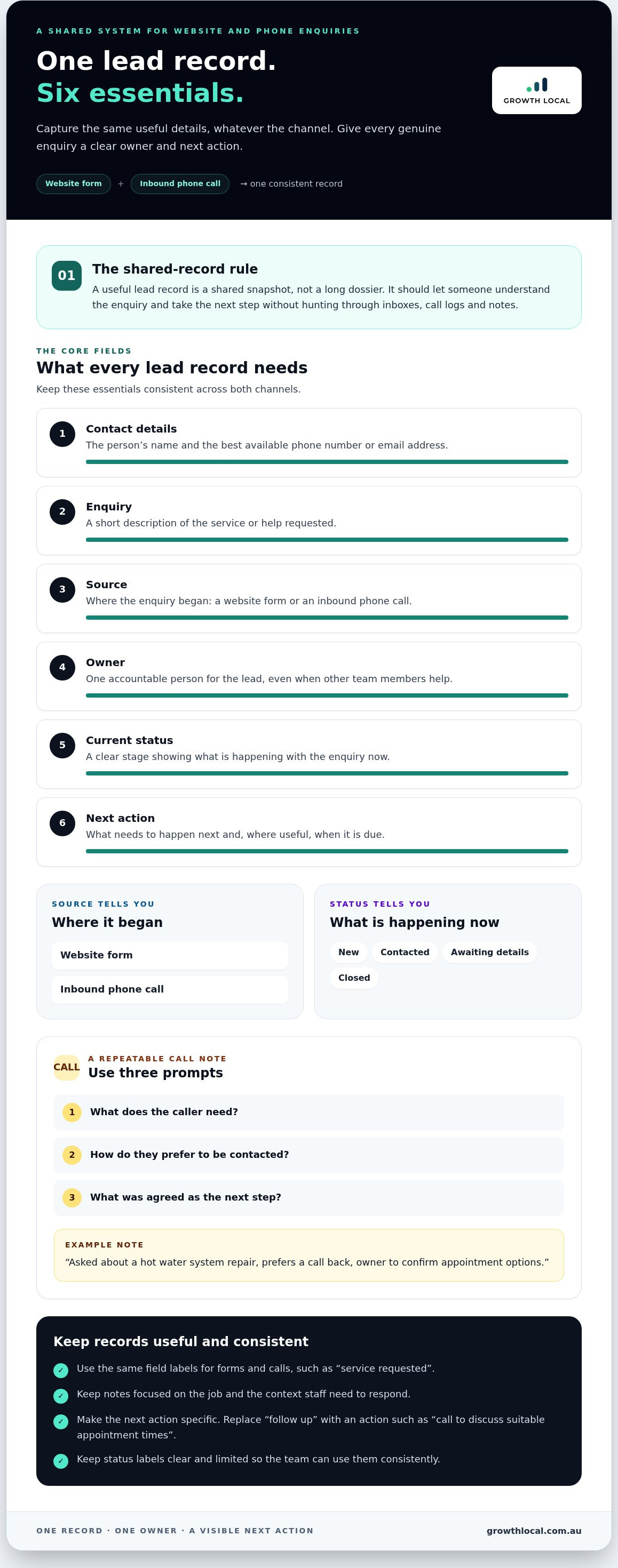
A useful lead record isn’t a long dossier. It’s a shared snapshot that lets someone understand the enquiry and take the next step without searching through inboxes, call logs and notes. Keep the same core fields for website and phone leads, then add only the context staff need to respond.
At minimum, record who made the enquiry, what they need, where it came from, who owns it, its current status and the next action. That’s enough to make the lead workable, whether it arrived through a form or a call.
- Contact details: name and the best available phone number or email address.
- Enquiry: a short description of the service or help requested.
- Source: website form or inbound phone call.
- Owner and status: the person accountable and the lead’s current stage.
- Next action: what needs to happen next and, where useful, when it’s due.
Keep notes focused on the job. A call note might say, “Asked about a hot water system repair, prefers a call back, owner to confirm appointment options.” That gives the next staff member useful context without adding personal details they don’t need to handle the enquiry.
Capture consistent details from forms and calls
Website forms should ask for the information needed to understand and respond to the request, not every detail that might be useful one day. For calls, use a repeatable note with three prompts: what the caller needs, how they prefer to be contacted and what was agreed as the next step. Matching labels across both channels make records easier to search and compare.
For instance, use the same “service requested” field whether someone types “leaking tap” into a form or describes it during a call. Staff can add a concise note for anything that doesn’t fit a standard field. Avoid vague notes such as “follow up”. Record the action, such as “call to discuss suitable appointment times”.
Track source, ownership and status in the CRM
Source and status answer different questions. Source tells you where an enquiry began, such as a website form or phone call. Status shows what’s happening now, such as new, contacted, awaiting details or closed. Keep status labels clear and limited so staff use them consistently instead of creating a new label for every situation.
Give each lead one accountable owner, even if other team members help. A configured CRM can hold that assignment alongside the source, status and next step. This connects day-to-day lead handling with the wider lead generation system, linking capture to follow-up and reporting. If your records are hard to keep consistent, a walk-through of a connected lead workflow can help you see how a CRM setup can support your process.
CRM, spreadsheet or separate inboxes: which lead process fits?
The best setup is the one your team can keep up to date. Separate inboxes may feel simple at first, but they make it harder to compare website enquiries with phone leads or see who’s responsible for each follow-up. A shared spreadsheet brings records together, while a CRM can organise lead details, status and next actions in a more structured workflow.
To decide how to manage leads from website and phone calls, compare each option against three practical questions: can the team see all enquiries, is one person accountable for each lead, and is the next action clear? If any answer is no, the process needs attention, whatever tool you use.
- Separate inboxes: Familiar, but useful context can stay split between email, call logs and personal notes.
- Shared spreadsheet: A simple central tracker, provided staff update it consistently and can access the current version.
- CRM: A structured place to manage lead records, ownership, status and follow-up in one workflow.
Don’t start by adding complexity. Agree on the process and essential fields first, then choose a tool that supports how the team handles enquiries. Add extra steps or automation only when they solve a real workflow problem.
When can a spreadsheet be enough?
A shared tracker may suit a small team with a low volume of enquiries and a straightforward follow-up process. Set clear columns for contact details, source, owner, status and next action. Decide who updates each record and how staff access the current file. A spreadsheet won’t bring calls and website forms together automatically, so someone still needs to enter and maintain the information.
That manual upkeep is the trade-off. Notes can become inconsistent, updates may be missed, and a lead can sit without a clear owner if the team assumes someone else will act. A spreadsheet can be a sensible starting point, but review it regularly to check records are complete, current and easy for the right staff to use.
When does a CRM become more useful?
A CRM becomes more useful when the team needs a reliable shared view of who enquired, what’s happening with the lead and what needs to happen next. Staff can work from consistent records instead of piecing information together across separate tools. The value comes from configuring the workflow around your process, not simply adding software.
Keep the setup practical: agree on a small set of statuses, assign one accountable owner to each enquiry and make the next action clear. Then check that the system supports those habits for both website and phone leads. If your team is weighing up a CRM workflow, a walk-through of a connected lead process can help you think through the setup before adding unnecessary complexity.
Manage website or phone leads from capture to follow-up
A website form and a phone call should enter the same working process. The details arrive differently, but the team still needs to check the enquiry, assign responsibility and keep the next step visible. Use this sequence for both channels, so staff know what to do after capturing a lead.
- Capture the enquiry. Create a record as soon as the form arrives or the call is taken. Include the contact details, request and source.
- Check for an existing record. Search by name, phone number or email before creating a new entry. If a record already exists, add the latest interaction there instead of splitting the history.
- Assign an owner. Name one person accountable for moving the enquiry forward, even if someone else first received it.
- Respond and clarify. Make contact through the appropriate channel, confirm what the person needs and agree on a useful next step.
- Log the interaction. Record what happened, relevant context and whether the lead’s status has changed.
- Schedule the next action. Add a specific task and due date, such as calling back to discuss the service requested. Don’t leave “follow up” as a note with no owner or timing.
These steps offer a practical way to manage leads from website and phone calls: keep one record per enquiry, apply the same ownership rules and update progress after each interaction. A web form shouldn’t skip the process just because it arrived in writing, and a phone lead shouldn’t remain in someone’s personal call notes.
Set clear ownership and next actions
Make the owner responsible for the next step, not just the initial response. If that person is unavailable, use a simple handover rule that names who takes over and requires the record to be reassigned. If an enquiry isn’t ready to progress, keep it visible with a status such as “awaiting customer” and a dated check-in task. Don’t leave a lead unassigned without someone responsible for reviewing it.
This rule also helps with team handovers. The person passing a lead on records the latest update and next action; the incoming owner accepts responsibility by updating the assignment. That small habit helps stop a lead falling between roles when the usual contact is away or priorities shift.
Review the process using useful measures
Set aside time to review open leads regularly. Focus on a few measures the team can maintain: new enquiries by source, leads by owner and status, and next actions completed or overdue. You can also review how long it takes to make initial contact and whether leads progress to the next stage. Use these measures to find process gaps, not to promise sales outcomes.
If one source has a growing queue of unassigned leads, adjust the handover. If records often lack a next action, tighten the team’s update routine. A configured CRM can keep lead records and progress together, making these checks easier. The review helps turn that information into practical workflow improvements.
How Growth Local can set up a connected lead management system
A CRM only helps if it reflects how your team handles enquiries. Growth Local works with Australian service businesses to set up CRM and marketing systems around their lead process, bringing website enquiry capture and phone lead handling into a shared workflow. The aim is to make the process clear for staff, from recording an enquiry to knowing who owns the next step.
Good implementation starts with the work behind the software: where enquiries come in, what details the team needs, how leads are assigned and what follow-up looks like. Those decisions shape the CRM’s records, status labels and tasks. A configured system gives staff a consistent way to manage enquiries, rather than asking them to adapt to a generic process that doesn’t fit the business.
What a practical implementation should connect
Map each entry point to the agreed workflow. A website form and an inbound call should both lead to a record with useful contact and enquiry details, a source, an owner and a clear status. Set ownership rules that match how the team works, then define what happens if the usual owner is unavailable or the lead needs later follow-up. This makes the handover part of the process, not an informal assumption.
Automation can support specific steps, but it needs a clear purpose. For example, an AI receptionist can support initial lead capture and interactions. It’s one part of the workflow, not a substitute for deciding who reviews the enquiry and takes responsibility for what follows. The AI receptionist guide explores how this option can fit into lead handling.
Once the process is mapped, configure the CRM around it and check that the records, statuses, assignments and follow-up tasks make sense for the team. Keep the setup focused on steps staff will actually use. That way, online enquiries and phone leads can follow the same operating rules while retaining the context of each conversation.
Choose a clear next step for your business
Start by spotting the weak point in your current process. Are website enquiries sitting in an inbox? Are phone notes hard for others to find? Are leads duplicated or left without an owner? Pinpointing where the handover breaks down gives you a practical starting point for shaping a system around your real workflow.
If you’re ready to bring those steps together, schedule a Growth Local demo to discuss a lead management system suited to your business process. Focus on how enquiries are captured, assigned and followed up, then consider which CRM setup or automation will support your team.
Make your next enquiry easier to manage
You don’t need to overhaul everything at once. Pick one point where your current approach causes friction, then decide what a simpler experience should look like for your team and the person enquiring. A focused first change is easier to put into practice and review.
If you’re considering how to manage leads from website and phone calls as your business grows, start with the problem you most want to solve. A clear priority makes it easier to choose a practical next step without adding complexity for its own sake.
Build on that first improvement as your team gets comfortable with it. A manageable change can create momentum towards a more organised way of working.
Schedule a Growth Local demo to plan a connected lead workflow for your business.
Frequently Asked Questions
Can a CRM manage website enquiries and phone calls in the same place?
Yes. For a business deciding how to manage leads from website and phone calls, a CRM can hold enquiries from both channels as records the team can work with. The setup needs to match how information enters the business. For example, staff can enter a call manually while a website enquiry is added through the configured process. Either way, the team can see the relevant history together rather than checking separate sources.
What should I do when a phone lead does not provide an email address?
Record the caller’s name, phone number if they’re comfortable providing it, and the details needed to respond to their request. An email address isn’t essential if the agreed next step is a phone call. Note their preferred contact method and any relevant timing they’ve mentioned. If there’s no reliable way to follow up, record the enquiry accurately and don’t fill gaps with guessed details.
How should a small business handle leads when the owner is out on a job?
Agree in advance who can take responsibility while the owner is unavailable. For example, a team member who receives a call can record the request, note that the owner is on site and assign the enquiry to a nominated colleague for initial follow-up. Set a clear hand-back rule for decisions that need the owner’s input, so the lead doesn’t sit unnoticed until they return.
Do I need a separate phone number to track where leads come from?
No. You can record “phone call” as the source in the lead record without having a separate number for every campaign. If you need to distinguish particular advertising sources, decide what detail you’ll use and make sure staff capture it consistently. A dedicated number may be one tracking option, but it doesn’t replace recording the source and enquiry details clearly.
What happens if the same person submits a form and then calls?
Check whether the person already has a record before creating another one. Search details such as their name and phone number for a likely match, then add the call as a new interaction on the existing record. Keep both sources visible if useful: the form shows how they first reached out, while the later call adds context about what they need now.
Can an AI receptionist handle every type of customer enquiry?
Not necessarily. An AI receptionist can support lead capture and initial interactions, but its role should suit the enquiry types and information your business is prepared to handle that way. Decide which requests fit the workflow and how the team will manage enquiries that need a more detailed response. Treat it as one part of the process, with the business’s follow-up responsibilities clearly defined.
Should I keep a lead record if the person is not ready to buy?
Usually, yes, if the person has expressed genuine interest and there’s a useful, appropriate next step. They may be comparing options or waiting until a project is ready to proceed. Record their current position and any follow-up they’ve agreed to, rather than marking the enquiry as active without context. If they’ve asked not to be contacted, make that preference clear and follow it.


