

How to Make a Small Trade Business Look More Professional with an Automated Booking System
What if a more professional booking experience didn’t mean spending more time on your phone? When calls, texts and paper notes compete for attention, it’s easy to miss a change or leave a customer wondering whether their enquiry got through. An automated booking system for tradies can help capture enquiries and keep communication consistent, while you stay focused on the job.
If you run a small trade business, you know that good work and reliable service matter. But customers also notice how easy it is to get in touch, what happens after they enquire and whether expectations are clear. You shouldn’t have to choose between personal service and less admin.
This guide covers practical ways to simplify booking, acknowledge enquiries and set clear expectations before and after a job. It also explains how connecting enquiry details with CRM records and follow-up workflows can keep information organised without making your process feel impersonal. The goal isn’t to automate every conversation. It’s to make routine steps smoother, so customers feel looked after and you spend less time chasing messages.
Key Takeaways
- Professionalism comes from dependable updates and clear expectations, not just a polished brand.
- Match the booking path to the job: let straightforward work book directly, while complex jobs may need an enquiry first.
- Start your automated booking system for tradies with one suitable booking path, then test and refine it before expanding.
- Make each customer message useful by confirming what happens next and how to get in touch.
- Understand how scheduling tools, CRM records and AI receptionist functions differ before connecting them into a wider process.
Why an automated booking system can make a small trade business look more professional
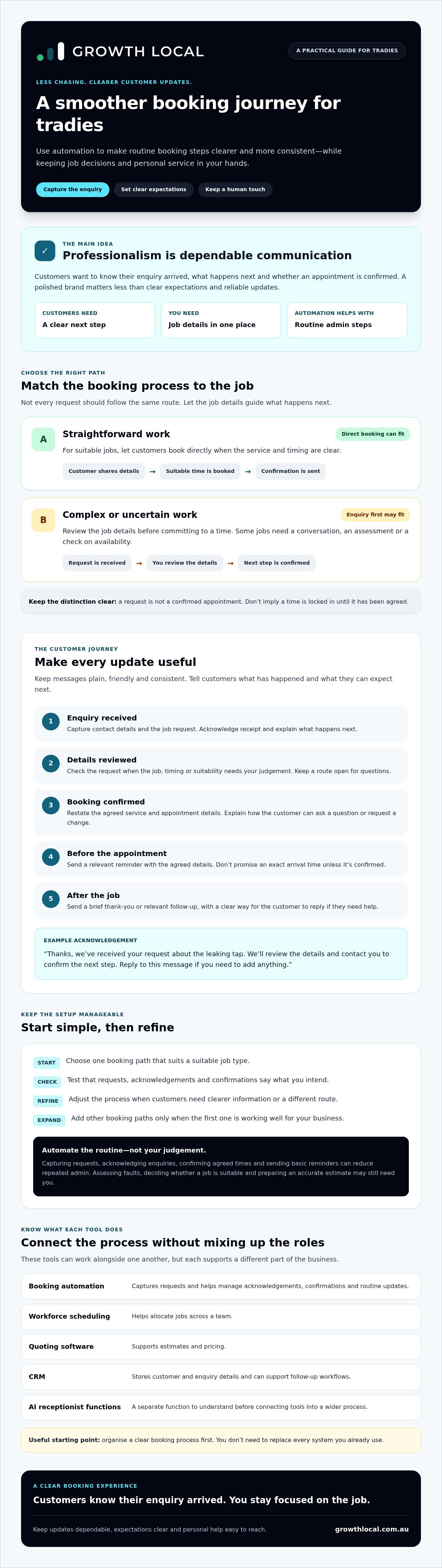
A professional customer experience doesn’t depend on a fancy logo or polished website. It depends on customers knowing their enquiry has arrived, what happens next and whether an appointment is confirmed. An automated booking system for tradies is a process for capturing, confirming and managing booking requests, helping keep these steps clear and consistent.
The term can cover different tools and workflows. Appointment scheduling software is one way to manage appointments, but booking automation doesn’t necessarily mean customers can choose any time and lock it in. You may need to review a request first, particularly if the job details or timing need checking.
Booking automation is also different from workforce scheduling, which helps allocate jobs across a team, and quoting software, which supports estimates and pricing. A CRM stores customer and enquiry details and can support follow-up. These tools can work alongside one another, but each has a different role. You can start with a clear booking process without replacing every system you already use.
Scattered calls, texts and paper notes make it harder to keep track. A customer might text about a job, then call to change their preferred day, while the original request is still on a notepad. If the details aren’t updated in one place, you and the customer may have different ideas about what’s been agreed.
What does a professional booking experience look like?
It gives customers a clear path from enquiry to appointment. They submit the job details, receive an acknowledgement and learn what happens next. For example, if someone requests a visit to check a leaking tap, your acknowledgement could confirm receipt and explain that you’ll review the details before confirming a time. Don’t imply the appointment is locked in if it isn’t.
That distinction builds trust. Customers aren’t left guessing, and you have time to check the job before committing.
Which booking tasks can a small trade business automate?
Automation can capture contact details and job requests, acknowledge an enquiry, send a confirmation once a time is agreed and issue a basic reminder. These routine steps reduce repeated admin, but they don’t replace your judgement. Assessing a fault, deciding whether a job is suitable or preparing an accurate estimate may need a conversation with you.
Keep a clear route for customers to ask a question or speak with someone. The aim is to handle routine steps consistently while keeping personal service available when the job needs it.
How an automated booking system improves the customer journey for tradies
A booking process feels professional when customers aren’t left wondering what’s happening. Map each step from the first enquiry to any post-job follow-up, then decide what customers need to know at each point. An automated booking system for tradies can send routine updates consistently while leaving job decisions and unusual questions in your hands.
- Enquiry received: Acknowledge the request and explain what happens next, such as reviewing the details before confirming a time.
- Booking confirmed: Restate the agreed service and appointment details, and explain how to ask a question or request a change.
- Before the appointment: Send a relevant reminder with the agreed details. Don’t imply an exact arrival time unless you’ve confirmed one.
- After the job: Send a brief thank-you or relevant follow-up, with a clear way to reply if the customer needs help.
Keep the wording plain and consistent. A message can be friendly without sounding overly familiar, and clear without promising more than you can deliver. For example: “Thanks, we’ve received your request about the leaking tap. We’ll review the details and contact you to confirm the next step. Reply to this message if you need to add anything.” This acknowledges the enquiry without suggesting a booking is already confirmed.
What should a booking confirmation include?
Make the confirmation easy to scan on a phone. Name the requested service, repeat the agreed appointment details and explain the next step. If the time is still being checked, call it a request rather than a confirmed appointment. Include a contact route for questions or changes, and use the same straightforward tone across your messages.
Clear details help prevent avoidable mix-ups. Customers can check what’s been agreed without searching through an old call or text thread.
How can reminders and follow-ups feel personal?
Use the customer’s name and relevant job details when your system supports it, but don’t send updates just to fill the silence. A reminder should help customers prepare or check the appointment, not repeat information they already have. Keep templates short and review them when your services or process change.
Set a clear handover point for a person. If a customer changes the job details, asks for advice or raises something a template can’t answer, pause the automated path and respond directly. Collect only the details you need to handle the enquiry, consider the customer’s preferred contact method and make it clear how they can get in touch. If you’re reviewing how enquiry capture and follow-up fit together, Growth Local’s approach to connected lead capture may offer a useful starting point.
How to choose booking automation that fits your trade and job types
The right booking path depends on how predictable the work is. A repeatable service with a clear scope may suit direct online booking. A job that needs photos, access details or a site assessment may need a request form and your review before a time is confirmed. Choosing the right level of automation helps customers take the next step without locking you into work you haven’t assessed.
Which jobs are suitable for direct online booking?
Consider direct booking when the service, likely duration and requirements are clear enough for a customer to choose a time with confidence. For example, a regular maintenance visit with a defined scope may be easier to book than a fault that could have several causes. Suitability varies by trade and business, so assess your own jobs rather than assuming one booking method fits them all.
If the scope, access, urgency or parts required could change the work, use a request form or enquiry-first process. Ask only for the details you need to decide what happens next.
What should you check before choosing a booking tool?
Test the process on a mobile phone, since customers and tradies often manage enquiries while on the move. Check that you can update availability, and find out what happens when someone cancels, changes a request or needs help. Make the booking status clear rather than assuming a confirmation means the appointment is final.
Before choosing, check whether the tool connects with your existing calendar or CRM and what information carries across. Features and integrations vary, so confirm the details with the provider. A well-matched automated booking system for tradies should suit the jobs you actually want to book and leave room for a person to review requests that need judgement.
How to set up an automated booking system without making it complicated
A smooth rollout doesn’t need to cover every service or staff member at once. Start with one booking path, check that it works for customers and your team, then build on what you learn. This keeps an automated booking system for tradies manageable and makes it easier to spot problems before they become part of your daily routine.
What information should you prepare before setup?
Before configuring a tool, write down your service types, working hours and conditions for accepting a booking. Note what customers need to tell you, such as the job location, access details or a description of the issue. Decide which requests need a quote, site assessment or personal conversation before a time can be confirmed.
Draft the booking instructions and confirmation messages first. Clear wording makes setup easier and helps prevent customers from mistaking a request for a confirmed appointment.
Then work through this rollout sequence:
- 1. Map your current process. Follow an enquiry from its first contact through to confirmation. Note where details are recorded, who responds and where requests can get missed.
- 2. Choose suitable jobs. Pick a service with clear booking conditions. Keep complex or uncertain work on an enquiry-first path.
- 3. Configure the process. Add the required questions, availability, instructions and messages. Make sure the system shows whether a request is pending or confirmed.
- 4. Test the customer journey. Submit a test booking on a mobile phone. Check the form, confirmation, calendar entry and steps for changing or rescheduling the request.
- 5. Refine before expanding. Fix confusing wording or missing details, then consider whether to add other services or staff.
How do you test and improve the booking process?
Test more than the ideal scenario. Try a request with incomplete details, a change to the preferred time and a question that needs a person to respond. Check that each update reaches the right place and the customer knows what happens next. If staff are involved, ask them to follow the process too, including how special requests reach them.
Once the path is in use, review missed requests, incomplete forms and the manual work still involved. Listen for customer feedback about steps that feel unclear. Use those observations to make targeted changes instead of adding features without a clear need. There’s no universal benchmark to hit. The useful measure is whether the process is working better for your business and customers.
How connected systems help tradies manage bookings and look professional
A booking request is only the start. If its details sit in an inbox, a text thread or a notebook, it’s easy to lose track of who needs a reply or what was agreed. Connecting booking enquiries with lead records and follow-up workflows gives your business a clearer view of each customer’s progress, from first contact to next step.
The tools have different roles. Booking or scheduling software collects appointment requests and manages available times. A CRM keeps customer and enquiry records organised, so you can see relevant details and follow-up activity. An AI receptionist can help capture initial enquiries and customer information. It isn’t a human call centre, and it shouldn’t be expected to resolve every complex question.
These systems don’t need to be one giant platform. The practical aim is to reduce repeated data entry and make it easier to see what needs attention. Before connecting tools, check which information passes between them and whether the setup supports your existing process.
When should a booking system connect to a CRM?
A connection can be useful when you’re handling enough enquiries that it’s hard to remember who has been contacted, which job details are confirmed or what follow-up is due. A consistent record helps a team member pick up an enquiry without relying on scattered messages or someone else’s memory.
For example, a new request could be recorded with the customer’s details and enquiry status, then updated as your team reviews it and follows up. The workflow depends on the systems involved, so check what they can share before relying on an integration. For more background, read this CRM implementation guide.
Where can an AI receptionist fit into the process?
An AI receptionist may help capture an initial enquiry and collect useful details before the request is reviewed. That can support a more organised handover into lead records and follow-up. A person should still handle questions that need trade expertise, a sensitive conversation or clarification the system can’t confidently provide.
Set clear boundaries: decide what information the AI should collect, what it can say about the next step and when an enquiry needs a person. Growth Local sets up CRM and marketing systems for Australian service businesses, including AI receptionist integration. If disconnected lead capture and follow-up are adding admin, a connected setup may be worth reviewing alongside your booking process. For more detail, see the AI receptionist guide and the lead generation system setup guide.
Make your next booking step a simpler one
A professional customer experience comes from clear expectations and dependable communication, not complicated software. Choose a booking path that fits the work, make it clear when a request is confirmed, and start with one process you can test and improve.
An automated booking system for tradies can help reduce booking admin, but connected enquiry records and follow-up matter too. Growth Local sets up CRM and marketing systems for Australian service businesses, including AI receptionist integration for capturing enquiries and handling initial customer interactions. The aim is to help your systems support personal service, not replace it.
Frequently Asked Questions
Can customers book a tradie online without speaking to someone first?
Yes, customers can book online without speaking to someone first if the job, service details and booking conditions are clear. Direct booking may suit repeatable work with a defined scope. Quote-dependent or assessment-based jobs may need an enquiry first, so you can check the details before confirming a time. Either way, include a clear option to contact a person if the customer has a question or isn’t sure what to book.
What should an automated booking confirmation say?
An automated booking confirmation should state the requested service, agreed appointment details and what happens next. Keep it short, clear and easy to read on a mobile, with a simple way to ask a question or request a change. Make sure the wording matches what your business can deliver. Don’t suggest a booking is confirmed if it’s still a request, or promise an arrival time you haven’t agreed.
Is an automated booking system suitable for a sole trader?
Yes, a sole trader can start with a simple process for suitable jobs without automating every enquiry. Before choosing a tool, check how much setup and ongoing updating it needs, whether customers can use it easily on mobile, and how exceptions reach you. A well-planned automated booking system for tradies can reduce repetitive admin while leaving you available for personal conversations when a job needs your judgement.
Can a booking system handle quote requests as well as appointments?
Yes, a booking system can collect quote requests, but an enquiry acknowledgement isn’t the same as a confirmed appointment. Use a form to gather job details, then route quote-dependent work for review before offering or confirming a time. Make the next step clear in the message, such as explaining that you’ll review the information and follow up. This helps customers know their request has been received without assuming the job is booked.
How do I make online booking feel personal rather than robotic?
Use concise, plain-English messages that include relevant booking details and explain what happens next. A customer’s name and the requested service can make an update feel more specific, provided those details are available and accurate. Keep a clear contact option, and decide when a person should step in to answer questions or clarify the job. Useful, reliable updates matter more than sending a string of automated messages.
Does an automated booking system replace a CRM?
Not necessarily. Booking tools generally manage appointment requests and times, while a CRM can organise customer and enquiry information, including follow-up records. Some software may include overlapping features, so check the specific functions rather than assuming all tools work the same way. Connect systems when doing so makes the process clearer or cuts duplicate data entry. If a connection adds steps without helping your workflow, keep the setup simpler.
How can I tell whether my booking process looks professional?
Test the journey as a customer, from submitting an enquiry to receiving a message that explains the next step. Check that service and appointment details are clear, updates are consistent, and there’s an obvious way to ask a question or request a change. Then review customer feedback and recurring admin issues, such as missing details or requests that need chasing. Use what you find to improve the process rather than relying on industry benchmarks.
If disconnected enquiries and follow-up are making admin harder, a systems demo can help you explore a more joined-up approach.


