

CRM Setup for Tradies Australia: Build a System That Fits the Job
What if the best CRM for your trade business isn’t the one with the most features, but the one that follows how you win work? Practical CRM setup for tradies Australia starts with how enquiries arrive, how you quote and what needs to happen before a job is booked. Without that fit, customer details can stay scattered across calls, messages and spreadsheets.
If you’re flat out on the tools, it’s easy to miss an enquiry or leave a quote without follow-up. Buying software won’t fix the gap on its own. The system needs a clear process your team can use, from first contact through to a won job.
This article shows you how to organise customer details, track each opportunity and set useful follow-up actions without making every interaction feel automated. You’ll learn what to capture, how to shape a simple sales pipeline, which tasks may suit automation and how to avoid adding unnecessary admin.
Key Takeaways
- Start with the work your business handles each day, then choose CRM features that support it.
- Map how enquiries arrive and what happens next before creating pipeline stages.
- Good CRM setup for tradies Australia should make the process easier to use, not add another layer of admin.
- Clean and organise existing customer records before importing them into a new system.
- Assign someone to check pipeline hygiene, unanswered questions and workflow issues regularly.
Why CRM setup for tradies starts with the work, not the software
Buying a CRM won’t fix a messy process by itself. First, look at how work moves through your business: an enquiry comes in, someone checks whether it’s a good fit, a quote goes out, the customer decides, and the job is booked or closed. Your CRM should make these steps visible and easier to manage.
Customer relationship management (CRM) describes the broader approach to managing a business’s relationships and interactions with customers. For a trade business, that means more than storing names and phone numbers. A useful system connects each enquiry to its history, current status and next action.
What should a tradie CRM actually do?
A tradie CRM organises customer details, enquiries and follow-up so every potential job has a clear next step. It gives you a shared record of who made contact, what they need, what’s been discussed and whether someone needs to call, prepare a quote or check in.
That record reduces the need to search through texts, emails, call logs and spreadsheets. A CRM can help keep the customer and sales process organised, but it doesn’t replace your trade expertise or the tools you use to manage the work itself.
Where do tradies lose track of potential work?
It can happen in ordinary moments: you’re on a job when an enquiry comes through, a quote gets delayed until the evening, or a customer says they’ll think about it and no one remembers to follow up. When details live in different places, it’s harder to see what’s waiting and who’s responsible for the next step.
That’s a lead-management problem, not necessarily a shortage of enquiries. More marketing won’t resolve it if new leads and outstanding quotes still slip through the cracks. Before choosing software, identify where each enquiry comes from, who responds and what information helps you decide whether it’s worth quoting.
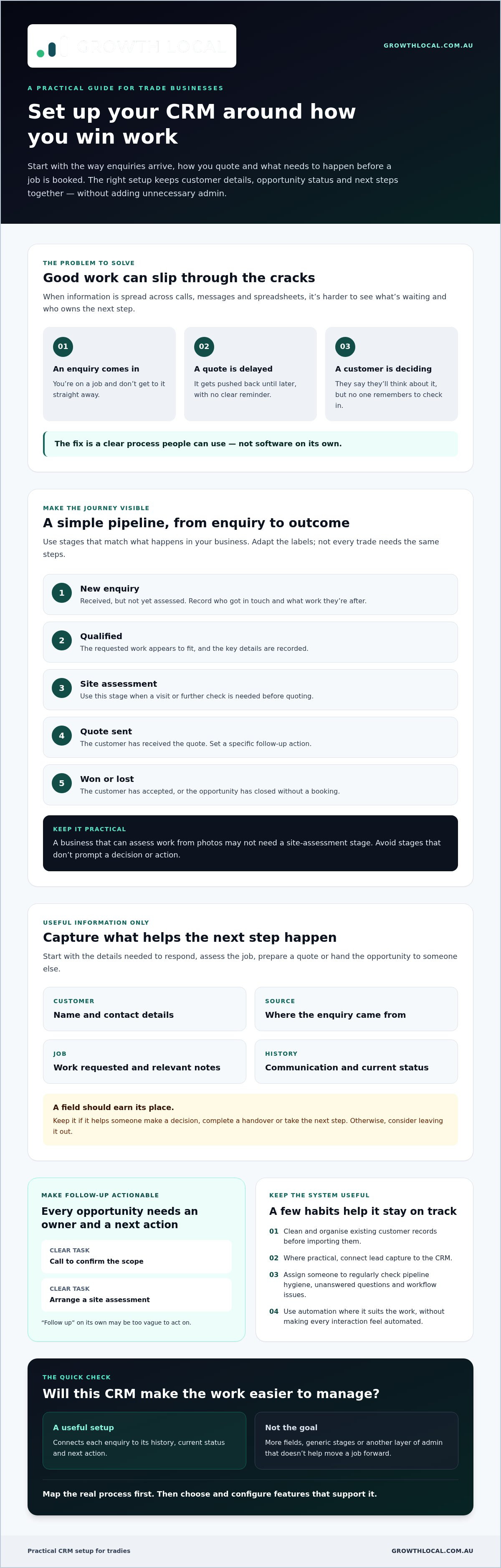
Then map the real journey in plain language: new enquiry → qualification → quote sent → decision → booked or closed. Your stages should reflect what happens in your business, not a generic sales process. At each point, decide what needs to be recorded and what action moves the opportunity forward. This groundwork gives CRM setup for tradies Australia a practical starting point and helps you configure a system people can use.
Map the tradie customer journey before configuring CRM stages
Before building pipeline stages, sketch what happens from the moment someone gets in touch. Do enquiries arrive by phone, website form, email or social media? Who checks them, and what do they need to know before deciding whether to quote? The answers help shape a workflow around your business instead of forcing your team into a generic sales process.
Where practical, connect lead capture to the CRM so new enquiries have a clear path into the pipeline. A lead generation system setup framework can help you plan how the two should work together. For each enquiry, set an owner and a next action. “Call to confirm the scope” or “arrange a site assessment” gives someone a practical task. “Follow up” on its own may be too vague to act on.
Which CRM stages fit a typical trade enquiry?
Use stages that make the status of each opportunity clear at a glance. Depending on how your business quotes and books work, a starting point might be:
- New enquiry: Received, but not yet assessed.
- Qualified: The requested work appears to fit, and key details are recorded.
- Site assessment: A visit or further check is needed before quoting.
- Quote sent: The customer has received the quote and a follow-up action is set.
- Won or lost: The customer has accepted, or the opportunity has closed without a booking.
Adapt the labels to your actual process. A business that can assess work from photos may not need a site-assessment stage. A more involved quoting process may need an extra step. Keep the pipeline easy to understand, and avoid stages that don’t trigger a decision or action. There’s no single pipeline that suits every trade or business size.
What customer and job details should the CRM capture?
Start with the information needed to respond and progress the enquiry: customer name and contact details, where the enquiry came from, the work requested, relevant notes and communication history. Add details that help someone assess the job, prepare a quote or hand the opportunity to another team member. If a field doesn’t support a decision, handover or next step, consider leaving it out.
Every CRM field should earn its place by helping someone make a decision, complete a handover or take the next step. This keeps data entry manageable and records useful, rather than turning CRM setup for tradies Australia into a form-filling exercise. Once you’ve mapped the stages and fields, you’ll have a practical blueprint for setting up the system around your customer journey.
Is CRM setup worth it for a small trade business? Choose useful features first
A CRM should take admin off your plate, not give you another system to feed. If every enquiry needs too many fields, stages don’t match your process, or alerts fire without prompting useful action, the setup is creating work rather than solving it. Start with the bottleneck you want to fix, then choose features that address it.
Use this needs-versus-features check to guide your shortlist:
| Business need | Useful capability | Check before choosing |
|---|---|---|
| Find customer details quickly | Shared contact records and communication history | Can you view and update records easily on a mobile device? |
| See what needs attention | A clear pipeline, assigned owners and reminders | Can reminders follow your real response process? |
| Understand what’s progressing | Simple reports on lead status or quote outcomes | What decision will each report help you make? |
| Reduce repeated entry | Connections with the tools you already use | Confirm platform compatibility and what information passes between systems. |
| Support future workflows | Optional automation, such as routing or follow-up prompts | Can you test the workflow and check how customer data is handled? |
A sales workflow automation guide can help you consider where repeatable steps fit into the wider process. Automation should support a workflow that already makes sense, not disguise one that doesn’t.
Which CRM features solve real tradie workflow problems?
Prioritise features that reduce manual searching and make handovers clearer. A contact record linked to an opportunity can show what the customer asked for, what’s been discussed and who needs to act next. Mobile usability matters too: if updating a lead from the ute is fiddly, records can quickly fall behind.
Reminders are useful when they prompt a specific action, such as checking whether a customer has received a quote. Reporting earns its place only if it helps answer a practical question, like which opportunities are still waiting for a decision.
What should stay human rather than automated?
Automate suitable administration, routing and timely prompts. Keep people involved in judging whether a job is the right fit, clarifying scope and responding to customer concerns. Automated messages should suit your business and make it easy for the customer to continue the conversation with a person.
Before committing, check that the CRM works with your existing tools and phone workflow, and review how it stores and handles customer information. Thoughtful CRM setup for tradies Australia means choosing a system your team can use while maintaining the personal service customers expect. If you’re considering how a CRM could fit your workflow, discuss your CRM workflow needs.
How to set up a CRM for tradies in practical, manageable steps
Keep the rollout focused. A staged setup lets you check the workflow before your team relies on it during a busy week. For CRM setup for tradies Australia, work through these steps in order:
- Map the workflow. Write down how enquiries arrive, who handles them and what needs to happen before a job is booked or closed. Agree on who owns each active opportunity and what counts as completing its next action.
- Prepare your records. Gather customer details from the places you currently store them, such as spreadsheets, email or contact lists. Decide which records belong in the CRM, then check them for duplicates, outdated details and information you don’t need.
- Configure stages and fields. Set up the pipeline to match your quoting and booking process. Keep the information requested at each step practical, so people can update a record without unnecessary data entry.
- Test tasks and automations. Set up only the reminders or automatic actions that support your agreed process. Check that each has a clear trigger, reaches the right person and helps move an enquiry forward.
- Train users and refine. Show everyone how to add an enquiry, update its stage and record the next action. Make it easy to raise questions, then adjust confusing labels or steps before wider use.
How should you prepare customer data and workflow rules?
Before importing anything, list where customer information currently lives and choose what should move into the CRM. A clean, relevant starting set is easier to manage than a bulk import full of duplicate contacts and old details. Confirm how stages are used, who owns each lead and what a completed action looks like. For example, “quote follow-up completed” should mean the customer was contacted and the outcome recorded, not just that a reminder was dismissed.
How do you test the CRM before relying on it?
Run sample enquiries through the whole process, from capture to outcome. Check that the contact record is created correctly, the opportunity lands in the right stage and tasks update as expected. Test different scenarios, such as an enquiry needing a site assessment and one that isn’t suitable to quote. Confirm alerts reach the intended person without creating a flood of notifications.
Ask the people who’ll use the CRM to try the workflow on their usual devices. Their feedback can uncover awkward steps that are easy to miss during setup. Fix those issues before relying on the system for live enquiries, then keep an eye on questions and friction as the team uses it.
Keep your tradie CRM useful with ownership, review and connected lead capture
A CRM needs an owner after launch. Without someone responsible for keeping the pipeline tidy, answering user questions and approving workflow changes, records can become stale and useful reminders can turn into noise. Make ownership clear: one person can oversee the system, while team members update the opportunities they handle.
Set a regular review time that suits your workload. A short weekly check is a practical starting point, then adjust the rhythm to fit how often enquiries come in. Look for unassigned enquiries, opportunities that haven’t moved, missing essential details and automation errors. Check that reminders still match your process, and remove or revise any that no longer prompt a useful action.
What should a simple CRM review check?
Work through a consistent checklist. Does each active opportunity have an owner, a current stage and a sensible next action? Are there duplicate records or gaps that could make a handover difficult? Have any leads been left sitting without a clear outcome? These checks help you find workflow issues, rather than just tidying records for the sake of it.
Use reports to spot friction, such as opportunities regularly stalling at the same stage or enquiries arriving without enough detail to assess them. Treat those patterns as a prompt to review your process. Reporting can show where follow-up or data capture needs attention, but it can’t guarantee a particular revenue result.
When can specialist CRM implementation help?
If your lead sources, customer records and follow-up steps aren’t working together, specialist implementation can help configure a connected workflow rather than simply put software in place. Growth Local provides CRM and marketing system setup for Australian service businesses, with workflows designed around how leads are captured and managed. The right configuration depends on your current tools and how your team handles enquiries.
An AI receptionist may also suit your setup as a lead-capture component. First check whether it fits your existing phone workflow and how information should reach the CRM. The aim is a clear handover, not another disconnected place to check.
Keep the system practical, review it regularly and change it when the way you handle work changes. Ongoing ownership helps CRM setup for tradies Australia stay useful beyond launch.
Build a CRM that keeps good work moving
A useful CRM starts with your actual workflow, not a long list of software features. Map how enquiries become quotes and booked jobs, keep the pipeline simple, and give every active opportunity a clear owner and next action. Clean records and tested reminders help the system stay practical instead of adding admin.
That’s the value of thoughtful CRM setup for tradies Australia: customer details, lead capture and follow-up work together in a process your team can keep using. Growth Local specialises in CRM implementation and lead generation systems for Australian service businesses. Depending on your phone workflow, AI receptionist integration may also support lead capture and initial customer interactions.
Ready to shape a setup around the way your business captures and wins work?
Start with a clear process, keep it manageable, and give your next opportunity a better chance of moving forward.
Frequently Asked Questions
What is the best CRM for tradies in Australia?
The best CRM is one your team can use to manage enquiries, quotes and follow-ups without adding unnecessary admin. Look for clear mobile access, a pipeline you can customise to match your work, useful reminders and compatibility with your existing tools. Before choosing, check how it handles customer records and whether its features suit your quoting and booking process. There isn’t one option that’s right for every trade business.
How do I set up a CRM for my trade business?
Start by mapping how enquiries move through your business, from first contact to booked or closed. Decide who owns each lead and what details you need to assess and quote the work. Then organise existing customer records, configure stages and next actions, and test sample enquiries before relying on the system. A practical CRM setup for tradies Australia should reflect your real process, not force you into unnecessary steps.
Is a CRM worth it for a small trade business?
A CRM can be worthwhile if customer details are scattered, quotes go without follow-up or you spend time searching for enquiry history. Start with the basics: a shared record, a simple pipeline and clear reminders. A small business doesn’t need to switch on every available feature. If the system creates more data entry than it removes, simplify the fields, stages and alerts until they support the way you work.
Can a CRM automatically follow up with quote enquiries?
Yes, some CRM setups can create reminders or send automated messages after a quote, depending on the platform and configuration. Start by deciding when follow-up should happen, who is responsible and what the customer should receive. Test the workflow before using it with live enquiries. Automation can prompt timely contact, but personal judgement still matters when customers have questions about the quote, job scope or suitability.
What information should a tradie store in a CRM?
Keep details that help your team respond, assess the work and take the next step. This usually includes the customer’s name and contact details, enquiry source, requested work, relevant notes and communication history. You may also record the opportunity’s stage, owner and next action. Avoid collecting fields just because they’re available. Each one should support a decision, a handover or useful follow-up.
How long does CRM setup take for a trade business?
Setup time depends on how clearly your workflow is defined, how much existing data needs organising and whether the CRM needs to connect with other tools. A straightforward setup may involve less configuration than a workflow with several lead sources, custom stages and automations. Before setting a timeframe, map the requirements, review your records and confirm platform compatibility. Allow time to test the process and help users learn it.
Can a CRM connect with my website and phone enquiries?
It may be possible, but connections depend on the CRM, your website setup and your phone workflow. Check which integrations are supported and what information passes into the customer record. Website enquiries may be captured through a compatible connection, while phone enquiries may need to be recorded or routed through an appropriate workflow. An AI receptionist can be considered for lead capture and initial interactions if it fits how your business handles calls.


