

CRM Migration for Service Companies: A Practical Guide
What if your CRM migration moved every customer record but still left your team chasing job details across inboxes and spreadsheets? That’s the risk with CRM migration for service companies when the focus is only on transferring data. A new system won’t fix scattered records or inconsistent follow-up if the workflows that keep sales and service moving are left behind.
It makes sense to be cautious. Your team can’t simply pause bookings, customer calls and active jobs while a new CRM is being set up. A planned migration can protect the information you rely on and give staff clearer ways to manage leads, follow-ups and customer history from day one.
This guide covers the practical decisions that make a migration smoother, from setting goals and auditing records to mapping workflows, testing the new setup and helping your team adopt it. You’ll learn how to choose the right data to move, keep day-to-day work on track and build a cleaner CRM foundation for better visibility and future growth.
Key Takeaways
- CRM migration for service companies works best when customer records, relationships and everyday workflows move together.
- Separate active, useful information from duplicates and outdated records before deciding what to bring across.
- Choose a big-bang cutover, phased rollout or parallel run based on your processes, integrations and team’s capacity for change.
- Use backups, sample transfers and checks on record links to catch issues before they affect priority customer accounts.
- A well-planned CRM can create a stronger base for lead capture, consistent follow-up and clearer visibility across a service business.
CRM migration for service companies: what needs to move, and why?
A CRM migration is the planned move of selected customer records, relationships and workflows into a new or reconfigured CRM. For a service business, that could mean transferring a customer’s contact details alongside their enquiry history, current job status and next follow-up task. Staff can then see the context they need in one place instead of piecing it together from different systems.
Data transfer is only part of the job. Data migration covers moving information between systems, but a successful CRM migration for service companies also considers how staff will manage leads and customer work once the new setup is live. Copying every old record and field can carry clutter forward instead of solving the problems that prompted the change.
Three parts of a CRM change
- Data migration: Moving selected records and information from one system to another.
- CRM implementation: Setting up the CRM’s structure, access and tools to support the business.
- Workflow redesign: Defining how work moves through the team, such as who owns a new lead and what happens next.
Which signs suggest your service business is ready to migrate?
Look at what slows the team down each week. Duplicate customer records, missed follow-ups and leads with no clear owner are practical signs that the current setup isn’t supporting consistent work. The same goes for customer details split across spreadsheets, inboxes and job systems. Staff may spend time searching for context, re-entering information or asking customers to repeat details they’ve already provided.
These issues can be a reason to review your CRM, but a new platform isn’t the goal by itself. Start with the operational problem you want to solve, such as improving lead ownership or making customer history easier to find. This keeps the migration focused on what the business needs, rather than on software for its own sake.
What should a CRM migration include?
Build the scope around the information and processes that support current work and future reporting. Depending on your setup, this may include:
- Customer and lead records, including links between contacts, companies and jobs.
- Fields, notes and tasks that give staff useful customer context.
- Sales or service pipelines that show where enquiries and jobs stand.
- Automations that trigger follow-ups or move work along.
Not every old field or record needs to come across. An inactive lead, duplicate entry or unused field may add little value, while a note about a customer’s requirements could help staff provide a more joined-up service. For each item, ask whether it supports day-to-day work, customer continuity or a report the business relies on. For broader system planning, see our CRM implementation guide.
How to prepare CRM data and workflows before the move
Good preparation makes the move more controlled and gives your team a say in how the new CRM will work. For CRM migration for service companies, the goal isn’t to transfer everything unchanged. It’s to bring across useful information and shape workflows around how enquiries, jobs and customer follow-up actually run.
Work through these steps before transferring data:
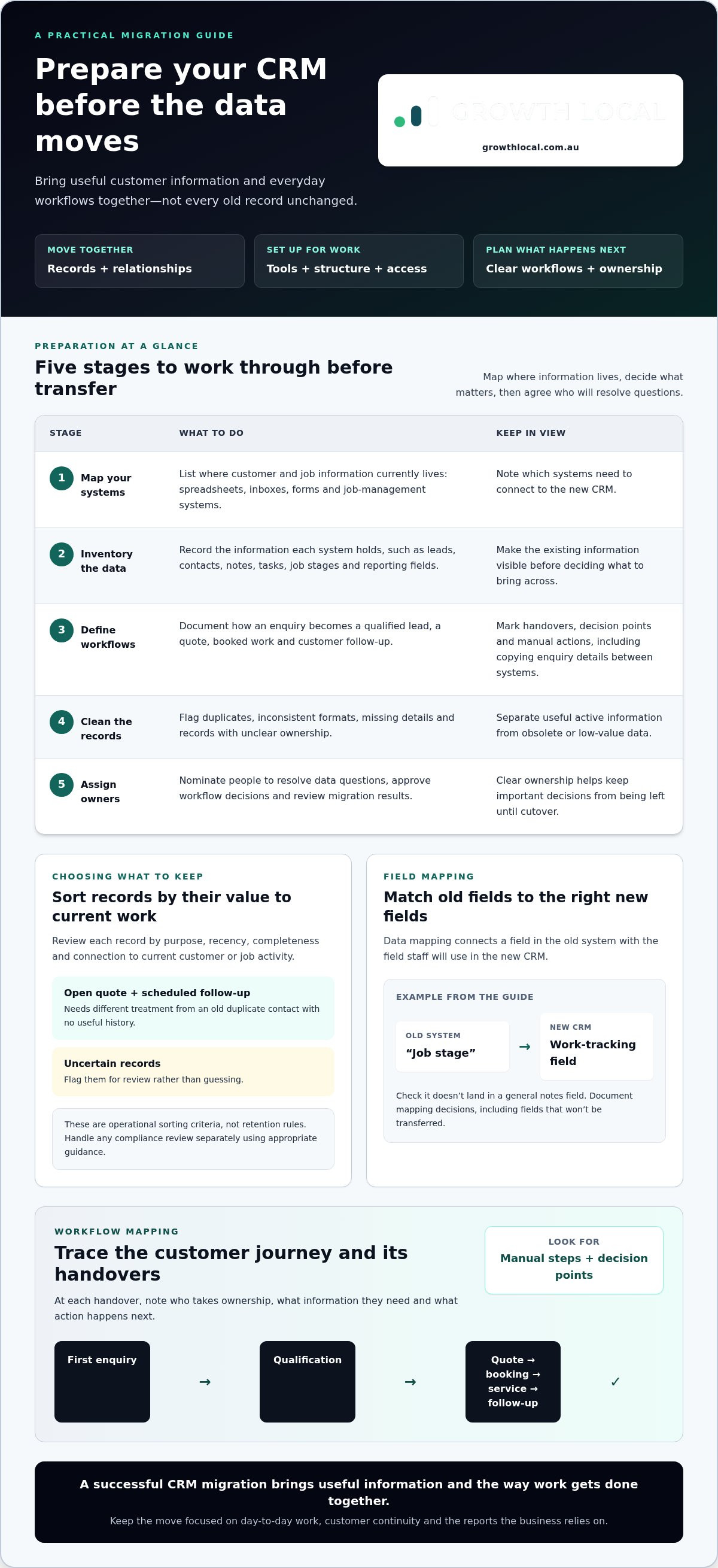
- 1. Map your systems. List where customer and job information currently lives, including spreadsheets, inboxes, forms and job-management systems. Note which systems need to connect to the new CRM.
- 2. Inventory the data. Record the types of information held in each system, such as leads, contacts, notes, tasks, job stages and reporting fields.
- 3. Define the workflows. Document how an enquiry becomes a qualified lead, a quote, booked work and customer follow-up. Note handovers, decision points and manual actions.
- 4. Clean the records. Flag duplicates, inconsistent formats, missing details and records with unclear ownership. Separate useful active information from obsolete or low-value data.
- 5. Assign owners. Nominate people to resolve data questions, approve workflow decisions and review the migration results. Clear ownership helps prevent important decisions being left until cutover.
How do you decide which CRM data to keep?
Sort records by purpose, recency, completeness and connection to current customer or job activity. An open quote with a scheduled follow-up needs different treatment from an old duplicate contact with no useful history. Flag uncertain records for review rather than guessing. These are operational sorting criteria, not retention rules, so handle any compliance review separately using appropriate guidance.
Data mapping means matching fields in the old system to the right fields in the new CRM. For example, check that an existing “job stage” field maps to the field the team will use to track work, rather than landing in a general notes field. Document the mapping decisions, including which fields won’t be transferred.
How should service workflows be mapped before migration?
Trace the customer journey from first enquiry through qualification, quoting, booking, service delivery and follow-up. At each handover, write down who takes ownership, what information they need and what action happens next. Mark steps handled manually, such as copying enquiry details from an inbox into a spreadsheet. This gives you a clear view of what the CRM should support and which processes may need redesigning. ZDNET’s guidance on migrating to a new CRM also highlights the value of planning for data and workflow continuity.
If you’re working through these decisions, view a CRM setup demo to see how customer records can connect with practical workflows.
CRM migration options: big-bang move, phased rollout or parallel running?
There’s no single rollout method that suits every service business. The right choice depends on how much data and process complexity you’re moving, which systems need to connect, and how much change your team can manage while serving customers.
| Approach | How it works | Best suited to | Main trade-off |
|---|---|---|---|
| Big-bang cutover | Move the agreed records and workflows at one point, then use the new CRM. | A smaller, well-prepared setup with straightforward processes and limited integration needs. | Testing and cutover pressure are concentrated into one changeover. |
| Phased rollout | Move a defined team, workflow or data group first, then expand in stages. | More complex operations where teams or workflows can be separated clearly. | Old and new processes may need coordination while the rollout continues. |
| Parallel running | Keep both systems in use temporarily while the new setup is checked against live work. | Situations where the team needs time to build confidence or compare records during transition. | Staff need clear rules to prevent conflicting updates or uncertainty about the current record. |
Choose your rollout based on complexity, continuity needs and data readiness. Then weigh those factors against the team’s capacity for change. A large volume of records, intricate handovers or several integrations may call for more staging. A simple workflow with well-prepared records may be easier to move in one cutover.
When is a phased CRM migration a better fit?
A phased approach lets you move one clearly defined group first, such as a team, lead pipeline or service workflow. Before expanding the rollout, review whether records appear correctly, handovers make sense and staff can follow the new process. This can expose mapping or adoption issues early. It also means someone needs to coordinate old and new processes so staff know where to update records at each stage.
What are the risks of switching systems all at once?
A single cutover concentrates the work. If testing is incomplete or a handover is missed, staff may be unsure which system has the latest customer details just as enquiries and jobs keep coming in. On the other hand, a big-bang move can be simpler for a small, well-prepared workflow with clear ownership and few dependencies.
Parallel running can ease the transition, but only with firm rules. Decide which system is the source of truth for each type of record, who can make changes and how updates will be reconciled. Without that clarity, both systems can drift apart and create extra admin.
How to migrate CRM data safely and keep the team working
A safe transfer is a sequence, not a single upload. For CRM migration for service companies, plan each step so customer and job information can be checked before staff rely on the new system. Keep sales and service work moving by telling the team what’s changing, when it’s changing and where updates belong.
- Back up: Keep a usable copy of the source data before changes begin.
- Map fields: Confirm where each source field, such as lead stage or job reference, belongs in the new CRM.
- Test a sample: Move a representative set of records and inspect the results.
- Transfer data: Proceed with the agreed records and workflows once the sample checks out.
- Validate: Compare record counts, inspect samples, check relationships and review priority customer records.
- Confirm cutover: Tell staff when the new CRM becomes the source of truth and what to do with any remaining work in the old system.
Assign an owner to each stage and set access according to each person’s role. Share the timing and expected changes with the team early, including how to report a missing note, incorrect owner or broken customer-to-job link. Clear communication helps reduce uncertainty while work is in progress.
How can you test CRM data before going live?
Choose sample records that cover different customer types, lead stages and service workflows. Compare them with the source system. Check field mapping, duplicate handling, notes, assigned owners and links between customers, enquiries and jobs. Then ask staff to complete realistic tasks in the new CRM, such as finding an enquiry, updating its status and recording a follow-up. Fix errors before the full transfer.
How do you prepare staff for the new CRM?
Explain what’s changing, when to start using the new system and where to record updates during the transition. Train people by role using familiar tasks, from qualifying an enquiry to preparing a quote, booking work and following up. Give staff one clear route for questions and issues after launch, with a named person responsible for triage and resolution.
After launch, check:
- Can staff complete key workflows from enquiry to follow-up?
- Do users have the access they need, and no unnecessary access?
- Do priority reports show the expected records and stages?
- Are data errors, missing links or workflow issues logged for correction?
Make CRM migration a foundation for better service-business systems
A migration can do more than move records. It can give your business a cleaner base for capturing enquiries, managing customer history and automating routine steps, provided the CRM reflects how your team works. A new lead, for example, needs a clear owner and practical next action. Staff handling booked work need the customer context to deliver a joined-up service.
Growth Local sets up CRM and marketing systems for Australian service businesses, tailoring lead management and workflows to operational needs. This can connect lead capture with follow-up processes, helping enquiries move from an inbox or form into a process the team can manage. Growth Local also provides solar CRM setup for businesses with solar-specific workflows, while other service companies can shape their CRM around their own processes.
For broader system planning, explore CRM implementation and marketing system setup. The aim is to connect the right records, processes and tools, rather than add technology for its own sake.
What should a service business measure after CRM migration?
Start with a pre-migration baseline, then review whether the new setup is improving the work it was designed to support. Track data quality, team adoption, follow-up consistency, pipeline visibility and completion of key workflows. Compare like with like rather than relying on generic industry benchmarks. Ask the people using the CRM where they’re getting stuck, then prioritise fixes by operational impact, such as a blocked handover or a follow-up task that isn’t appearing as expected.
How can Growth Local help connect CRM setup and lead management?
Growth Local’s CRM setup aligns customer records with lead handling and practical sales or service workflows. Marketing systems and AI receptionist integration can support lead capture and initial customer interactions, helping enquiries enter a process the team can manage. Use your migration goals and the way your business handles leads and customers to shape the system around your day-to-day work.
A CRM migration is a chance to build a system your team can use, measure and improve as the business grows.
Set your service business up for a cleaner next chapter
A successful CRM migration for service companies is about more than transferring records. Choose the information and workflows your team needs, prepare and check the data, then select a rollout approach that fits your processes and capacity for change. Clear ownership and practical staff training help keep customer work moving through the switch.
Use the migration to create a stronger base for lead capture, follow-up and customer visibility. Growth Local implements CRM and marketing systems for Australian service businesses, connecting customer records with practical sales and service workflows. Solar CRM setup supports businesses with solar-specific processes, while AI receptionist integration can support lead capture and initial customer interactions.
Ready to talk through your migration goals and how your CRM could support the way your team works?
With a clear plan and a system built around your day-to-day work, you can move forward with more confidence and a better foundation for growth.
Frequently Asked Questions
How long does a CRM migration take?
There’s no fixed timeframe. The work depends on the amount and quality of your data, workflow complexity, integrations and rollout approach. A focused migration with clean records may take less effort than moving information across several systems and teams. Map the scope, responsibilities and validation steps first, then test a representative sample. Set a go-live date only when the plan is clear enough to support a controlled changeover.
Can you migrate CRM data without losing customer history?
You can plan to move the customer history your team needs, but the result depends on source data quality and accurate field mapping. Before transferring records, identify essential notes, interactions, ownership details and links between customers, enquiries and jobs. Test representative records in the new CRM, compare them with the originals and resolve missing or misplaced information before staff rely on the new system.
What data should a service company migrate to a new CRM?
Prioritise current leads, customer records, relevant interaction history, job or service context, ownership and fields used in everyday workflows. Include information that helps staff manage customers, follow up enquiries and report on pipeline activity. Review duplicates, incomplete records and details that no longer support the business before moving them. The right scope depends on what your team needs to manage customer relationships and daily work.
Should we clean our data before migrating a CRM?
Yes, review and clean data before transferring it wherever practical. Duplicates, inconsistent formats and unclear record ownership can cause confusion if copied unchanged into the new CRM. Decide which records are useful, agree on consistent field formats and assign someone to review exceptions. Then test a sample of the cleaned data in the destination system. This helps uncover mapping problems before the full migration is under way.
Can our business keep operating during a CRM migration?
Yes, plan the migration around the work your team needs to keep doing. Depending on your workflows and systems, you might use a staged rollout, a single cutover or temporary parallel running. Set clear rules about where staff enter updates and when the new CRM becomes the source of truth. Test key tasks, such as updating a lead or checking a booked job, before switching systems.
How do we get staff to adopt a new CRM after migration?
Give staff clear instructions about what’s changing, when to use the new CRM and where information belongs. Train each role on practical tasks, such as handling an enquiry, preparing a quote or recording follow-up, rather than covering features alone. Let users test realistic workflows before launch and give them a clear way to report problems. After go-live, review adoption and fix points of friction before adding more automation.


