

CRM Implementation for Small Business Australia: The 2026 Growth Roadmap
What if the leads slipping through the cracks aren’t a marketing problem, but a slow-response problem? When enquiries are scattered across spreadsheets, inboxes and phone notes, it’s easy to miss a follow-up, enter details twice or lose sight of what’s moving through your sales pipeline. Effective CRM implementation for small business Australia should fix those bottlenecks, not create another layer of admin.
This guide shows you how to move from manual tracking to a system that captures leads, organises customer details and prompts practical follow-ups. The goal isn’t to build a complicated database. It’s to create digital infrastructure that helps your service business respond faster and manage growth with more control.
We’ll cover the decisions, setup steps and workflows that make a CRM useful day to day, from choosing what to track to connecting an AI receptionist as the front end for your CRM. You’ll get a practical roadmap to streamline admin, see your pipeline clearly and build a system your team can use.
Key Takeaways
- CRM implementation for small business Australia starts with mapping how leads move through your business, not with picking software.
- Automated lead capture and a clear sales pipeline help reduce missed follow-ups and give you a better view of every opportunity.
- Customise your CRM around your service workflows so the system cuts admin instead of adding another layer of work.
- Audit and clean your existing data before migration to give your team a more reliable starting point.
- Connect lead capture, CRM workflows and an AI receptionist to build practical digital infrastructure for growth.
Why Aussie Small Businesses are Swapping Spreadsheets for Smart CRM Systems
A spreadsheet can be a handy place to start. But as enquiries increase, it becomes harder to keep every contact, conversation and next step up to date. A lead might sit in someone’s inbox, a follow-up might be missed, or your team might enter the same details in several places. That’s the spreadsheet ceiling: not a set number of customers, but the point where manual tracking starts slowing down sales and service.
For a service business, a missed enquiry could mean a potential job goes elsewhere, or a customer moves on because they didn’t hear back. The cost depends on the work you do, but the practical risk is simple: if you can’t see who needs a response, it’s harder to follow up reliably.
CRM implementation for small business Australia means mapping your sales journey into a digital system. A CRM, or Customer relationship management (CRM) system, gives your team one place to track enquiries, customer details, conversations and next actions. Done well, it does more than store information. It helps make the next step clear, whether that’s returning a call, sending a quote or checking in with a prospect.
The High Cost of Slow Lead Response
In a competitive service market, responding promptly can help you start a conversation while a potential customer is still looking. A CRM can record enquiries, assign responsibility and remind your team to follow up, so a new lead doesn’t depend on someone remembering to check a particular inbox. Connect your lead capture channels and enquiries can flow into the same pipeline, ready for action.
Faster follow-up won’t guarantee a sale, but it gives your team a better chance to understand the customer’s needs and provide a quote. It also helps you see which enquiries are waiting for a response, rather than relying on memory.
Streamlining Admin to Reclaim Your Weekends
Manual data entry and repeated follow-ups take time. With the right CRM workflows, enquiry details can be captured once, then used to organise records and prompt the next action. Your team spends less time copying information between tools and more time speaking with customers and delivering work.
A CRM also creates a shared source of information. Staff can check the latest notes and status instead of relying on scattered spreadsheets or someone’s memory. That reduces duplicated effort and the mental load of keeping every relationship in your head. The aim isn’t automation for its own sake. It’s a practical system that keeps work moving and shows your team what needs attention.
Essential Features for a High-Performance Service Business CRM
A CRM should fit the way your service business wins and delivers work, not just store contact details. In practical CRM implementation for small business Australia, prioritise tools that capture enquiries, show what needs attention and work for staff in the office and out on the job. When choosing the right CRM solution, start by asking how each feature supports your actual customer journey.
Capture enquiries and see the pipeline clearly
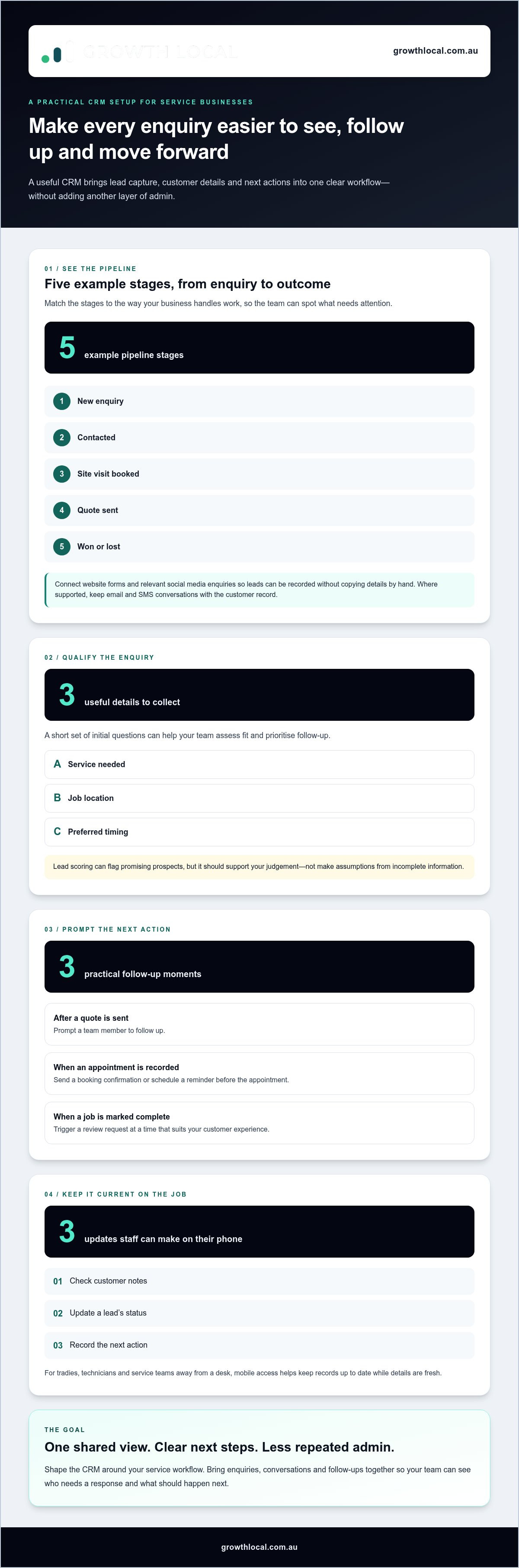
Connect website forms and relevant social media enquiries to your CRM so new leads can be recorded without someone copying details across by hand. Set up pipeline stages that match your sales process, such as new enquiry, contacted, site visit booked, quote sent, and won or lost. At a glance, your team can see which opportunities need a call and where prospects are getting stuck.
Where your CRM supports it, keep email and SMS conversations connected to the customer record. That gives the team useful context before replying, instead of leaving important details buried in separate inboxes and phones.
Qualify leads and automate the next step
Not every enquiry is ready for a quote. Use a short set of initial questions to collect details that help you assess fit, such as the service needed, job location and preferred timing. Agree on clear criteria for sorting enquiries and prioritising follow-up. Automated lead scoring can help flag promising prospects, but it should support your judgement, not make assumptions based on incomplete information.
Follow-up sequences can keep a conversation moving without relying on someone to remember every task. For example, a CRM can prompt a team member after a quote is sent, send a booking confirmation when an appointment is recorded, or schedule a reminder before the appointment. For longer decision cycles, a measured nurture sequence can share useful updates and give prospects an easy way to respond. When a job is marked complete, you can also trigger a review request at a time that suits your customer experience.
Make it useful on the job site
Mobile access matters for tradies, technicians and service teams who aren’t always at a desk. Staff should be able to check customer notes, update a lead’s status and record the next action from their phone. That keeps the CRM current while details are fresh, rather than leaving a backlog for later.
Choose features around the work your team actually does. A well-configured CRM brings lead capture, conversations and follow-ups into one practical workflow. If you’re shaping that workflow for your business, explore CRM setup for service businesses as a next step.
Choosing Your Tech Stack: Customising Systems for the Australian Market
Off-the-shelf software can look ready to go, but a generic setup may not match the way your business handles an enquiry, prepares a quote and follows up. CRM implementation for small business Australia means shaping the system around your actual workflow, rather than forcing your team to work around default fields and stages.
Start with your process, then compare tools against it. Monday.com can be configured to organise work and track opportunities, while GoHighLevel brings CRM and marketing activity together in one platform. The better fit depends on whether your priority is coordinating tasks, managing lead follow-up or connecting both. Don’t choose on feature count alone. Map the steps your team needs, then assess how cleanly each platform supports them.
Build around your service, not a generic template
A plumber and a solar business won’t follow the same customer journey. A plumber may need to track an urgent enquiry, a job location, an assessment and a quote. A solar business may need to manage a longer sales process, with additional consultation and proposal stages. Use pipeline labels, required information and follow-up prompts that reflect those differences. For tradies looking to connect lead generation and CRM workflows, this lead generation system setup guide outlines the approach.
GoHighLevel can suit a service business looking to bring CRM and marketing workflows into one tech stack. The practical benefit is less switching between disconnected tools, provided the setup matches how enquiries arrive and how your team follows them up. A platform won’t fix a confusing sales process by itself, so configure the workflows around clear steps your team can follow.
Connect the customer journey to your accounts
Map the handover from enquiry to quote, accepted work and invoice. If your business uses Xero or MYOB, work out how customer and job details will pass between the CRM and accounting software, whether through a direct integration or another connection. Test the fields and hand-offs with a sample record before relying on the setup. This helps reduce duplicate data entry and mismatches between customer records.
Set sensible internal notifications for actions such as a new enquiry, an overdue follow-up or a quote awaiting a response. You can also record communication preferences and build reminders around them. These workflow controls are not a substitute for understanding your own privacy and communication obligations.
Solar teams can benefit from a pipeline tailored to their sales process rather than a generic trades template. See how solar CRM workflows can be structured around that industry’s needs.
The Step-by-Step CRM Implementation Roadmap for 2026
A CRM can become expensive shelfware if it’s built around features instead of how your team works. Keep your CRM implementation for small business Australia practical: start with the process, launch the essentials, then improve the system using real feedback.
Step 1: Audit your current process
Before choosing settings or importing data, trace what happens from first enquiry to completed sale. Note where leads come from, who responds, how quotes are followed up and where handovers stall. Include the workarounds your team relies on. This shows you what the CRM needs to fix, instead of simply digitising a messy process as it stands.
Step 2: Clean and migrate your data
Review spreadsheets or old software before importing anything. Remove duplicate records, correct obvious errors and decide which information is still useful. Then map existing columns to CRM fields, including any service-specific details your team needs to act. Test a small sample first and check that names, contact details and notes appear in the right places before migrating the rest.
Step 3: Launch a minimum viable pipeline
Start with the stages your team needs to manage work today, such as new enquiry, contacted, quote sent and won or lost. Add only the fields and reminders that support those steps. A lean pipeline is easier to learn and maintain than a complicated setup packed with options nobody uses. Start with the essentials, then add features when there’s a clear need.
Step 4: Train the team and set a clear standard
Show staff how the CRM makes their day easier, using real examples from your workflow rather than a feature tour. Agree on a simple rule: if an enquiry or sales update isn’t recorded in the CRM, the team can’t rely on it being followed up. Keep the system straightforward and use a dashboard to show practical indicators, such as enquiries actioned and quotes awaiting a response. A confident “Super User” can answer everyday questions and help good habits stick.
Step 5: Review, refine and automate
After launch, ask the team where information is missing, steps feel clunky or manual admin still piles up. Fix the friction first. Then automate repeatable tasks, such as assigning new enquiries or prompting a follow-up after a quote. Review workflows as your business changes. Automation should support a process that works, not lock in a problem.
Growth Local sets up CRMs and automated workflows around the lead and sales processes of Australian service businesses.
Scaling with Growth Local: Turning Your CRM into a Lead-Generating Machine
A CRM can only manage the enquiries it receives. If leads come through missed calls, website forms and social messages, connect those entry points to a clear follow-up process. That’s why effective CRM implementation for small business Australia starts at the front end: capture the enquiry, record useful details and make the next action visible.
Growth Local helps Australian service businesses build digital infrastructure through lead generation and CRM system setup, with automated workflows designed to reduce manual admin. The practical focus is connecting how customers get in touch with how your team qualifies, follows up and progresses opportunities. A CRM can then do more than manage existing customer records: it can help your business act on new enquiries and progress opportunities consistently.
The AI receptionist advantage
Missed calls can mean missed opportunities, especially when your team is out on a job or already speaking with a customer. An AI receptionist can support initial caller interactions, capture enquiry details and pass information into a connected CRM workflow for follow-up. The value is a more organised handover, not a promise that every call will become a customer. Growth Local integrates AI receptionist technology with CRM systems to help service businesses capture enquiries and organise next steps.
Done-for-you implementation or DIY?
Building automations yourself can seem straightforward until different tools, fields and triggers need to work together. A change to one workflow may affect how an enquiry is assigned or what information reaches the team. Professional setup helps map those connections around your actual process, test the handovers and keep the system organised as your business evolves. No setup can predict every future change, but a flexible foundation makes it easier to adapt without starting from scratch.
The aim is to move from simply managing customer records to consistently capturing and progressing sales opportunities. Start with a system your team can use, then refine it as you learn which workflows save time and support more jobs. Growth Local can help you plan a CRM setup around your business and its workflows.
Build a CRM That’s Ready to Grow With You
A practical CRM starts with your real sales process, not a pile of features. Map how enquiries become jobs, clean up your data and build a pipeline your team can keep current. Then automate repetitive follow-ups and review what’s working as your business grows.
That’s the practical approach to CRM implementation for small business Australia: create digital infrastructure that helps you capture leads, organise customer information and move opportunities forward. Growth Local provides CRM setup, including solar CRM setup, with a focus on service business workflows.
You don’t need to tackle every workflow at once. Start with the bottleneck costing your team the most time, then build a system that makes the next step clear. A well-set-up CRM can help your team spend less time chasing admin and more time progressing customer opportunities.
Your spreadsheets got you started. Now you can build a smarter system for the next stage of growth.
Frequently Asked Questions
What is the best CRM for a small service business in Australia?
There’s no single best CRM for every small service business; the right fit depends on your sales process, team and tools. A tradie may need a straightforward way to track enquiries, quotes and follow-ups, while a solar business may need stages suited to a longer sales journey. Growth Local sets up CRMs for Australian service businesses, including solar CRM workflows.
How much does CRM implementation actually cost for a small business?
The cost depends on what needs to be configured, such as your pipeline, data migration, integrations and automated workflows. A basic setup has different requirements from a system connecting multiple lead sources and customer processes. Consider the implementation work and ongoing subscription costs separately. Growth Local tailors CRM setup to the business and its workflows, so the requirements differ from one project to another.
How long does it take to set up a CRM from scratch?
There isn’t a reliable one-size-fits-all timeframe. Setup depends on factors such as how many workflows you need, the condition of your existing data and whether other systems need to connect. A focused first version can start with a simple pipeline and essential fields, then expand as the team uses it. For CRM implementation for small business Australia, begin by mapping your process so the setup work has a clear scope.
Can I integrate my CRM with Xero or MYOB?
In many cases, a CRM can connect with accounting software such as Xero or MYOB, either through a built-in integration or another connection. The available options depend on the CRM and the information you want to share. Map the handover first, such as when a customer record or accepted quote needs to flow into accounting, then test with sample records to catch mismatched fields before relying on the integration.
Is a CRM worth it for a business with only 2 or 3 employees?
It can be, especially if enquiries are spread across inboxes, phones and spreadsheets or follow-ups are easy to forget. A small team doesn’t need a complicated platform. Start with shared customer records, a few clear sales stages and reminders for important next steps. That gives everyone the same view of each opportunity and reduces reliance on one person’s memory, without building a system bigger than the business needs.
What happens to my data if I decide to switch CRM providers later?
Your ability to move data depends on what the current CRM lets you export and how your records are structured. Before switching, identify the information you need to keep, such as contact details, notes and sales status, and work out how it can be exported and mapped into the new system. Keep a secure backup and test a small sample import first. A tidy, consistently used database is easier to migrate than cluttered records.
Do I need a full-time IT person to manage a CRM?
Most small service businesses don’t need to start by hiring a full-time IT person just to use a CRM. The day-to-day essentials are keeping records accurate, following agreed workflows and showing staff how to use the system. More complex integrations or automation may need specialist setup. Keep the CRM simple, nominate a team member to oversee routine use and document key processes so the system doesn’t depend on one person’s memory.
How does an AI receptionist work with my CRM system?
An AI receptionist can support initial interactions with callers, collect relevant enquiry details and pass that information into a connected CRM workflow. The team can then review the record, assess the enquiry and follow up with the right context. The handover depends on how the tools are configured. Growth Local integrates AI receptionist technology with CRM systems to help service businesses capture enquiries and organise the next steps.


