

Components of a Marketing Automation System: A Practical Guide
What if a new enquiry could move from first contact to timely follow-up without anyone having to remember the next step? When customer details are scattered across tools and reminders live in people’s heads, leads can slip through the cracks. The components of a marketing automation system work best when they connect, rather than add another layer of software.
Automation can feel complicated at first. There are platforms, data fields, workflows and communication channels to consider, and it’s not always clear what needs to come first. Start with a simple system map: what information you capture, what action it triggers and how you’ll tell whether that action happened.
This guide breaks down the essential building blocks and shows how they fit together, from enquiry capture and CRM data to automated follow-up across relevant channels. You’ll also see where measurement belongs and what to prioritise before adding more tools. The goal is a connected process that reduces manual handling and makes the next step for every lead easier to see.
Key Takeaways
- The components of a marketing automation system are connected tools, data and rules, not just a software platform.
- Use your CRM to organise enquiry details, interactions, lead status and next actions in one record.
- Map what happens when an enquiry arrives: a trigger starts the process, and rules guide the next action and message.
- Connect tools to solve a specific process need, then track business outcomes as well as activity such as messages sent.
- Build in a practical order: identify friction, map data, define workflows, connect tools and measure what’s working.
What are the components of a marketing automation system?
A marketing automation system is a connected set of tools, customer data and decision rules that handles repeatable marketing work. It might record a new enquiry, determine who should follow up and send an appropriate acknowledgement, while keeping the team informed about what happened.
A marketing automation system connects customer information, defined rules and communication tools to carry out repeatable marketing tasks. That’s broader than a single software platform. A platform may provide the features, but the system also depends on how information enters, how tools share it and how people manage the process. The Marketing Automation Overview also describes automation in relation to marketing tasks and CRM integration.
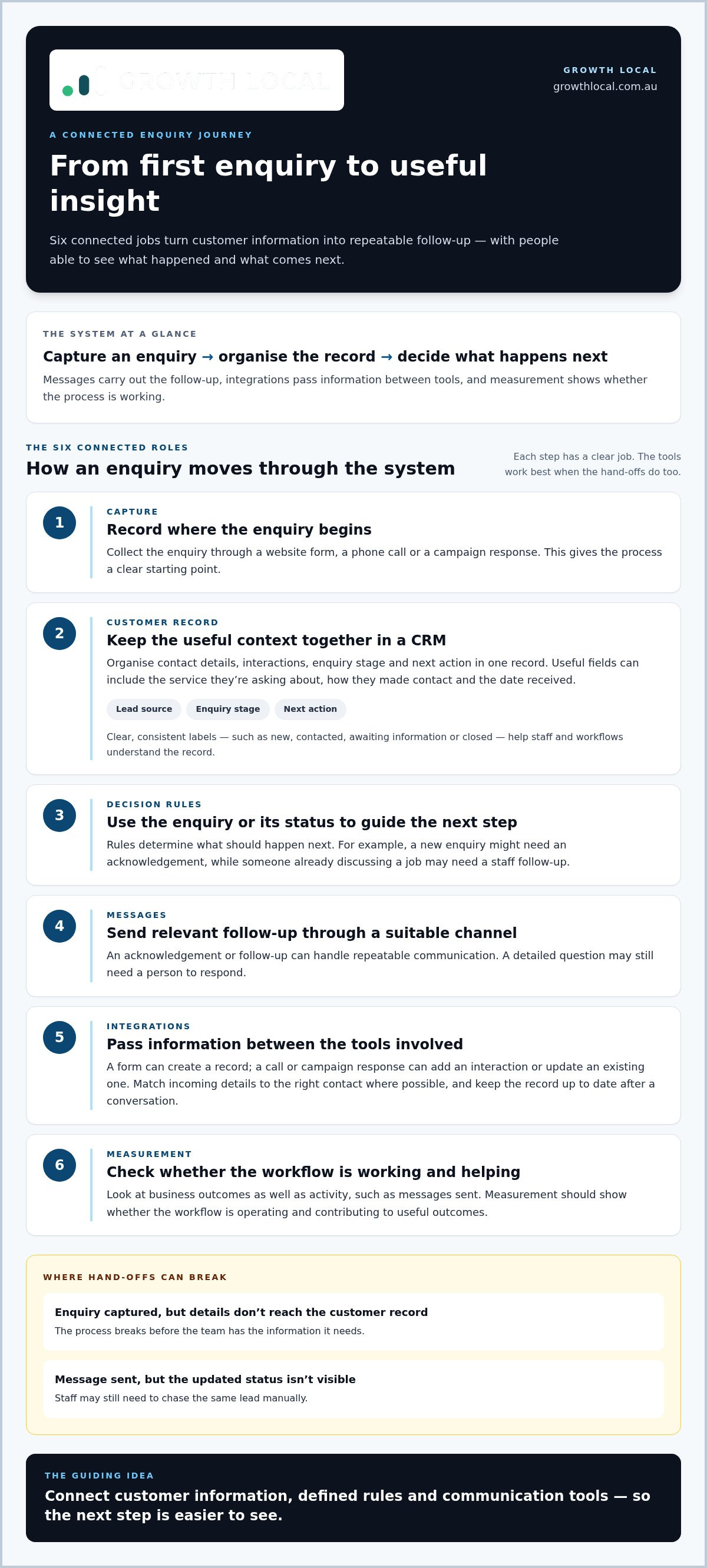
The components of a marketing automation system generally work across six roles:
- Capture: collect an enquiry through a form, call or campaign response.
- Customer records: organise contact details and interactions in a CRM.
- Decision rules: determine what should happen next based on the enquiry or its status.
- Messages: send a relevant acknowledgement or follow-up through a suitable channel.
- Integrations: pass information between the tools involved in the process.
- Measurement: show whether the workflow is operating and contributing to useful outcomes.
Think of these as connected jobs, not a shopping list of software. If a form captures an enquiry but the details don’t reach the customer record, the process breaks. If a message goes out but nobody can see the updated status, staff may still need to chase the same lead manually.
How is a marketing automation system different from automation software?
Software is a tool; the system is the tool plus its data, configuration and operating process. For example, a service enquiry could arrive through a website form, create or update a CRM record, trigger an acknowledgement and prompt a staff member to review the request. Each step has a defined role. Automation handles repeatable tasks, but it doesn’t replace every conversation or judgement call. A detailed question may still need a person to respond.
What business problem should the system solve first?
Start with a bottleneck you can point to, such as enquiries waiting too long for follow-up or customer records split across tools. Write down what happens now, where work stalls and what a better handover would look like. “Automate everything” isn’t a useful starting point. It makes it harder to choose rules or judge whether the setup is helping.
For a service business, a practical lead generation system setup can be planned around the path from enquiry capture to follow-up, rather than adding tools without a clear job. Choose one repeatable process, map who or what handles each step, then identify the data and connections it needs. That gives you a manageable starting point and a system you can refine as the business changes.
How customer data and CRM form the system’s foundation
Automation can only act on the information it can access. A CRM (customer relationship management system) gives your team an organised record of enquiries, conversations, status and next actions. Instead of piecing together context from an inbox, form notifications and staff notes, people can work from a shared customer history.
Clean, consistently updated customer records help automation send relevant follow-up and give staff the context to take the next step. That depends on agreeing what information matters and using the same terms across the business. If one person marks an enquiry “new” and another calls it “uncontacted”, a workflow may not recognise which record needs attention.
What information should a useful customer record hold?
Keep fields tied to a practical job: responding, following up or handing the enquiry to the right person. A service business might record a customer’s name and preferred contact details, the service they’re asking about, how they made contact, the date received, the current enquiry stage and the next action. Record only what helps the process. Extra fields can make records harder to complete and maintain.
Two details are especially useful when applied consistently:
- Lead source: note whether the enquiry came through a website form, phone call or campaign response. This helps staff understand the context and gives reporting a reliable basis.
- Enquiry stage: use clear labels such as new, contacted, awaiting information or closed. A defined stage makes it easier to spot what needs attention and what follow-up is appropriate.
Forms can create a record automatically, while a call or campaign response can add a new interaction or update an existing one. Before creating a duplicate, the system should match the incoming details to the right contact where possible. Staff also need a straightforward way to update the record after a conversation, so the next person isn’t working from stale information.
How does segmentation make follow-up more relevant?
Segmentation means grouping records using useful details, not assumptions. A business could group enquiries by service interest, source, current stage or whether the contact is an existing customer. Those groups become valuable when they change what happens next: a new enquiry might receive an acknowledgement, while someone already discussing a job may need a staff follow-up instead.
Connect each segment to a clear action. If a label doesn’t change the message, timing or handover, it may not need to be a separate group. Review labels as your process evolves, and make sure staff know when and how to update them.
A well-structured CRM setup for service businesses gives these records, stages and handovers a consistent home. Start with the fields your team needs to respond well, then build segments and workflows around that dependable information.
How workflows, messages and channels turn data into action
A workflow turns an enquiry record into a defined sequence of actions. It starts with a trigger, an event such as a form submission or a change in enquiry status. A rule is a condition that determines what happens next, such as sending an acknowledgement only when the enquiry is marked as new.
Picture someone asking a service business for information through its website. A straightforward workflow could run like this:
- 1. Enquiry arrives: a form submission creates or updates the customer record.
- 2. A rule checks the record: if the enquiry is new and includes a valid contact method, the workflow assigns the next step.
- 3. A message goes out: the customer receives a clear acknowledgement, while the team gets a prompt to review the request.
- 4. The status updates: when a staff member makes contact, the record changes so the workflow can stop or move to an appropriate next action.
This is how the components of a marketing automation system turn information into a practical handover. The message matters, but so does the record update. Without that update, the system may keep treating an enquiry as untouched and send follow-up that no longer fits.
What makes a workflow reliable rather than noisy?
Give each workflow one clear trigger and a useful customer outcome, such as acknowledging a request or prompting a staff follow-up. Add stopping conditions: pause or end the sequence if the customer replies, books or moves to a different status. If the request needs judgement or a detailed conversation, route it to a person rather than forcing it through a fixed sequence.
Test the workflow using common situations before relying on it. What if the same person submits the form twice? What if staff update the record before a message is due? A reliable setup accounts for these moments, avoids duplicate or irrelevant contact and makes it clear who owns the next action.
Where do content and communication channels fit?
Choose the channel and message to suit the customer’s action and enquiry stage. Email can provide a written acknowledgement or useful detail; SMS can suit a brief, timely update. An AI receptionist can support lead capture and initial customer interactions, while complex questions or decisions can be handed to staff. Each touchpoint has a different job.
Keep automated content clear, accurate and consistent with the way your business normally speaks. A message should explain what happens next, not imply that a person has reviewed an enquiry if that hasn’t happened. For AI-assisted call handling, set clear boundaries around what it can capture and when it should pass the conversation to a team member.
Automation isn’t just about sending messages. It’s about choosing the right response, stopping at the right point and making the handover obvious. Review the workflow when your process changes, and check that its messages still match the actions your team can take.
How integrations, measurement and safeguards keep automation useful
Connected tools are only useful if information moves in the right direction. An integration might copy an enquiry into a customer record, trigger a task for a staff member or pass campaign data into a report. Each connection should support a clear step in the process, not just add another line to a software diagram.
Start by mapping the tools already used for enquiry capture, customer records and communication. Then look for friction: does someone copy details by hand, miss a handover or struggle to see what happened after a message was sent? Prioritise connections that remove that specific problem. If an integration can’t be tied to a workflow need, it may add complexity without making the process more useful.
Which connections are worth prioritising?
For a service business, a practical connection might send form details into the CRM, create a follow-up task when an enquiry arrives, or bring campaign responses into reporting. These serve different purposes: moving records, prompting action and showing outcomes. Map what information each tool sends and receives, and decide which system should hold the main customer record to avoid conflicting updates.
Keep the first connections focused. If a team already enters the same enquiry in two places, linking those tools could cut duplicate handling. If requests are being missed between marketing and sales, a workflow that assigns and records the handover may matter more than connecting every available platform.
What should a business measure and review?
Don’t confuse activity with results. Messages sent or tasks created show that a workflow ran; they don’t tell you whether enquiries received a response, progressed or became qualified opportunities. Use a small set of measures that links system activity to the next meaningful business outcome.
- Component: enquiry capture. Purpose: bring submissions into the customer record. Signal to monitor: missing or incomplete records.
- Component: task handover. Purpose: assign follow-up to the right person. Signal to monitor: enquiries with no recorded next action.
- Component: messaging workflow. Purpose: send relevant updates. Signal to monitor: messages sent alongside replies or enquiry progression.
- Component: reporting connection. Purpose: show how activity relates to business outcomes. Signal to monitor: qualified enquiries by source or stage.
The components of a marketing automation system need operating safeguards as well as connections. Check that records are accurate, access is appropriate for each person’s role, and communication preferences or consent status are recorded and respected in your workflows. These checks help prevent outdated details, unnecessary access and messages going to the wrong audience.
Review the process regularly with the people who use it. Look for failed handovers, incomplete records and steps that no longer match how the business works. A workflow that made sense at setup can become noisy as responsibilities or services change. Include these checks in your sales workflow review so the process stays clear and current.
How Growth Local connects marketing automation components for service businesses
For a service business, the value isn’t in having the most tools. It’s in making sure an enquiry can move from first contact to a clear next step, without staff having to re-enter details or piece together what happened. Growth Local sets up CRM and lead-generation systems that connect these parts around the way a business handles leads.
A practical setup follows a clear sequence:
- Identify friction: pinpoint where enquiries get delayed, details go missing or handovers rely on memory.
- Map the data: note what information comes in, where it needs to be recorded and who uses it.
- Define the workflow: agree what should happen after an enquiry arrives, including when a staff member needs to take over.
- Connect the tools: link capture, CRM and communication processes where a connection removes a real bottleneck.
- Measure and refine: review whether enquiries are recorded, followed up and moved through the process as intended.
This order keeps the business process in charge. Software choices should support the steps your team needs to complete, rather than dictate a workflow that doesn’t fit the way you serve customers.
What does a joined-up system look like for a service business?
Imagine a prospective customer submits an enquiry. Their details enter the CRM, where the request is recorded with a source and status. A defined workflow can then prompt the next follow-up, while the record shows whether the enquiry is awaiting action, being handled or has progressed. Staff can pick up the conversation with context instead of starting from scattered notes.
An AI receptionist can support initial lead capture and customer interactions, helping information enter the process in an organised way. It can form one part of the system, with the CRM holding the record and the workflow making the next action clear. More involved questions can be handed to a team member for a personal response.
The details of that process can vary by industry. For example, solar CRM setup can be tailored to the enquiry stages and handovers a solar business needs to manage, rather than relying on generic labels that don’t reflect its work.
What are the next steps for improving your system?
Before adding software, write down one recurring lead-handling bottleneck. Describe what starts the problem, who currently deals with it and what information they need to move the enquiry forward. That small map can reveal whether the fix is better record keeping, a clearer handover, a workflow or a connection between existing tools.
Growth Local’s CRM and lead-generation system setup joins enquiry capture and follow-up into a practical process for service businesses. To talk through a system that fits your business, schedule a Growth Local demo.
Make your next improvement practical
You don’t need to rebuild everything at once. Choose one point where a lead slows down or information gets lost, then decide what a smoother handover would look like. That gives you a clear way to assess the components of a marketing automation system against your day-to-day work, rather than adding features for their own sake.
From there, keep refining. A useful system should make the next action easier to see, help your team stay on top of enquiries and give you a clearer view of what’s working. Start with a manageable change, learn from how it performs, and build on it as your needs evolve.
A more connected process is within reach. Start with the bottleneck that matters most, and build from there with Growth Local’s CRM and lead-generation system setup.
Frequently Asked Questions
What are the main components of a marketing automation system?
The main components of a marketing automation system are the tools and processes that capture, organise and act on customer information. In practice, check that each has a clear job: a website form collects an enquiry, a CRM stores it, a workflow prompts a response, and reporting shows whether the handover happened. If any step has no owner or purpose, simplify the setup before adding another tool.
Is a CRM the same as a marketing automation system?
No. A CRM is primarily used to manage customer and prospect records, while marketing automation applies rules to carry out repeatable tasks using relevant information. The two can overlap, and some platforms include both types of functionality. For example, a CRM might store a customer’s service history, while an automated task reminds the team to follow up when that customer makes a new enquiry.
Can a small service business use marketing automation?
Yes. A small service business can start with one contained workflow instead of building a large campaign programme. For instance, it could organise quote requests so each is logged and assigned for review, while unusual or detailed enquiries go straight to a person. Begin with a process that currently takes staff time or gets missed, then expand only when the first workflow is manageable and useful.
How do the components of marketing automation work together?
They work together by passing information and actions along a planned customer journey. For example, after a customer accepts a quote, a status change could stop prospect follow-ups and prompt an internal task to prepare the next handover. Define what event starts the action, what information it needs and what should happen if circumstances change. That keeps the sequence relevant rather than running on autopilot.
What is the difference between marketing automation and email automation?
Email automation uses rules to send emails, such as a confirmation after someone requests information. Marketing automation can include email, but it can also coordinate other tasks and communication touchpoints, update records or alert staff. A business using only email automation may be able to send a message but still need to manage the enquiry status and follow-up manually. The right scope depends on the process you want to improve.
Do I need a CRM before setting up marketing automation?
No, but you do need a reliable way to organise the information your workflows depend on. A CRM can provide that structure, especially if enquiries are spread across inboxes, spreadsheets and staff notes. Before choosing a setup, decide where each enquiry should be recorded and who maintains its status. If your current tools can support that consistently, you may be able to build from them rather than replace everything at once.
How can I tell whether my marketing automation system is working?
Check whether the system is completing the job it was set up to do, not just whether it sent messages. Compare records against real enquiries: were details captured correctly, was the right person prompted, and did the next step happen? Also look for duplicate records, failed tasks and messages that continue after a customer has progressed. These checks help reveal where to adjust the workflow before small issues become routine.


