

Client Intake Automation for Consultants: 2026 Guide
What if client intake automation could save you admin time without making your first conversations feel impersonal? With client intake process automation for consultants, the goal isn’t to automate every interaction. It’s to capture the right details, keep enquiries moving and leave decisions about fit in your hands.
If enquiries land in your inbox, on your website and through phone calls, useful information can quickly become scattered. Manually qualifying leads and chasing follow-ups also takes time away from billable work. A generic workflow won’t solve that if it ignores how you scope services and decide which projects to take on.
This guide shows you how to map your intake journey, compare automation options and build a process that suits your firm. You’ll see which repeatable tasks a CRM can organise, how an AI receptionist can help capture initial details, and where consultant judgement matters most. Start with a practical workflow, then adapt it as your firm grows.
Key Takeaways
- Map each step from first enquiry to a clear decision, so you can spot where information gets lost or follow-up stalls.
- Use client intake process automation for consultants to organise repeatable tasks while keeping decisions about fit and next steps in your hands.
- Compare manual intake, forms linked to a CRM and AI-assisted initial capture. Choose an approach that suits your enquiry volume and service complexity.
- Start with one intake path: remove unnecessary steps, set clear rules, then configure and test the workflow before expanding it.
- CRM and marketing system implementation can help structure enquiry capture, organise information and clarify hand-offs.
Why client intake process automation matters for consultants
Before a consulting engagement gets underway, there’s often a quieter workload to manage: gathering enquiry details, sorting messages and chasing missing information. One person might receive a website enquiry, another might take a call, and a third might add notes to a document. When those details aren’t brought together, consultants can end up repeating work or wondering who owns the next step.
Client intake is the process from a prospective client’s first enquiry to a clear decision about fit and what happens next. It can include recording the enquiry, collecting context, arranging an initial conversation and deciding who should follow up. Consultant intake automation uses systems to handle repeatable information-gathering and administrative steps, while leaving decisions about fit and advice to people.
That distinction matters. Automation can make the process more consistent, but it can’t guarantee more clients, revenue or good-fit projects. Its value is reducing avoidable admin and making it easier to see what’s known, what’s missing and what needs attention. This is a practical application of Business Process Automation, where technology supports repeatable process steps.
Which intake tasks consume consultant time?
The work often hides in small, repeated actions. A consultant may copy contact details from an email into a spreadsheet, ask for the same missing project context in a follow-up, then coordinate a time for an initial conversation. If details arrive through separate forms, emails and notes, someone also needs to reconcile them and make sure the right person follows up.
Each task is manageable on its own. Together, they interrupt focused work and can pull consultants away from billable client delivery. A consistent intake workflow can reduce repeated data entry and make hand-offs clearer, without removing the personal conversation that helps both sides understand the opportunity.
What should an automated intake process achieve?
A useful process captures key details in a consistent place, shows the current status of each enquiry and makes the next action visible. For example, it might record the prospective client’s problem, desired outcome and preferred timing, then flag missing context for a person to review. The aim isn’t to collect every possible detail upfront. Gather enough to decide what should happen next.
- Routine administration: recording enquiry details, acknowledging receipt and prompting for missing information.
- Professional judgement: assessing whether the work fits the firm’s expertise, scope and decision process.
Keep that boundary clear. A workflow can organise information and prompt a hand-off, but a consultant should stay in control of assessing complex or unusual enquiries. Measure success by whether decisions are clearer and easier to manage, not by how much you’ve automated.
How an automated consultant intake process works from enquiry to next step
A good intake workflow does more than collect a name and email address. It moves each enquiry through clear stages, from initial capture to a decision and a confirmed next action. The process should match your services: a firm offering a defined advisory package may need different questions and routing rules from one handling complex, bespoke projects.
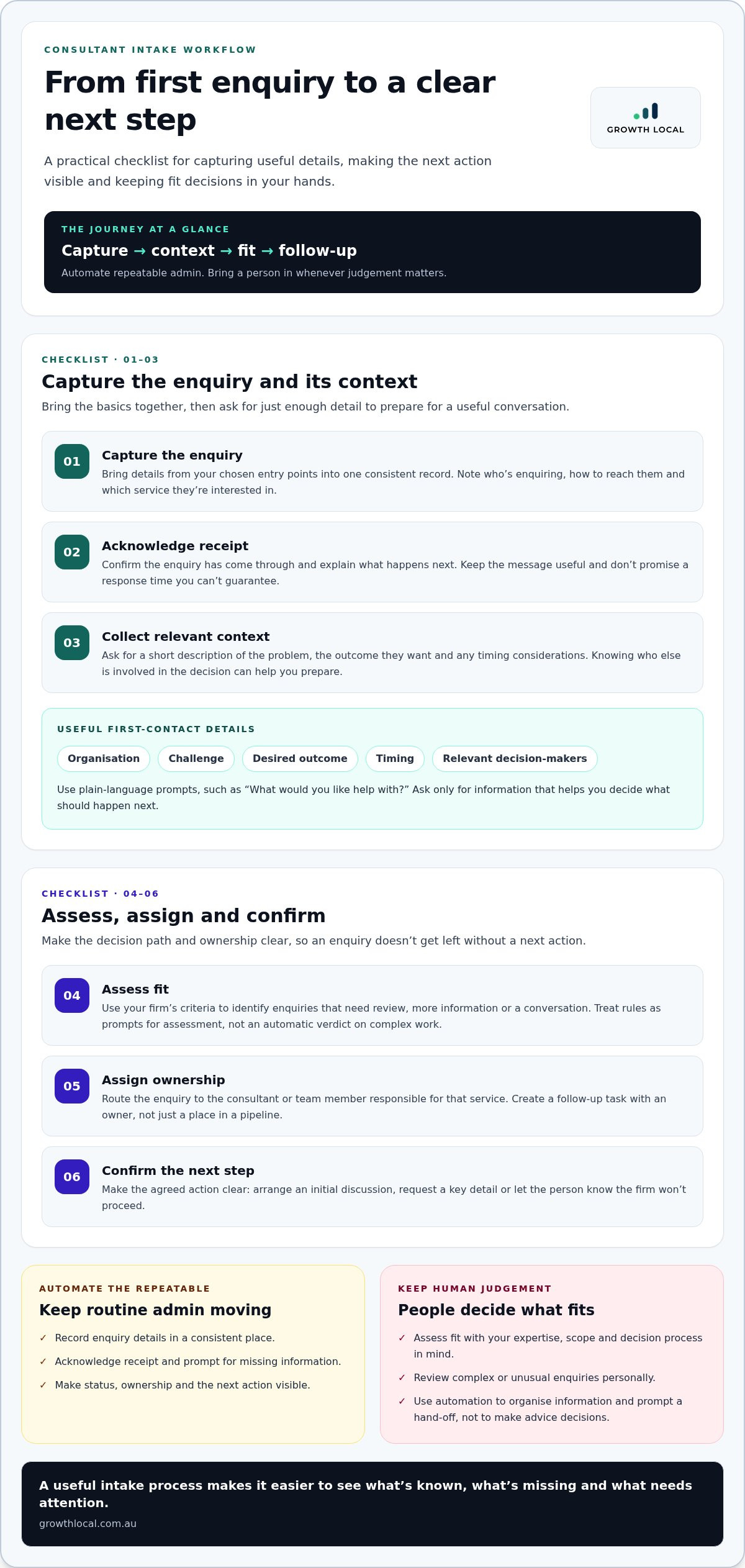
A practical intake workflow moves from capture to context, fit and follow-up, with a person stepping in whenever judgement matters. Here’s how to build that sequence:
- Capture the enquiry. Bring details from your chosen entry points into a consistent record. Capture who’s enquiring, how to reach them and which service they’re interested in, so the basics aren’t buried in separate inboxes.
- Acknowledge receipt. Send a clear confirmation that the enquiry has come through and explain what happens next. Keep the message useful and realistic, rather than implying a response time you can’t guarantee.
- Collect context. Ask for a short description of the problem, the outcome they want and any timing considerations. Asking who else is involved in the decision can help you prepare for a useful first conversation.
- Assess fit. Use your firm’s criteria to identify enquiries that need review, more information or a conversation. Treat rules as prompts for assessment, not an automatic verdict on complex work.
- Assign ownership. Route the enquiry to the consultant or team member responsible for the relevant service. Create a follow-up task so the next action has an owner, not just a place in a pipeline.
- Confirm the next step. Make the agreed action clear, whether that’s arranging an initial discussion, requesting a key detail or letting the person know the firm won’t proceed.
What information belongs in an initial consulting enquiry?
Ask only for information that helps you understand the request and prepare for a useful conversation. A first-contact form might cover the organisation, the challenge, the desired outcome, timing and relevant decision-makers. Save detailed discovery questions, sensitive background and project specifics for a conversation where you can explain why they matter.
Use plain-language prompts. “What would you like help with?” is clearer than a broad request for “project requirements”. Mark essential questions clearly and avoid asking for information you won’t use to decide what happens next.
Where should automation hand the process back to a person?
Automation can acknowledge an enquiry, create a task and route it using straightforward rules. A consultant should review questions of scope, suitability and relationship fit, especially when a request is unusual, high-context or doesn’t neatly match a service category. That review point stops a rigid rule from making a decision that needs professional judgement.
For client intake process automation for consultants, the fields, routing and hand-offs should reflect how the firm actually works. A CRM provides a foundation for organising this information and making ownership visible. Keep the process simple enough to follow, then refine it as you learn which questions and hand-offs support better decisions.
How to compare client intake automation options for a consulting firm
The right setup depends on how enquiries arrive, how consistent your services are and what systems you already use. More automation isn’t automatically better. Compare options by the work they remove, the oversight they need and how well they handle your firm’s approach to complex requests.
| Approach | Setup effort | Consistency | Human oversight | Fit for complex enquiries |
|---|---|---|---|---|
| Manual intake | Low to start, with ongoing manual handling | Can vary between people and channels | High | Flexible, but details and hand-offs can be harder to manage |
| Forms plus CRM workflow | Requires form, fields and workflow configuration | More consistent when fields and rules are well designed | Needed for fit decisions and exceptions | Useful for capturing standard details, with review for unusual requests |
| AI-assisted initial capture | Depends on the setup and connections required | Can follow defined prompts, but needs clear boundaries | Essential for uncertainty, scope and relationship-sensitive decisions | Can collect initial context, but shouldn’t replace consultant assessment |
This isn’t a performance ranking. A manual process may suit a firm with few enquiries and highly individual work. A structured CRM workflow can be a sensible middle ground if you ask similar first questions and want clear task ownership. AI-assisted capture may suit enquiries that begin through an initial interaction, provided there’s a clear route to a person.
When is a simple form and CRM workflow enough?
Start here if your firm asks repeatable first-contact questions and can manage enquiries through a straightforward process. A form can place answers into structured fields, while a CRM workflow can organise the record and assign responsibility for follow-up. The specific fields and tasks depend on how the system is configured, so don’t assume they come ready-made.
When might AI-assisted intake add value?
AI can support initial interactions and lead capture by gathering basic context and directing an enquiry for review. It isn’t a consultant and shouldn’t provide professional advice or make autonomous decisions about scope. Set a human review point for sensitive information, unclear requests and complex scoping. Growth Local integrates AI receptionist technology into lead capture systems as one possible intake component.
Can automation still feel personal? Yes, if the messages are clear, the questions are relevant and people take over at the right moments. A generic acknowledgement followed by a confusing process feels impersonal. A useful confirmation and an intentional hand-off make the next step clearer.
For client intake process automation for consultants, choose based on enquiry volume, service complexity and your existing systems. If intake begins across several marketing channels, consider how it connects to your wider lead generation system setup, so enquiry capture and follow-up work together.
How to implement client intake process automation without disrupting client trust
A new workflow shouldn’t make prospective clients jump through extra hoops or leave unusual enquiries sitting in a queue. Roll it out in stages. Start with one enquiry path, test the experience from the client’s side and make sure your team knows what to do when a request doesn’t fit the usual pattern.
Map the existing process before building anything
Trace each touchpoint from the moment an enquiry arrives to the first agreed next step. Note where details are recorded, who reviews them and how the prospective client is kept informed. Mark repeated questions, duplicate data entry and hand-offs with no clear owner. Keep steps that reassure clients or help them understand what happens next. Remove internal admin that adds no value to their experience.
Once the current process is visible, simplify it before configuring technology. Define which information you need, what each enquiry status means and which rules can safely trigger a task or hand-off. Be clear about exceptions too: name who reviews unclear requests, owns follow-up and steps in if an enquiry hasn’t progressed. Automation needs a responsible person behind it.
Test, review and improve the workflow
Run sample enquiries through the process before making it the default. Include a straightforward request and an ambiguous one. Check that details land in the right record, the right person owns the task and the acknowledgement sets a clear expectation. Ask the people who handle client conversations to review exceptions and flag anything that feels confusing or impersonal.
Then pilot one intake path, such as enquiries for a single service or from one channel. Keep an eye on practical measures: whether clients complete the questions, whether hand-offs have clear owners and whether follow-up status is visible. These checks help you find friction without relying on made-up benchmarks. Refine prompts and routing rules when your services or enquiry patterns change, then consider extending the approach to other paths.
Trust comes from clarity and follow-through, not from avoiding automation altogether. Use straightforward language, ask only relevant questions and make it obvious how a person can take over. Once an enquiry is qualified and its next step is agreed, intake can connect to later sales stages through sales workflow automation for Australian businesses. Keep that transition deliberate, so prospective clients aren’t passed into a process that feels disconnected from the conversation so far.
With client intake process automation for consultants, the aim is a controlled rollout that supports people rather than leaving them to chase the system. Map, test and review before expanding. Growth Local sets up CRM and automation workflows around how your consultancy captures enquiries and manages hand-offs.
How Growth Local can set up a consultant intake system
Once you’ve mapped how enquiries move through your consultancy, the next step is turning that process into a practical system. Growth Local’s CRM and marketing system implementation organises enquiry capture, information and hand-offs around the way your firm works, rather than forcing every service into the same generic workflow.
A CRM provides a foundation for managing enquiry information. Growth Local configures the system around your services, the questions you need answered and how your team decides what happens next. Growth Local also integrates AI receptionist technology to support initial interactions and lead capture. It can be part of the intake process, but it doesn’t replace consultant judgement.
What a tailored intake setup should address
A useful setup connects the places enquiries come from with the information your team needs and the person responsible for follow-up. It should reflect the differences between your services, including which requests need a conversation, which details help assess fit and where a human review is essential. The point is to make the process clearer, not to add automation just because the technology is available.
Before configuring a workflow, bring together the key decisions your team makes. For example, identify which enquiry details help distinguish between service types and who should review a request that doesn’t fit a standard route. This gives the CRM workflow a clear purpose: capture useful information, make ownership visible and support a sensible next step.
What to prepare before discussing an implementation
You don’t need a perfect process map to get started. A few real examples can show where admin is piling up and what a workable first version might look like. Bring notes on how enquiries currently arrive, what consultants need to assess a request and where details are copied, chased or handed between people.
- Enquiry paths: List the channels and service types you want the intake process to cover.
- Useful information: Note what helps your team understand the request and decide on fit.
- Friction points: Identify repeat tasks, unclear hand-offs and exceptions that need human review.
Use that information to define a sensible first workflow and its review points. You can also look at Growth Local pricing information as you consider the scope of implementation. Focus on the operational changes that will make a meaningful difference to your team’s intake process.
If you’re ready to discuss how client intake process automation for consultants could fit your firm, bring your current workflow and key questions to a Growth Local demo. Together, you can explore a practical setup that keeps enquiry details organised and consultants in control of the decisions that matter.
Make your next intake improvement count
Your intake workflow doesn’t need to be perfect before you improve it. Choose one point of friction that regularly slows your team down, then decide what a better experience would look like for both the prospective client and the consultant handling the enquiry. That gives you a practical starting point, grounded in how your firm works rather than what a tool happens to make possible.
Think of client intake process automation for consultants as an approach you can refine as your services and working practices change. Keep a clear view of where people need to step in, and make sure any new process still feels straightforward from the client’s side. Small, considered improvements can give your team a stronger foundation for handling future enquiries.
Growth Local sets up CRM and marketing systems to help organise enquiry capture and follow-up for consulting businesses. Bring the intake steps you want to improve to a demo and discuss a practical next move.
Frequently Asked Questions
Can a solo consultant automate client intake without a large technology stack?
Yes. A solo consultant can start with a simple enquiry form and a reliable way to organise responses and follow-up tasks. The aim of client intake process automation for consultants isn’t to add lots of software, but to reduce repeated admin. For example, collect key details in one place and use a calendar tool you already rely on to arrange conversations. Add more tools only when a clear gap remains.
Will client intake automation make a consulting firm feel less personal?
Not if you use automation for background admin and keep personal contact where it matters. A tailored confirmation can thank someone for explaining their challenge and tell them what to expect next. Avoid making every message sound like a template or sending automated questions that don’t relate to the service they asked about. Review messages as your offer changes, and make sure a consultant can respond when the enquiry needs a thoughtful conversation.
What information should a consultant collect before a discovery call?
Collect enough to prepare, not a full project brief. Useful details may include the organisation’s industry, the main issue, what’s already been tried and what the person hopes to change. You could also ask who will join the call and whether there’s a particular constraint to keep in mind. Make optional questions clearly optional, and let people answer “not sure” rather than forcing a guess. Save detailed documents for later if they’re not needed to plan the first conversation.
How much does client intake process automation cost for consultants?
There isn’t one standard cost for client intake process automation for consultants. The scope can depend on whether you’re improving an existing CRM, setting up a new workflow or connecting several enquiry sources. Software subscriptions or other ongoing charges may also apply separately from implementation. To understand the likely investment, first define which tasks and hand-offs you want to change, then assess the setup needed to support them. Avoid paying for complexity your process doesn’t require.
Can AI qualify consulting enquiries on its own?
AI can help collect initial information or direct an enquiry using clear, predefined rules, but it shouldn’t make the final call on complex consulting work. A request may look like a poor fit until a person understands the context, constraints or relationships involved. Treat AI output as an initial signal for review, not a final decision. Set clear boundaries for sensitive details, unusual requests and questions that call for professional advice.
How do you measure whether intake automation is working?
Track practical signs that the process is easier to manage. Check whether enquiry records contain the information your team needs, whether follow-up tasks have an owner and whether each enquiry has a visible status. You can also note where people abandon a form or regularly need to clarify a question. Compare these observations over time, and adjust the workflow when a recurring snag appears rather than chasing an arbitrary target.
Should client intake automation connect to a CRM?
A CRM can be a useful home for enquiry details when your team needs to find them, track progress and see who owns follow-up. It’s not essential to connect every tool straight away. Start by deciding which information needs to be shared and what action should follow. If your current setup already keeps those details accessible and organised, avoid adding a connection that creates extra work without solving a real problem.


