

Automating Client Follow-Up for Builders: A Practical Guide
You’re halfway through a site walk-through when a new enquiry arrives. Another job needs your attention, a quote is waiting for a follow-up, and the reminder you meant to set slips through the cracks. That’s the challenge of automating client follow up for builders: staying responsive while you’re busy running projects, without handing important client conversations over to a robot.
It’s understandable to worry that automation could feel impersonal or take control away from your team. Used well, it can make communication more consistent by handling routine acknowledgements and reminders, so prospective clients know what happens next and you can focus on conversations that need your judgement.
This guide walks through a practical follow-up workflow, from capturing an enquiry and organising its details in a CRM to checking in after sending a quote. You’ll see where personal calls matter, how to keep messages relevant and what to consider when using email or SMS. The aim is to respond consistently, keep prospects informed and spend less time chasing reminders, while staying in control of the relationship.
Key Takeaways
- Map each step from first enquiry to decision so prospects know what happens next.
- Use automating client follow up for builders to manage routine prompts while keeping important conversations personal.
- Match each message and trigger to the prospect’s stage and the way your building business works.
- Start with one enquiry type, assign clear ownership and test the workflow before expanding it.
- Use CRM setup and marketing systems to bring enquiry details and follow-up tasks into a more organised process.
Why automating client follow-up matters for builders
A building enquiry rarely arrives at a convenient moment. You might be coordinating trades on site, checking progress on an existing job or preparing a quote when a prospective client gets in touch. The problem usually isn’t a lack of care. It’s that client communication competes with work that needs your attention right now.
When a prospect doesn’t know whether you received their enquiry, what information you need or when to expect an update, they’re left guessing. That uncertainty can affect confidence before you’ve had a chance to explain how you work. Automated client follow-up records each enquiry and prompts or sends the next relevant communication based on where the prospect is in your process.
That doesn’t mean sending more messages for the sake of it. A useful update confirms receipt, answers a likely question or explains the next step. Repeated nudges that add no information can feel like noise. The goal of automating client follow up for builders is consistent, relevant communication, with a person stepping in when the conversation needs judgement.
Where manual follow-up breaks down on a building job
Enquiry details can end up scattered across an email inbox, a call note, a text thread and someone’s calendar. If a team member is away from their desk or another job takes priority, it may be unclear who last spoke with the prospect or what was promised. Busy periods make that harder, even when everyone intends to follow through.
From the client’s perspective, silence can look like a lack of interest. If you said you’d send an update but didn’t give a timeframe, they may not know whether to wait, follow up or keep looking. A shared record and a clear next action help remove that uncertainty.
Which builder-client moments benefit from a follow-up
Follow-up is most useful when a prospect needs acknowledgement, information or a clear next step. A CRM can keep those interactions and enquiry details together. For a plain-language overview of how CRM systems organise customer information and interactions, see Customer Relationship Management (CRM).
- Enquiry acknowledgement: Confirm the message arrived and explain what happens next.
- Information gathering: Ask for relevant details, such as the project type or information needed to assess the work.
- Quote delivery: Let the prospect know the quote has been sent and how to raise questions.
- Decision follow-up: Ask whether they need clarification, then record whether to continue or pause contact.
These are sales conversations before work is agreed. Once a project is under way, updates about scheduling, progress or changes belong in project communication and should follow the actual job process. A lead generation system can support the wider journey by capturing enquiries and moving them into an organised follow-up process.
Map an automated builder follow-up from enquiry to decision
A dependable workflow gives every enquiry a clear path without assuming every client will decide at the same pace. Start by recording the enquiry and acknowledging it. Then gather any details needed to assess the project, follow up after sending the quote, and mark the opportunity as won, declined or paused. The sequence should match how your business handles enquiries and quotes.
Keep a CRM record for each prospect so their enquiry details, previous contact and next action sit together. Anyone picking up the conversation can then see useful context, rather than a bare reminder to “call back”. A workflow trigger is an agreed event that starts a follow-up action. Automation in construction can cover digital information processes as well as machinery and robotics, a broad field explored by the International Association for Automation and Robotics in Construction.
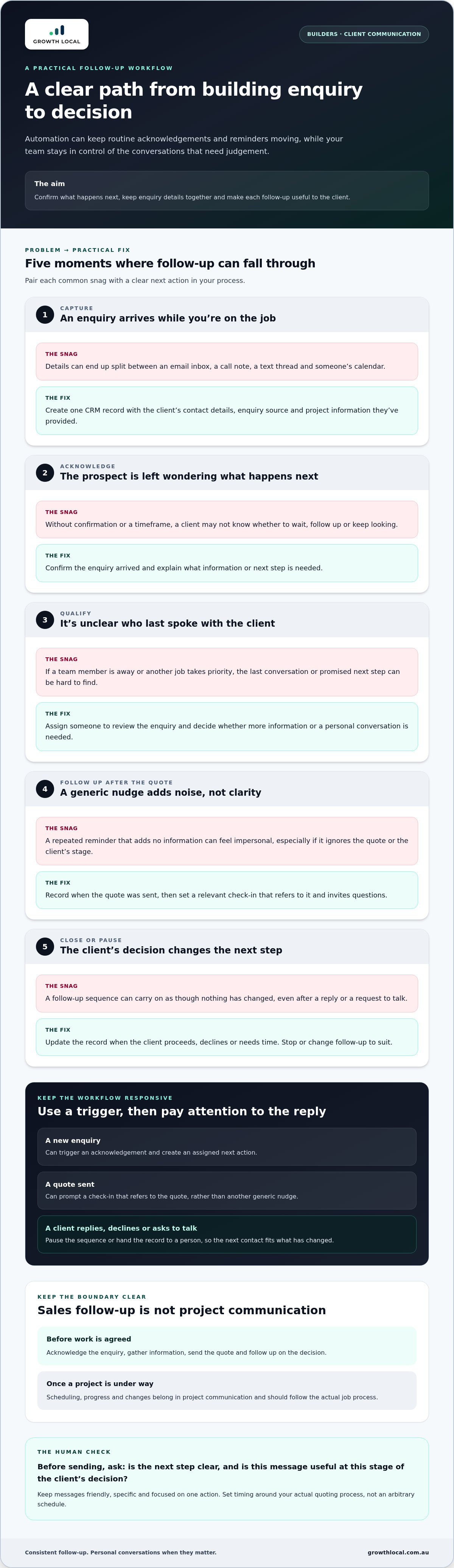
- Capture: Create a record with the client’s contact details, enquiry source and project information they’ve provided.
- Acknowledge: Confirm the enquiry arrived and explain what information or next step is needed.
- Qualify: Assign someone to review the details and decide whether more information or a conversation is needed.
- Follow up after the quote: Record when the quote was sent, then set a relevant check-in that invites questions.
- Close or pause: Update the record when the client proceeds, declines or needs time, then stop or change follow-up to suit.
Set useful triggers for each stage
A new enquiry can trigger an acknowledgement and create an assigned next action. Sending a quote can prompt a check-in, but the message should refer to that quote rather than send another generic nudge. If the client replies, declines or asks to talk, pause the sequence or hand the record to a person. This prevents the workflow from carrying on as though nothing has changed.
Make each message relevant to the client's next decision
Keep each message friendly, specific and focused on one action. An acknowledgement might ask for plans or project details if you need them to assess the enquiry. After sending a quote, invite questions without presuming the client is ready to proceed. Set timing around your actual quoting process and the client’s stage, not an arbitrary schedule.
Read each message from the client’s point of view: is the next step clear, and is the message useful at this stage of their decision? That check keeps automating client follow up for builders practical and human, rather than turning the process into a string of reminders.
If you’d like support turning this sequence into an organised CRM workflow, see how a tailored follow-up system could work for your enquiry process.
Compare automated and personal follow-up for building clients
Automation doesn’t have to make client communication feel robotic. It can handle predictable tasks and routine updates, while you stay responsible for conversations that call for experience and judgement. The key is to decide which moments follow a set process and which need a builder to take the lead.
Use this comparison to set clear boundaries. A CRM workflow can organise activity, while email or SMS can deliver a straightforward update. Personal follow-up is a better fit when context, sensitivity or a project decision matters.
| Task | Suitable automation | Personal handover | Purpose |
|---|---|---|---|
| Record an enquiry | CRM workflow creates or updates the enquiry record and next action. | A team member checks details that need clarification. | Keep information organised and assign ownership. |
| Send a routine update | Email or SMS confirms a known step, such as a quote being sent. | Builder follows up if the client raises a question. | Keep the client informed without drafting every routine message. |
| Discuss scope or concerns | CRM records a prompt for someone to make contact. | Builder speaks directly with the client. | Use judgement to resolve complex or sensitive matters. |
| Check in manually | Automation reminds the owner, but doesn’t have the conversation for them. | Builder contacts the prospect through their preferred channel. | Build a genuine connection and understand the client’s position. |
Automate routine acknowledgements, reminders and status updates
Use automation for messages with a clear trigger and purpose: confirming an enquiry arrived, reminding the team to check a quote or sharing a status update you can reliably provide. A template saves drafting time, but should leave room for relevant details such as the client’s name, project type or the step they’re waiting on. Check that every message is accurate and specific before using it.
Choose email or SMS based on the client’s preference and the nature of the update. A detailed explanation may suit email; a brief appointment reminder may work better by text. Whichever channel you use, keep the message focused on one action and avoid promising a response or update the team can’t deliver.
Keep scope, pricing and concerns in a builder’s hands
Hand the conversation to a person when a client asks a complex question, raises a concern or changes what they want included in the project. Scope and pricing decisions depend on context. A pre-written message can’t weigh those details or negotiate with care. Set the workflow to pause and prompt a builder to respond, then record what was agreed.
This balance is the point of automating client follow up for builders: routine steps stay organised, but genuine conversations remain personal. The same handover principle applies across sales workflow automation, from the first enquiry through to a decision. Use the system to prompt, organise and record, not to make commitments on your behalf.
Set up a builder follow-up workflow step by step
A useful workflow starts with the process your team already follows, not a complicated chain of messages. Pick one enquiry type, such as a request for a renovation quote, and one clear outcome, such as finding out whether the prospect wants to discuss the quote. Keep the first version small enough to test and improve.
Every automated message needs a relevant trigger, an owner and a next step. That way, the system supports the team instead of sending messages without anyone responsible for what happens next.
- Map the current journey. Write down what happens from enquiry to decision, including who responds, what details they need and where delays tend to occur. Include the actual steps, even if they’re currently handled through calls, emails or reminders.
- Choose the trigger and next action. Decide which event starts each step, such as a new enquiry arriving or a quote being marked as sent. Set a clear action for the system and name the person responsible for anything that needs review.
- Draft the messages. Prepare concise wording for an acknowledgement, a quote follow-up and a close-or-pause point. Give each message one clear purpose and next step for the client.
- Assign ownership. Name the person who monitors replies, handles questions and updates the enquiry record. Automation can prompt an action, but someone still needs to take responsibility for the conversation.
- Test and review. Run example enquiries through the workflow before relying on it. Check that messages arrive at the right stage, replies pause the sequence and no duplicate or mistimed communication is sent.
Build and test the first follow-up sequence
Use the journey you mapped as the blueprint, rather than adding automation to steps that are unclear or inconsistent. Test different scenarios: a prospect who replies straight away, someone who asks for more information and a client who decides not to proceed. Check that each case reaches the right person and ends with a recorded next action, close or pause.
Review performance without relying on vanity metrics
Focus on whether enquiries receive a timely response, next actions are completed and replies that need personal attention are handed over. Review real conversations to spot confusing wording, missed replies or reminders that don’t help the client decide. A configured CRM can bring enquiry details, communication history and ownership into one process, making these checks easier to manage.
Keep the workflow useful as it develops. If a message creates confusion or a handover is missed, adjust the trigger, wording or ownership before adding more steps. This practical approach to automating client follow up for builders gives your team a process it can follow and improve without losing sight of the client experience.
How Growth Local can implement follow-up systems for builders
You’ve mapped the enquiry journey, chosen practical triggers and decided which moments need a personal response. The next step is putting those parts into a system your team can use consistently. Growth Local sets up lead generation and marketing systems for service businesses, including CRM implementation and automated workflows, to organise your process.
Connect lead capture, CRM records and follow-up workflows
A well-planned setup can bring enquiry details, CRM records and agreed next actions into a clearer process. When a new project enquiry is captured, for example, your team can track the information received, who owns the follow-up and what needs to happen next. The workflow should reflect how your business assesses projects and prepares quotes, rather than forcing your team into a generic sequence.
An AI receptionist can support lead capture and initial customer interactions. It can help start the enquiry process, while your team handles project-specific discussions and decisions. Plan its role around where enquiries currently need attention and the kind of first interaction you want prospects to have.
Plan the next step around your current process
Start by pinpointing where enquiries tend to stall. Is it unclear who responds, are project details missing, does momentum drop after a quote is sent, or are reminders scattered across different places? Identifying the bottleneck gives you a practical starting point. It also keeps the first workflow focused on one enquiry type and outcome, rather than trying to automate every part of the client journey at once.
Growth Local works with Australian service businesses to set up lead generation and marketing systems, including CRM setup and AI automations. For builders, that means designing and implementing the digital process around enquiry capture and follow-up, while leaving construction work and important client conversations in your hands. You can plan which information to record, how follow-up should work and where personal contact should take over.
Discuss your follow-up system with Growth Local
Make your next follow-up step easier to manage
Your next improvement doesn’t need to be a full system rebuild. Start with the point where a promising enquiry most often loses momentum, then decide what would make the next step clearer for your team and the prospective client. A focused change, reviewed against real conversations, can give you a practical foundation to build on.
That’s the useful aim of automating client follow up for builders: make the process dependable enough to support your workload, while leaving room for the judgement and personal contact that help clients feel understood. As your process evolves, refine the workflow around how your team handles enquiries, quotes and decisions.
If you’re ready to plan a follow-up system around your building business, take the next step and talk it through with Growth Local.
A clearer process can start with one small change. Choose the point where follow-up most often slips and make that your first improvement.
Frequently Asked Questions
How can builders automate client follow-up?
Builders can use a CRM-based workflow to turn enquiry details into reminders and agreed communication tasks. Start with one enquiry type, such as a request for a new home quote, and decide what should happen if details are missing or the prospect replies. This makes automating client follow up for builders manageable: the system keeps work visible while a team member handles decisions and exceptions.
What is the best way to follow up after sending a building quote?
Send a relevant check-in that makes it easy for the client to ask questions, without assuming they’re ready to accept. For example, refer to the quote you sent and ask whether any part needs explaining. If the client has shared when they expect to decide, use that to guide your follow-up. Record their response or next step so another team member can continue the conversation with context.
Can automated follow-up still feel personal to building clients?
Yes, if messages reflect the client’s project and don’t imply a personal conversation has taken place when it hasn’t. Use details the prospect has actually shared, such as the kind of work they’re considering, and remove wording that sounds generic or overly familiar. Keep automated communication to straightforward updates. If the client raises a concern or asks for advice, assign the conversation to the right team member for a personal response.
How often should a builder follow up with a prospective client?
There isn’t one suitable interval for every building enquiry. Base the timing on what you’ve told the prospect, the stage of your quoting process and any preference they’ve shared. If you said you’d check in after they’ve had time to review a quote, follow that plan. If they ask for space or say they’re not proceeding, update the record and stop reminders that no longer make sense.
What should an automated follow-up message to a building client say?
Keep it brief, accurate and centred on one useful next step. For example: “Hi [Name], just checking you received the quote for [project]. If you’d like any part explained, reply here and I’ll arrange a time to talk it through.” Only use details that match the enquiry, and don’t imply a person has reviewed or approved something if they haven’t. For marketing emails, follow Australian consent and unsubscribe requirements.
Which CRM features help builders manage client follow-up?
Look for practical ways to keep an enquiry’s contact details, project notes, communication history, current status and next action together. Clear ownership shows who is responsible for a reply, while reminders make outstanding tasks easier to spot. For example, a record marked “quote sent” should also show who will handle the next check-in. Configure fields around your process, rather than collecting details your team won’t use.
Can an AI receptionist follow up with building leads?
An AI receptionist can support lead capture and initial customer interactions, helping start the enquiry process. Ongoing follow-up should use a workflow that reflects your business process, with a person stepping in for project-specific questions or decisions. Keep that distinction clear: the initial interaction can gather or acknowledge information, while your team remains responsible for assessing the project, discussing scope and managing the relationship.
How do builders know whether their follow-up workflow is working?
Check whether new enquiries receive a response, assigned actions are completed and client replies reach the right person. Review enquiry records regularly and look for missing notes, unanswered questions or reminders that continue after a client has replied. These checks show where the process needs adjustment. Open rates alone won’t tell you whether a prospect understood the next step or received the personal contact they needed.


