

Automated Review Requests for Service Businesses: Build a Better Workflow in 2026
What if you could ask for reviews consistently without making the request feel pushy or scripted? Automated review requests for service businesses can take follow-up off your team’s to-do list while keeping each message connected to the job just completed.
It’s easy for staff to forget to ask when they’re moving on to the next customer. Manual reminders take time, and a generic message sent at the wrong moment can feel awkward. The answer isn’t to automate the customer relationship. It’s to automate the repeatable follow-up, so customers get a timely, relevant invitation and your team can focus on the work itself.
This guide shows you how to build review requests into your service workflow, link them to completed jobs and customer records, and reduce repetitive admin without losing a human touch. You’ll learn how to choose a useful trigger, write a clear, low-pressure request and track what happens next. The result is a process your team can follow as the business grows.
Key Takeaways
- Build automated review requests for service businesses around a clear sequence: record completed work, identify the customer, send a relevant invitation and track its status.
- Use CRM records to connect customer details with completed jobs, so each request reflects the service delivered.
- Keep the wording neutral and invite honest feedback. A thoughtful message feels more personal than a generic request for praise.
- Track requests sent, delivered, responded to and completed separately to spot where your workflow could improve.
- CRM setup and AI automations can fit review follow-ups into your wider customer workflow and reduce repetitive admin.
Why automated review requests matter after a service job
A finished job creates a natural moment to invite feedback, but the follow-up can get lost among the next booking, paperwork and customer calls. Automated review requests for service businesses are scheduled or triggered messages that invite customers to share honest feedback after a service. They give the request a reliable place in your workflow instead of leaving it to someone’s memory.
A useful distinction: a review request workflow invites a customer to share their experience; buying or manufacturing reviews tries to control the feedback itself. Automation can help your team ask consistently, but it can’t guarantee a response, a positive rating or better search rankings. Customers decide whether to leave a review and what to say.
Where review requests fit in a service-business customer journey
The customer journey usually moves from enquiry to booking, service delivery and completion, then into post-job communication. A review invitation belongs after the work is complete, when the customer can reflect on the service they received. For example, marking a maintenance job complete could prompt a follow-up linked to that customer and job record.
That context matters. A message that refers to the completed service is more relevant than a generic request sent without a clear connection to the job. An Online Review is customer feedback shared publicly, so make clear that your message is an invitation, not a script for what to write.
Keep the request distinct from other messages. A service reminder helps a customer prepare for upcoming work. An invoice records payment due or received. A promotional message promotes an offer or another service. A review request asks for feedback on work already carried out. Keeping these purposes separate makes your communication easier to understand and less likely to feel like a sales pitch.
What automation can and cannot do
Automation handles repeatable steps behind the follow-up. A workflow can use a recorded job-completion event to trigger a message, deliver it through the chosen channel and log its status where that information is available. Staff can then see which requests need attention without checking every completed job manually.
That’s the operational benefit: fewer missed opportunities to ask, less manual chasing and a clearer record of customer feedback. Automation is the delivery mechanism, not the reviewer. It doesn’t decide what a customer experienced or how they’ll describe it.
- It can: make timing and delivery more consistent.
- It can: connect follow-up activity with customer and service records.
- It can’t: guarantee that customers respond, leave positive feedback or change your rankings.
Set the goal as a dependable, respectful invitation after completed work. The process should make it easier to ask while leaving the customer free to respond in their own words, or not at all.
How to build an automated review request workflow
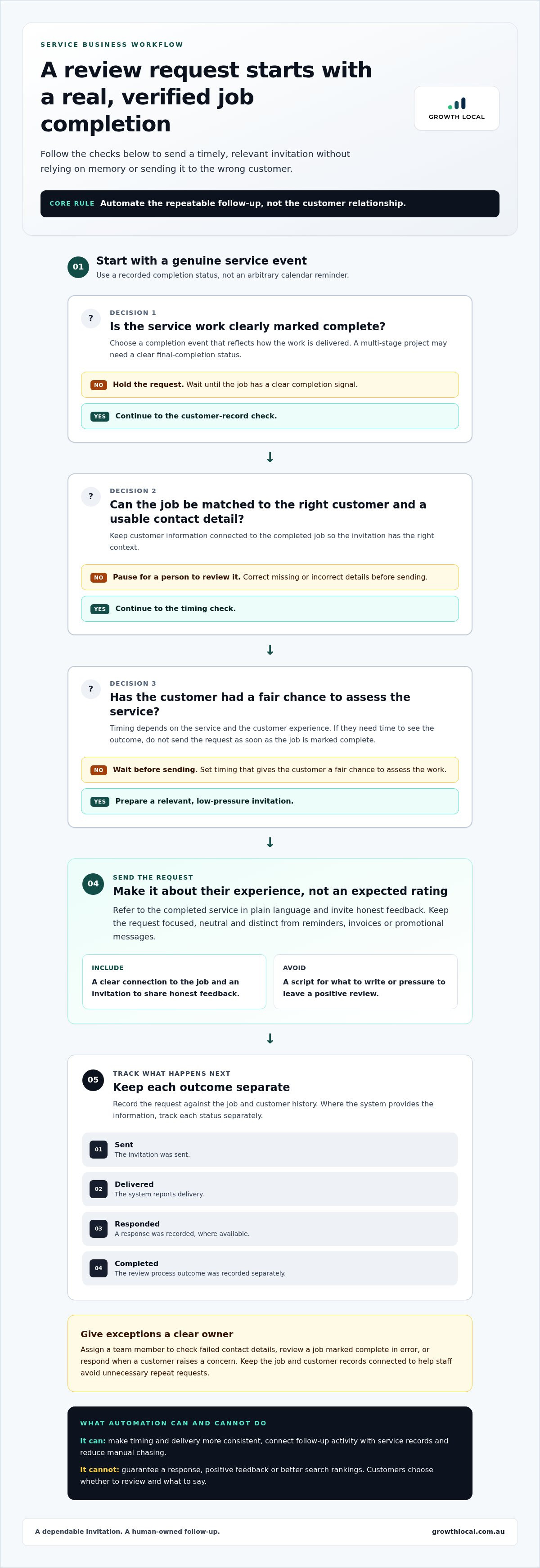
A reliable workflow starts with a real service event, not a calendar reminder that fires whether a job is finished or not. Map the steps from job completion to request tracking, then decide who handles exceptions. That gives your team a consistent process without sending messages blindly.
Choose a useful trigger and request timing
A completed-job trigger is a recorded signal that service work has finished. It prompts a review invitation for the customer linked to that job, rather than sending a request on an arbitrary date.
Choose a trigger that reflects how your work is delivered. A technician might mark a job complete after leaving, while a multi-stage project may need a clear final-completion status. Timing depends on the service and customer experience. If a customer needs time to see the outcome, don’t send the request as soon as the work is marked complete. Set timing that gives them a fair chance to assess the service, and use consistent rules for similar jobs.
Connect the request to customer and job records
Before activating a workflow, check that each job can be matched to the right customer and that the record contains a usable contact detail. Structured CRM records connect customer information with service activity, a core part of CRM implementation for small businesses. Clear records also help prevent duplicate requests and completed jobs being missed.
Build the process in this order:
- Identify completed work. Use a clear job status or completion event, and decide what counts as finished for each service type.
- Select the right customer. Match the completed job to the customer record and use the contact detail held for that customer. If details are missing or appear incorrect, pause the request for a person to review rather than risk sending it to the wrong contact.
- Send a relevant request. Refer to the completed service in plain language and invite the customer to share honest feedback. Keep the message focused on their experience, not an expected rating.
- Track the outcome. Record whether the request was sent and, where the system provides the information, whether it was delivered or answered. Keep the job and customer records connected so staff can see the history and avoid sending another request unnecessarily.
Decide who owns exceptions before the workflow goes live. Assign a team member to correct failed contact details, review a job marked complete in error, or respond when a customer raises a concern. Without clear ownership, these cases can go unnoticed in a system that appears to be running smoothly.
Test the workflow on a small group of completed jobs first. Check that it selects the right customer, reflects the service, and records activity where staff can find it. Once those hand-offs work, automated review requests for service businesses can reduce repetitive admin while keeping follow-up grounded in real customer and job records.
How to keep automated review requests genuine and respectful
Automation can save your team from writing every follow-up manually, but a message that feels like a bulk blast can undermine trust. The fix isn’t to make the system pretend to be a person. Use clear, relevant wording and build the request around the service the customer received.
Send requests consistently to customers who meet your workflow’s eligibility criteria, not just those your team expects to be pleased. Selecting only customers likely to leave favourable feedback can skew the picture and make the process feel unfair. A neutral invitation gives every eligible customer the same opportunity to share an honest account of their experience.
Write a clear request that sounds like your business
Keep the message short, name the service and make the next step clear. Use everyday language your team would use with a customer, rather than generic marketing copy. Avoid urgency, pressure, incentives or wording that suggests a particular rating. Before using platform-specific instructions, check the platform’s current guidance, as requirements can change.
For example, after a completed repair, a straightforward message could say: “Thanks for choosing us for your repair. If you’d like to share feedback about your experience, you can leave a review here: [link].” It identifies the job, makes the request optional and leaves the customer to choose what to say. Adapt the details to the work completed, but keep the invitation balanced.
Read the message aloud before switching it on. Does it sound like something your business would actually say? Is it easy to understand without extra explanation? This quick check can catch stiff phrasing, unclear service references or language that accidentally pushes for praise. Use variations for different service types if needed, while applying the same fair approach to all eligible customers.
Handle feedback without letting automation take over
An automated invitation and a response to feedback are different jobs. The system can send and record the request, but a person should handle replies that need context, care or a practical resolution. Assign someone to monitor responses and pass concerns to a team member familiar with the work. Clear handovers help stop customer messages disappearing between admin tasks.
For instance, if a customer says the repair didn’t solve the problem, route the reply to the person responsible for service follow-up. Don’t send another automated review prompt while the concern is unresolved. Give the person handling it the relevant job details, then let them respond to the issue the customer actually raised. Workflow automation is most useful when it makes ownership clear, not when it replaces judgement.
Keep the request process consistent, but leave room for human attention where it matters. That balance helps automated review requests for service businesses feel like a practical part of customer care, not a disguised campaign for positive ratings.
Measure review request performance and improve the process
Measure a review workflow in two ways: whether the process runs as intended, and what customers choose to do afterwards. Keep those separate. Process measures show whether requests are being handled consistently; they don’t promise a particular review result.
Start with jobs eligible for a request, then compare them with requests sent. Where your system records the information reliably, follow the path from delivery to response and completed review. These stages can show where the workflow is losing track of activity:
- Eligible completed jobs: jobs that met the criteria for a request.
- Requests sent: invitations recorded as sent by the system.
- Requests delivered: messages recorded as delivered, where available.
- Responses and completed reviews: customer replies and reviews recorded, where available.
Track useful measures without chasing vanity metrics
Calculate a request completion rate only if the records are dependable. For example, compare requests sent with eligible completed jobs if both figures cover the same period and your system consistently records each stage. If delivery or review data is incomplete, show that gap rather than treating missing information as a customer outcome.
Counts and ratings don’t tell the full story. Look at feedback themes and service issues too. If customers repeatedly mention unclear arrival updates, the useful next step may be improving that part of the service, not sending more invitations. Review volume or an average rating alone isn’t proof that the workflow has increased sales or improved business performance.
Use results to refine the workflow
When the figures don’t line up, investigate the hand-offs before changing message timing. Check whether jobs were marked complete, whether the right customer record was matched and whether contact details caused delivery problems. Confirm that someone owns replies and records that need correcting. Otherwise, a process issue can look like weak customer response.
Make a focused adjustment based on what you can observe. If requests go out before work is genuinely finished, fix the completion trigger. If a customer receives a confusing message, clarify its wording or service reference. If replies sit unanswered, assign responsibility for reviewing them. Change one part at a time and compare the records again to see whether the fix addressed the actual friction.
Review requests also sit within a wider customer journey, alongside enquiry handling, bookings and follow-up. Looking at them as part of the whole system can reveal gaps between lead capture and completed service, rather than treating reviews as a disconnected marketing task. That wider view keeps the measures tied to how work moves through the business.
Use the data to improve the workflow, not to pressure customers or chase a particular rating. A well-measured process makes it easier to see what’s working, where records break down and who needs to act next.
Set up automated review requests as part of your business system
A review follow-up works best when it fits the way your business already handles enquiries, bookings and completed jobs. If it sits outside those processes, staff may still need to copy details across, remember who to contact and check whether anything happened. A tailored CRM and marketing system can connect follow-up to the customer journey and cut down on repetitive admin.
Growth Local sets up lead-generation, CRM and marketing systems for service businesses, including CRM setup and AI automations. The aim is to shape a practical workflow around your existing customer and job processes, not to promise a particular number of reviews or a change in rankings. Automated review requests for service businesses should make the process easier to manage while keeping customer communication relevant and recognisably yours.
What a review workflow setup should clarify
Map the details the workflow needs: which customer or job event starts the follow-up, what information connects the customer to the completed work, and who handles exceptions. Consider failed contact details, replies that need attention and jobs whose completion status is unclear. A clear handover gives staff enough context to act without leaving unresolved tasks buried in the system.
Then check the customer-facing message. It should name the service, use your business’s natural voice and invite honest feedback. Keep it distinct from invoices, service reminders and promotions, so customers understand why they’re receiving it. Automation can manage repeatable steps, but your team should handle judgement calls and conversations that need a personal response.
Make the next step straightforward
Before changing systems, write down how follow-ups happen now. Note where staff record a finished job, how they identify the customer, who sends the request and where replies are handled. Pinpoint the drop-off: perhaps completion isn’t recorded consistently, contact details are scattered, or nobody owns follow-up when a customer responds. This map helps define what the setup needs to support.
From there, decide which records and handovers should connect, then shape the workflow around those needs. Growth Local implements CRM and AI automation as part of a broader business system, helping reduce manual steps without taking the human element out of customer communication. The process should be clear to staff as well as useful to customers.
If your team is still chasing job records or relying on memory to follow up, a practical setup can bring those steps into a more organised workflow. Discuss how a tailored system could fit your service business and its current process.
Make your next customer follow-up easier to manage
A review process shouldn’t be a set-and-forget project. As your services, team responsibilities or customer journey change, revisit whether the workflow still reflects how jobs are completed and feedback is handled. That check can keep automated review requests for service businesses useful for your team and relevant to customers.
If follow-ups are still slipping through the cracks, start with the current process. Identify where staff rely on memory, which handovers create extra admin and what a better-connected system needs to support. A practical setup should fit the way your business works, not add another disconnected task to the day.
Growth Local helps Australian service businesses build digital systems and workflows. A clearer process gives your team more room to focus on customers and the work ahead.
Frequently Asked Questions
Can automated review requests sound personal?
Yes. Use familiar language and a sign-off customers can identify. Before sending a template, check that customer and service details are accurate and that no placeholder text remains. A short, correctly addressed message is more considerate than one that uses a customer’s name but includes the wrong job details.
When should a service business send an automated review request?
Choose a time when a customer can reasonably assess the service. If the outcome becomes clear later, an immediate request may arrive too early. Consider the customer experience, set a suitable point in the workflow and keep timing consistent for similar work. Revisit it if customers regularly say they were asked before they could assess the result.
Do automated review requests guarantee more Google reviews?
No. A request can’t ensure that Google will publish a review or that a customer will leave one. Treat the invitation as one part of looking after your online presence, not as a promised result. Keep your review process separate from claims about rankings or business growth, and check Google’s current review guidance before relying on platform-specific advice.
Can I automate review requests through a CRM?
Yes. A CRM can organise customer and job information, while the review platform remains where customers post feedback. That distinction helps clarify what the CRM should manage: the relevant customer record, service context and follow-up history. Make sure your team knows which system holds each piece of information.
Should I send review requests to every customer?
Send requests to all customers who meet your stated process, rather than filtering people by predicted satisfaction. Practical exceptions may include a record with no usable contact channel or a customer who has asked not to receive further messages. Document how your team handles these cases and apply the same criteria consistently, without using them to screen out negative experiences.
What should I do when a customer raises a concern after a review request?
Take the concern seriously and avoid arguing with the customer or trying to influence what they wrote. Check the service record, acknowledge the specific issue and explain what you’ll do next. If the customer has posted publicly, keep any public response calm and focused on the issue, without sharing personal details. A clear, respectful reply can show other readers that feedback is taken seriously.


