

Automated Client Onboarding Systems: A Practical 2026 Guide
What if the moment a customer says yes is the start of your smoothest customer experience, not the point where admin piles up? A new client can mean re-entering details, chasing missing information and explaining next steps from scratch. Automated client onboarding systems can turn that handover into a clear, tracked journey without making every interaction feel like a template.
It’s reasonable to be cautious. A clunky workflow can confuse customers, while complicated software can create more work instead of less. The answer isn’t to automate every conversation. It’s to make routine steps consistent, keep important details together and flag when a person needs to step in.
This practical 2026 guide shows how to map your onboarding process, choose tools that fit the way your business works and connect the steps from confirmed work to a delivery-ready handover. You’ll see what to automate, where a human touch matters and how to track progress so no one is left wondering what happens next. The goal is simple: less repetitive admin for your team and a reliable first impression for every new client.
Key Takeaways
- Separate post-sale onboarding from lead capture and sales follow-up so each stage has a clear purpose.
- Map the journey from confirmed work to delivery-ready, using one agreed customer record to guide messages, tasks and handover.
- Compare manual, partly automated and connected approaches against your needs for consistency, effort, visibility and maintenance.
- Plan automated client onboarding systems by mapping and simplifying the process first, then assigning responsibilities, configuring, testing and improving.
- Track completion, missing information and avoidable follow-up. Use a documented workflow to guide CRM setup when professional configuration is needed.
What automated client onboarding systems do for service businesses
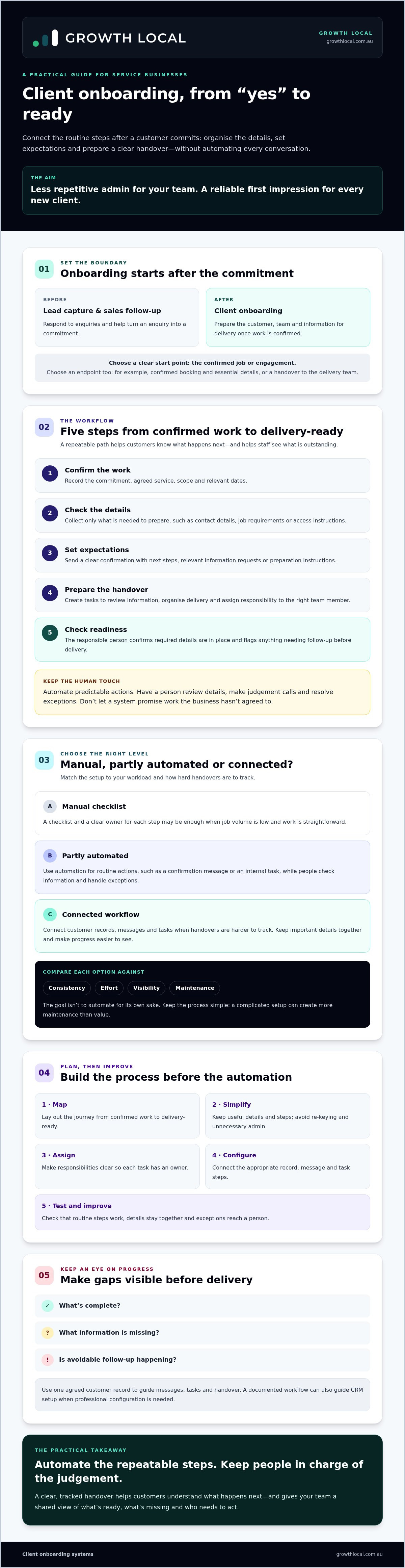
An automated client onboarding system connects the steps that organise information, communication and tasks after a customer commits to a service. It helps the customer understand what happens next and gives the team a way to see what’s complete, what’s missing and who needs to act.
The key word is after. Lead capture and sales follow-up help you respond to enquiries and win work. Onboarding starts at the agreed handover point, such as a confirmed job or engagement. The processes can connect, but they have different jobs: sales turns an enquiry into a commitment; onboarding prepares everyone for delivery.
This is a practical application of Business Process Management (BPM), the discipline of improving and organising business processes. The aim isn’t to automate for its own sake. It’s to make the steps between a customer saying yes and receiving the service easier to follow, repeat and check.
Where does client onboarding begin and end?
Start with the point your business recognises as a confirmed commitment. From there, your process might record job details, confirm expectations, prepare the team or materials, and check that the customer and business are ready to proceed. The right order depends on what you deliver and what your team needs before work begins.
Set a clear endpoint, too. For one service, onboarding may finish once the booking and essential details are confirmed. Another may need a handover to the delivery team before work can begin. Define that boundary so customers aren’t left guessing and staff know when to move the job into its next stage.
Which service businesses benefit from a repeatable onboarding process?
Australian tradies and other service businesses can benefit when the same handover tasks recur for each new customer. That might mean confirming the scope, recording access details, sharing preparation steps or making sure the right person has the job information. A repeatable process helps reduce re-keying and forgotten steps without making every customer interaction feel identical.
Choose the right level of structure for your workload. If you handle a low volume of straightforward jobs, a checklist and a clear owner for each step may be enough. As handovers become harder to track, automated client onboarding systems can help connect records, messages and tasks. Keep the process simple: a complicated setup can create more maintenance than value.
How an automated client onboarding workflow moves from yes to ready
A clear workflow turns a confirmed job into a delivery-ready handover. It records the agreement, gathers what’s needed, confirms next steps and prepares the team to deliver. The exact steps will vary, but customers shouldn’t have to repeat information and staff shouldn’t have to guess what’s outstanding.
For example, once a service engagement is confirmed, a team member updates the customer’s record and changes its status. That change can act as a trigger, a defined event that starts a routine action such as sending a confirmation message or creating an internal task. The system handles predictable steps. A person still reviews details, makes judgement calls and resolves exceptions.
- 1. Confirm the work. Record that the customer has committed, along with the agreed service, scope and relevant dates.
- 2. Check the details. Collect only the information needed to prepare, such as contact details, job requirements or access instructions.
- 3. Set expectations. Send a confirmation with clear next steps, plus any relevant information requests or preparation instructions.
- 4. Prepare the handover. Create tasks for reviewing the information, organising delivery and assigning responsibility to the right team member.
- 5. Check readiness. Have the responsible person confirm that required details are in place and flag anything that needs follow-up before delivery.
What information and actions belong in the workflow?
Keep the record useful, not bloated. Capture the customer’s identity, agreed work, important requirements and any details the delivery team needs. Then connect that information to relevant customer messages and internal tasks. This helps avoid copying details between places or relying on memory.
Automation can send a standard confirmation or prompt someone to review an incomplete record. It shouldn’t decide whether unusual requests are acceptable or promise something the business hasn’t agreed to. IBM’s overview of streamlining the onboarding journey discusses how data capture and automated communication can support the process, while your team remains responsible for decisions and customer commitments.
How should a CRM support the customer handover?
A CRM can keep customer details and job status together in an organised record, giving the team a clearer view of the handover. Depending on the platform and its configuration, it may also support tasks or automated messages. Before planning around a feature, integration or report, check that your CRM supports it and that it fits the process.
For practical guidance on choosing and setting up a CRM, see CRM Implementation for Small Business Australia: The 2026 Growth Roadmap. A well-planned workflow gives your team a sound basis for configuring the CRM, rather than expecting software to fix unclear steps.
Manual, partly automated or connected onboarding: which approach fits?
There’s no single right level of automation. The useful question is where your current process breaks down: do details go missing, does the team repeat data entry, or do customers have to ask what happens next? Compare the trade-offs before adding tools. A connected system can support consistent steps, but it still needs a clear process and someone responsible for exceptions.
| Approach | Consistency | Effort and visibility | Maintenance |
|---|---|---|---|
| Manual | Depends on who handles each job. | Flexible, but updates and handovers rely on people remembering each step. | Little software upkeep, with more manual coordination. |
| Partly automated | Reminders or templates standardise selected steps. | Reduces some repeat admin; visibility can be split across tools. | Requires checking that reminders and templates stay relevant. |
| Connected | Linked records and workflow steps can make the process more consistent. | Can improve visibility across tasks, provided the tools share the information needed. | Needs configuration, testing and ongoing attention to connections and process changes. |
Automation doesn’t have to make onboarding impersonal. Routine confirmations and reminders can be automated while a named team member handles unusual requests, sensitive decisions and conversations that need judgement. IBM’s overview of automated customer onboarding discusses automation as a way to manage repeatable tasks, not as a reason to remove human oversight. Set clear rules for what the system can do and who reviews anything outside them.
When is a simple or partly automated workflow enough?
Start with a process people can follow before adding software. If job volume is low, or each engagement regularly needs a different approach, a checklist and a small number of reliable reminders may be easier to manage. Assign an owner to check each item. This gives the team a consistent baseline while leaving room for human review where the work calls for it.
What makes a connected onboarding system worth considering?
Look for recurring friction: staff re-enter the same customer details, nobody’s sure who owns the next task, or customers keep asking for an update. Then check whether your existing tools can share the information the workflow needs. If they can’t, weigh the value of connecting them against the setup and upkeep involved. For the sales-to-handover connection, see Sales Workflow Automation Australia: 2026 Trends for Service Businesses.
Be cautious with time-saving figures published by software providers or drawn from individual testimonials. They describe a particular product, process or customer experience, not a guaranteed result for your business. Judge your approach by whether it improves consistency, effort, visibility and maintenance in your own workflow.
How to plan and measure automated client onboarding
Good automation starts with a process you understand, not a collection of software settings. Plan the workflow first, then build only what helps your team deliver it clearly. This keeps automated client onboarding systems useful, manageable and easier to adjust when your service changes.
- Map: Write down each step from customer commitment to the agreed delivery-ready point. Include customer actions, staff tasks and handovers.
- Simplify: Remove duplicate questions, unnecessary approvals and unclear steps before automating them.
- Assign: Name an owner for each task and decide which decisions need human review.
- Configure: Set up the chosen tools to support the agreed process. Check what your systems can actually do before relying on particular features.
- Test: Run ordinary jobs and exception cases through the workflow before using it with customers.
- Improve: Review results with the people handling the work, then update the process when you find a genuine gap.
Design for clarity as well as efficiency. Customer messages should explain what happens next and who to contact for help. Staff need to know who owns each handover, what information they’re responsible for checking and when to step in. Be deliberate about what customer information the process collects, where it’s recorded and who needs access. If you need to make legal claims about data handling, verify them against an appropriate source before publishing or building them into the workflow.
Which onboarding measures show whether the process is working?
Use measures that reflect your own process, not a generic target. Check whether required details and internal tasks are complete before the next agreed step. Review how often information is missing, customers need to ask repeated questions, jobs are delayed or handover errors occur. Compare these observations with your own starting point, then look for changes after adjusting the workflow.
A count alone won’t explain what’s going wrong. If a task is often late, check whether ownership is clear, the prompt arrives at the right point or the information needed to complete it is available. Use what you find to improve the process rather than chase an unsupported industry benchmark.
How can a business test automations without disrupting customers?
Test in a small, controlled workflow before relying on the automation for routine customer work. Check that messages arrive at the intended stage, tasks go to the right person and incomplete information triggers a review instead of an incorrect next step. Include an exception case, such as a request that needs a staff decision. Make the escalation route clear so customers can reach a person when the workflow doesn’t fit.
How Growth Local can help connect CRM and customer workflows
A well-configured CRM can help make an agreed onboarding process easier to follow. Start by documenting what happens after a customer commits: what information is needed, which tasks recur, who owns each handover and where a person needs to make a decision. That process can then guide CRM and marketing-system setup, rather than asking software to compensate for unclear steps.
Growth Local sets up CRM and marketing systems for Australian service businesses. Its CRM implementation may be relevant if customer details, job status and handover tasks need a more organised home. The right setup depends on your current tools and confirmed requirements. Check specific integrations and workflow functions before including them in a plan, as capabilities vary between platforms.
What should a service business clarify before requesting implementation help?
Bring a practical picture of how work moves through your business. Useful details include:
- Your current handover steps and the points where information gets re-entered.
- Common customer questions and repeated admin tasks.
- The systems and information sources your team already uses.
- Tasks that need a staff member to review, approve or make a judgement call.
- The outcome you want, such as clearer job status or fewer missed handover steps.
You don’t need to choose a platform or assume that every tool can connect. Start with the process and the problem. A clear brief makes it easier to assess whether a CRM or marketing-system setup fits the way your team works.
What can a CRM and marketing system setup address?
Depending on your requirements and the confirmed capabilities of the systems selected, setup may help organise customer records and support a clearer path between marketing activity and customer management. The aim is a usable workflow with clear ownership, not automation for its own sake. Review any proposed data sharing, triggers or integrations before relying on them.
Growth Local also offers AI receptionist integration for lead capture and initial customer interactions. That can support the enquiry stage before onboarding, but it shouldn’t be confused with managing every post-sale task or replacing staff decisions. For more on that earlier part of the journey, see AI Receptionist Australia: 2026 Service Business Guide.
If you’re considering automated client onboarding systems, a documented workflow gives you a practical starting point for deciding what your CRM should support and where your team should stay involved.
Make every new client handover clearer
A smooth start doesn’t require automating every conversation. Begin with a documented process, remove unnecessary steps and make sure customers and staff know what happens next. Then choose the right level of automation for your workload, with clear owners for tasks and decisions that need a human touch.
Well-planned automated client onboarding systems can help keep information organised, handovers visible and routine follow-up consistent. Growth Local implements CRM and marketing systems for Australian service businesses, and offers AI receptionist integration for lead capture and initial customer interactions. These tools can support different stages of the customer journey, while your onboarding workflow guides the post-sale handover.
Start with the steps that cause the most friction, then improve the process as you learn what your team and customers need. A clearer handover is a practical foundation for a better client experience and more confident growth.
Frequently Asked Questions
What is an automated client onboarding system?
An automated client onboarding system connects routine steps that happen after a customer agrees to work with your business. It can organise customer information, send relevant messages and prompt staff tasks, so the customer understands what happens next and the team can see what’s outstanding. Automated client onboarding systems don’t need to remove human contact. They work best when routine actions are defined and a person remains responsible for decisions and exceptions.
How does automated client onboarding work for a service business?
It starts at an agreed point, such as a confirmed job. A change in job status might trigger a confirmation message or an internal task to check the details. The customer can then receive relevant instructions or a request for information, while a staff member prepares the handover and checks readiness. The exact steps depend on the service. Keep the workflow clear about what the system handles and what a team member must review.
Can a small business automate onboarding without a CRM?
Yes. A small business can begin with a written checklist, reusable message templates and reminders in tools it already uses. Assign someone to check each step and keep customer information organised in an agreed place. This can suit a low volume of straightforward jobs. If details are repeatedly entered or handovers become hard to track, review whether a CRM would help before adding more automation or a complex set of connected tools.
Which parts of client onboarding should be automated?
Consider automating predictable, repeatable actions, such as sending a confirmation, requesting standard job details or reminding a team member to review a record. Keep decisions that require judgement with a person, including unusual requests, changes to agreed work or situations where a customer needs individual help. Before automating a step, confirm the information is reliable, the message is accurate and someone is responsible for responding if the process flags an issue.
Will automated onboarding feel impersonal to customers?
Not necessarily. Customers are more likely to find the process helpful when messages are clear, relevant and sent at the right point. Use automation for routine updates and instructions, then make it easy to contact a person with questions or special circumstances. Avoid sending messages that ask for information already supplied or promise something the team hasn’t confirmed. Review the customer experience regularly, not just whether the automation technically ran.
How do you measure whether an onboarding system is working?
Track practical signs of a complete handover: whether required details and internal tasks are ready before the next agreed step, and whether staff can see the job’s status. Also review missing information, avoidable follow-up, repeated customer questions and handover errors. Compare results with your own starting point rather than relying on a generic benchmark. If a step keeps causing friction, investigate its instructions, timing and ownership before changing the automation.
What should happen when an onboarding automation fails?
A failed automation should have a clear human fallback. Make sure someone can spot the missed action, check the customer’s record and complete the necessary step manually. If a message hasn’t arrived or information is missing, contact the customer with an accurate update rather than assuming the workflow succeeded. Test common failure scenarios in a controlled process, and document who handles problems so responsibility doesn’t disappear between team members.


