

Automated Call Answering: Small Business Buying Guide
What happens when a good prospect calls after hours, reaches voicemail and never tries again? Automated call answering for small business can help capture enquiries when your team is unavailable, but answering the call is only the first step. If the caller’s details and reason for calling end up scattered across messages, the lead can still go cold.
It’s reasonable to wonder whether AI will make things easier or leave callers frustrated. The difference comes down to fit: the system needs to suit the calls your business receives, capture useful details consistently and feed them into a clear follow-up process. The best option isn’t necessarily the one with the most features. It’s the one your team can use to act on enquiries promptly.
This guide explains how to choose an after-hours answering setup around your call patterns, what information to capture and how to connect call records with a CRM and follow-up workflow. You’ll also learn where AI reception can help, when a human handoff may matter, and how to assess the whole process rather than judging a system by its greeting alone. The aim is simple: turn missed calls into organised enquiries your team can follow up.
Key Takeaways
- Match your answering approach to the calls you receive. Repeatable enquiries may suit automation, while sensitive or complex conversations can need a human response.
- With automated call answering for small business, clear prompts help collect the details your team needs to assess and progress each enquiry.
- Map the process from incoming call to recorded information and follow-up. Decide who owns the next step and where the details should go.
- Test common enquiries, unclear requests and calls that need human handling before relying on the workflow.
- Growth Local connects AI receptionist integration with lead-generation systems and CRM processes, helping turn initial call handling into an organised lead-management workflow.
Why automated call answering matters after hours for small business
A potential customer might call while you’re finishing a job, driving between appointments or away from the phone for the evening. If the call goes to voicemail, they may not leave enough information for your team to act on. Automated call answering gives callers a way to share an enquiry when no one is available to pick up.
Automated call answering is software that handles the first part of an inbound call using a workflow configured for your business. That can mean greeting the caller, asking set questions and recording their responses. It doesn’t make every caller a qualified lead. Its value depends on collecting details that help your team understand the enquiry and decide what to do next.
What does automated after-hours call answering do?
An AI receptionist can handle initial caller interactions using information and prompts configured for the business. For example, a trades business might capture a caller’s name, contact details and a brief description of the work they need. Choose questions based on the service and what your team needs before following up.
Answering is only one step. Captured details need to be clear and accessible, with a practical next step for the team. Automation can gather initial information, but it doesn’t replace quoting, a detailed sales conversation or delivering the service. It’s a first point of contact, not the whole customer journey.
The idea is related to a virtual receptionist, which can handle front-of-house communication remotely. With an automated system, the caller experience and information collected depend on how the workflow is set up.
Which small businesses can benefit from after-hours coverage?
Automated call answering for small business can be useful for enquiry-led operators whose work takes them away from the phone. Tradespeople may be on a ladder or under a sink; solar teams might be out discussing a project; other service businesses could be travelling, meeting customers or wrapping up a job.
In those moments, answering every call personally may not be practical. An automated system gives callers a structured way to share useful details instead of relying on a missed-call notification alone. Your team can then review the enquiry, decide whether it’s a fit and work out who should respond and what they need for follow-up.
A recorded call or caller’s name by itself isn’t a complete lead-management process. Set up the system to gather relevant details and connect them to a clear next step. That makes after-hours call handling more useful to both the caller and your team.
How an automated call answering system turns enquiries into follow-up
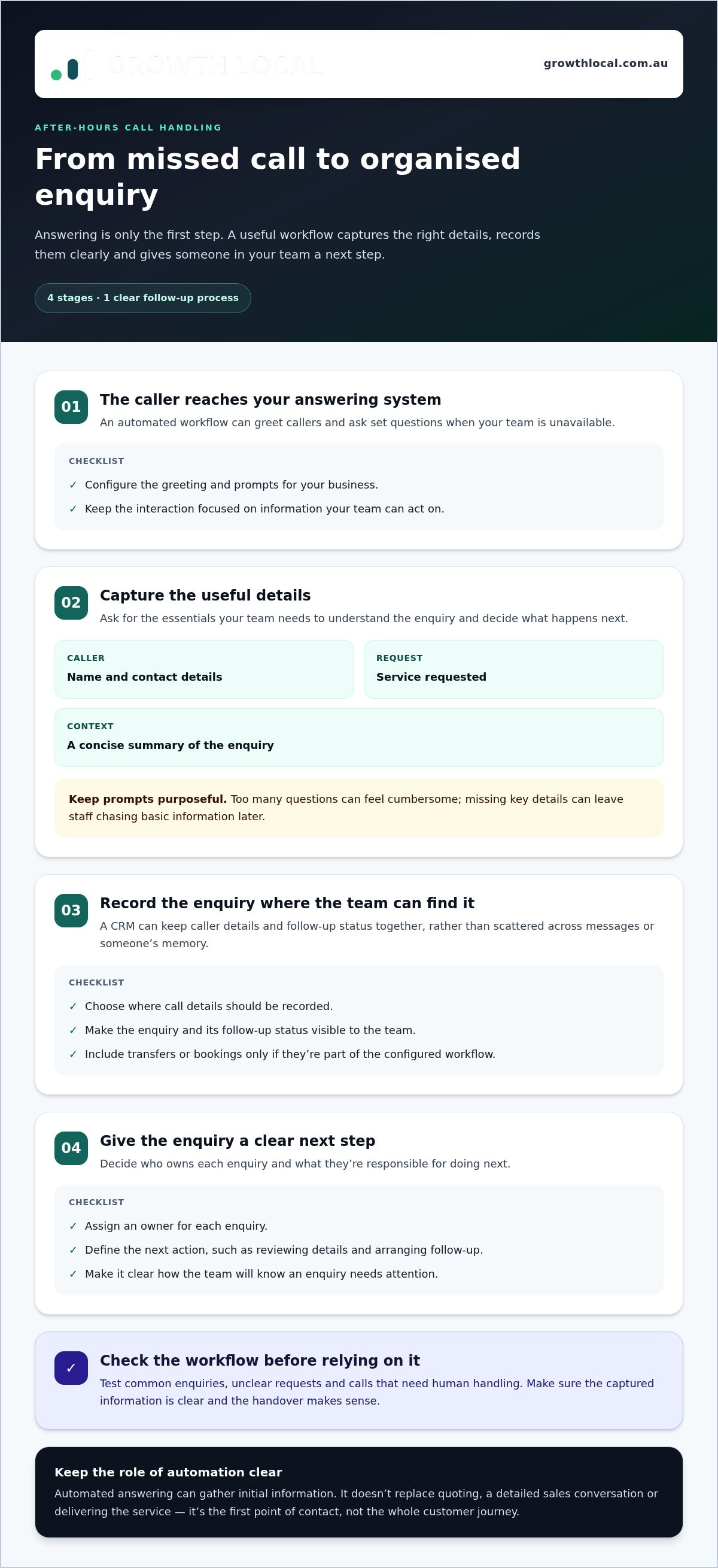
A useful call workflow doesn’t stop at answering. It moves an enquiry through four clear stages: the caller reaches the system, shares relevant details, that information is recorded, and someone in your team follows up. Consider each stage when setting up automated call answering for small business. Otherwise, a call may be answered but still leave your team unsure who called or what they need.
The prompts and workflow should reflect how your business handles new enquiries. For example, an operator taking service requests may need to know what work the caller is asking about and how to reach them. IBM’s overview of the benefits of customer service automation offers useful context on using automation to manage customer interactions. In practice, keep the call focused on information your team can act on.
What information should an automated receptionist capture?
Start with the essentials: the caller’s name, contact details, service requested and a concise summary of the enquiry. Focused prompts can gather these details in a natural conversation, rather than making the caller feel as if they’re completing a long form over the phone.
Only ask for information that supports the next step. If your team needs to understand the type of job before deciding who should respond, include a simple question about the work required. Avoid adding prompts just because they’re possible. Too many questions can make the interaction feel cumbersome, while missing key details can leave staff chasing basic information later.
How should call details reach the team?
A CRM gives each enquiry a place to live, with caller details and follow-up status organised together. That helps the team see what came in, whether anyone has taken ownership and what still needs attention. It also reduces reliance on scattered messages and someone’s memory.
Before launch, decide where call details should be recorded and how the team will know an enquiry needs attention. Set an owner for each enquiry and define the action they’re responsible for, such as reviewing the details and arranging follow-up. Transfers or bookings depend on the workflow and its supported capabilities, so include them only if they are part of your configured process. A well-planned CRM implementation for small business can help keep the handover clear.
Growth Local connects AI receptionist integration with lead-generation systems and CRM processes, helping businesses organise captured details around a practical follow-up workflow. The Growth Local demo page outlines a way to discuss how the system could fit your enquiry workflow.
AI, voicemail or a staffed answering service: what suits your business?
There’s no single right way to handle every call. The best fit depends on what callers usually need, how predictable their enquiries are and what your team can follow up. Compare the options by what happens when a call comes in, what the caller experiences and how useful the information is afterwards.
- Voicemail: The caller can leave a message if they choose. It’s simple, but details may be incomplete, and your team still needs to listen, record the enquiry and organise a callback.
- Automated answering: Software handles the initial interaction using a configured workflow. It can ask consistent questions and capture responses. The caller experience and follow-up depend on how it’s set up.
- Staffed answering: A person answers and can respond to information as it’s shared. This may suit calls that need more judgement or conversation. How enquiries are recorded and passed to your team depends on the service arrangement.
Automation can feel impersonal if the prompts are vague, repetitive or don’t make the next step clear. Keep the language straightforward, ask only useful questions and explain what the caller can expect next. Automated call answering for small business works best when it’s designed around real enquiries, rather than treated as a set-and-forget replacement for every conversation.
When is automated call answering a good fit?
Consider it if calls are often missed and many initial enquiries follow a familiar pattern. If your team can define what it needs to know before following up, a configured workflow can collect those details consistently. Plan what should happen when a request needs individual attention, so the caller isn’t left in a process that can’t address their situation.
When might voicemail or human answering suit better?
Voicemail may be enough if enquiry volumes are low and callers can reasonably wait for a callback. Human answering may be a better match when calls regularly involve sensitive topics, complex questions or decisions that need judgement. The practical test is whether a caller can be helped appropriately at that first point of contact.
A hybrid approach is another option: automation could handle routine initial interactions, with a process for directing more complex enquiries to a person. Configure that handoff as part of the workflow. Don’t assume a system includes call transfers, a staffed fallback or a particular response process by default.
Before choosing, weigh caller needs against your team’s capacity. A simple voicemail process may work well for occasional enquiries; structured automation may help organise repeatable first contacts; and human answering may suit conversations that need more flexibility. The goal isn’t to automate every call. It’s to choose an approach your callers can use and your team can reliably follow through.
How to choose and implement automated call answering for your business
A system is only useful if it fits the way your business handles enquiries. Before choosing automated call answering for small business, map out what callers need, what your team needs to know and what should happen after each call. That gives you a clear brief for setup and a practical way to check whether the workflow is doing its job.
What should you decide before setup?
Start with your usual enquiry types. A caller might be asking about a new job, following up an existing request or seeking information your team can’t provide without more detail. For each type, decide what needs to be captured and who should respond.
- Call types: List the common reasons people call and note which need a person’s judgement.
- Details to capture: Choose the caller and enquiry information your team needs to respond appropriately.
- Tone and expectations: Set the opening message, preferred style and a clear explanation of what happens after hours. Don’t imply someone will respond at a particular time unless your business can support that.
- Follow-up owner: Assign responsibility for reviewing and progressing each enquiry.
- CRM destination: Decide where caller details and enquiry status should be organised, so they don’t get lost in scattered messages.
Keep the workflow focused. Asking for information your team won’t use adds friction without improving the handover.
How can you test and improve the workflow?
Walk through realistic scenarios before relying on the system for live enquiries. Test a typical request, an unclear explanation and a call that needs a human response. Check whether the prompts make sense, the summary is accurate and the captured details reach the agreed destination. Confirm that someone knows what to do next.
Once the workflow is in use, review whether the information captured is useful, whether assigned follow-ups are completed and whether any enquiries remain unresolved. These checks help show where the process is working and where it needs attention, without relying on generic benchmarks. If summaries regularly miss the caller’s main request, refine the prompts. If enquiries sit untouched, revisit who owns the next step.
Small adjustments can make the experience clearer for callers and easier for your team to manage. Treat the setup as a workflow to review and improve, not a recording you set once and forget.
How Growth Local connects automated call answering with lead management
Answering an enquiry is only useful if the information has somewhere to go. Growth Local helps Australian service businesses connect AI receptionist integration with lead-generation systems and CRM processes, so initial caller details can feed into a more organised way of managing enquiries.
The aim is a practical handover: a caller shares information through the configured call workflow, the enquiry is recorded in the appropriate place, and a team member takes responsibility for the next step. CRM setup helps keep lead details and progress together as an enquiry moves forward, rather than leaving staff to piece the story together from separate messages.
What does a connected lead-capture workflow achieve?
A connected workflow gives your team a consistent process for handling initial call information. The receptionist prompts are shaped around the details your business needs, while the CRM process provides a place to organise those details and track what happens next. Configure the handover to suit your process, including any notifications or other actions the team needs.
For example, a service business may want an enquiry recorded with the caller’s contact details, the service they’re asking about and a short summary. The team can then review it, assign an owner and update its status as follow-up progresses. This doesn’t guarantee a particular response time or business result. It gives staff a clearer starting point and a more structured way to manage the enquiry.
Growth Local brings together the setup behind automated call answering for small business: AI receptionist integration, lead capture and CRM processes. Readers looking for more detail can also explore Growth Local’s AI receptionist information for Australia and its Lead Generation System Setup resource.
What happens in a Growth Local demo?
Use the discussion to explain where calls currently get missed, what callers usually need and how your team manages enquiries once they’ve been recorded. It’s also useful to describe which details belong in your CRM and who should own follow-up. That keeps the conversation practical: matching the receptionist workflow to your lead-management process, rather than adding automation for its own sake.
A clear system should make it easier to capture, organise and progress enquiries. Schedule a Growth Local demo to discuss how call handling and lead management could fit together for your business.
Make every enquiry easier to follow up
The right automated call answering for small business does more than greet callers. It captures useful details, places them where your team can find them and supports a clear next step. Choose a setup that matches your call patterns, then test it with routine, unclear and more complex enquiries before relying on it.
Growth Local implements CRM and marketing systems for Australian service businesses, with AI receptionist integration to support lead capture and initial customer interactions. The focus is on connecting call handling with an organised process, so your team can see what came in and who’s responsible for following up.
If missed calls or scattered enquiry details are creating extra work, map out a workflow that fits your business.
A practical system can make new enquiries easier to manage and give your team a clearer path from first contact to follow-up.
Frequently Asked Questions
What is automated call answering for a small business?
It’s software configured to handle the first part of incoming calls, gather relevant details and support a business’s follow-up process. For an after-hours enquiry, the caller can interact with the system rather than reaching voicemail alone. What the system asks, records and passes on depends on its setup. It can capture initial information, but it doesn’t automatically qualify every enquiry or replace later sales conversations and service delivery.
Can an automated receptionist answer calls after hours?
Yes, an automated receptionist can be configured to handle initial calls outside your business’s usual answering hours. Set clear prompts that explain what the system can help with, what information it collects and what the caller should expect next. Some enquiries will still need a team member to follow up. Make that next step clear rather than suggesting every caller’s question will be resolved during the call.
Will callers know they are speaking to an AI receptionist?
The caller experience depends on how the system is introduced and configured. Use clear, natural language and don’t present the AI as a human team member. Keep prompts focused, explain what happens next and make the follow-up process easy to understand. Before relying on the workflow, test common enquiries from a caller’s point of view. If the interaction feels confusing or unclear, adjust the wording and prompts.
Can automated call answering send leads to a CRM?
It can be part of a CRM-connected workflow when the system is configured to capture and organise enquiry details. Decide what information your team needs, where it should be recorded and who owns follow-up. The integration should be set up to match that process rather than assumed to happen automatically. Growth Local sets up CRM processes and AI receptionist integration to support lead capture and initial customer interactions.
Is automated call answering better than voicemail for a small business?
It depends on your call patterns and what callers need at first contact. Voicemail may work if enquiries are occasional and your team can manage callbacks reliably. Automated answering may suit repeatable enquiries where consistent initial details are useful. Compare the caller experience, how information is organised and who owns follow-up. The best choice is the one your team can manage and callers can use comfortably.
How much does automated call answering cost for a small business?
The investment depends on the system’s scope, the call workflow and any CRM or marketing-system setup involved. Generic market estimates may not reflect the configuration your business needs, so focus on understanding what your setup includes and how it fits your processes. Growth Local can discuss your requirements in a demo. For relevant pricing information, visit the Growth Local pricing page.
What should an automated after-hours receptionist ask callers?
Ask for the details your team needs to take the next step, such as the caller’s name, contact details, service requested and a short summary of the enquiry. Keep prompts focused so the call doesn’t feel like a long form. Avoid collecting information the business won’t use. Test the questions against common enquiries, then refine them if callers’ needs or important details are regularly unclear.
Can an AI receptionist replace a human answering service?
Not in every situation. Automation can support repeatable initial interactions and lead capture, while complex or sensitive enquiries may need human judgement and conversation. Decide which calls suit a defined workflow and what should happen when a caller needs individual attention, such as a clear escalation or callback process. Be upfront about the system’s role, so callers understand what it can handle and what happens next.


