

Automate Quotes: Guide for Australian Service Businesses
Automating quotes shouldn’t mean letting software guess your prices. If you’re working out how to automate sending quotes, the goal is to speed up repeatable admin while keeping pricing decisions and unusual job details in human hands. That matters when enquiries arrive through different channels, customer details are scattered and a promising lead can go quiet while you’re still preparing a quote.
It’s frustrating to spend time copying information, checking figures and chasing follow-ups that should already be in motion. A well-designed process can capture enquiry details, prepare a draft from approved information, send it with a clear next step and keep its status visible in one place. You stay in control of what goes out.
This guide shows Australian service businesses how to map a quoting workflow, choose which steps to automate and build in checks for pricing accuracy and human approval. You’ll also learn how a connected CRM workflow can organise customer and job details, prompt consistent follow-up and show what needs attention. The result is less repetitive admin and a clearer path from enquiry to decision.
Key Takeaways
- Automate repetitive steps between enquiry and quote delivery, while keeping pricing decisions and unusual jobs under human review.
- Map the workflow from enquiry capture to quote follow-up so customer details and quote status stay organised.
- Compare templates, CRM-supported workflows and connected automations to find an approach that fits your team and job complexity.
- Learn how to automate sending quotes by starting with one common quote type, then setting clear review and approval rules.
- A connected CRM workflow can help organise enquiries, customer records and sales follow-up with less double-handling.
Why automate sending quotes when manual quoting slows down service businesses?
An enquiry lands while you’re on a job. Later, you’re back at your desk copying customer details into a document, checking the scope and writing an email. Then follow-up competes with the next day’s work. For service businesses, quoting can become a chain of small admin tasks that interrupts paid work and makes it harder to keep every prospective customer moving.
Quote automation uses software-triggered steps to prepare, send or track quotes using information captured from an enquiry. It’s a practical application of Business process automation: repeatable tasks follow a defined workflow instead of relying on someone to remember each one. A well-mapped process can cut repeated data entry, make quote statuses easier to see and prompt consistent follow-up. It won’t guarantee a faster sale, but it can help stop quotes getting lost in inboxes or forgotten during a busy week.
The key is knowing how to automate sending quotes without handing over every decision. Automating the sending step doesn’t mean software should decide the job’s scope or price. A system can prepare a draft from captured details or send an approved quote according to your rules. A person still needs to judge whether the quote reflects the actual work.
Which parts of a quote process are repetitive enough to automate?
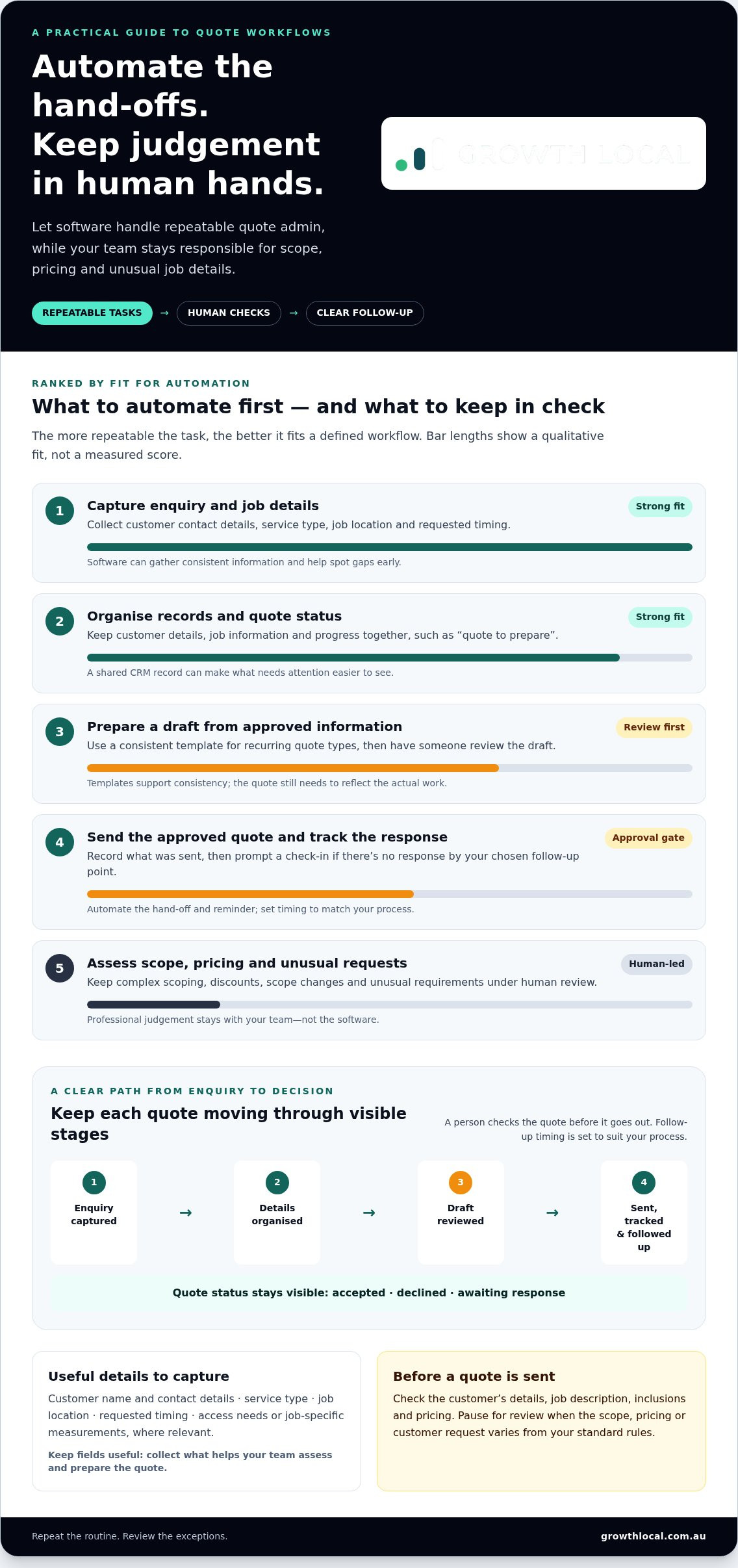
Start with administration that follows the same pattern each time. A workflow might collect a customer’s contact details and job information, assign the enquiry a status such as “quote to prepare” and prompt a follow-up if there’s no response. It could also prepare a draft from approved information for someone to review.
Quote automation is software handling repeatable quote administration, while people remain responsible for decisions that need judgement. Site assessments, complex scoping and pricing decisions often depend on the job’s details, so they shouldn’t be treated like routine form-filling.
What should stay under a person’s control?
Keep unusual requirements, discounts and scope changes subject to human review. Before a quote is sent, check the customer’s details, job description, inclusions and pricing. A copied address, outdated detail or misunderstood requirement can create confusion for both the business and the customer.
Automation should support staff, not replace professional judgement. Set clear approval points for quotes outside your standard rules, and make sure the reviewer can see the information the quote is based on. That balance lets software move routine steps along while your team stays accountable for what’s being offered.
How does automated quote sending work from enquiry to follow-up?
A reliable workflow moves each enquiry through clear stages instead of relying on someone to remember what happens next. The triggers depend on how the CRM and workflow are configured, but the sequence can stay straightforward: capture the enquiry, organise the job details, prepare a draft, review it, send it and track the response.
New enquiry → Details organised → Quote drafted → Human review → Quote sent → Follow-up prompted → Accepted, declined or awaiting response
For example, a new enquiry could create a customer record and receive the status “quote to prepare”. Once the job information is complete, the workflow can prompt a draft for review. After approval, the quote is sent and its status recorded. If the customer hasn’t responded by the follow-up point you’ve set, the system can prompt a relevant check-in. Set the actions and timing to match your process rather than relying on a one-size-fits-all rule.
What information does an automated quote workflow need?
Start with the details your team needs to scope and price the work: customer name and contact details, service type, job location and requested timing. Add any other information your quoting process relies on, such as access requirements or job-specific measurements. Consistent fields help staff spot gaps early, avoid entering the same details twice and give the person preparing the quote a clearer starting point.
Keep the fields useful, not exhaustive. If a detail doesn’t help your team assess or prepare the quote, collecting it may add admin without improving the workflow.
How do templates, CRM records and approval steps fit together?
A template provides consistent wording and structure for recurring quote types. A CRM record can keep the customer’s details, job information and quote status together, helping the team see what’s been sent and what still needs attention. Before building a template, use Business Queensland’s guide to what to include in your quote as a reference for the information a quote may need.
Build in a human approval checkpoint whenever scope, pricing or customer requests can vary. A straightforward, repeatable job might follow a simpler review path, while a complex request should pause for someone to check the details before anything goes out. That’s the practical answer to how to automate sending quotes: automate hand-offs and prompts, but make approval rules fit the work.
With the stages mapped, choose an approach that suits your team and the complexity of your jobs.
Which quote automation approach suits your jobs and team?
The right setup depends on how consistent your jobs are and how much customer information your team needs to track. A simple template may be enough for predictable work. If enquiries and quote updates are spread across inboxes and spreadsheets, a CRM-supported workflow can bring the steps into one organised process. More connected automation can handle additional hand-offs, but it isn’t automatically better if every job needs individual scoping.
| Approach | Setup effort | Repeatability | Review needs | Best suited to |
|---|---|---|---|---|
| Email and document templates | Low | Low to moderate | Staff prepare and check each quote | Lower volumes or straightforward, consistent services |
| CRM-supported workflow | Moderate | Moderate to high | Review where scope or pricing varies | Teams tracking enquiries, conversations and quote status |
| More connected automation | Higher, depending on the workflow | High for defined steps | Approval rules for exceptions remain important | Repeatable processes with several hand-offs to manage |
When is a quote template enough, and when does a CRM workflow help?
Templates work well when you offer consistent services and the details and pricing rules are predictable. They standardise recurring wording and structure, while leaving staff to add and check job-specific information. A CRM workflow becomes more useful when leads, customer conversations and quote statuses need to be tracked together. For a deeper look at CRM implementation for small business in Australia, consider how a structured customer record can support clearer handovers and follow-up.
Think about how to automate sending quotes as a decision about which steps to standardise, not a race to automate everything. A CRM can help organise the process, but it still needs sensible rules and accurate information from your team.
How should complex or custom jobs be handled?
Don’t force a custom job into a standard template just to make the workflow look seamless. If an enquiry is incomplete or includes unusual requirements, route it to a person for clarification before preparing a quote. That helps prevent assumptions from being mistaken for confirmed scope.
Keep a clear distinction between an automatically prepared draft and an approved quote sent to a customer. The draft can save repetitive effort, but a person should check variable scope, pricing and exceptions before approval. Use defined approval steps for those cases, while allowing suitable, repeatable jobs to follow a simpler path.
How to set up automated quote sending without creating avoidable errors
A quote workflow needs clear rules before it needs more automation. Start by mapping how work currently moves through your business, then automate the repeatable steps and test them before customers are involved. A small pilot makes it easier to spot gaps and adjust the process without disrupting every quote your team handles.
What should you map before building the workflow?
Write down where enquiries arrive, who gathers job details, who prepares and approves quotes, and how the outcome is recorded. Follow one enquiry from arrival to acceptance or decline. Note where information gets re-entered, where a hand-off can stall and which details are often missing. Your process may span forms, email or a CRM, so map the actual workflow rather than assuming one software setup.
This gives you a practical starting point for sales workflow automation guidance. Choose one common service or quote type for a pilot. Define which steps can happen automatically, what information must be present and which situations need staff approval before a quote is sent.
How can you test a quote automation workflow safely?
Run sample cases before enabling customer-facing sends. Include a straightforward enquiry, one with missing information and a complex request that should be referred to a person. Check that the workflow behaves as intended in each case, especially when details are incomplete or don’t fit the usual pattern.
- Confirm the recipient and customer details are correct.
- Check the message wording and that the correct quote document is attached.
- Make sure approval notifications reach the right person before a quote is sent.
- Test how duplicate records and unusual job requests are flagged or handled.
During the pilot, assign someone to review errors, collect staff feedback and refine the workflow. Track practical indicators such as time from enquiry to quote, whether follow-ups are completed and how easily the team can see each quote’s status. These checks show where the process needs attention without assuming time savings or sales results.
A measured rollout is a practical way to learn how to automate sending quotes while keeping the process accurate and accountable. Growth Local helps Australian service businesses organise connected lead and CRM workflows around their sales processes.
How Growth Local can help connect quote workflows to your lead system
Quote automation works best when it fits the way your business already handles enquiries, customers and sales follow-up. Growth Local sets up CRM and marketing systems for Australian service businesses, helping organise customer records and digital workflows. The aim isn’t to force every job into the same path. It’s to shape a process around your services, team hand-offs and the level of judgement each quote needs.
What does a connected lead-to-quote workflow aim to improve?
A connected workflow can make it clearer who owns a new enquiry and whether its quote is drafted, sent or awaiting a response. Consistent records help staff find relevant customer and job details, see the next step and follow up more reliably. That supports an organised sales process, but it can’t guarantee a particular sales result.
Good workflow planning starts before a lead becomes a quote. Explore the lead generation system setup framework to see how enquiry capture and follow-up fit into the broader customer journey. From there, a CRM workflow can be tailored to the steps your team actually uses, with approval points for jobs that need closer review.
What should you bring to a quote workflow planning session?
Bring examples of common services and outline the steps your team currently follows, from receiving an enquiry to recording the outcome. Note recurring follow-up tasks that are easy to miss, where information changes hands and which jobs need individual scoping. These details make a discussion about how to automate sending quotes practical, rather than just a conversation about software.
- Examples of standard and complex quote requests.
- The information staff need before preparing a quote.
- Current hand-offs and follow-up tasks.
- Which team members can approve quotes, and what exceptions need escalation.
With that picture in hand, Growth Local can discuss how CRM implementation and marketing-system setup can support a more organised lead-to-quote workflow. The focus is on reducing repetitive administration, improving visibility and making follow-up more consistent, while leaving pricing and scope decisions with your team.
Build a quote process that keeps work moving
Effective quote automation isn’t about removing people from the process. It’s about taking repeatable admin off their plate while keeping scope, pricing and exceptions under human review. Map the enquiry-to-follow-up journey, choose an approach that suits your jobs, then test it with a small pilot before expanding.
That’s the practical foundation for how to automate sending quotes: organised customer records, clear quote statuses and follow-up steps your team can trust. Growth Local specialises in lead-generation and marketing-system setup for Australian service businesses, including CRM implementation and AI receptionist integration, with a focus on digital infrastructure and automated workflows.
Ready to explore how a connected workflow could fit your business? Schedule a Growth Local demo
Start with one common quote type, make the hand-offs clear and improve the process as you learn. A more organised workflow can give your team a steadier path from enquiry to decision.
Frequently Asked Questions
How do I automate sending quotes to customers?
Start by mapping the steps from enquiry to quote follow-up, then identify which tasks happen the same way each time. To work out how to automate sending quotes, organise customer and job details in a structured record, use a suitable template and set clear rules for when someone must review the quote. Test standard and unusual enquiries before enabling customer-facing automation. The exact setup depends on your CRM and current workflow.
Can quotes be sent automatically from a CRM?
Yes, a CRM-centred workflow may use customer records, quote statuses and defined triggers to support sending and follow-up. The steps depend on the CRM and how it’s configured. Keep a person involved wherever scope, pricing or customer requirements need judgement. Before the workflow sends anything to customers, test it with complete and incomplete records so incorrect or missing details are caught rather than passed straight into a quote.
What information should an automated quote include?
Include enough information to identify the customer, describe the requested service and explain the proposed work. Depending on the job, that could mean contact details, scope, assumptions, inclusions and the next step for the customer. Build your workflow around the fields your team genuinely needs, rather than collecting details for their own sake. Have a person check the final quote whenever the scope is customised or key information is still uncertain.
How do you follow up quotes automatically without annoying customers?
Choose follow-up timing and wording that suit your sales process, and make sure reminders stop or change when the customer replies or the quote status updates. Keep each message relevant to the quote and make it easy for the recipient to respond. Avoid sending the same fixed sequence regardless of context. Review customer interactions and adjust the workflow if messages arrive at the wrong time or no longer match the conversation.
Is it safe to send quotes automatically without checking them?
It depends on how standardised your service and pricing are. A repeatable, well-tested quote may need fewer manual steps, while custom scope, discounts or missing details call for human review. Set approval rules for exceptions, then test the customer-facing message and quote document before the workflow goes live. Assign someone to monitor it afterwards so errors can be spotted and the process refined as needed.
How much does it cost to automate sending quotes?
The cost depends on the software you already use, the complexity of the workflow and the implementation work involved. A basic template process is different from a connected CRM workflow with approval steps and follow-up. Compare the full effort involved, including setup and ongoing administration, rather than looking at headline cost alone. Clear records and consistent processes are useful considerations, but the right approach depends on your business needs.
Can quote automation work for a service business with custom jobs?
Yes. A workflow can handle repeatable administration while directing custom or uncertain jobs to a person for review. Standard enquiries might follow a template process, while incomplete details or unusual scope trigger a pause before quote preparation. Set clear exceptions instead of forcing every job into one format or treating every draft as ready to send. That way, automation supports the process without taking professional judgement out of complex quoting.


